Syncing output to input using ASRC
I’m using the ADAU1466 running at a 48 kHz sampling rate for a project.
I have a digital input that will accept either 44.1 or 48 kHz sampling rate, going through an ASRC at input to sync it to the DSP.
I have an A/D as an additional input, which will be clocked directly to the DSP at 48kHz.
When the user chooses the digital input, I would like to offer the user two outputs, one synchronized to the DSP, the other re-synchronized to the original digital input signal's "house" sync.
I have figured out the input ASRC programming and the first output at the DSP rate, but I need to be clear on the way to use the SigmaStudio software to program the output arrangement to use another of the ADAU1466’s ASRCs to synchronize the second output to the digital input.
I can send the MCLK that is recovered from the digital input IC (a DIR9001PWR digital audio receiver/decoder) directly to the output driver chip (DIT4096IPW digital audio transmitter) but I believe I need to return synchronization signals (BCLK, LRCLK) back to synchronize the output ASRC in the ADAU1466, which I believe has to be running in “sl@ve” mode, but I'm not sure how to do all this.
I’m pretty sure there’s a simple solution I’m overlooking.
Thanks
David Reaves
Audio Signal Processors
adau1452
Audio Products
software
sample rate
sigma studio 4.7
4.7 and earlier
output
SigmaDSP Audio Processors
asrc
adau1466
Show More
Hello David,
DavidReaves said:
I can send the MCLK that is recovered from the digital input IC (a DIR9001PWR digital audio receiver/decoder) directly to the output driver chip (DIT4096IPW digital audio transmitter) but I believe I need to return synchronization signals (BCLK, LRCLK) back to synchronize the output ASRC in the ADAU1466, which I believe has to be running in “sl@ve” mode, but I'm not sure how to do all this.
I presume that the input and output modules DIR9001PWR (to serial input port) and DIT4096IPW (from serial output port) will be acting as serial clock masters to serial input and output ports respectively and running off of a different master clock than the DSP.
DSP is a slave at both input and output ports.
You successfully synced the serial input to the core rate by using ASRC and If I understand correctly, you want your serial out to be in sync with the DIT4096IPW module. which is running off of a different master clock and acting as a serial clock master to the serial output port.
please look at the project below.
ASRC 0 is used for converting the external serial input rate to the core rate and ASRC1 is used for syncing to the external serial out rate.
You can simply route the ASRC output to the respective serial port.
ASRC_sync.dspproj
Note: Since I don't know which ports you are using, I have not made any changes in the serial port control pages, everything was set as a default setting. please set it as you require. I only set the ASRC part and sent the output to Serial out 0 (to channel 0-1). The SOUT SOURCE 0 refers to channel 0-1 of the serial output port 0. It's a stereo out for a single tab.
DavidReaves said:
When the user chooses the digital input, I would like to offer the user two outputs, one synchronized to the DSP, the other re-synchronized to the original digital input signal's "house" sync.
Do you want the other output without being synchronized with the core rate? i.e. your serial input signal directly comes into the core (without any ASRC routing)? your original input signal rate is out of sync with the core right? Do you want one of your outputs to be synced with that rate?
can you explain this part a little more clearly?
what rate is your start pulse set for? Is it set for the internal fs (CG1's rate) or your incoming serial port rate?
if you set your start pulse rate as any serial input rate then, you can simply have the core start the frame processing after a new sample has arrived.
Regards,
Harish
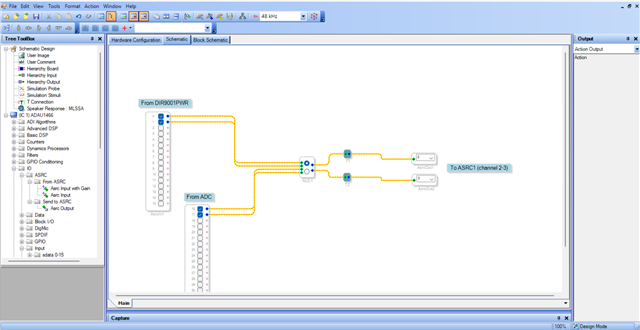
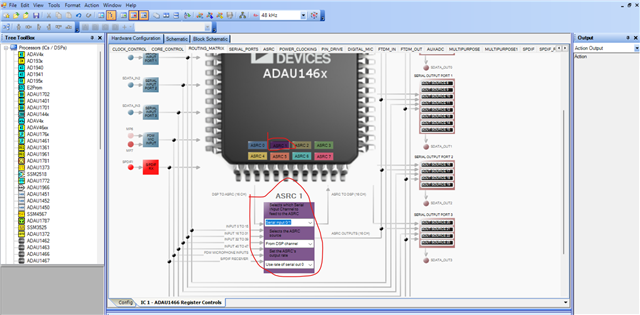
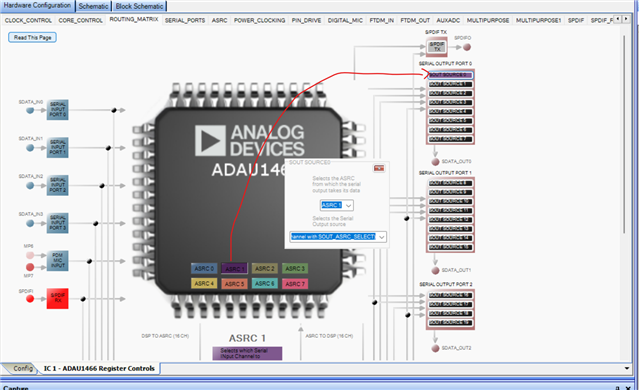
Harish,
Thank you for the quick response. I believe you have a pretty good grasp of what I'm trying to do. Please correct me where I'm wrong.
Inputs:
The analog (ADC) input will be connected to Serial Input Port 0 (SDAT_I0) and will be sync'ed to the DSP's BCK (BCK_I0), MCLK and LRCK (LRCK_I0) signals. Of course this signal needs no ASRC.
The incoming digital signals from the DIR9001PWR digital audio receiver will be routed to Serial Input Port 1 (SDAT_I1, BCK_I1, LRCK_I1), which will be routed to ASRC 0, the dark blue button on the ROUTING_MATRIX menu page. The three settings on the drop-down menu for ASRC 0 are: "Serial input 16/17"; "From serial input" and "Use DSP Rate."
Outputs:
Serial Output 0 (SDAT_O0, BCK_O0, LRCK_O0) goes to a DAC, and requires no sample rate conversion.
My digital output design concept is an attempt to make life easier for users that require all their internal digital signals to be run on "house sync."
However, not everyone needs - or wants - this. So I would like to offer two separate digital outputs: the first of the two digital outputs is simply running at the DSP's internal sampling rate, which will be 48kHz. This output will be provided on the set of Serial Output 1 pins (SDAT_O1, BCK_O1, LRCK_O1), connected, along with the DSP's MCK signal, to a DIT4096IPW digital audio transmitter.
The second digital output will be sync'ed to the "house", i.e., the digital sync signals coming in on Serial Input Port 1.
This second digital output is where I want to be sure I'm doing things right.
From a hardware wiring standpoint, am I correct in saying the sync signals (BCK, LRCK) coming from the DIR9001PWR should go not only to:
• Serial Input Port 1 (BCK_I1; LRCK_I1), but also to:
• a set of output pins on the ADAU1466. In my design that will be Serial Output Port 02, so the two sync pins will be BCK_02 and LRCK_02.
AND also to:
• the sync input pins of the second output's DIT4096IPW digital audio transmitter (which also requires the MCK signal from theDIR9001PWR receiver).
From the software programming standpoint the second digital output will use ASRC1, the purple button on the ROUTING_MATRIX menu page.
If I have this correct, the three settings on the drop-down menu for ASRC 1 are: "Serial input 0/1"; "From DSP channel" and "Use Rate of Serial Out 2."
Then, under the "SERIAL OUTPUT PORT 2" heading, in the lower right area of the ROUTING_MATRIX" page, I click on the button "SOUT SOURCE 16" which reveals a small window with two dropdown menus. From the lower dropdown menu I select "From ASRC (select channel with SOUT_ASRC_SELECT)". Then, from the upper dropdown menu I choose "ASRC 1"
Hopefully, so far I am correct.
On the "Serial Outputs" submenu of the "SERIAL_PORTS" window of the "IC 1 - ADAU1466 Register Controls" Hardware Configuration window:
on Serial Output Port 0, I accept the default settings (SERIAL BYTE 4.0: 24 bits; I2S - BCK delay by 1; 2 channels, 32bit/channel; BCLK is m@ster; negative polarity; LRCK is m@ster; 50/50 duty cycle; negative polarity; SERIAL BYTE 4.1: Sampling rate: Fs; Clock generator 1; drive every output channel);
Same for Serial Output Port 1
For Serial Output Port 2, Here's where I'm not sure:
24 bits; I2S - BCLK delay by 1; 2 channels, 32 bit/channel; Do I set the BCLK Source and the LRCLK Source to "sl@ve from clock domain 2"? Do I leave the BCLK polarity and LRCLK polarity at "negative polarity"?
On the POWER_CLOCKING configuration window, are there any special settings for Serial Out 2, since I'm using the sync pins as inputs? How about on the PIN_DRIVE page... do I disable the pulldowns resistors for the BCLK and LRCLK of Out 2?
Thanks for taking time for my project, Harishgowtham. I hope I have given you the information you need in order to help me out, but I'll be delighted to give you more details if you need them. I look forward to your response.
-David Reaves
Hello David,
Thank you for a very detailed explanation. It helped a lot.
I almost simulated your setup and will give you an answer soon. I do have a few questions.
DavidReaves said:
along with the DSP's MCK signal, to a DIT4096IPW digital audio transmitter.
Here you mentioned the MCLK signal, The MCLK to the DSP is coming from the DIT4096IPW device?
DavidReaves said:
the sync input pins of the second output's DIT4096IPW digital audio transmitter (which also requires the MCK signal from theDIR9001PWR receiver).
Here, you said the MCLK to the DIT4096IPW is coming from the DIR9001PWR, Am I right?
You have three devices, the receiver, transmitter and the DSP. Is that receiver DIR9001PWR is giving the MCLK to the DSP as well as DIT4096IPW?
I have got a pretty good understanding of what you wanted to do, but I didn't get the MCLK part quite clearly.
Is the MCLK for the DSP is derived from DIT4096IPW and MCLK for the DIT4096IPW is derived from DIR9001PW?
could you please clarify the MCLK part?
Regards,
Harish
Thanks, Harish,
Sorry for the confusion. There are two different signals called "MCLK" (Or "MCK"). The external or "house" sync'ed MCLK, and the ADAU1466 DSP's own local MCLK. Perhaps we should give them separate names. How about "MCLK" for the DSP, and "XMCLK" for the external sync.
The DSP's MCLK is derived from a crystal, running at 12.288 MHz. This is the common setup, from my understanding. This is the main sync signal for my DSP project.
The frequency of the second "XMCLK", the signal coming from the digital receiver is unknown, but would reflect the sampling rate of whatever the input "house" rate is, typically 48.0 or 44.1 kHz. The associated incoming digital signals (call them XSDATA, XBCK, XLRCK) will of course need to be converted via one of the ADAU1466's ASRCs to be usable to work at the sampling rate of the DSP.
This set of sync signals (XBCK, XLRCK, XMCLK) coming from the digital receiver carry the "house" synchronization information I would like to be used to control the synchronization of my second digital output, also running at the "house" sync rate. If my assumption is correct, the XBCK and XLRCK signals coming from the digital receiver will need to be connected to drive the corresponding pins on the ADAU1466's Serial Output Port 2, (BCK_O2, LRCK_O2) programmed to be used as sync inputs.
Thanks again for your help; I'll be happy to further elaborate on my design if needed.
David
Hello David R,
It would probably be good to see a detailed system block diagram to be able to really "see" the entire system to give good advice. I understand now the confusion. You used "Master clock" for the "house Clock" like you used to see in production facilities. This is at the sampling rate. Our use of "Master Clock" is for a super clock rate of 256xfs usually. This is because at a chip level you will have a 256x fs clock, and fs clock and a bit clock. This is why we end up with three different names. Glad we got this straight now!
So you want the second serial OUTPUT port of the DSP to be running at the same house rate that is coming into the DIR? The DIR audio is being routed to the ASRC to get it to the internal DSP rate. I will assume you will want the SPDIF output of the ADAU1452 to go to your DIT chip to go out at the same rate as the DIR correct? So that is two outputs at this house rate?
What else is in your system?
Will the DIR always be active or will it come and go depending on the use of your product? This is an important question.
Here are the issues I see. You can route (physically connect) the sampling rate clock and bit clock from the DIR to the serial output port 2 and have that port slave to this rate. The problem is that the DSP core will be depositing audio samples to be transmitted at a different rate! So you will either miss samples or duplicate samples from time to time as the clocks drift.
The other problem is that the SPDIF output of the ADAU1452 will be at the core rate. Again, this may cause issues with your system depending on the equipment it is going to. That equipment may or may not have an ASRC.
The solution is to set the DSP core rate to follow the SPDIF Receiver rate. Then you will not need the ASRC for the DIR and the SPDIF transmitter in the DSP will run at that rate. Then you will still need to connect the DIR clocks to the serial output port clock pins but that is easy to do. Then everything will be running at the rate of the DIR.
Then you have to look at the rest of the system. What rates will those parts run at? You could distribute the DIR clocks to all the other parts and serial ports. That will work but...
If the DIR goes away then you have a problem! All your clocks go away! We can set it up so that it will switch sources. If there is a uC in the system then that can get involved in changing the clocking configuration.
Then you might want to have other things in the system using ASRCs instead. It all comes down to how many signals, how important are they? Other details of the application? Etc. This is why a good system overview and clocking diagram can be helpful.
This part is super flexible but there are a few little details you have to work around.
Dave T
DaveThib: "Here are the issues I see. You can route (physically connect) the sampling rate clock and bit clock from the DIR to the serial output port 2 and have that port slave to this rate. The problem is that the DSP core will be depositing audio samples to be transmitted at a different rate! So you will either miss samples or duplicate samples from time to time as the clocks drift."
Yet, if I'm reading the dataheet correctly, there is a way to do this. On page 54 of Rev. C of the AD "ADAU1462_1466" data sheet, it says:
"Asynchronous output signals (for example, serial outputs that are slaves to an external, asynchronous device) typically are routed from the DSP core into the ASRCs, where they are synchronized to the serial output port that is acting as a slave to the external asynchronous master device."
This is what I'm trying to do with my "house" sync output. The datasheet continues with instructions on how to set the proper registers to achieve this. But I'm not sure I understand how to do this using the SS graphical interface.
Thanks again for your time.
-David
Hello David,
Yes, this part is super flexible and the core can be setup to follow a serial port or the ASRC can be setup to translate from one sample rate/clock domain to the internal DSP sample rate/clock domain. However, this flexibility brings with it a lot of register settings to properly setup.
This is where a system data and clocking flow diagram can help define what is going on to be able to tell you how to set this up or sometimes making this diagram will allow you to see a better way to do it.
Learning all about the clocking of this part takes a while to really learn because it is flexible and also learning what it can do and where the registers are located. Most, if not all of this, is covered in posts on the forum but it would not be just one post. It is a deep topic.
Make up a diagram of your system and then send over your project and I can setup the registers or advise you how to but it is tough if I cannot "see" what is in front of you.
Dave T
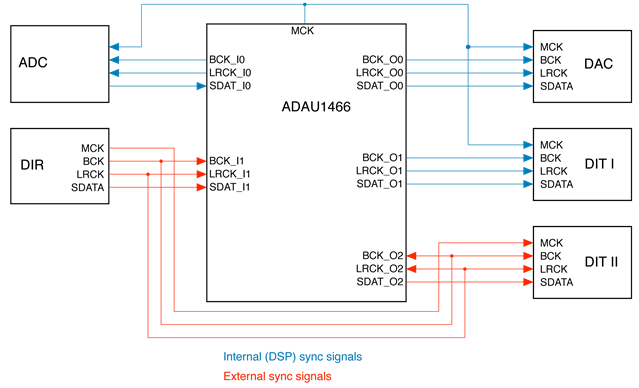
Here's a drawing of what I have explained.

Sorry, I mis-labeled the DSP outputs. I've corrected the graphic. I might add that the source of all the external synchronizing signals is the DIR digital receiver.
Hello David,
Thanks this is really helpful. I have one question. The MCK looks like it is an output from the 1466 going to the ADC, the DAC and DIT1. This is fine and the MCLK_Out pin on the 1466 is good to use but what is the MCLK_IN pin of the 1466? I looked up at our earlier conversations and it looks like that is the 12.288MHz crystal.
Looking at this I think the best way to do this will be to run the DSP in its own clock domain and use an ASRC for the DIR to go into the core and another ASRC to go out to the DIT II. Your jumpers of the clocks between Input 1 and output 2 is perfect. That is needed because there is no way to jumper it internally.
It does not look like you ever attached your project so I cannot go in and set it all up for you.
By the way, at what sample rate do you plan on running the ADC? The clocks and data are in opposite directions which makes the timing margins a little tighter.
Dave T
Yes, I'm using a 12.288 MHz crystal at the MCLK_IN.
Your second paragraph is exactly what I had planned. I expect to use use ASRC0 for the external digital input, and ASRC1 for the asynchronous output. I just want to make sure I set up all the various software setting correctly for this. In a separate letter, I have requested a more in-depth instruction manual for the register controls software for the ADAU1466. As I say in the letter, the sheer number of windows, menus, submenus and settings buttons is intimidating, even with serious study.
I will run the sample rate of the ADC at 48 kHz.
If I may send you my project confidentially, I will do so.
Thanks again for your assistance. SigmaStudio products are simply amazing.
Hello DavidReaves,
Yes, send me the project in a PM. Just make sure to also send me a friend request. If we are not friends then chances are your account is set to the default to not allow messages from people who are not your friends. Then I will not be able to respond.
These parts are amazing and very simple in many ways. Any little piece of it is usually rather simple concepts but the problem is they can do so much that it becomes complicated and overwhelming. The big part of the learning curve is to learn all the features of the parts and where the controls are located!
If you send over a project that has most of your basic routing done, I can quicky make the register changes for you.
Dave T
Please log in to reply.