how to implement auto gain according to the frequency using ADAU1701
Hello all,
we want to implement metal loss correction acc.to the incoming frequency. the adjust step is 0.1db/octave. I used the crossover to split the incoming frequency into low frequency and high frequency. but i don't know how to implement the adjust step 0.1db/octave. i noticed there was a gain parameter in crossover filter and the step is 0.1, but i'm not sure if the per unit is 0.1db/octave. My questions is:
Can I use this gain parameter to implement the adjust step(0.1db/octave)? if no, what should i do to implement this function?
Waiting for your support, thanks!
Best regards
Eason
Audio Signal Processors
Audio Products
software
adau1401
SigmaDSP Audio Processors
adau1701
Show More
Hello Eason,
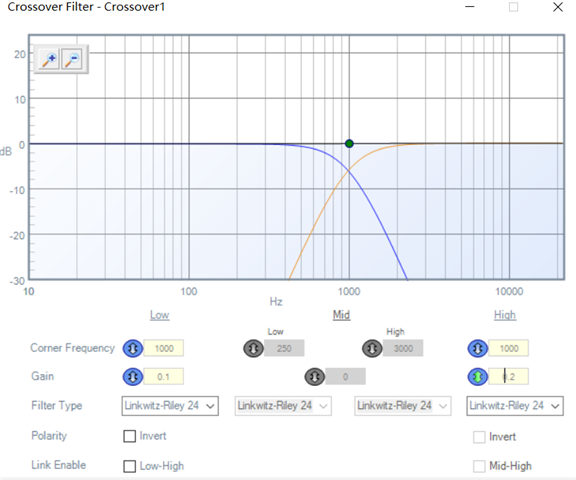
The parameter is to add gain for the entire low audio output or the entire High audio output. It is not a control of the slope of the filter so your question about 0.1dB/Octave implies a slope not an overall gain of the block.
Just enter in a larger number, like 0dB and look at what it does on the screen. You will see what it does.
The slope you select through the Filter Type and filters do not have that kind of control. A single pole filter is 6dB/Octave. A two pole filter is 12dB/Octave. A three-pole filter is 18dB/Octave and four-pole is 24dB/Octave. Etc...
Dave T
Hello Dave
thanks for your response, i got your point. As the crossover cell do no have a control of the sloope, Could you give some suggestion on how to implement this function?
Hello Eason,
You missed a significant part of this. You cannot change the slope of a filter. It is the math involved. One filter is 6dB/Octave. Period end of sentence. If you cascade them you add 6dB for each filter you add.
The other way to do it would be to do a graphic equalizer with many bands. This gets a little complicated to do and with the ADAU1701 you will probably run out of instructions if you were to try to do something like a 31-band graphic.
Fill us all in on what you really are trying to do for the end result?
Dave T
Hello Eason and Dave,
This is quite an interesting problem. As Dave said, filers are assembled with mathematical constructs consisting of poles and zeros, with each having a -6 or +6 dB / octave slope respectively. Yet, I haven't understood how the pinking filter in the toolbox works. It turns white noise into pink noise, with a -3 dB / octave slope. Does it have "half a pole?" Does anyone know how this works? I've looked in several DSP books, yet no one covers this.
I assume that metal objects in the field create a loss which linearly increases with log frequency, thus what you desire is a filter whose gain rises with log frequency (e.g. x dB / octave, with x settable in 0.1 dB steps). A differentiator has a constant 6 dB/octave slope, and it's easy to make. I tried "diluting" its slope by mixing its output with the straight input, as well as a few other ideas -- but none of these worked. Dave's idea of a many-stage parametric filter is a good one. 31 double-precision stages at 10 instructions each would easily fit into a -1701. However, adjusting the filter array involves safeloading coefficients to all those filters for each dB step -- requiring an external microcontroller.
A crossover-based design can be made to work if the requirements aren't too severe. The circuit below shows slopes of 1, 2, and 4 dB / octave between approx. 80 Hz and 8 KHz. If this is good enough, it could be modified to allow for infinite adjustment within this range with a pot and an Aux ADC (and a lookup table if discrete steps are desired). It would not use the redundant adders and fixed gains I show. These are only necessary for this little demo, because the Stimulus=Probe tool cannot handle non-GUI adjustments. The project is attached below:
Design 2.zip
Best regards,
Bob
Hello Dave and Bob,
Bob's assumption is completely correct. we want a filter whose gain rises with the incoming frequency,because the metal loss will increase with the log frequency.
the project provided by Bob is very useful for us. but the slope is not enough. we want provide several potions for the customer: 0.1dB/octave、0.2dB/octave、0.4dB/octave、1dB/octave、2dB/octave、4dB/octave..
As both of you said the 31-band parametric filter would be workable, i will learn how to use it firstly. a external microcontroller is not a problem, we do use a STM32 controller in the design.
if you have some projects for reference,could you share with us? Thanks.
Best regards,
Eason
Hello Eason,
I just took a quick look at my example projects that I have collected through the years. This is the only graphic EQ I have for the 1701. As it sits it uses 472 instructions which is a lot. However, it is written to use external AUXADC pots and a table for the values. This could all go away and you can simply drive the index selectable filters with a DC cell that is loaded in with values from an external uC. Just be careful to not load in a value that is out of range of the MUX. That would save some instructions. There will be other ways to do this. This should give you a start.
KJBob, I will ask about the Pinking Filter.
Dave T
Hello Dave,
Thanks for your suggestion. we will proceed according to your instruction.
Best regards,
Eason
Hello Eason,
I am talking with someone about this who developed the Pinking Filter. He is asking a few questions.
First is if this is an audio application as in 20-20kHz normal audio band? So I will assume you will run at 48kHz fs?
The second is filters. He asked if it needs to be IIR or FIR filters. I can answer this for him since you are looking to use the ADAU1701 then it really would need to be an IIR filter because of the limited instructions available on the 1701 platform. If you were to use the ADAU142 platform then an FIR filter would work well.
Actually, I would like to add a third question and that is to define the control range a little more. You mentioned 0.1dB steps then mentioned a few more settings like 1,2,4 db/Oct.
What range would be good and would the 0.1dB steps be over the entire range? I think what makes sense to me is to have this filter be 0 to +6dB range. That would be 60 steps from 0dB to 5.9dB if my crude math is correct. Really the 0dB would not be needed, that is a bypass setting. Then I am not including the 6dB/Oct because a standard single pole filter will do that. So one filter that can go from 0.1dB to +5.9dB can be cascaded with standard filters to get things like 6.1dB/Oct etc.
Does your application require that entire range or would just a handful of values be enough?
Bob, I am talking to Bob Adams who is the person who did the Pinking filter. He used some sort of scrip or MatLab calculation to come up with the coefficients. I miss him around here, he is retired now, sort of, and he never ceased to amaze me at how he can quickly turn a tricky problem into a simple solution.
Thanks,
Dave T
Hello Dave,
Appreciate for your further help.
for the first question, our application audio band is 20-20kHz. the Sampling rate is 48kHz.
for the second question, actually, we are using both ADAU1701 and ADAU1401 in our different application, because the working temperature of ADAU1701 is limitted in some cases. we will consider using the IIR filter.
and for the last question, a handful of values will be enough for our application, instead of the entire range. we provide sereval options for field application,the minimum step is 0.1dB/oct, the maximum step is 4dB/oct.when the metal loss is small, 0.1dB/oct can be used. and when the metal loss is terriable, the maximum step 4dB/oct can be used.
Thanks.
Eason
Hello Bob,
I have learned your crossover-based project, and i think it could be applied to our design. but i still have two questions for the principle of this crossover design.
1. How to calculate the gain value if i want change the slope? we want to config the slope via an external uc, so i should know how to config the gain value to get the specified gain signal.For example, 1.35 and 1.82 is configed to the Gain control for 1dB slope in your project, how these two values are calculated?
2. I saw Linkwitz-Riley12 fiter is used in your project. and i checked wiki but didn't find how to calculate the output value. for example, in the project below, the rms value of input is -7dB,the low output is -10dB while the high output is -18dB. My question is how to calculate this output acc.to the input and the Linkwitz-Riley12 filter.
Thanks.
Best Regards,
Eason
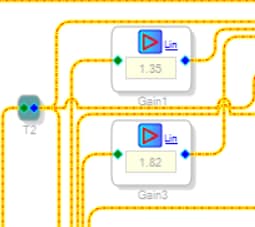
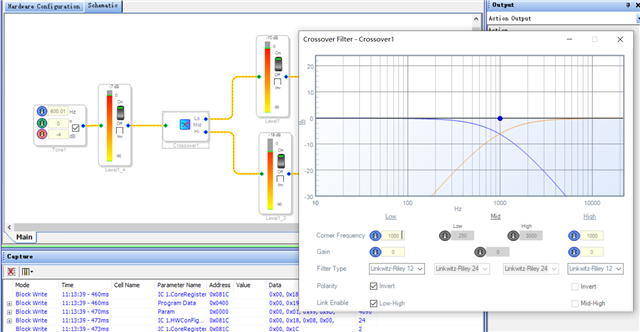
Hello Eason,
If the crossover-based arrangement works well enough for your application, the good news is that you need not load any coefficients at all. Since the crossover type and frequencies don't change, you can use volume controls external to the crossover to adjust the boost per octave. The example below adjusts the boost with a simple Aux ADC and pot, affording continuous adjustment from flat to +4 dB / octave. The messy project I showed previously could have been like this except I had wanted to test it with the Stimulus-Probe tool, which won't work on this project.
If you prefer digital control via your uC, simply substitute a DC source for the Aux ADC. Then your micro can compute and safeload its one parameter into parameter memory. This is a lot easier than loading all the filter coefficients. That source is likely to appear at the very low end of parameter memory, which means its address is unlikely to change as you modify the schematic. Search the forum for how to do the safeloading.
Since you do have a uC available, the pursuit of a filter that really implements the variable gain / octave by adjusting its coefficients becomes more appealing. Unfortunately, I have no idea how to do this. I was raised on vacuum tubes so what little DSP I know is from reading books and playing with SigmaStudio. It won't be long before I might go the way of my avatar...
Best regards,
Bob
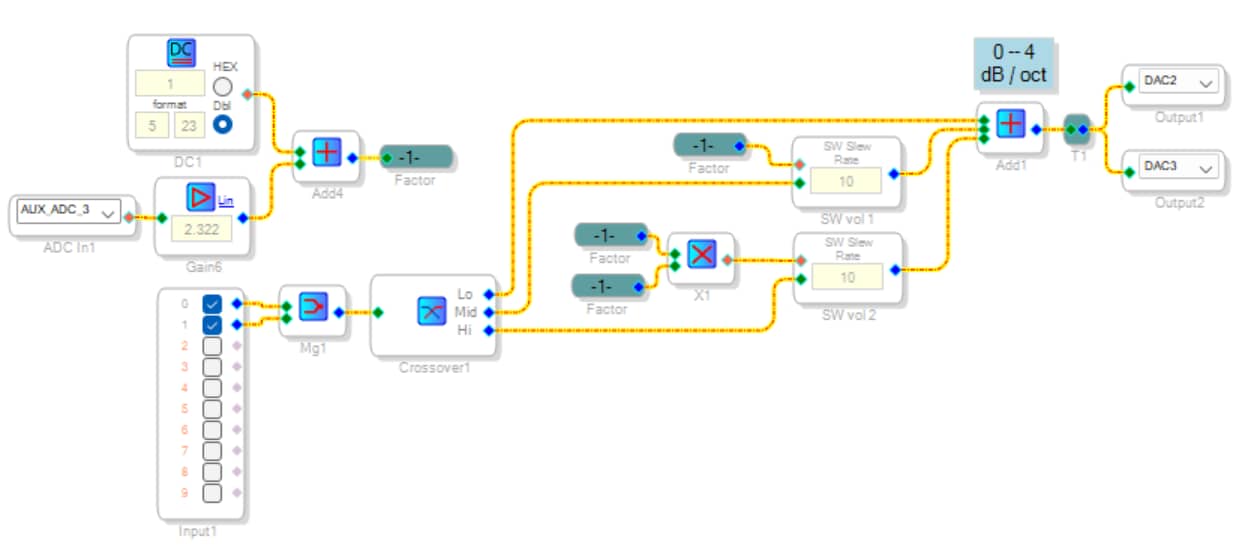
Hello Bob,
Really appreciate for your detailed guidance.
The new example is much easier for me to implement the function. I will proceed based on your new example.
Thanks.
Best regards,
Eason
Hello Eason,
Thank you for your appreciation!
Sorry I forgot to attach the project. It runs on a ADAU1701MINIZ eval board.
Best regards, Bob
Design 2b.zip
Please log in to reply.