E2Prom read/write&selfboot problem.
Hi,
I have a similar problem and could not figure out how to solve it. In addition to the previous question, I was also able to read the writing cycle of 1466 core via Analog Discovery logic analyser and put some of the screenshots to DIY audio. See here the https://www.diyaudio.com/community/threads/low-cost-adau1452-china-board.309680/post-7606801 and then later post #387 and #389. I desoldered the 24LC1024 E2Prom last night and connected my 1466 DSP board to Sigma Studio via the SPI interface. When I command read E2prom to display it shows the same screen whilst no E2Prom exists on the board (this is very interesting.). Any help will be appreciated!
Many thanks,
Audio Signal Processors
adau1452
Audio Products
software
4.7
SigmaDSP Audio Processors
adau1701
ADAU1466-24LC1024E2PROM
adau1466
Show More
Hello Ferda,
It will help to understand a little but of the history of these parts.
The "read EEPROM to display" and "Write to EEPROM" command windows features of SigmaStudio were developed for the older SigmaDSP chips. The ADAU1701 only has one communications port. The USBi interface it connected to the slave comms port of the ADAU1701 and the EEPROM is also connected to the same comms port because there are no others. This means the USBi has direct access to the EEPROM. When the ADAU1701 self-boots, it temporarily changes the mode of the comms port from a slave to a master to read the contents of the EEPROM. Once it has completed booting it reverts back to being a slave so SigmaStudio or some other system controller can communicate with the objects and registers in the DSP.
Many years later we made a huge jump in performance and features by releasing the Sigma300 (ADAU1452 family) and the Sigma350 (ADAU1467 family) of parts. These parts have TWO communications ports. One is always a slave and the other is always a master. The EEPROM is connected to the master comms port and the USBi, or other system controller, is connected to the slave comms port. Therefore there is NO direct connection to the EEPROM from the USBi or a system controller. This means the features in SigmaStudio to directly read or write to an EEPROM will not work because it is not connected to it!
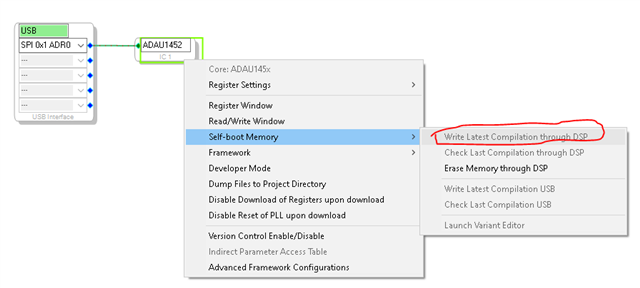
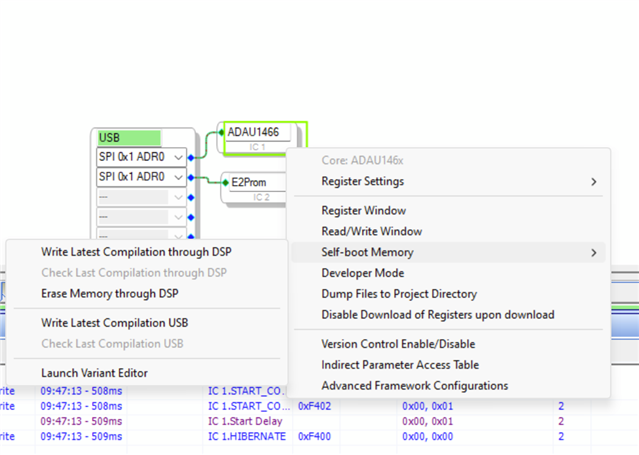
You have to right click on the GUI object for the part on the config page and select the command "Write latest compilation through DSP"
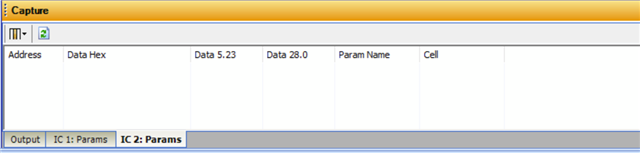
SigmaStudio will then load in a small program that acts like a server to shuffle data between the two comms ports. You can see this happening if you watch the Capture Window.
There are many posts explaining this process on the forum and it is also in the user guides for the evaluation boards.
By the way, I should add that in my screenshot you did not see an EEPROM in the configuration. I just used a program I had running. You must include an EEPROM in the configuration even though you cannot talk to it. This is because you need a place to define the EEPROM details and also to let SigmaStudio know that it has to generate a HEX file for an EEPROM.
Dave T
Hi Dave,
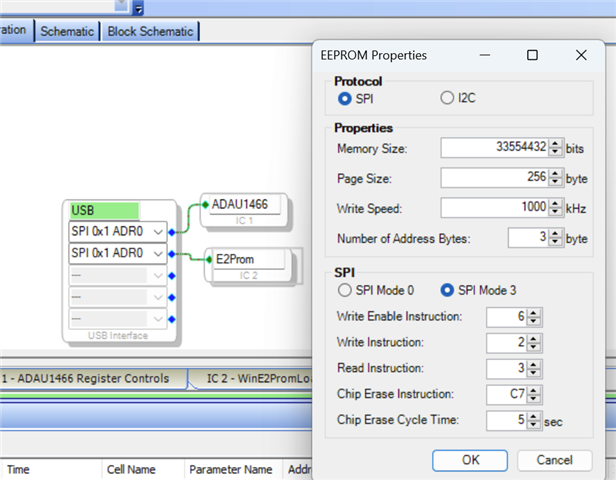
Many thanks for your quick action. For the history of the Sigma 100 and Sigma 300 families, it is easy to see that difference on the Eval board schematics and thanks for reminding. I have followed the EVAL-ADAU1466 schematic for my design and am also familiar with the ADAU1701 DSP programming. This is why I used a Sure ICP5 programmer in the SPI mode to read/write my board that uses ADAU1466 (I also tested another programmer board that is built around the CY7C69013a). There must be something odd. I can not understand. For sure, the main controller port configuration has an E2PROM included and it is configured for the SPI protocol communication to talk with ADAU1466.
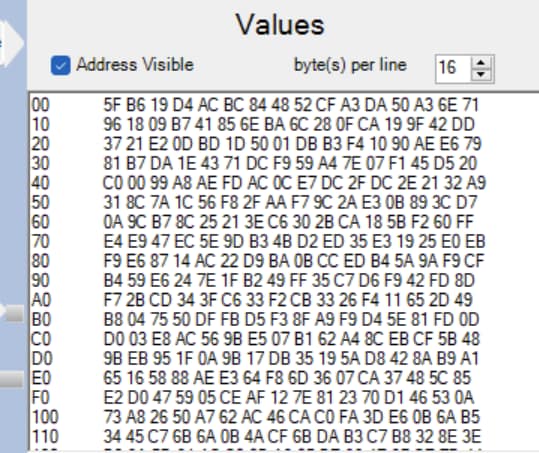
During my post waiting for moderation approval (due to the external links), I placed a 4MB SPI Flash (25Q32) instead of the 25LC1024 E2prom and it behaved similarly. I can "link&compile&download" the program to the ADAU1466 DSP (every DAC output works properly) and then write the "latest compilation through DSP". Moreover, when I check the "last compilation through DSP" it says, they are matching. However, when I read the E2PROM to the screen through the IC 2-WinE2prom loader tab on the main screen it shows the program inside the IC2, i.e. E2prom, (starts with random numbers sometimes 1F, sometimes 1D or sometimes 5F etc.) but it is different than the hex file (starts with AA) generated by the Sigma Studio. This is the same for 25LC1024 or SPI Flash, no matter which is used.
I am not interested in what the screen shows as long as the program working correctly. But, when I disconnect the power from the board for a while, the ADAU1466 DSP does not boot the latest firmware that I put inside. In addition to these, the read/write registers for holding some rotary volume and GPIO input selector values, do not function correctly and reset. I am not sure but do you think the problem can be the hardware configuration of the IC1, i.e., ADAU1466?
By the way, the IC2 tab on the capture window never shows values.
The schematic of the whole system exists on the link provided in my previous post here and I can suplly the other files if needed.
Many thanks for your help.
Best wishes,
Ferda

Hello Ferda,
You cannot do this:
Ferda said:
Moreover, when I check the "last compilation through DSP" it says, they are matching. However, when I read the E2PROM to the screen through the IC 2-WinE2prom loader tab on the main screen it shows the program inside the IC2, i.e. E2prom, (starts with random numbers sometimes 1F, sometimes 1D or sometimes 5F etc.) but it is different than the hex file (starts with AA) generated by the Sigma Studio. This is the same for 25LC1024 or SPI Flash, no matter which is used.
You cannot read the EEPROM using the IC2 EEprom Loader functions in SigmaStudio. It will not work. It has no connection to it.
Are you setting the Selfboot pin high?
Please supply the SigmaStudio program here and also supply your hardware schematics showing the connections to the EEPROM and to the USBi interface. Also show what you are doing with the Selfboot pin.
I do not want to go to other web sites to get files.
It is a good idea to take it out of selfboot mode when programming the EEPROM. I explained that in an older post years ago. Read this post especially the part where I talk about disabling selfboot.
(+) Selfboot Problem on ADAU1452 - Q&A - SigmaDSP Processors & SigmaStudio Dev. Tool - EngineerZone (analog.com)
Dave T
Hi Dave,
Thanks for your reply. I read many of your answers on this on the EZ threads and I was aware of your answer on the given link. The thing that I did not know, it was not possible to read the E2prom onto the screen. So, the E2prom loader shows something different than I expected but it does the job as ADI expected. Anyway, I enclosed the code that I uploaded to the board a few hrs ago. Now the board keeps the last program on the E2prom (still has a 4Mb SPI flash) and boots (the capture window shows that the E2prom starts with 0xAA). The only remaining issue is memorising the interface read/write.
1466SmartAmp.dspproj
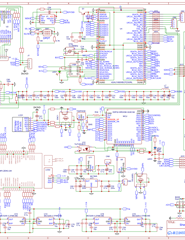
Here is the schematic file as well.
The SW1 (DPST) controls the self-boot. It is on, i.e. short to ground, during programming and writing to E2prom over DSP. Then it is off, i.e., sets the SLFBT pin high over the pullup resistor. The SS-M row is just an emulation of EVAL-AD1466 but, it does not have a pull-down resistor to ground (does not populate) and is always on, meaning that the pin 26 (MP0) is always connected to the chip select of the E2prom which has 4K7 pullup resistor to 3V3 digital supply.
In the current program Serial input 0 provides 16bit/44.1kHz signals over the precision Clock Gen 3 (N: M= 49/320) to a target audio source module and then the data is routed over ASRC 0 for processing. This is the basic version to test the functions of the DSP and the plan is to implement different functions such as bi-amping HPF/LPF or surround selection etc. The thing is that I need to be sure everything working properly before diving deep into implementing extended functionality.
I am looking forward to hearing back from you.
Best wishes,
Ferda
Hello Dave,
Sorry for interrupting.
Hello Ferda,
Ferda said:
The only remaining issue is memorising the interface read/write.
I believe your issue is that the interface read/write doesn't hold the previous value, right?
I downloaded your project and made a little change, after that it did hold the previous value. could you please give it a try?
I'm referring one the posts of Dave, where he edited the checksum value to zeros. Here is the post. This post shows how you can find the checksum value in the sequence window and change those 8 bytes as zeros then download the entire program to the EEPROM. This post will help you do that. This post is originally from a 1467 self-boot issue when interface read/write block is included in the schematic. Dave found a workaround of zeroing out the checksum value and download the program to the EEPROM. So, this post will walk you thru how to identify and edit the checksum value.
Once I edited the checksum as mentioned above and downloaded the program into the EEPROM via sequence window, it did hold the previous volume.
Make sure that your EEPROM details are properly given in the interface read/write block config window.
Please give it a try and get back to us.
Regards,
Harish
Hi Harish,
Many thanks for your suggestion. It is working now!
I appreciate your DaveThib&Harishgowtham very precise approach to the users!
Thanks a lot. Now I can dive into introducing special functions to my DSP program.
All my best wishes,
Ferda
Please log in to reply.