SigmaStudioPlus light mode makes text unreadable; need user ability to adjust colors/fonts.
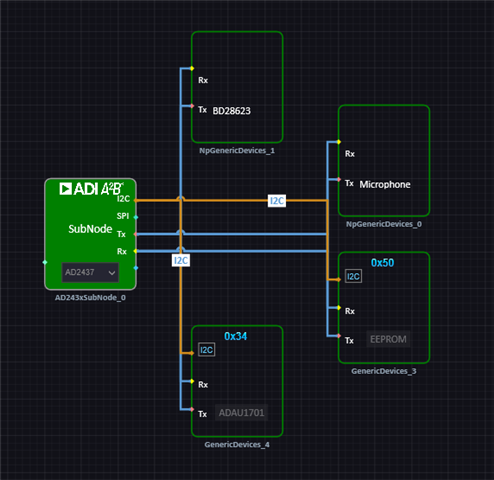
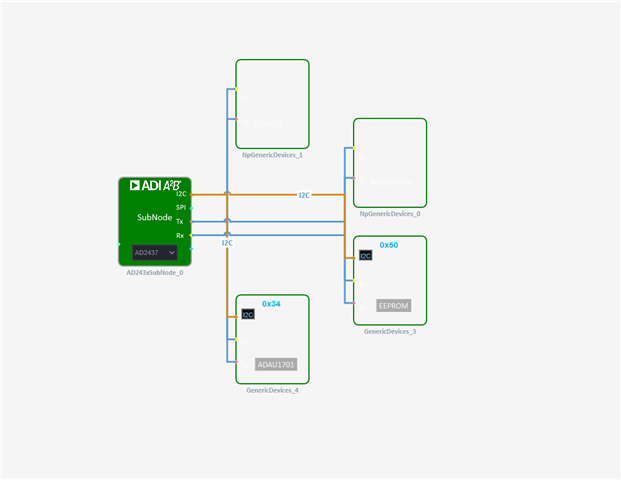
If you change the view from Dark to Light, text inside of boxes isn't not reversed, making it disappear. I'm trying to document some SS+ schematics and I need a white background, the best I can get here is a light grey background (with the text more or less invisible) I don't see a way to control any details about the visual theme. Also on a 4K monitor the text can be very small. Example attached, these were created from the export canvas option.
.
Edit Notes
fixed typo
[edited by: Brewster at 10:29 PM (GMT -5) on 8 Mar 2024]
software
2.1.0
ss+
SigmaStudioPlus
Hello Brewster,
You are preaching to the choir here. I do not like the dark mode at all. they have listened and made some changes but apparently not quite enough.
I will report this to the programming team right away.
Thanks,
Dave T
Please log in to reply.