SigmaStudioPlus - how to export capture window to Excel?
I would like to export from the Capture window to Excel to make it more readable. All I get is all of the data in a single column vs. a row with all of the values comma or tab separated in a way that Excel could import it. I can't seem to figure out how to make SS+ do that, I thought perhaps by copying the data to the sequence window and trying from there but I only seem to be able to move a single line vs. all entries (or a range).
Feel like I've overlooked an obvious step but my google-fu is not good today.
Seems like the answer should be found here: https://wiki.analog.com/resources/tools-software/sigmastudiov2/usingsigmastudio/captureoutputdata but that page is totally silent on how to actually save/manipulate the capture data.
software
2.1.0
capturewindow
export
SigmaStudioPlus
Hi,
Please find the below steps for saving all Capture window data into a file format.
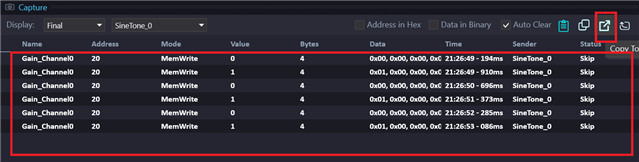
Copy all data from the Capture window to the Sequence window. (Select one row in the Capture window, press Ctrl+A, and then click on "Copy to Sequence Window" as shown below.)
Go to the Sequence window, select one row, then press Ctrl+A, and finally click on the "Save Sequence File" button as shown below.
It will save all the Sequence window data in the file in XML format as shown below.
Thanks


Thanks, it was the CTRL-A I was forgetting about, I was trying to do shift-click to select them.
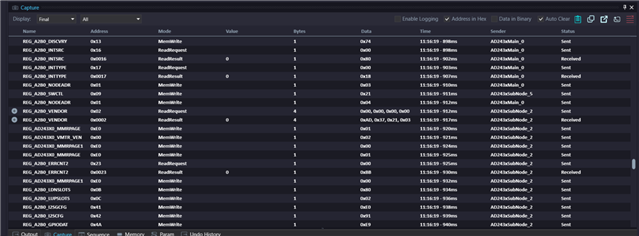
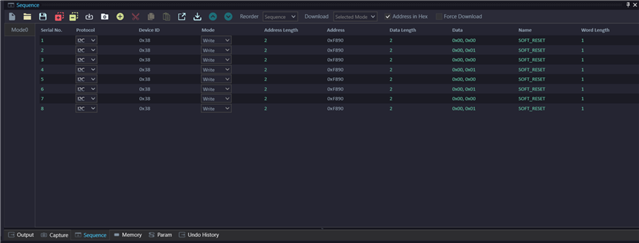
I was OoO yesterday so didn't get to actually try this until today. I also upgraded to 2.2.0 to deal with the data column width bug, I'm not getting things to work as expected, I must be missing a step. I select all the data (CTRL-a) in the Capture window:
and hit the Copy to Sequence button, but only get a couple of entries.
I must have missed some other step?
NUDGE.
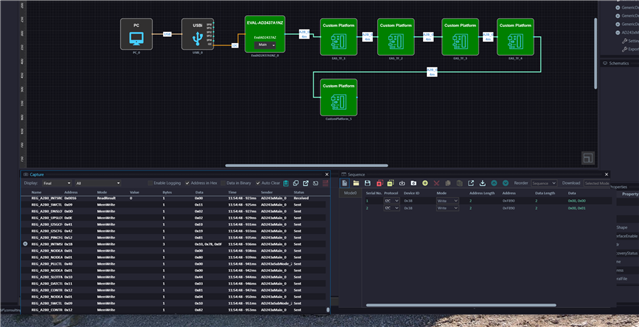
Here's another example where I put the capture and sequence windows side by side to make it more obvious that something is not right.
Hi Brewster,
A new SigmaStudio+ update is available; SigmaStudio+ v2.2.0.1, which addresses the copy to Sequence Window issue. Please refer to Update Manager [Analog Devices Wiki] for details on how to apply this update. Details of changes included as part of this update will be displayed in the Update Manager.
Best Regards,
John
Thanks, looks like that fixes it.
Please log in to reply.