First use of adau1452 - how to check basic operation
Hi Folks,
I am trying to start newly soldered adau1452, but not sure if it's even working. USBi adapter is green and seems to be communicating, but eeprom read/writes fail, and seeing some conflicting core statuses. No errors when trying to read registers, but almost all values are the same.
On top of that, sigma studio 4.7 help is not even starting and it was just installed.
Thanks in advance.
Audio Signal Processors
adau1452
Audio Products
hardware
adau1467
SigmaDSP Audio Processors
adau1701
Show More

For the 1452, do you have an EVM board to try things on? I seem to almost always screw up the clock/PLL settings and having known hardware is really helpful.
Not talking to the EEPROM seems like the easy one to figure out. Put a scope on SDA and SCL and see what you get.
When I get stuck a TotalPhase Aardvark and Beagle are pretty indispensable to figure out my own mistakes.
Good luck
Thanks Brewster, for your reply!
Hello zdr,
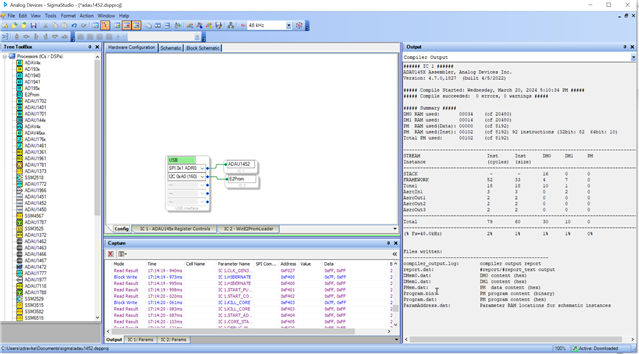
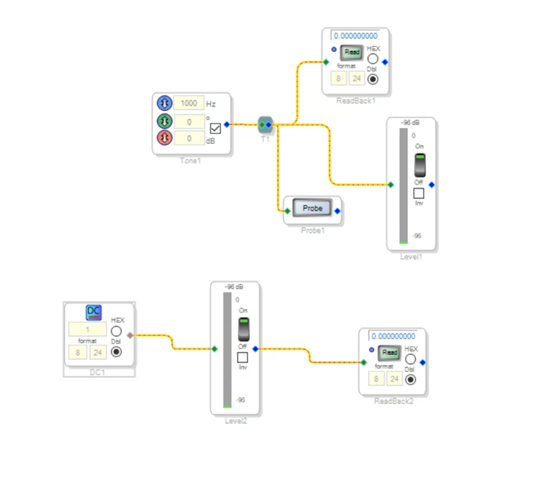
Just try the project given below and see whether you can read the values from the DSP. The first step is to see whether the USBi is communicating properly with the DSP. The below screenshot shows a simple and proper read/write communication.
Note that, you can't directly read/write the EEPROM from the USBi. You can write the EEPROM thru the DSP. Did you follow the self-boot procedure, and it didn't work?
Ok, let's establish and confirm a proper communication between the Sigma studio and the DSP, and then we will go further into EEPROM read/write.
The attached project has a basic flow and clocks settings are set for a 12.288MHz MCLK.
run_test.dspproj
Feel free to get back to us with your questions.
Regards,
Harish
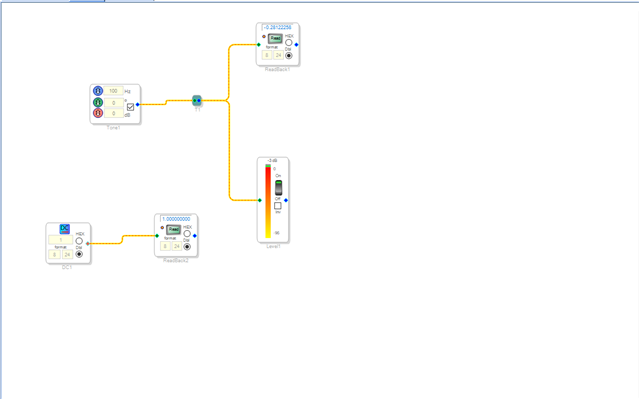
Thanks for the help. I tried it, this is the result:
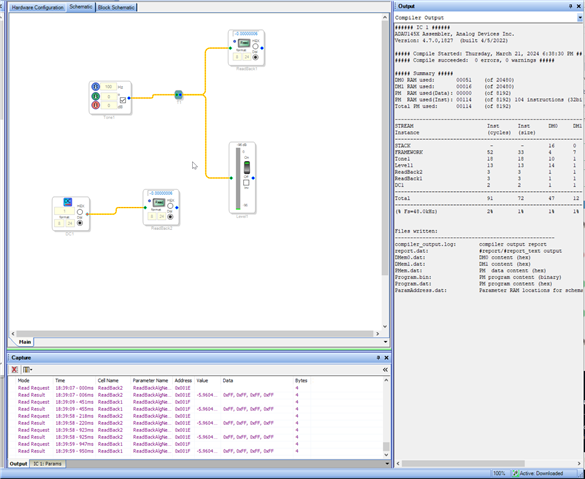
Maybe I should mention I am trying to run with external MCLK of 24.57MHz. Selfboot was enabled, but I disabled it now. No difference. All voltages seem correct.
Hello zdr,
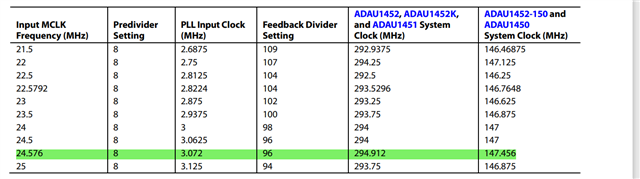
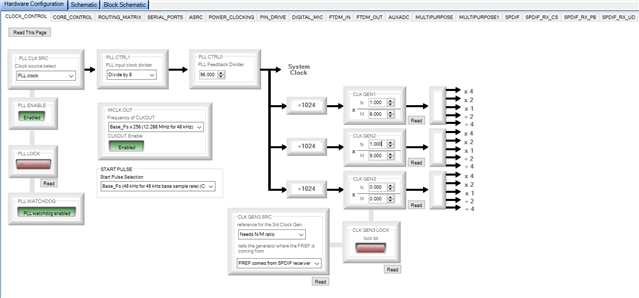
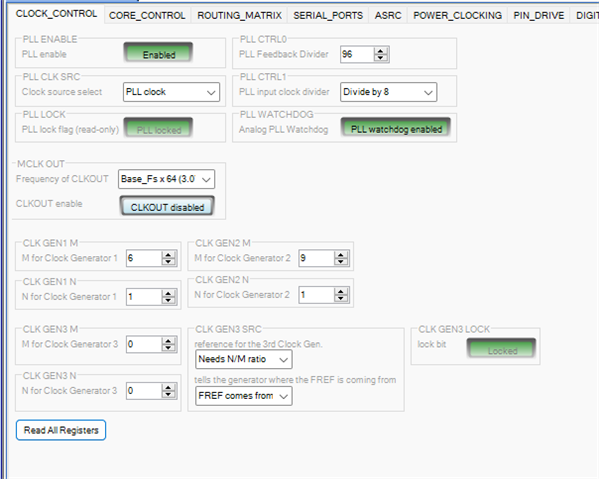
If your MCLK is 24.576MHz, then you must set the PLL clock divider to 8. Look at the setting below. Hope you have done that.
where your MCLK is coming from? Is it from a crystal?
If not from crystal, though you aren't using a crystal and externally giving the MCLK at the XTALIN/MCLK pin, The PLL source register has to be 'PLL clock', it should not be 'Direct from MCLK pin'. Please refer below.
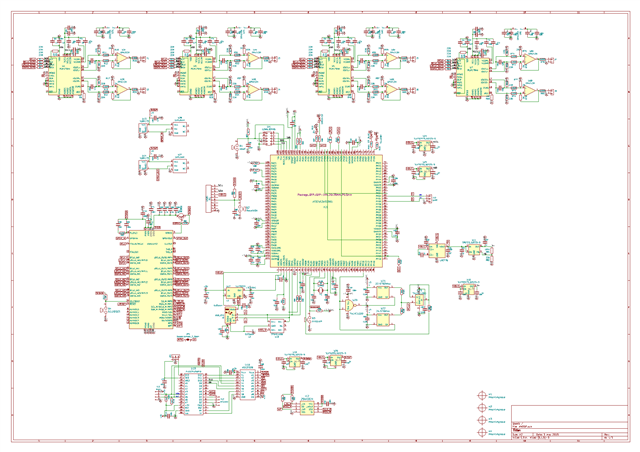
It would be helpful if you attach your hardware schematic and the project in your next reply.
Also please make sure that, your USBi is in working condition and see what it is sending out.
Regards
full schematics.
USBi is working fine, checked with another ADAU1701 board which is working fine.
I changed the values but they don't seem to get written at all. When I try to read them, they seem to go back to defaults.
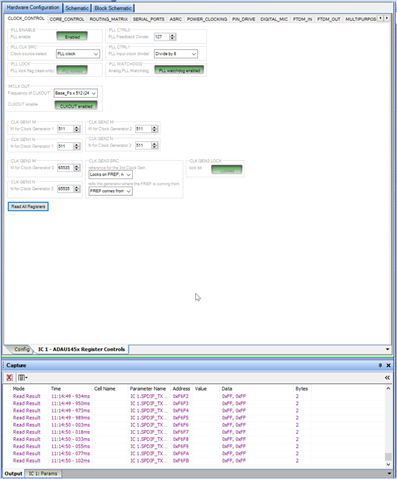
ok, I am getting somewhere:)
I had to change to I2C from SPI in your project file.
My core seems to be sleeping and cannot wake it up:)
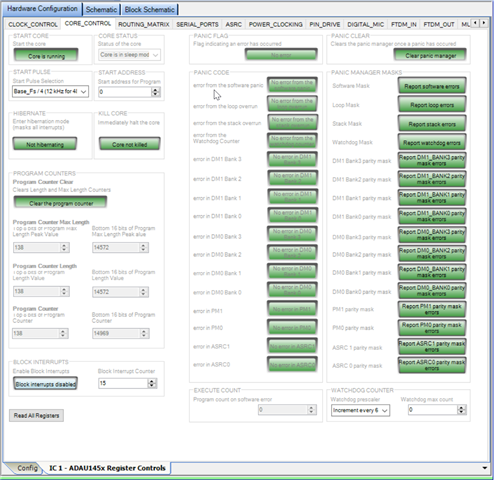
Hello zdr,
I chose SPI in the project, since I saw in your first screenshot that it seemed to be using SPI. Anyway, it's good that you established the communication.
Your clock generators and other things are set for different numbers that the usual one. You run the core at 12KHz.
May I know what you are exactly trying to do. since the DSP responds to your commands, it's now easy to get done with your requirements. If you give us an overall view about your application. I could understand it better and will try to help you at the earliest.
what sample rate you are trying to use?
Regards,
Harish
I am already happy that two major problems were resolved - ADAU1452 is now operational and comms are working, so thanks a lot for that! I am trying to make 4 way stereo crossover with USB UAC2 audio frontend sending I2S audio to ADAU1452, which will then distribute it to four stereo DACs to drive class D amps feeding speakers.
I am not sure why all of the sudden your test project stopped working and core goes to sleep every time. I am not sending any commands to ADA or anything like that, it just gets I2S signal from USB frontend. Also, I am unable to set divider to 8, it keeps reverting to one. PLL lock is also off.
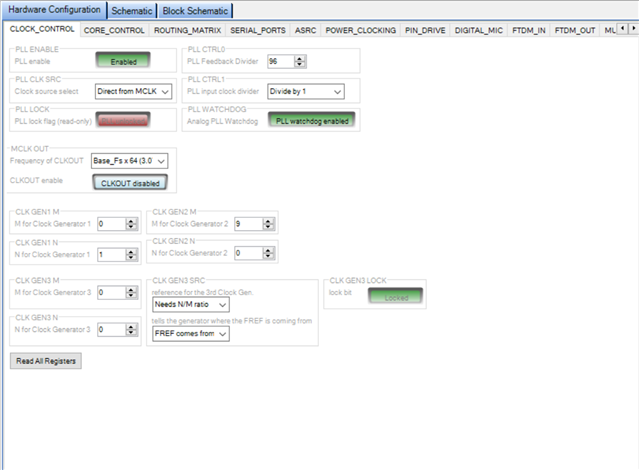
I tried everything I could think of, core just keeps sleeping. I can write to some registers, like stop core and it reads back correctly, but some settings just do not get written - I cannot switch back to PLL clock source, nor I can change divider to 8. MCLK output also does not turn on. Test project worked once at some point, now it just does not, probably because core is sleeping. Datasheet says that only reason for sleep can be explicit command in the code which is not the case. I just don't understand...
Hello zdr,
As I already mentioned above, The PLL clock source register must be set for 'PLL clock'. But you set it for 'Direct from MCLK pin', what it will do is, it will bypass the PLL and run the core about 12 times lower than its nominal rate which is 294.912MHz.
That is not the source to the PLL, it's the source to the core, the register isn't quite correctly name. So, please change PLL clock source register like below.
Your clock generators are set inappropriately. I'm not sure what is your system sample rate and why you set the CG's that way. A clear picture about your system will also help assisting you further.
I attached a sample project which runs at 48KHz. please try that. please change the respective I2C address in the USBi module.
test_run.dspproj
Regards,
Harish
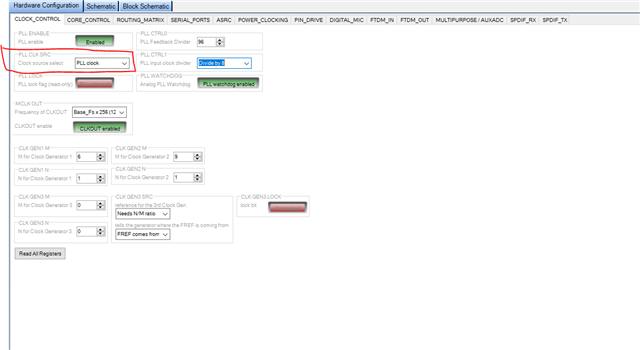
Yes, but I cannot set them. Now I cannot change back to PLL, it just won't take the change. I cannot set some of the registers while I can set others.
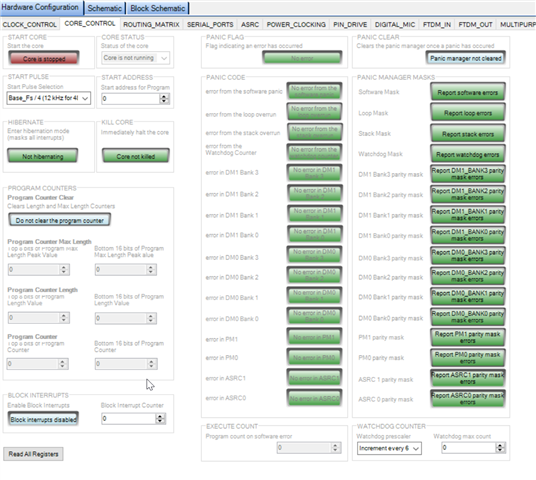
Thinks are just getting worse and worse, and I am completely blind - no errors, no logs. Core is now stopped and cannot start it. Some registers take the change, some do not. I can't even blame the hardware anymore as it has been working at one point. This is just ridiculous... Did a reset, and core is started, but gone to sleep again...
Is there a way to do a blanket register write to default settings to make sure it's not the specific combination of register settings that it's putting it to sleep?
Hello zdr,
I will chime in here since I am reading this but Harish has been doing a great job with helping you, (Harish, you can continue to help here as well. I have been travelling and have been busy.)
For the settings of the PLL to take affect you must disable the PLL and reenable it. There is a shadow register involved so you write the new PLL settings but they will not take affect until you disable and reenable. This also goes for the CLKOUT pin setting. It will not change until you toggle the PLL enable.
Also, read the details in the datasheet for how to start and stop the core. There are some specific ways it needs to be done. The most recent revision of the ADAU1452 datasheet I had updated some of these functions. If you are working with the ADAU1467 family I suggest you refer to the 1452 datasheet for the core control. That datasheet was not updated.
One other thing to point out. If you check the core status, chances are you will catch it when it says hibernating or sleeping. This is because it goes into sleep after it completes the program every sample period. If your program is short this will mean that most of the time it is sleeping waiting for the next start pulse to trigger it to start running the program again. If you set the source of the start pulse to a pin that has no clock then the program will never run. It will never get the interrupt to start the program running.
Dave T
Thanks Dave. I am using the project Harish attached, I guess it should run constantly as it's an internal sine wave/DC source? Also, it is not giving any readings.
Ok, I was finally able to set the clock settings by disabling PLL first. Core is still taking a nap though:
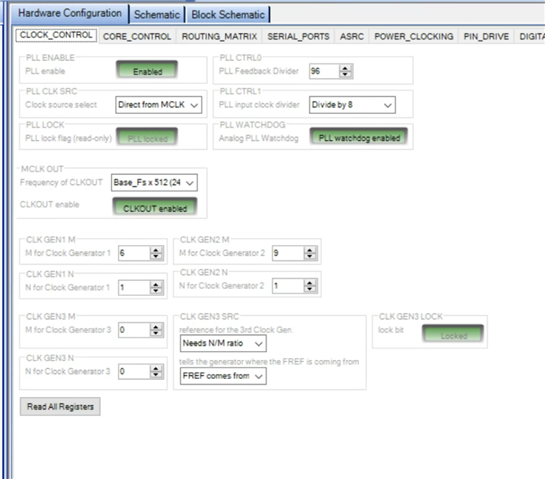
Hello zdr,
You missed a couple of details. Harish had mentioned this before. You changed the PLL CLK Source to "Direct From MCLK" This is wrong. I am not sure what your MCLK frequency is on the MCLK pin but this selection takes the internal system clock directly from the MCLK pin rather than from the PLL output. So your DSP is running at 24.576MHz rather than 293MHz. HUGE difference. This register label is not great. It should not be PLL CLK Source, it should say internal System Clock Source. Direct from the pin or the output of the PLL. The PLL source is always the MCLKIN pin. You cannot change that.
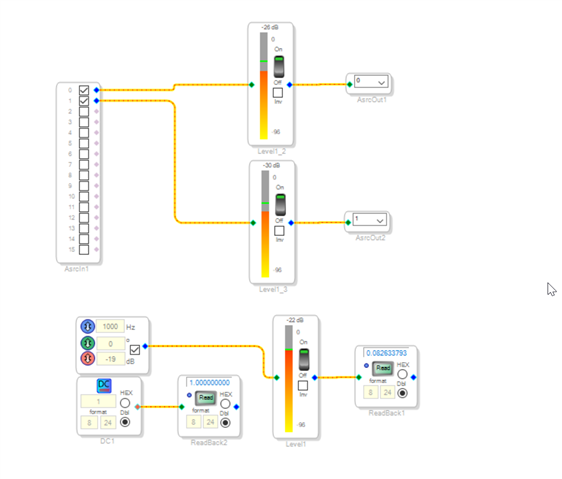
The program Harish sent to you makes it easy to test to see if the program is running. The meter should work off of the oscillator and you should be able to turn the oscillator on and off and see the meter come and go. For the DC cell, you can read the DC cell using the Readback and if the correct number shows up then you have communications and you have the core running.
Dave T
Hi Dave, thanks for the valuable input. I have set it back to PLL clock. Frequency at the MCLK pin is 24.576MHz derived from an external clock. According to the datasheet, these settings should give system clock of 294.912MHz if I'm reading it right (pre-divider:8, feedback divider:96).
Either way, the test program does not run, so I must be missing something else.
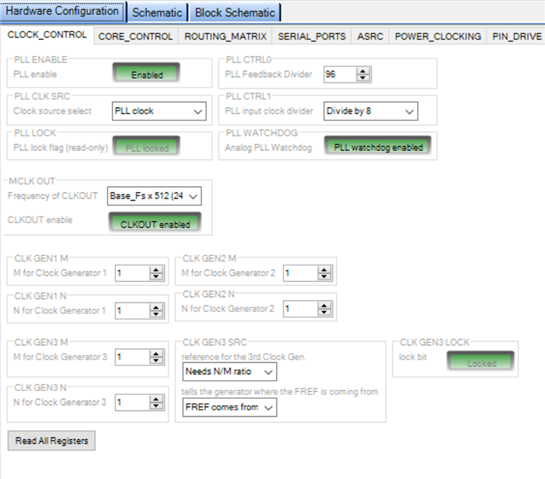
Thanks for your inputs Dave!
Hello zdr,
Your CG is set for some random number. what is your start pulse set for? Is it set to follow the CG? Since you made few changes in the clock control page of the project that I sent, I'm not sure what the start pulse is set for.
Please make below mentioned changes in your project. The changes are to run the core at 48kHz.
Regards,
Harish
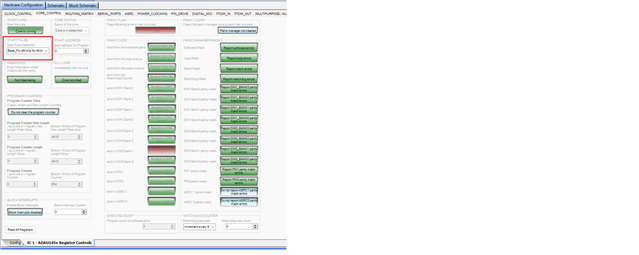
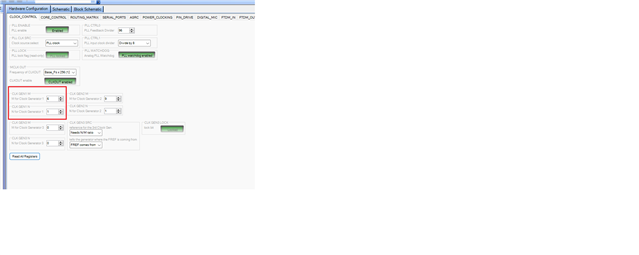
Thanks Harish. Just in case, I loaded your program again and made only necessary changes to reflect differences in my setup. All is green and happy. Selfboot is disabled, low, just in case. No luck yet with the program though.
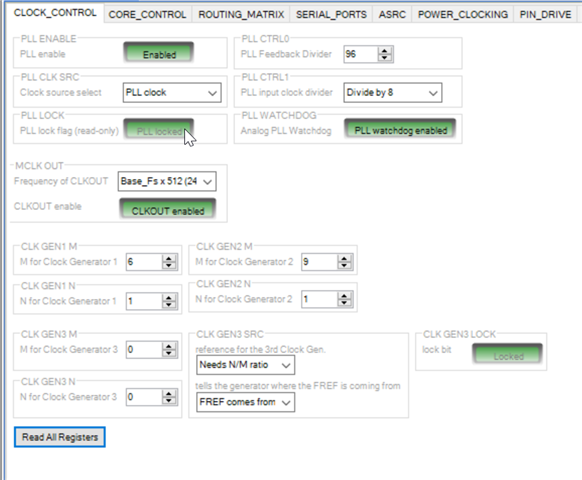
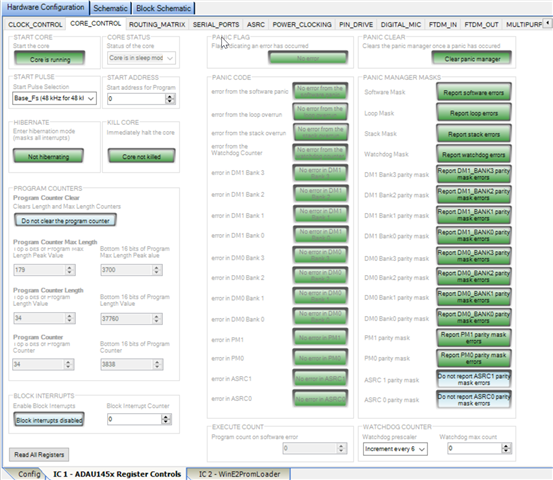
It seems that on power off, some or all registry values are set to default and core does not start until I set the values for clock again. Is it possible that IC is defective? Can that be checked?
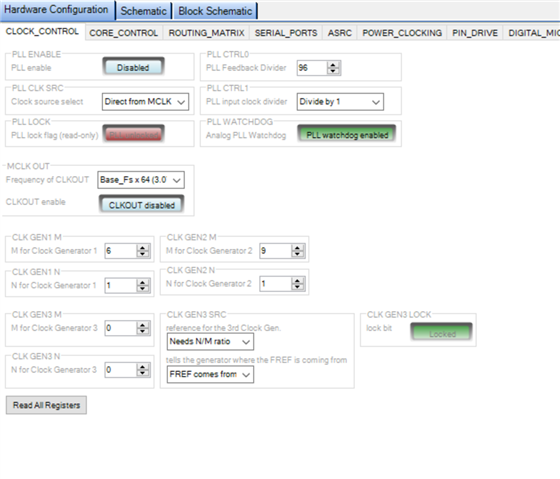
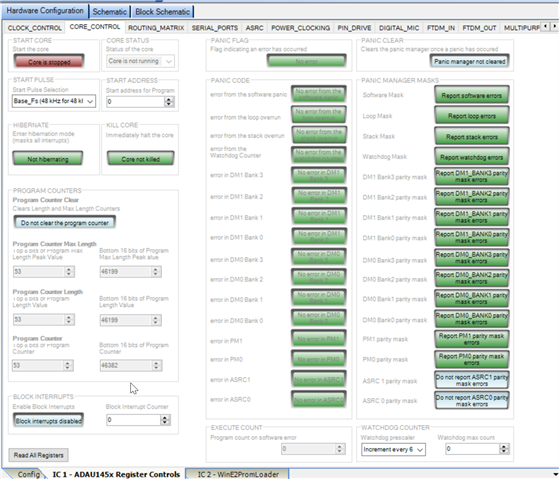
This is what I get each time I press reset:
Hello zdr,
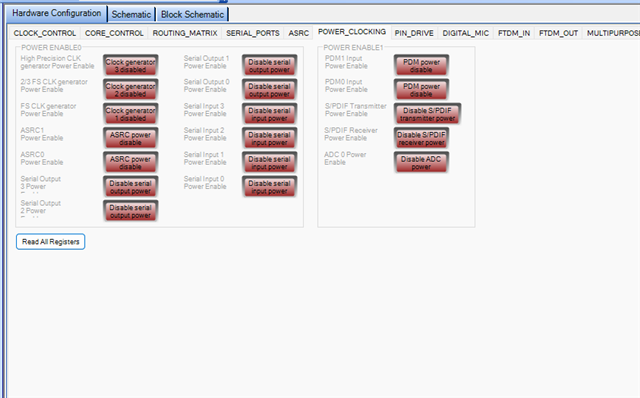
If you read all the registers after the reset, the power clocking registers go into a disabled state.
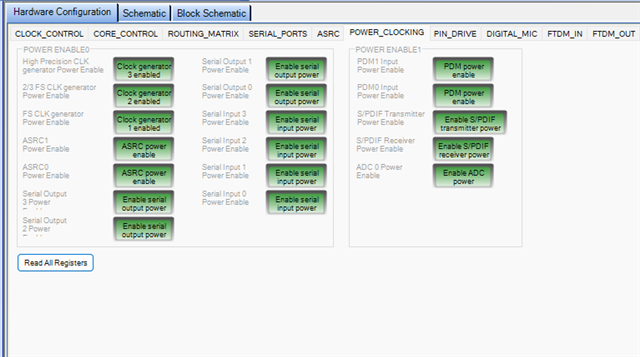
You must enable those registers for normal operation. Please look below.
For reading meters and readback cells for testing, even enabling clock generator 1, i.e 'FS CLK generator' alone is enough.
Set the register settings like below and do link compile download.
Then it will be running!
I have also attached a project below.
Test ADAU1452.dspproj
Regards,
Harish
Thank you. I went ahead and assembled another board, with minimum component count required for ADAU1452 and SPDIF input operation and it seems to be working now:
However, all the register values are lost on power off, and I have to set everything back manually. Is that expected behaviour?
Both boards are working now, I'm just a bit puzzled why are the register values lost sometimes on power loss.
Hello zdr,
OfCourse, everything in the memory is vanished if you give a power cycle.
zdr said:
I have to set everything back manually
Are you saying you have to setup the sigma studio project every time manually? Not really.
If you save the project with required register settings, then it will be saved. If you are powering up the board, just a 'link compile download' will write the register values which you set and saved in the sigma studio project to the DSP.
Regards,
Harish
Hello zdr,
Why would you press reset? This is an analogy of what you are doing. You get into your car, you start the engine, you put it into drive then you turn the key off and then step on the gas and wonder why it does not move? Why would you load in the program and then press reset? If you are using Selfboot then what will happen is it will load in the program again and start running but when you are using SigmaStudio you never need to hit reset unless you want the confidence of starting from the beginning again. Hitting reset is almost like removing the power.
Dave T
I was having issues at the time, reset was one of the desperate attempts to resolve it. Anyway, I thought the register settings are non-volatile, now it makes sense. I probably did a register read on multiple occasions during some fault which basically overwrote the project register settings. Saving a project in this state actually saved also the incorrect register settings. I wish there is a way to reload the project without closing it, in case register read overwrote the project register settings - is there? As far as I can see, I need to close the project without saving it and load it again, then compile-download to send correct register settings back to IC.
Hello zdr,
You are exactly correct and you did hit upon a danger that had bitten me when I first started learning how to use SigmaStudio. It is VERY rare for me to use the "Read All" button because it does overwrite all the registers. What is really bad is if someone has an issue with communications with the DSP and you click on "Read All" you will read all 0xFF or 0x00 into every register. With a part like this that has hundreds of registers it is very bad. Especially if you are using SPI communications.
By the way, this is not a bug but just a reality with using SPI communications where there is no handshaking like I2C has.
There are two things I do to work around this issue.
1) I do exactly what you suggested in your latest reply is to save the project before clicking on "Read All". then if something does not go work you close without saving and reload the project from the saved file. I agree that a "Revert to Saved" would be a good command in the File menu.
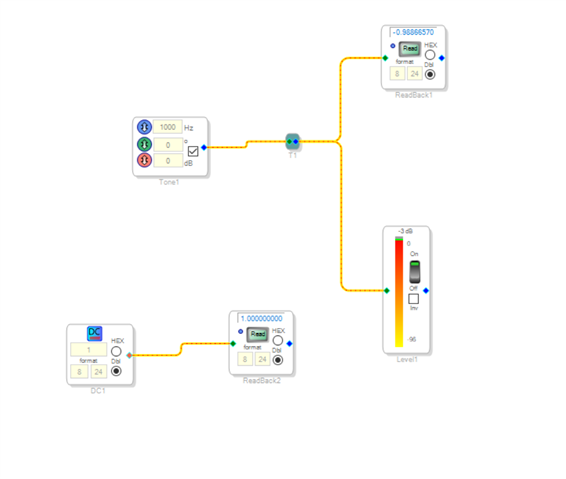
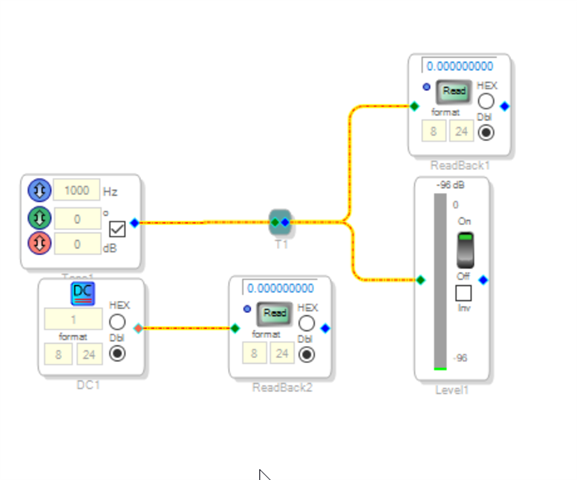
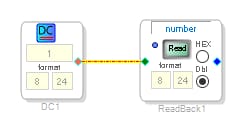
2) I place a DC cell and a Readback in every project I build. This allows me to test the communications with the DSP without having to read all the registers.
It looks like this:
The number in the DC cell is stored in the DSP. The Readback memory location gets the value from the DC cell stuffed into it every sample period. Then when you click the "Read" button in the Readback cell it reads that memory location and SigmaStudio displays it in the PC. Yes, it wastes a few instructions but usually most programs are not that close to the instruction limit and you can always delete it later when you are ready to compile the production version of your program.
You can also test writing to the DSP by changing the value in the DC cell and then reading it back to see if it changed. This saves lots of grief and is a time saver for times when you forget to plug the power into the evaluation board or forget to actually connect the USBi to the board. (Of course I would NEVER do anything that dumb... LOL, I do this more often than I like to admit.)
Now to get serious. I also want to thank you for responding to my question about why you were hitting reset. It really helps to know what your logic was and allows me to help you learn how to use SigmaStudio in a more user friendly way and also to outline these steps to help others who read these posts. It is users like you who help to make the forum be a better source of help for the SigmaDSP community.
I also will make an announcement here on your post so you can be the first to know. I am starting a YouTube channel and I have one video up there now but many more in the queue. I will be posting a more formal announcement when I have a few more videos setup with a play list as a good starting set of tutorials. Here is the link: (1) How to SigmaDSP and SigmaStudio - YouTube
Thanks!!
Dave T
Hi Dave,
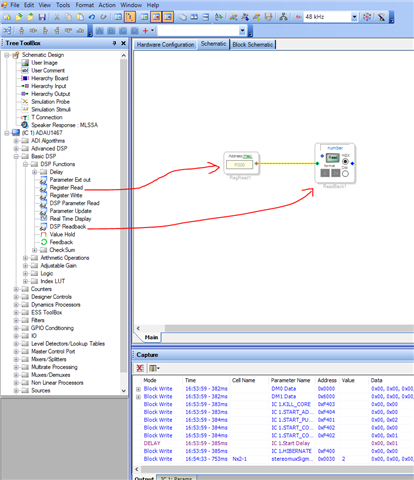
Yes, those two blocks can be helpful in most of the situations, got it from Harish. Do you have one that can display the status of SPDIF_IN signal? I need to read them all if I want to check the status of the lock for example, and unfortunately cannot read just a few relevant ones from SPDIF page. It would be useful to have a selective read button on each page that reads only relevant registers on that page.
I even ended up in situation where I had a totally random register values, even on the pin drives, saved in the project - it was blocking the USB comms each time I did compile-download, since there were some strong pulls set on I2C pins.
Thanks for the help and the channel link!
Hello zdr,
You can read any specific registers that you want and do some logical operations with it. Here, just give a respective address in the register read block.
Note that you can't read the parameter address with this. But you can read all the control registers with it.
Here I have attached one of Dave's projects that I quickly found online. Here he has done some logical operations based on the SPDIF registers, have a look at this, you will have an idea.
ADAU1452 SPDIF Lock Detect and Compressed Audio Detect Example (2).dspproj
Regards,
Harish
Please log in to reply.