DC value output
Dear Team ,
I am using the DC block from Sources in Sigma Studio v4.6.I am using the default Sigma Studio settings and with SPDIF Transmitter enabled.
Now when I send a value AAAAAA to SPDIF and chcek the recorded wave file , the wave file instead shows a 555555 value on converting the recorded wav file back to a dat file .
Is this expected ? If yes why ?
Regards,
Hermione
Audio Signal Processors
adau1452
Audio Products
software
SigmaDSP Audio Processors
adau1466
Show More
Hello Hermione,
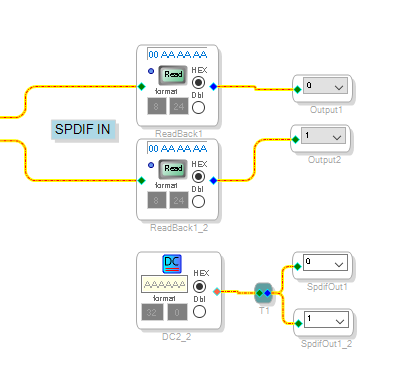
Here is a screenshot of a program I quickly slapped together where I looped the SPDIF out of the DSP back into the SPDIF input of the DSP. I did not run it through the ASRC. You will see the data is fine.
Are you sending this out to an external SPDIF part using I2S? If you are then you have a setting wrong on the serial port out of the DSP to the SPDIF or wrong on the SPDIF part such that you have a bit shift to the right. 0xAAAAAA shifted right one bit will divide this by two and give you 0x555555.
So I suspect a setup mismatch between the sending and receiving serial port.
Dave T
Yes I am sending this to the SPDIF.
What should be the correct serial port settings then ?
What should be the SPDIF settings ?
If you could share an example project that uses SPDIF it would be so supportive.
Thank you for your prompt reply always ️
R️regards,
Hermione
Hello Hermione,
Sorry to chime in Dave!
What Dave meant is that, if the sending device is set for I2S format and receiving device is set for LJ format, then this may happen. Make sure that your sending device and receiving device have the same settings.
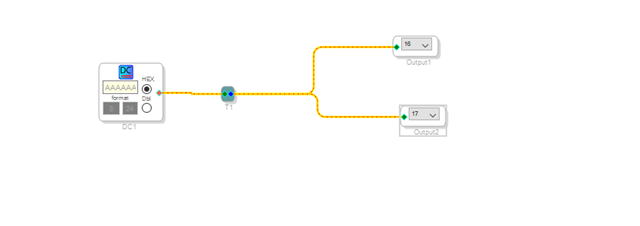
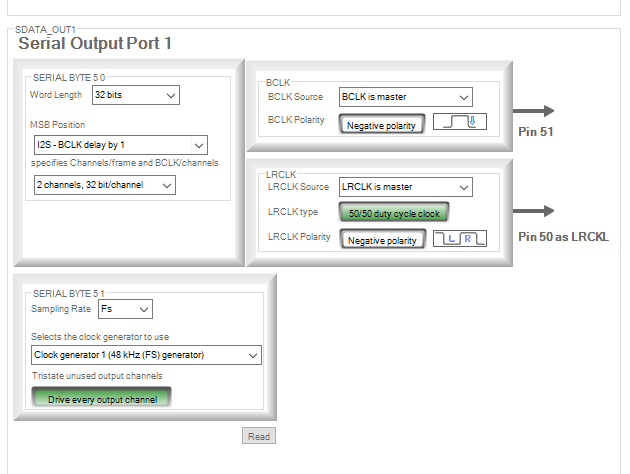
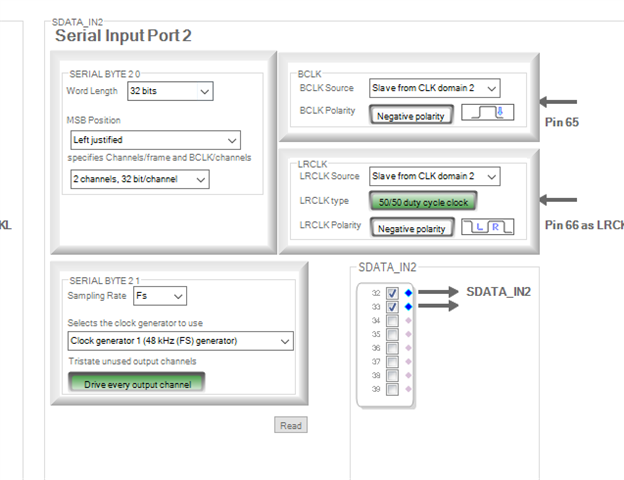
Here is how I simulated it.
Transmitting a signal in I2S format
Note that I set the core to output the 32-bit number as is to the serial port (bypassing the internal saturators). Right click the output block and change the data format to 32.0 mode. The same goes for the input side.
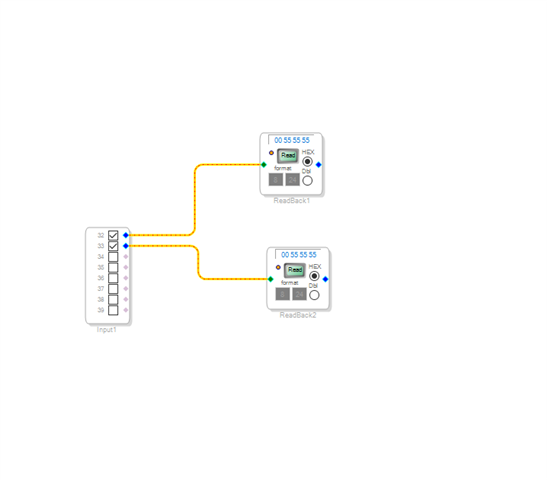
Receiving the signal in LJ format
Now you can see the results.
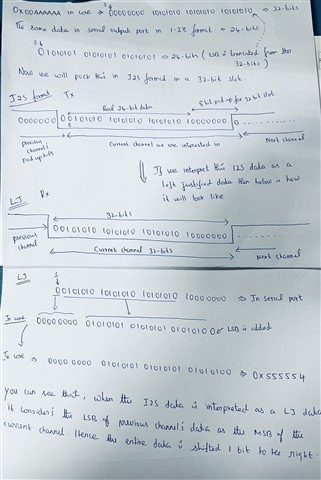
If the signal goes thru the saturators in both sides, then the same thing will happen, but the result will be 1 LSB lesser. which is 0x555554.
Sorry, I didn't have time to capture it on the scope, So I quickly drew how it would be. The picturization will help you understand the mismatches. I'm not sure whether it is super helpful, but it may give you an idea.
If the saturators/truncators are bypassed. The core is set to output 32-bit data as is to the serial port. Please refer below.
If the data goes thru the saturators and becomes a 1.23 number (24-bit).
I didn't cover so much detailed info in this notes, I just quickly gave a basic outlook. I will try to explain it in a detailed way and will document it sooner.
Regards,
Harish
Hermione said:
Yes I am sending this to the SPDIF.
Can you explain this more? The SPDIF TX internal to the part or is it an SPDIF external to the DSP like a Cirrus Logic part? That is what I was asking. Because an external part you use our serial port. The internal SPDIF TX built into the DSP does not use a serial port.
Thanks for the help here Harish!!
ADAU1452 SPDIFStereoWithOutASRC-DC out to test received value.dspproj
Dear Dave ,
Sorry for all the confusion.
I was indeed sending it to internal SPDIF which does not use the Serial Ports .
But anyways I got this working . I was sending this DC value to both a Serial Port and the SPDIF via a T Connection to another DSP .
The other DSP serial port settings were misaligned with the Serial Port settings in the ADAU1466 ,hence I invited trouble .
But thanks to both of you.
This is working now .
Regards,
Hermione
Please log in to reply.