Sigmastudio+ Real-time display capture rate
Ahoy there,
I've just moved over to Sigmastudio+ from sigmastudio. Is there any way to increase the polling/read rate of the real-time display?
As it stands it's far too slow to capture the sorts of things I'm attempting to play with, it's almost useless to show anything except that there is something happening, or for reading digital states.
Years ago using Purepath on the TI dsps you could view a realtime output of any point in the schematic at a super high capture rate - now that we're several years later and multiple advances in technology this really does feel like a step backwards.
~D
Audio Signal Processors
adau1452
Audio Products
software
adau1467
2.2
SigmaDSP Audio Processors
Show More
Hello David,
First I want to start by saying you can read at a higher rate. Let me share the details...
I am not certain exactly which RTA block you are using but it really does not matter to respond to your questions.
Let me break this down to a few different questions and use cases.
Most of the SigmaStudio "continuous read" blocks will read the DSP memory locations every 10ms. A few are able to adjust the time but the meters are setup for 10ms. This is because we setup the time constants in the code running in the DSP to integrate and hold the data for 10ms. So reading every 10ms gives you a pretty good idea what happened to the level in-between reads. This works fairly well for most applications where you want to watch the audio level.
By the way. One of the reasons it is set slower is because you want to limit the amount of reads going over the I2C/SPI connection to the DSP using the USBi. If you have too many meters turned on and too many Readback cells set to continuous read you can overwhelm the USB interface or the I2C.SPI speed. More of an issue with I2C. We did improve SigmaStudio years ago to turn off meters what are not on the active part of the screen which helped.
Now that I covered all this background I will focus more directly on your questions. I see after reading your post a bit more carefully that you are using SigmaStudio+ not the old SigmaStudio. The old SigmaStudio you could not adjust the refersh times of the meters but you were able to adjust the refresh times of a ReadBack cell when it is set to "Continuous Read". This is for the interface of SigmaStudio to the DSP. Inside the DSP the ReadBack cells are updated every sample period so if you are using an external controller you can read this as often as you are able to with the SPI or I2C speed limitations. This is true for either version of SigmaStudio because it is the code running in the DSP not the code running on the host computer.
Since you did not expand on exactly what you are trying to capture. Let me offer some ideas for you. I often need to capture events that happen too fast for any readbacks to be helpful. If something is just on for one or two sample periods every second or so I would have a better chance to hit the PowerBall Lottery than to catch the event. So the secret is to use the DSP program itself to help you capture the event! SigmaStudio is a powerful tool to make this easy to do!
You can setup a test using an ABCD block for instance where you can setup a level threshold to output a 0 or a 1 if over the threshold. Some of the compressors already have that output. Then there are two tricks you can use. I suppose three... One is to setup a HOLD cell to hold the value so you know the event happened.
I prefer to setup a pulse counter to count it for you. (more on that below) Another great way is to send this signal out to a GPIO pin setup as an output. Then clip a scope to the pin and you can "see" when the event happens. This is real time and is updated every sample period. Fully independent of SigmaStudio. All the code is being run on the DSP.
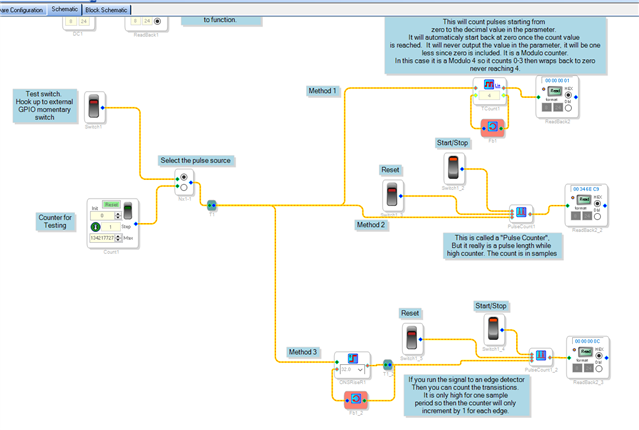
Back to the Pulse Counter. The Pulse Counter block is actually not exactly a pulse counter, it simply starts counting when the input is high and pauses when it is low. So it really gives you the number of samples the input signal has been high since the last time you reset the block. This might be useful to you but might not. For me often I want to know how many time the event happened not how long. The trick there is to run the signal through an edge detector then send it to the pulse counter. The edge detector will only be high during the sample period there is changed in the direction it is programmed to detect. So the pulse counter will count only the number of times it changed.
In my example project I also ran it through a counter where you can set a modulo to have a counter wrap around. This is helpful when driving things like external controlled muxes where you only have a fixed number of inputs/outputs and you cannot exceed that number.
I apologize that I have not ported this project over to SigmaStudio+ platform yet. I will attach the version for SigmaStudio and provide a screenshot. You will have to adapt to the event you are trying to capture anyway but this should start you in the right direction.
0247.ADAU1452 GPIO Pulse length and pulse toggle counter.dspproj
Let me know if you have further questions.
Dave T
Here is a screenshot of the program that shows the three different methods I discussed:
Please log in to reply.