ParametricEQ frequency axis incorrect?
I am using ADAU1701 as a subwoofer active low pass filter and parametric EQ. While measuring the sub response and adjusting EQ, I noticed that frequencies appear to be incorrect in ParamEQ.For example, adding peaking filter at 10Hz actually affects 100Hz frequency in subwoofer response. What am I missing?
software
4.7
adau1701
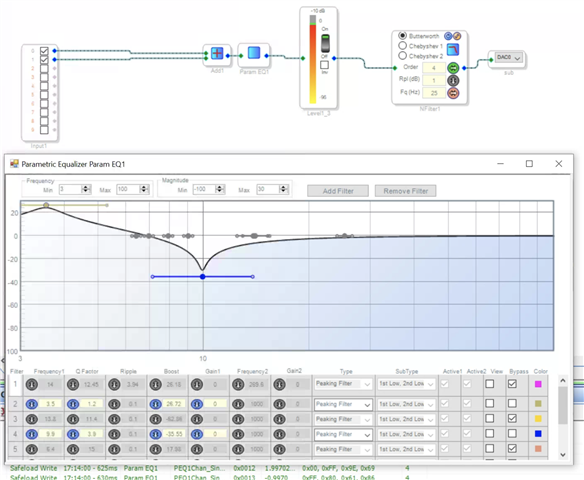
Hello zdr,
In the graph you are only going out to 100Hz on the far right. So I assume when you say it is "affecting" it you are measuring the audio externally using a Audio Precision?
Since you did not attach the project I had to look carefully at the little bit of the capture window that is visible. It looks like you are using single precision filters. With an IIR filter it gets very inaccurate and can add noise when you try to EQ low frequencies. Roughly 1/10th of the sample rate and down you should use double precision filters. Try that and see if that helps.
Thanks,
Dave T
Hi Dave,
Thanks for the response. Indeed, I was using single precision paramEQ, but changing to double precision did not make a difference in frequency axis shift. Project attached.
sub filter.dspproj
Hello zdr,
Thanks for supplying the project. It helps.
I do not know the exact frequency of your master clock coming into the DSP but I will make some assumptions.
MCLKIN = 11.2896MHz and you setup the PLL pins for 256x fs.
This would mean your base sampling rate would be 44.1kHz.
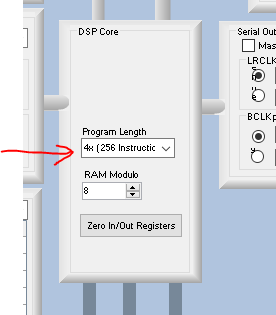
You have the DSP core running at 4x that rate so the program is running at 176.4kHz.
Here is the register setting:
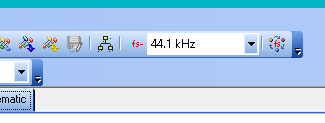
Then you have SigmaStudio set for a sampling rate of 44.1kHz.
So SigmaStudio is being told to generate code to run at 44.1kHz but you are actually executing the code at a 176.4kHz rate. So your 10Hz is actually at 40kHz.
If you are using a 12.288MHz crystal which is meant for a 48kHz rate then you will be even further off. Since it looks like it is closer to 100Hz you may be using the higher master clock rate.
You need three things to be consistent.
1) feed a master clock at a rate of 256x the desired sampling rate and make sure to setup the PLL pins to this setting. These are pins 38 and 39 PLL_MODE pins. See table 12 in the datasheet.
2) Set the desired sample rate at the top of SigmaStudio
3) Set the core rate to be the correct frequency. In this core it is a bit different. The base rate will be the 1X setting. Double it for the 2X and quadruple it for the 4X rate. Remember that the base rate is the master clock divided by the PLL mode setting.
SigmaStudio has no way to know the actual frequency of the clocks being applied and also the PLL mode settings and the core settings. It is up to you to set all these correctly.
This should fix you up.
Dave T
Thanks Dave, that must be it. My PLL mode is fixed at 256 x fs, I have now set 48kHz in the project, and the crystal is 12.288MHz. Core is set at 4x. If I set it to 1x nothing works. At 4X, frequency is still off - if I put a peaking filter at 10Hz, it actually peaks at around 50Hz.
Have to correct myself, forgot to rearrange the PEQ. It's all good now it seems
Please log in to reply.