ADAU1467 ASRC Lock Bits
Hey together,
I have a question regarding the ASRC Lock bits. I know that the lock bits are ACTIVE_LOW. Meaning 0x0000 would tell me everything is locked. So far this works as expected. But there is a strange behaviour. We have an I2S stream which is send out by another IC to the ADAU1467. This stream has the same sampling rate (both 48kHz) but a different master clock. Thats why we use an ASRC to feed it to the ADAU1467.
When the DSP is aleady running while we activate the I2S Stream, we can see the lock changing from 1 to 0. So as we use 5 ASRCs the register changes from 0x001F to 0x0000. Thats perfect. But when the stream is already present before the ADAU1467 has started, we see 0x001F always after the ADAU1467 bootet. Once we stop and restart the I2S stream we can see the change from 0x001F back to 0x0000.
Is there a problem with the lock bits when the stream is already present?
Best regards,
Eric
Audio Signal Processors
hardware
adau1467
SigmaDSP Audio Processors
asrc
Hello Eric,
I suspect the ADAU1467 datasheet has wrong information reg this.
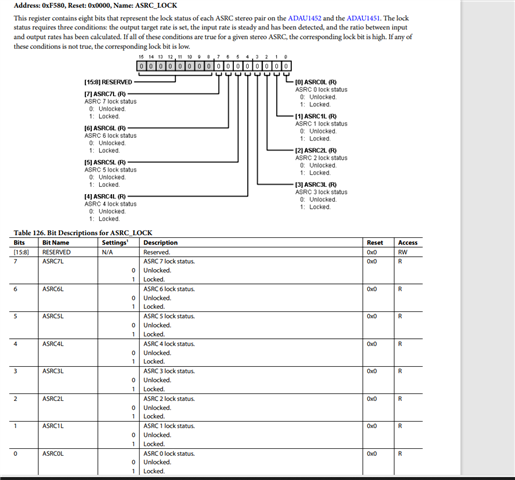
ASRC lock register bits should be 1 if it's locked and 0 if it's unlocked.
'1' is locked
'0' is unlocked
If you look at the ADAU1452 datasheet, it shows the below.
Please refer the attached project from Dave, it is on ADAU1452. But it will run on ADAU1467 without modification.
(Note that ADAU1452 hardware can go up to only 96KHz SPDIF rate)
58752.ADAU1452 ASRC Lock Detect Example.zip
Regards,
Harish
Hey Harish,
thanks for your reply. To be honest, I think 0: lock and 1: unlock is correct. SigmaStudio is also showing "LOCKED" if it reads a 0, while it shows "UNLOCKED" when it reads a 1. I also rechecked the datasheet of ADAU1462, just for comparison, and there the indication is the same.
I know that it is different on ADAU1452 but maybe you can reconfirm this.
Anyway the most interessting question is, if there is a difference in LOCK indication when the I2S Stream is present while the ADAU1467 boots up? Restarting it while the ADAU1467 is running shows the correct result. It is only wrong displayed when the I2S Stream is present from the very beginning. Maybe the values are not updated in this case. Could this be?
Best regards,
Eric
Hello Eric,
I apologize for the confusion on this. It is a documentation error that should have been fixed a long time ago. It is an internal issue here that I will not bother you with the details.
I actually tested it here in the lab to make certain I was remembering this correctly.
The ADAU1452 datasheet is correct. The ADAU1466/62 and ADAU1467/63 datasheets are in error.
All the Sigma300 and 350 parts behave the same way. When the ASRC is locked it will set the locked status to a "1".
The error crept in because of an older revision of the ADAU1452 that was never released had it the other way. This change was not reflected in the data files we use to create the tables. I had fixed it in the ADAU1452 datasheet revision back in 2018 but the datasheet for the Sigma350 parts were never updated.
These parts are so similar and I did an extensive update so it is usually a good idea to consult the ADAU1452 datasheet first for some of these details.
Sorry for the confusion.
Dave T
Hello Dave,
thanks for the clarification. So this means that also the UI of SigmaStudio is wrong, right? Because it shows "LOCKED" when it read a 0 in the register.
But then I have to recheck why the ASRC is sometimes not showing a "LOCK" on my system. I verified all clocks (BCLK/LRCLK) and they look perfect. Also the ASRC Ratio is detected correctly, but sometimes the register 0xF580 still shows 0x0000. While sometimes it shows 0x001F. The Audio Comming through sounds and measures also perfect. For sure we could leave it like it is, as it seems to work. But i'm a bit worried as the must be a reason for the ASRC to show "UNLOCK" sometimes.
What could be the reason for the ASRC to show different results? Or maybe what is the most common reason you know, so that we can recheck against it.
Best regards,
Eric
Hello Dave,
here a short update with some more detailed informations. I routed the ASRC lock bit to MP23 to trigger it with the logic analyzer. If you like i could send you the saleae capture as well.
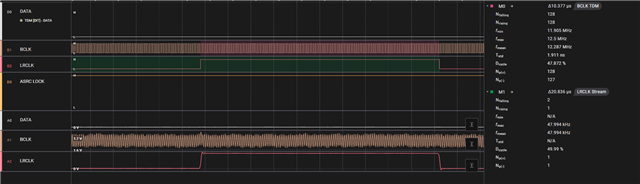
Here you can see that the ASRC is locked. We have a TDM8 stream which goes to Serial Input 2 and is then mapped over 4 ASRC into the DSP. So far here is everything perfect.
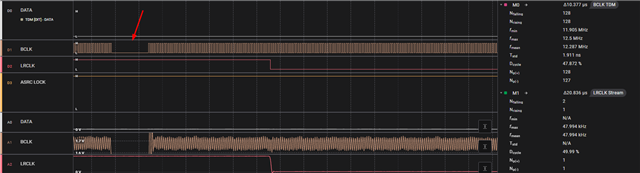
But it can happen that the TDM8 stream restarts. This is possible due to a external cable connection. Here you can see that as soon as we restart the stream, there is a short moment when the BCLK restarts.
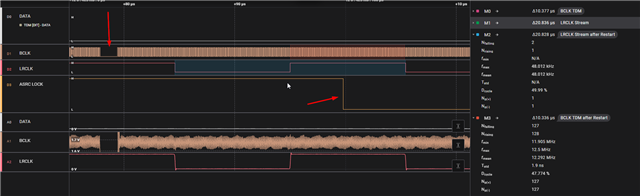
For an unkown reason the ASRC lock just drops shortly afterwards. Here is a snippet of it. The signal looks exaclty similar and the ASRC is not locking anymore.
What could be the reason for this behavior?
Best regards,
Eric
Hello Eric,
I have quickly tested this like how you described. It loses the lock when the clock goes away and re-locks as the clocks are restored. Please look below.
The 2nd channel is the GPIO trigger with ASRC lock register.
If you could attach your project, I would be happy to have a look and run it here. It might be a connection related issue.
Regards,
Harish
Hello Dave,
sorry for all the spread informations but want to give you every update we find. Maybe I have the reason for the UNLOCK of the ASRC.
Could it be that the ASRC has problems to relock when the samplerates are too equal to each other?
Let me explain a bit my findings:
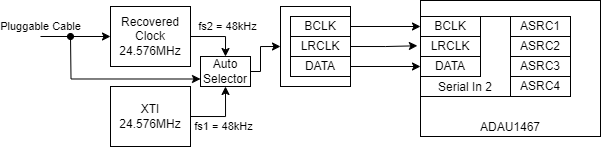
In our system we drive the TDM8 line to the serial input 2 from 2 different clock-domains (f1 and f2). When no cable is plugged the TDM8 line is driven directly from the XTI (24.576MHz) which is also used as clock source for the ADAU1467. As soon as a cable gets plugged the TDM8 line is driven by the recovered clock from the received asynchronous audio signal. Thats why we need the ASRC. The received audio signal is always based on 48kHz.
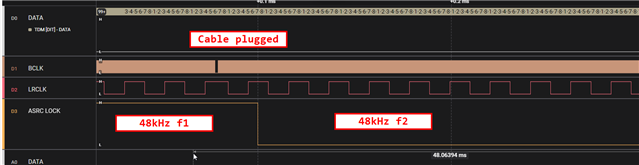
By default i configued the system in that way that both clock-domains run at 48kHz (f1 and f2). Meaning when no cable is plugged there is a 48kHz LRCLK with fitting BCLK. You can see this here in the picture. This resulted in the issue that as soon as the cable gets plugged the ASRC shows UNLOCK and stays at this state forever.
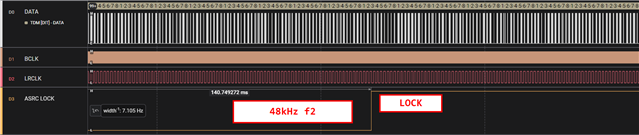
So maybe the ASRC was not able to resync because both clock-domains are too equal. To prove this I reconfigured the system so that if no cable is plugged the sample-rate gets changed to 12kHz. So f1=12kHz while f2=48kHz. When I configure it like this the ASRC relocks to f2 after 140ms and we have the correct LOCK state. The picture below shows this.
This configuration is not a problem in our product as the audio is only required when a cable is plugged. The only question I have is if this is a known problem? So is it required to either stop the LRCLK/BCLK or massively change the samplerate of LRCLK/BCLK to get LOCK on the ASRC?
This would at least explain why a change from 48kHz to 48kHz with a slight shift would cause UNLOCK forever.
Best regards,
Eric


Hello Eric,
Thank you for these great posts and for working with us to try to figure this out. (Thanks Harish for the tests you did as well)
There is a good chance that you are correct in that the sample rate is not changing enough to get it to unlock and relock. I suggest you read this datasheet for one of the original sample rate converters we produced. This IP we have reused and the ASRC in this product is very similar. This datasheet has a detailed explanation of how the PLL internally works. By the way, I should mention that the ASRC only looks at the LRCLK and does not look at the bit clock at all. Here is the datasheet:
AD1896 (Rev. A) (analog.com)
The absolute worst conditions for an ASRC is to have to convert between two very close sample rates. Our design does rather good with it but it is still difficult and the difference starts to be so small that the bit depth of the counters involved cannot see the difference. It is supposed to track slow changes without unlocking then if the difference becomes too great it will fully unlock and go to the fast mode to reestablish the lock. It does seem like it is locking up for you. The problem here is that you have external hardware to do this switching which makes it difficult for Harish and I to replicate it here on our bench. (Well, Harish is in India and I am in the USA so we have the time zones covered. LOL)
I would like to step back here and have a closer look at your application. It seems like you are switching to this incoming TDM source when it is plugged in correct? I assume this is a local source of audio as well or is it just digital black? If you have to switch all of the signals over to this cable then perhaps it is best to just set the start pulse to use the serial input port 2 as your sample rate for the core? Then there is no need for the ASRC. I just have no idea what you have on the other serial ports and what is on the serial output ports because the serial output ports would have to use the same clock.
You also could switch over the Start Pulse register when something is plugged in. I would like to see more complete details of your product including some block diagrams and or hardware schematics. You can PM me since this will be sensitive information.
By the way, I have seen some people purposely set the internal sample rate about 5% higher so that the ASRC has a more significant difference of sample rate to convert to. Again, I am not sure if you can do this in your design.
Dave T
Please log in to reply.