ADAU1452 Custom Board Bringup Issue
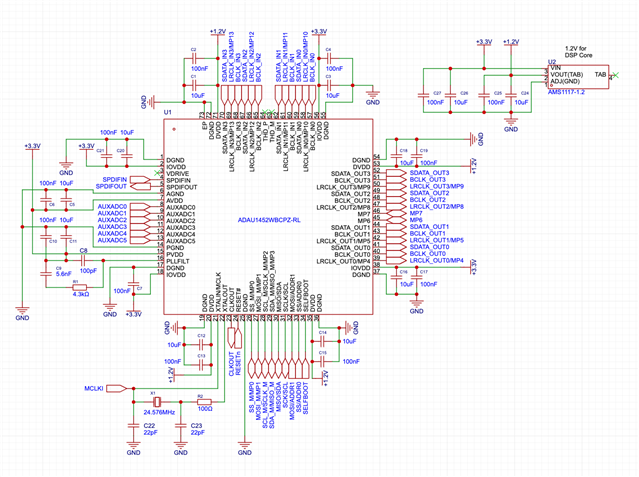
I've been working on a custom ADAU1452 for an upcoming product prototype and the schematic for my breakout board seems correct, but all registers seem to read 0xFF / remote control via USBi is impossible.
Not visible on this schematic is an SPI EEPROM (which is on a separate "stick" PCB).
Edit Notes
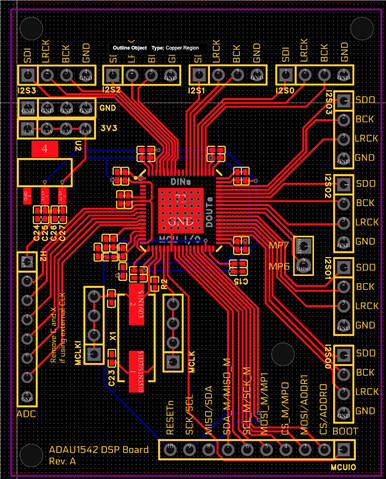
Added board layout
[edited by: Sylwester at 12:44 PM (GMT -4) on 17 Apr 2024]
Audio Signal Processors
adau1452
hardware
custom_board
bringup
SigmaDSP Audio Processors
Show More
Hello Sylwester,
which protocol you are using, I2C or SPI?
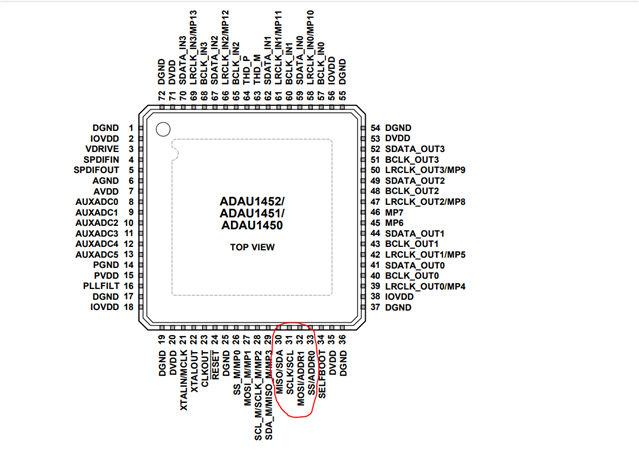
Note that you have to connect to slave control port of the DSP to program the DSP. Please refer the pins below.
If it's I2C, then need to take care of I2C addressing. The state ADDR0 and ADDR1 decides the address. Let me know how you have connected it.
If it's SPI, then you can put a scope on the SPI lines and see what it sends out.
Since you are using our ADI's USBi module, it would eliminate a few perspectives. (Third party USB to I2C/SPI module may have difficulties in communicating)
Please verify the above points, I didn't have a clear look at your schematic yet, I will do it and comment on it soon.
Regards,
Harish
Hello Sylwester,
I am going to add a few more questions to the ones Harish asked.
When this usually happens it means you are not communicating with the part and I know you understand that.. So the question is why? There can be many reasons and I will list them here as they come to mind. This is exactly what I do when faced with something like this.
This first one has bitten me enough times,... Does the board and the part have power? (I know, I would never be that dumb and do that.... LOL)
Do all the power supplies have voltage? IOVDD, AVDD, DVDD, PVDD?
Another good one is this: Is the USBi actually connected! Another LOL. but in your case you will have some sort of custom cable/connector arrangement so check that wiring carefully.
Is there a master clock coming in?
What is happening with the Reset pin?
These all can cause an issue with the part not responding and the data line sitting high and so you read all 0xFF's.
Do you see any clock out of the CLKOUT pin?
Let us know what you find.
Dave T
IOVDD = 3.3v
AVDD = 3.3v
DVDD = 1.2V
PVDD = 3.3V
USBi is double checked and connected via short jumper wires.
Communication is SPI.
Thanks for the info...
So do you have master clock?
what is going on with the reset pin? It goes off of the schematic so I cannot see anything about it. It should go high shortly after the board powers up. Do you have a reset generator? It is good to hold it in reset for a few hundred milliseconds.
Dave T
The reset pin is on a pin header, which is connected to the reset pin of the USBi. There is no clock coming out of CLKOUT.
Hello Sylwester,
That pin has an internal very weak pull-down so you need to add a pull-up resistor, 10K-ish, to IOVDD and it is a good idea to also have a 0.1uf or an 0.01uf cap on the pin.
If you put a scope or voltmeter on the pin then I think it is sitting low. Low is reset.
Dave T
Hello Dave,
Thank you for the hint. After adding a Pull-Up on the Reset Line and pressing "Read All Registers" in SigmaStudio,
I am now reading 0x7F and 0xFF on most registers - is that correct? Looking at my Logic Analyzer, there is still no MCLK.
In a 2nd read, the registers are 0xFF again.
Hello Sylwester,
Sorry this is dragging on. If I were standing there it would take five minutes...
Is there a clock on the MCLKIN pin?
When you send you are still seeing no MCLK you are most likely referring to the CLKOUT pin that I had asked about correct?
Can you send over your project file? I have a hunch about something...
Thanks,
Dave T
No worries. There is a 24.576mhz crystal on the mclkin pin. I did try with external MCLK from an oscillator before, with same results.
The CLKOUT pin has constant 0V.
My Project File is just a project with the default settings outputting a sine wave on out0.
Please attach your project file.
Save me from typing for a long time to explain something that might or might not be happening.
Dave T
Prj.dspproj
Hello Sylwester,
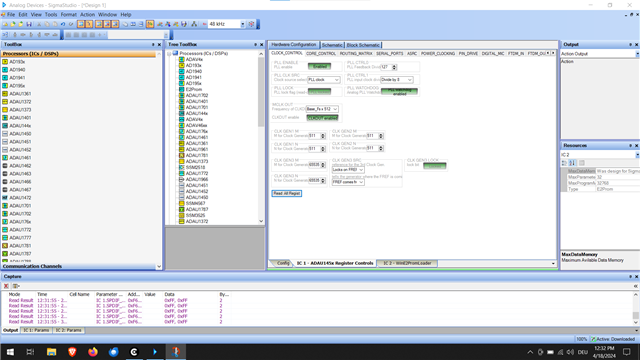
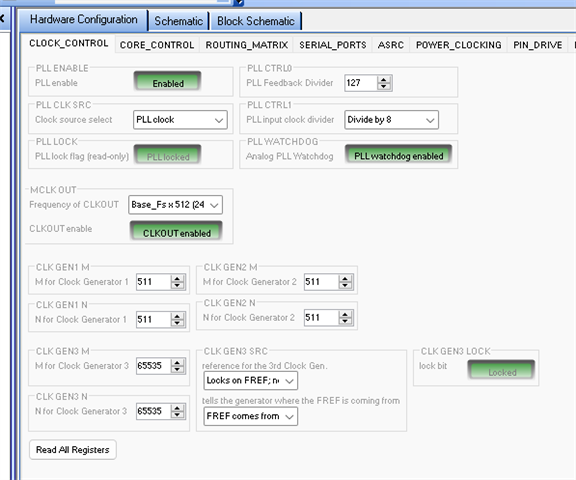
Thanks for the project. It helps a lot. Your PLL setting could not be more wrong!!! This is why you are having issues.
This is a screenshot of your settings.
The main PLL is not correctly set for a 24.576MHz input. But, the clock generators could not be more wrong!! You are multiplying the main PLL output by 1 !!
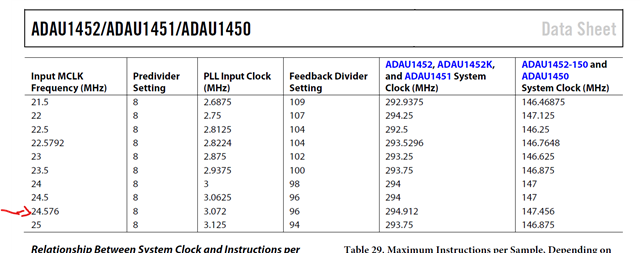
This is all covered in the datasheet.
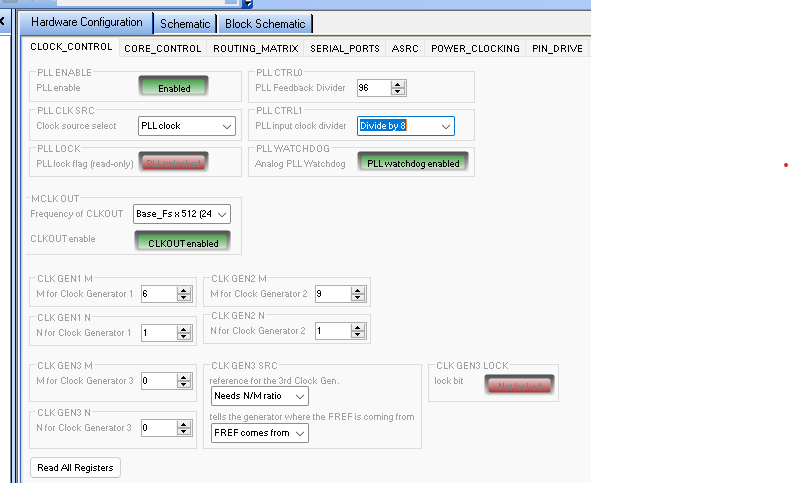
Here is the part of Table 28 in the Rev-D datasheet. For the main PLL you need to set the PLL Feedback Divider to 96
Since you have a 24.576MHz crystal and you desire a CLKOUT signal of 24.576MHZ as well then these will be your settings:
Then you also stated that you are hearing nothing out. Besides the sampling rate in the core being WAY off due to the CLK GEN 1 & 2 setting, your project is blank!!! Nothing is in the project so you have no DSP program running at all. You will never get audio!!
You have to pick up the audio from an input port, process it then send it to an output port.
Have you found my YouTube channel?
Here is one of my basic starter projects. You will have to change the PLL Input Clock Divider to divide by 8 and then change the MCLK OUT setting to get the CLKOUT to be 24.576MHz rather than 12.288MHz.
I have no idea what you are connecting to what port or the number of channels, the serial format or the sampling rate. So there is still a lot to setup. This project is written to work with our standard evaluation board.
ADAU1452 Basic Stereo Input-Vol-Meter-Mute Osc.dspproj
Dave T
Hello gerber pcb zip?
Please log in to reply.