Weird output from delay block when delay is set to 0 samples
Hi!
I'm having some problems with the simple delay block (not fractional) in SigmaStudio. When the delay is set to 0x00,0x00,0x00,0x00 (0 samples) it seems like the output is just garbage data from another block in project. It also seems like the maximum delay is being added to the garbage output as well (5 ms in the attached DSPPROJ). Using another value, such as 144 (3 ms) works fine with the output being as intended and delayed 3 ms.
The way I'm testing and using the DSP is by exporting the system files from SigmaStudio and generating a binary file using sigmadsp_fwgen before loading it in Linux. This works as expected for all other blocks.
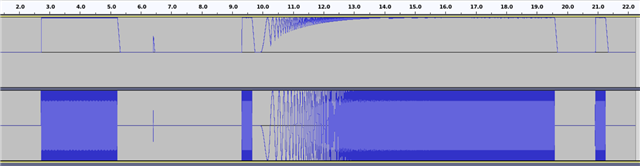
This is the resulting waveform when having the delay block set to 0 samples (L = delayed signal, R = reference without any processing):
(first a sine wave at 120 Hz, then a log sweep with timing references)
When looking at the XML file produced by SigmaStudio it seems like the address for the envelope peak is right before the delay block. It kind of looks like the output from the delay block is the peak detection from that block.
1325.test.dspproj
A possible workaround I've used for the time being is using the fractional delay block instead which seems to work as expected, but I'd like to use the simple delay block due to the effects on the frequency response (https://ez.analog.com/dsp/sigmadsp/f/q-a/543383/frequency-response-of-the-fractional-delay-component) and the increased instructions needed for the fractional delay.
BR,
Niklas
Hello Niklas,
I will have a look at this. Thanks for including your project. That is a huge help.
I do know that the external SPI delay has a minimum of 1 sample period delay when you set it to zero. But, what you describe seems new to me. I do not recall this being a problem.
I will get back to you...
Dave T
Hello Niklas,
This is very interesting. This block is very old and I am fairly certain that it has worked fine in the past. I could go through and trying older versions of SigmaStudio to see where this error was introduced but it is not important for you to know that. You should be using Rev4.7
Thanks again for providing your project. It is helpful.
I had to make some changes because you were using the digital input and output and I needed headphones etc. I also added an oscillator and eventually a counter to calculate the delay.
Here is my resulting project in case you want to experiment with it.
1325.test-DT-Edits.dspproj
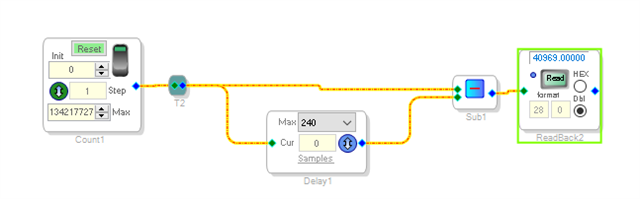
I ended up simplifying this down to only the counter and the subtraction block with the readback. No boards and the problem persisted so it does not seem to be an issue with the hierarchy board or things like "T"'s in the project.
What I found was that when you set the delay for 1 sample period you get one sample period of delay. If I set it to 2 I get 2. If I set it to 240 I get 240. All is great. However, when I set it to zero in the project I attached I get 241. The number 241. Not 241 samples of delay. If I change the MAX delay to 241 then I get 242. So it seems like it is pointing to the parameter where the MAX value is stored!
Then when I made changes to the project to simplify it then the symptoms changed to be garbage out. The value would change every time I clicked on the ReadBack. So this fits your description of the problem. I do not have any clever way to fix this besides suggesting you either never set it to zero or if you need to have zero delay then use a MUX to bypass the entire block. This will not be fixed any time soon so that is probably the best solution I can offer at the moment.
This is the super simple schematic I ended up with and it still had the problem.
The programmer either did not think that someone would drop in a delay cell and then never set it for zero delay. Or He/She did not test that use case. Either way it is not a good thing.
By the way. When I was changing your project to use headphones I found that your settings for the capless headphones was not setup properly. The Mono output was not set to the CM setting so it caused some strange audio output. You had all the outputs un-muted, the HP and the Line outputs but you were not using it in your project.
If you are using the mono as a mono output then you are fine although you had 6dB of gain which usually means you will clip it 12dB earlier than the other outputs. You get 6dB of gain by summing to mono and then you are adding 6dB. Just pointing this out in case it might cause problems later.
Thanks,
Dave T
Hi Dave!
It's great that it's reproducible on your end as well, I was starting to get worried that it was only a problem on my side. Including a Delay block in the project and never setting it to >0 samples might seem strange, but in our case we're using the same DSP project for multiple products, where the settings between the different products differ quite a bit, some require delay, some doesn't.
I did something similar to your proposed workaround by setting the minimum allowed delay to 1 sample always in the code that configures the blocks in runtime, which seems to be working fine for us at least. Maybe there could be a warning message or something in SigmaStudio that at least informs the user that using a delay of zero samples isn't supported?
Thanks for the tip regarding the output stages, they look a bit weird indeed. During boot we're rewriting all codec/DSP settings anyway so it shouldn't be a problem though.
BR,
Niklas
Please log in to reply.