Can somebody check if my program is OK?
Hello,
Could somebody check if there is an error in my program? I'm new to Sigmastudio and don't what to look for at the moment.
The first time I loaded this program into my tinysine board the speaker was making a horrible noise and to bad the tweeter was fried instantly.
Now I'm trying to load the progam once more, but it doesn't load at all, the allready running program keeps running. As far as I can see Sigmastudio runs through the loading procedure without any irregularities
Program is based off a downloaded program which is built for this tinysine board, but I changed it from stereo 2x2 to 1 channel full active use. My original program without volume and tone controls works flawlessly.
I hope this makes a little sense, if not please ask, you’re help is highly appreciated.
Regards Evert (NL)
TSA8804_3weg floorstander - links pro - No EQ.dspproj
software
sigmaStudio 4.7
programming dsp
Hello Evert,
I suggest you watch some of my videos on my YouTube channel. Channel Welcome Video! (youtube.com)
I have a lot of videos I need to add but there are a lot up there already.
Whenever I develop for a speaker system I never connect the outputs to a power amp until I am certain the outputs are correct for each driver.
I also always put in peak limiters near the output setup to prevent output greater than the DAC can reproduce. You can also take it a step further if you know the details of your power amplifier and speaker power handling capabilities and limit the output to a safe level.
Comments about your project:
You need to have a DC block at the very input. You are boosting the low end and using the Dynamic Bass so any DC offset can cause problems.
You also are multiplying the input by 7. This is a boost of 16.9dB which is a lot!! You are most likely clipping the output.
On the YouTube channel I have some videos for levels and serial port details. The output from the core to the DAC is just like a serial port, it saturates the output if the internal 5.23 number is greater than a 1.23 number that the DAC receives.
You are doing the EQ in an interesting way but I am not certain how good it is.
Also watch my video about how to use SigmaStudio for troubleshooting. I noticed you are running blind and making it difficult for you to see what is going on in your program because you have zero level meters. You cannot see if the level is too loud.
I applaud you getting this eval board and jumping in to build this project. It will just require a few more things for you to learn but you can have fun learning! This is the majic with SigmaDSP and SigmaStudio.
Keep it up and do not get discouraged.
Dave T
Hi Dave,
Thank you for your ellaborate answer. By coincidence I started watching a video from you this afternoon, these are really helpfull, thank you. So if I understand you well, the program I posted should work, but is not 100%. Thanks for the pointers.
The board is an integrated one with amps on board 4x100W, so I cannot disconnect the amps. The board is built into the speaker, so I better disconnect the speakers to prevent speakers from blowing up if something is not right, a bit of a hassle but better than a blown speaker.
I will attach the program that is working for me up to now. The only thing I want to add is the volume and tonecontrol (i'll probably won't use the tonecontrole but would like to ad it because it's a feature of the board). Can you give me some pointers how to do this in this program?
I cannot find where the DC block is located, can you tell me where to find it.
I've added some pictures for reference, so you can see what i'm doing.
I'm sorry if my English isn't 100%, but it is not my default language.
Thanks in advance, Evert
TSA8804_3weg floorstander - links - EQ woonkamer 280324.dspproj
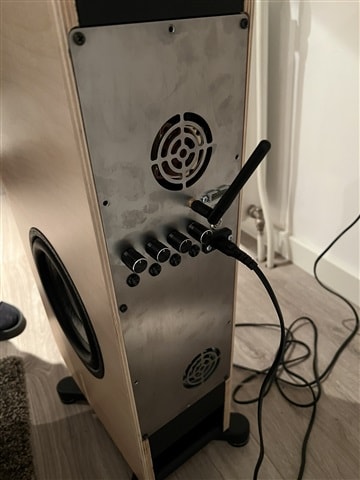
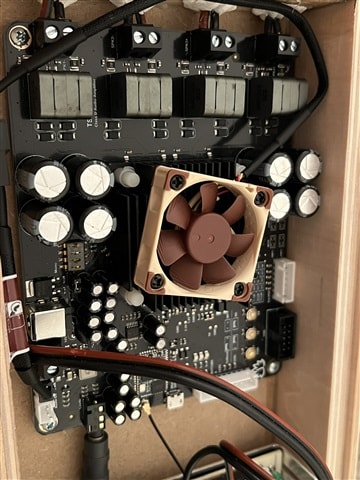
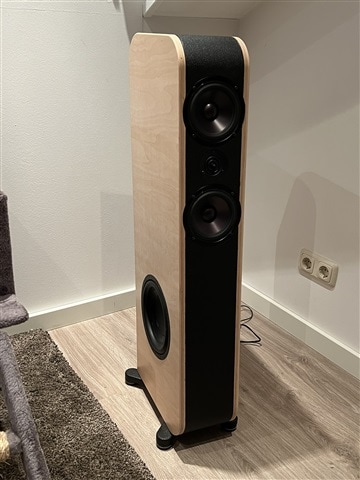
Today I was playing about with the program that is running for a few month now. I added the DC block (I found it). I downloaded it to the board (with the outputs muted), unmuted the sub everything was fine. Unmuted the mids and there was the noise again, speakers were popping in and out (without any input signal). Cut the power, disconnected the USBI. Power on, the original program restarted from the selfboot and everything is fine again.
Hello Evert,
What is this "original program"? Please attach that program and the most recent version of your program so I can compare.
My suggestion is not to have speakers attached. When I did repair work on stereos back in the dark ages (late 70's early 80's) I always used a dummy load and watched the output with a scope. I suggest you do that because it also gives you some information by "seeing" what the signal looks like.
Then you can add mutes in your signal flow to verify the signal is coming from where you think it is. Also, you can switch to an internal oscillator or white/pink noise source to test the outputs. Then you can run it up to clipping to see when it clips and see if you can prevent it. Doing all this with actual speakers attached is very dangerous and can get expensive or damage your ears!
You can find non-inductive loads
Dave T
Hi Dave,
These are the programs. These are pretty basic I believe. The one with original in the file name is working flawlessly. Thanks again.
Grts Evert.
TSA8804_3weg floorstander - rechts - No EQ.dspprojTSA8804_3weg floorstander - rechts - EQ woonkamer original.dspproj
Hi Dave,
Did you have some time to have a look at this
I should add that this program is only meant to measure the individual speakers. The sub from 0-1000hz, the midd/bass full range and the tweeter from 1000hz and up. While measuring only that one speaker is unmuted.
grts Evert
Hello Dave,
I just saw that I did reply to myself in the last post, maybe you didn’t see it.
Did you have a chance to have a look at it.
kind regards Evert
Hello Evert,
Sorry, I have been very busy with other fires to put out.
I have looked at your two projects.
First, I want to say that using a crossover as an EQ is not very good. For the most part you will only have cuts not boost but I guess you could argue that is fine but I think you should look into putting in a three-way EQ. Here is an example project of how to do it.
4722.ADAU1701 Graphic EQ Example.dspproj
Put this in instead of the crossover that is in the front of your project where you sum up the output then feed it to another crossover.
I did check for some obvious things where I have found cause oscillations and that would be using single precision filters for filters set to control low frequencies. All of the filters you are using are double precision so that is not your problem.
I had mentioned this earlier but let me put in an actual link. You should watch my video about troubleshooting.
Your projects have zero meters, zero readbacks and no bypass switches to isolate sections. You do not have known good input signals like an oscillator and a pink noise generator that you could switch over to. You are running blind and with no tools in the project to isolate where a problem might be happening.
You are adding a LOT of gain right at the input stage. I would place a meter after the gain cell and see what the level is at that point. See if it is too loud or too soft? Especially when using the Dynamic Bass block where level is very important.
Then place meters at the output to see what levels you are sending to the DAC. Remember that any level above -3dB on the internal meters will clip the DAC. You do not have any limiters to protect your speakers from signals that will clip the DAC.
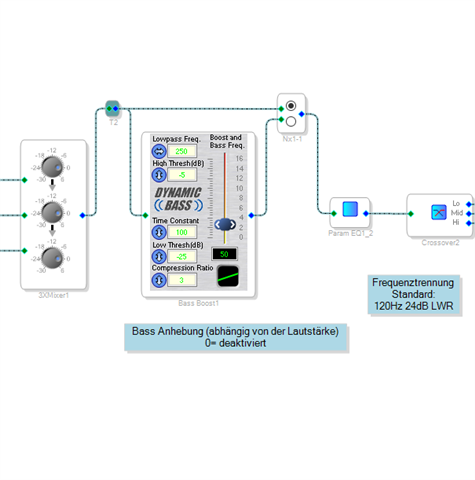
On to the Dynamic Bass block. I would put in a true bypass around this block to be able to turn it off to see if the issue is caused by the settings in this block.
Do it like this using a mono switch with no slew.
This makes it easy to see if this is the cause of the problem. I think it will be.
I also think that level will be an important factor.
You have the tools in front of you to figure this out. It is hard for me to duplicate the exact setup.
Dave T
Hello Dave,
No need for apologies, I’m very glad you’re even willing to help me.
I will make a project with all of you’re suggestions. I will take the amp out of the speakers and do some bench testing. I do not have a pink noise generator nor an oscilloscope. So I will have to rely on what sigmastudio has to offer (level indicators etc.). For now the input signal is a bluetooth connection, if I leave the gain on zero, the max output is to low. But I wil experiment with you’re suggestions and see what I will find. I’ll get baxk to you with my findings, but as you probably allready have noticed this is all new for me, so I will take some time for it.
Thanks again, grts Evert
Hello Evert,
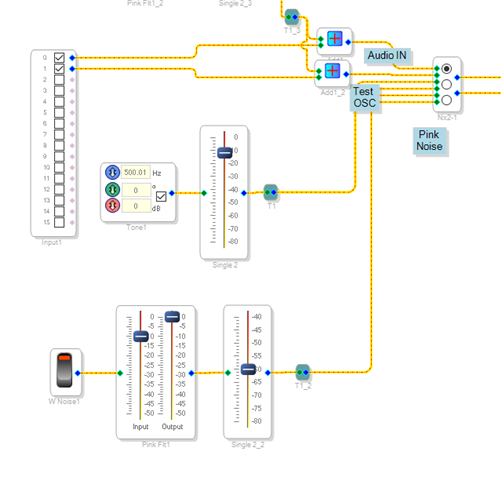
You have a super powerful tool at your disposal. It is called SigmaStudio.
Here is your test generator and your pink noise generator.
The Pinking filter is located in the Filters section under Miscellaneous.
Dave T
Hi Dave,
I got around tinkering a bit. I set up a complete new project with your pointers (but no tone controle yet). I left al gains to 0. And for the source I used the pink noise generator. Everything seemed to work until I started playing with parametric eq. Input level was stil low, but on one channel the output peaked out of the chart (same behaviour I had before). I unplugged everything, and then started everything up again, tried to download the same project again, and no responds. But the readback gave a 1.0000 so connection was fine. So I thought this is all to strange and I reïnstalled sigmastudio. Now everything seems fine. Downloaded the project the signal frome the noise generator was back and now I can play with all the controles in the active program. For now it seems there was a bug in my installation.
Grts Evert
Hello Evert,
Thanks for taking the time to report back.
This is strange. I have not heard of anyone else having these sorts of issues.
Glad it is working now.
Dave T
Please log in to reply.