Clocking for 96k Serial and ASRC inputs
I am working on a DSP processor that uses ADAU1452 for processing, with 16 total audio inputs and 8 Audio outputs; 8 audio inputs from 2x 4-channel ESS ADC in TDM4 mode, and 8 audio inputs from digital audio over IP (AoIP) using an Audinate Dante Brooklyn card also in TDM4 (x2) mode. The DSP and ADC and DAC are fixed at 96kHz sample rate, and are clocked from a single 24.576MHz master xo. The Dante has it's own master clock from the Network Audio. The I2S output of the Dante passes through the ASRC of the ADAU1452 before going to the core for DSP processing so that incoming sample rate and clock sync can be set to the DSP rate and clock. The ADAU1452 SDATA0-3 are in TDM2 mode to feed the 8 inputs into the DAC for 8 outputs.
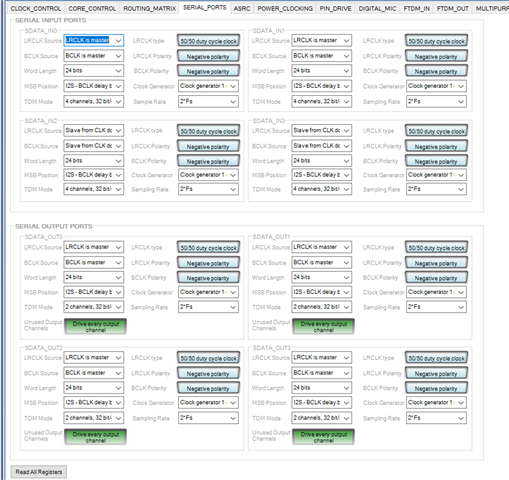
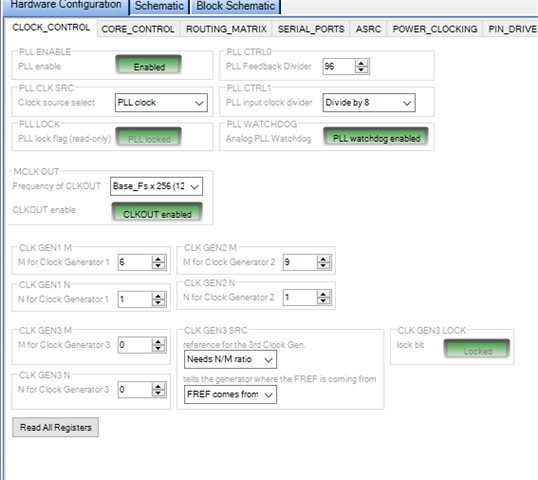
I want to make sure I have set the clocking correctly for all the SDATA I/O in the 1452. The screenshot below shows current settings, which do work, but I am concerned that I could have clicks or pops in the audio, or that I am not ensuring the tightest sync between different inputs.
It is hard to see these settings in the screenshot below, so I listed them out.
SDATA 0 and SDATA1:
(4 channel ADC in TDM4 mode)
SDATA 2 and SDATA3 :
(AoIP 8 channels in TDM4 mode)
LRCLK Source = LRCLK is master
LRCLK Source = slave from Clock Domain 2
BCLK Source = BCLK is master
BCLK Source = slave from Clock Domain 2
Clock Generator = gen 1
Clock Generator = gen 1
Audio Signal Processors
adau1452
hardware
SigmaDSP Audio Processors
Hello Todd_P,
Thanks for the detail and you supplied great information so I can "see" how you have setup the clocking.
It should work and you mentioned it does work which tells me the PCB layout is done well. By running at 96kHz sampling rate and using TDM-4 you end up with a bit clock rate of 12.288MHz which is well within the specifications of the part. You are not violating anything and like you said it does work. However, I applaud you for asking the question to find out if this is the best way and how close is the timing? It may be working well now but raise the temperature so the silicon speed slows down and then add to it some slight internal timing differences between parts and you could have some units under some conditions producing some clicks or pops.
So I am going to make some comments here that I have to say it is to squeeze out the most timing margins and not fix problems or work around design issues with our parts. This has more to do with the pesky laws of physics that I keep trying to get around but I am having a hard time with it!
The DAC side is perfect, no issues there and you have it setup the best.
For the serial inputs from the Dante system you are fine and it is setup well.
For the ADC serial inputs let me explain how this all works. I will probably make a video about this someday. The serial port is the master for the clocks. I will be talking just about the individual bits. Quick overview:
The DSP drops the BCLK pin low which is the signal for the ADC to change the SDATA output to the next bit that needs to be sent. The ADC changes the SDATA pin to a high or low depending on the bit value and then the DSP will raise the BCLK pin high and that will latch in the data inside the DSP shift register to record the value of this bit. Then the process repeats until all 24 bits (or32) are received.
That is in the perfect world but this is where pesky physics enters the arena.
The DSP drops the BCLK pin low
This high to low transition has to propagate and travel from the DSP to the ADC. this takes time. Plus, there is capacitance along the way which will filter out some of the really high frequencies present in a square wave thereby softening up the edge a little. (but this is another discussion)
The ADC receives this high to low transition but internally it has to recognize that the pin went low, then it internally switches some gates and logic to change the output bit to be the new data value. Then it has to go from this internal logic out to the actual pin! This all takes time. We call this spec tSODS (time for the serial data out delay when operating as a slave)
Then the data appears on the pin, however, it still has to travel over to the DSP so there is the time-of-flight time again and the capacitance issue.
Then the data appears at the DSP serial data input pin and there is a small amount of time where it needs to held steady so the circuit will correctly latch in this data when the BCLK pin goes back high. So a little more time generally called setup time.
The period of a 12.288MHz bit clock is ~81ns. So this means that from the time of the BCLK falling to the serial data latching in will be half that period so roughly 40ns.
Time of flight can be a handful of nanoseconds, 2-4ns but this is all dependent on your PCB layout and this is one direction.
The SDATA hold time is generally 5ns
Here is the tough one, the tSODS is 35ns in our part. I have no idea what it is in the ESS ADC but it is probably something similar.
Add up all of these delays, worst case, 4 + 4 +5 +35 and you get 48ns... This is too late and you just missed the bit and have a bit error.
Of course datasheets are written by people who are very pessimistic and look at the world as the glass-half empty and the sky is falling. (I am joking but they are written for worst case over the full temperature range with the silicon mixture skewed towards the worse slowest case so this is why it is working for you right now but I have no guarantee it will work always under all conditions.) I am poking fun at myself because I wrote the last revision of this datasheet.
After all this, here is my suggestions. When you have a bit clock of 12MHz or higher you should have the direction of the clocks be the same as the data. This will get rid of this tSODS turn-around time and shave off 35ns of time! Now you are WELL within the 40ns and can tolerate some transmission line reelections and bouncing of the data. I did not get into the signal integrity earlier!
Since you did a great job of sending the master clock to the ADC, the DSP and the DAC, you can flip the clock direction easily and you do not need to use sample rate converters or anything like that. They will be locked together by the master clock. The dividers in the ESS ADC will setup the sampling clock edge to most likely be a little different but we have circuits in DSP between the serial port and the DSP core to account for this and retime it. So it is not a problem.
Sorry that I put on my "professor hat" and explained all of this but I thought it is good to explain why you should have the clocks operate in the same direction as the data. This is why I said the DAC side if fine. The serial output ports are setup as masters and the data is going from the DSP to the DAC.
The Dante is fine.
One other thing I should mention is the Pin Drive registers. For any signal that originates from the DSP you can adjust the drive strength. This can be super helpful to overcome extra capacitance and speed up the edge transitions if needed. The default is fairly weak. Setting it to the strongest can cause problems if it is not needed like more ringing and more EMI radiation. I do not know if the ESS ADC has this feature.
Thanks,
Dave T
THANK YOU! This is very insightful and I appreciate the detail.
Just to be clear, for the SDATA0 and SDATA1 inputs (coming from the 2x ADC) ; I should change the ADAU1452 to LRCLK and BCLK to be Slave , assuming I need to also ensure the ESS ADC is set to Master? There are Clock Doman 0-3 options. (Not sure I understand the difference...maybe that is another Professor lesson?)
And if the ESS ADC has control of Pin Drive level, I can increase the strength (maybe)?
Hello Todd_P,
Yes, change the serial input ports to be slaves and go into the registers of the ESS and change that one to be a master.
Regarding clock domains. They are associated with the pins. the clock pins for serial input 0 are the clock domain 0. The clock pins for serial input port 1 are the clock domain 1 and so on.
I do not know what your hardware connections are between the ESS and the DSP. The ESS will only need one set of clocks and it only needs to go to one set of pins on the serial port. Let's say you connect the ESS clocks to serial input port 0 clock pins. Then you set serial input port 0 to slave to clock domain 0. Then set serial input port 1 to also slave to clock domain 0. No need to "Y" the hardware connections to both sets of pins.
This does not apply to you but for others reading this, The clock domains 0-3 for the serial input ports are NOT the same as the clock domains 0-3 of the serial output ports. If the design requires to slave to the same clocks for both the serial input and output ports then you have to "Y" the clock connections to one set of serial input pins and one set of serial output pins and set the registers to the correct domain that you used in hardware. In your case you are driving the DACs with the internal clock.
The other detail is these clock domains only apply when the serial port is in a slave mode. These are internal clock busses and the only time they have clocks on them is when that domain is a slave. If it is a master there are no clocks on the bus. The thinking is that why would you use an internal bus that is slightly delayed when you can simply switch to the internal clock directly. So if serial input port 0 is set to be a master, it will not put out clocks on the clock domain 0 bus. If you want serial input port 1 to use the same clocks as serial port 0 then set serial port 1 to be a master using the same internal clock!
With regards to the ESS drive level. The best answer is not easy to determine. If you have a good scope with very low capacitance probes (4pf or so) then you can look at the timing and the edges and see what it looks like as close to the destination as possible. In this case as close to the DSP clock pins as possible. See what the waveform looks like. Do NOT use a digital input on the scope, use the analog input. Digital inputs do not give you a picture of the actual waveform. Just transitions. See if there is a lot of over or undershoot, see if there are reflections cancelling out part of the transitions. This is a HUGE subject and you can spend your career studying it. Dr Bogatin has. Here is the best place to learn about signal integrity. Teledyne LeCroy SI Academy (bethesignal.com)
There is certainly a lot of science involved here but I feel a lot of this is almost an art and an exercise in finding a balance and a sweet spot. I have taken classes on the subject and Dr Bogatin actually came on site and gave a lecture for us once many years ago! For me, I am a very visual person and I have to "see" the transmission line and I imagine what the return current paths are to help me in my PCB layouts.
In short, do not increase the drive strength unless you have a good reason. You have bit errors or on a scope the clock edges are very slow and the timing margin is small. But, if you already see some overshoot or undershoot then certainly do not increase it.
You might want to look at my document about PCB layout for the codecs. The connections to bypass caps I talk about apply to all parts.
You can find that document on the "Audio" space on the forum... I guess I should not be lazy and find the link...
(+) PCB Layout Best Practices for AD193x codecs - Q&A - Audio - EngineerZone (analog.com)
Good luck with your project.
Dave T
Please log in to reply.