AutoEQ - What Am I Doing Wrong?
I'm trying to create an active crossover. Started fooling around with AutoEQ. I have the Wondom DSP 2IN 4OUT 1701 board.
Using Sigma Studio 4.7
Started with a simple sketch:
Everything works fine.
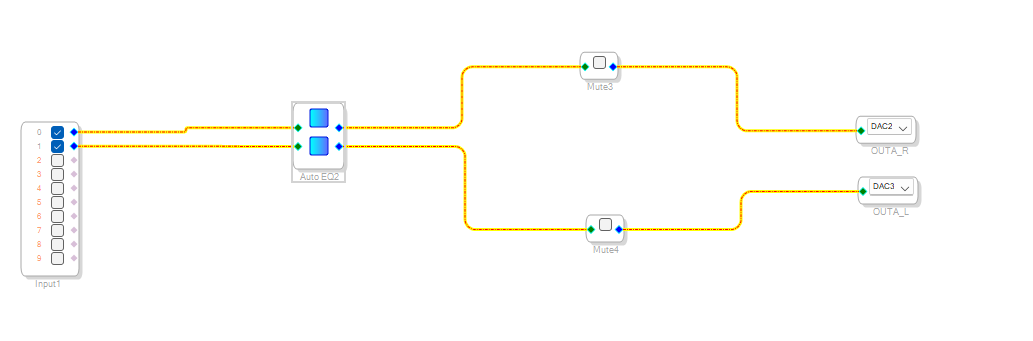
Added AutoEQ:
For some reason Mute3 mutes both channels and Mute4 mutes the left channel.
Only when separating the AutoEQ components I can separate EQ for the two channels.
Another thing: After closing the project the AutoEQ file is opened empty. I need to regenerate the filers. And I need some voodoo to get the AutoEQ to actually work. I didn't the get sequence yet.
Is it always like this?
Edit Notes
missing word
[edited by: MaorAvni at 12:17 PM (GMT -4) on 2 Sep 2024]
software
4.7
auto-eq
auto eq
auto_eq

Hello MaorAvni,
Could you please attach your project?
Regards,
Harish
Msound.zip
The project file is autoeq.
When opening the AutoEQ window I get an empty filter.
I open REQ.dspeq.
Hello MaorAvni,
I am not sure if you understand what the AutoEq block does? The name is not clear. It requires you have a MLSSA file that you measured. You input this file and it will attempt to produce an inverse curve to result in a flat response for the system.
Here is the Wiki help file on the subject.
Automatic Speaker EQ [Analog Devices Wiki]
I know you are starting from a basic program but you must have a DC block at the front of your schematic. The ADC has a DC offset and any EQ will amplify this DC offset and it is really not a great thing for your speakers.
I have one of the Dayton Audio 2-in 4out boards which I am fairly certain it is the same board. Do you have the optional external pots?
I could attach my program if you like. Dayton Audio does have an example project but there are a few things in it I changed.
Dave T
Hi,
I know I’m a noob, but I’m not that of a noob…
I started with the sample project of the board and tried to add the autoeq components, but it didn’t behave as expected so I started tearing down the project.
I have the mlssa file in the project archive attached.
it seems that the studio doesn’t behave as I expect it to.
for example, if I generate filters and save the project the project isn’t saved with the filters.
if I save as a new project the filters are saved with the project.
i wasn’t aware of the dc blocker requirement. I’ll add it.
that still doesn’t explain why one channel of the autoeq goes to both channels and the other to the correct channel.
Hello MaorAvni,
MaorAvni said:
Another thing: After closing the project the AutoEQ file is opened empty. I need to regenerate the filers.
Please find the attached project. I can't seem to have any difficulty with this. when I closed and re-opened the project/SS, I can see the window with pre-configured info.
MaorAvni said:
For some reason Mute3 mutes both channels and Mute4 mutes the left channel.
It's strange but both mutes work correctly and independently for me, I observed the capture window in my project. The read/write seems fine. Could you please verify that, when you check/uncheck the mute module, please see the capture window that what command is being sent and written to the DSP.
MaorAvni said:
Only when separating the AutoEQ components I can separate EQ for the two channels.
I can see that the same EQ settings apply to both channels, the change in one channel graph reflects in another channel. it compiles in ADAU1701 DLL.
In ADAU1467/ADAU1452 DLL, the program crashes when I grow the inputs.
I checked this really quickly, so I have to see the behavior even more closely.
So please try using two separate blocks for two channels for now.
eq_checkk.zip
Regards,
Harish.
Hello MaorAvni,
I will check with the programming team but I think this block is not supposed to be able to be grown. I would not grow it but use a separate block for each channel.
Dave T
Please log in to reply.