Write Biquad Coefficients through SPI
Hello,
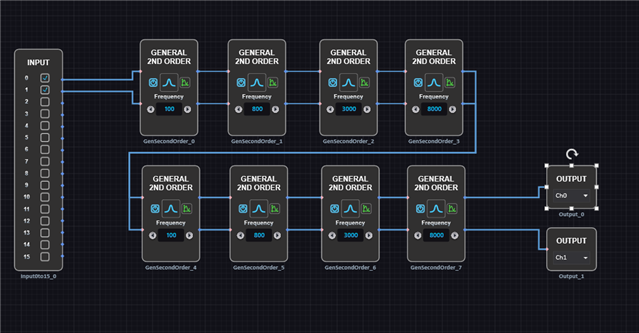
After uploading the schematic shown in the photo to the ADAU1467z, I exported the file and set it up to be remotely controlled via a Teensy 4.0.
I used an SPI connection, and I confirmed that the ADAU1467z was successfully initialized through the Teensy.
However, as soon as I try to change the parameters of the EQ filter through the Teensy, the output from the ADAU1467z stops.
https://wiki.analog.com/resources/tools-software/sigmastudio/toolbox/filters/general2ndorder
As described on the webpage above, I calculate the biquad coefficients and write them through SPI using the function shown in the photo below.
photo belows are the coefficient's value.
As you can see, I am inverting the values of a1 and a2, and there doesn’t seem to be a significant difference when compared with the biquad coefficient calculator on the website.
Interestingly, when the center frequency of the peak filter is around 10kHz, if I properly adjust the gain and Q values, the ADAU1467z starts outputting sound again. However, the sound is significantly altered and does not reflect the EQ values I intended.
I suspected a precision issue, so I even tried replacing all parameters with doubles, but the problem persists.
After trying various solutions on my own, I am now seeking help. Thank you.
Audio Signal Processors
SigmaStudi+
Biquad Coefficient
software
SPI write
adau1467
adau1467z
SigmaDSP Audio Processors
EQ filter
VScode
Show More


Hello seokhyun,
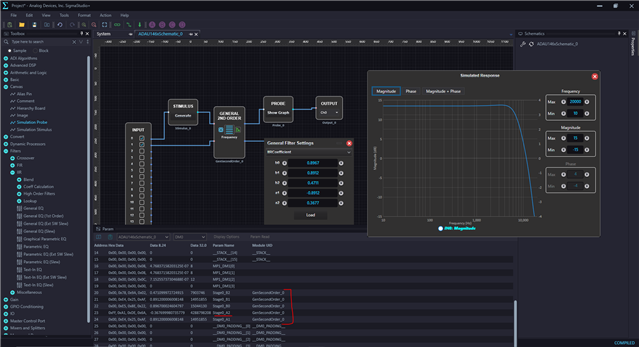
I took your coefficients and put it in the SS, this is what I got as a frequency response. Do you intend to have the same response?
Just put your calculated coefficients in the IIR filter block to see the response. You don't need to invert and enter the coeffs, just enter 'as is', SS will invert it. you can verify it in the capture window like below.
There may be something wrong with the Coeff calculation/precision, So, just try designing a desired filter using SS and take the coefficients from the capture window, which is calculated by SS, then send them from your MCU and see if that sounds okay. if it comes out well then, we can eliminate the SPI communication part and look at your coeff calculation more closely.
Don't write the coefficients directly into the addresses while the core is running, it may lead to an unstable filter and produce noise or clicks/pops. Try to safe load the coefficients, safe load addresses are given in the PARAM.h file.
I can see that your coefficients are only 4 digits after the decimal point, is that what you have got in your calculation?
24 bits is about 7 decimal places of resolution: log10(2^24) = 7.22
Make sure that the sample rate that you used in your calculation and the DSP sample rates are same.
Regards,
Harish
Please log in to reply.