Dynamic changing of EQ presets based on volume potentiometer level
Hello, I would like to change EQ preset based on volume potentiometer levels. In reality it will boost bass (and other EQ things) in low volumes and when shifting the volume up the EQ should be more and more flat. It is not necessary to have it dynamic, so for example 10 presets of EQ should be enough.
Thank you in advance
Audio Signal Processors
hardware
SigmaDSP Audio Processors
adau1701
Hello EDMOQ,
The filter/EQ parameters are based on the filter coefficients, so you can't control a single parameter using the pot.
What you can do is, there is an algorithm called index selectable filter in which you can design how many filters you want (subject to DSP cycles) and select which one you want at what conditions (pot input levels). There are a lot of posts which explained that. I will attach a most relatable one to your case where Bob explained about this clearly with a project.
How to create a parametric EQ controlled by pots on ADAU1701? - Q&A - SigmaDSP Processors & SigmaStudio Dev. Tool - EngineerZone (analog.com)
Hope this helps!
Regards,
Harish
Hello EDMOQ,
I am going to add a little to what Harish mentioned. The KJBob response is great for understanding how to use an index selectable filter and how to manipulate data to come up with the index for which filter to use. This example used an AUXADC pot and the level information from a rotary encoder to adjust the filter based on the volume setting. This is one approach and the basic idea is great. One great thing about SigmaStudio is that there are often so many ways to solve the same problem with subtle differences that might favor one application over another.
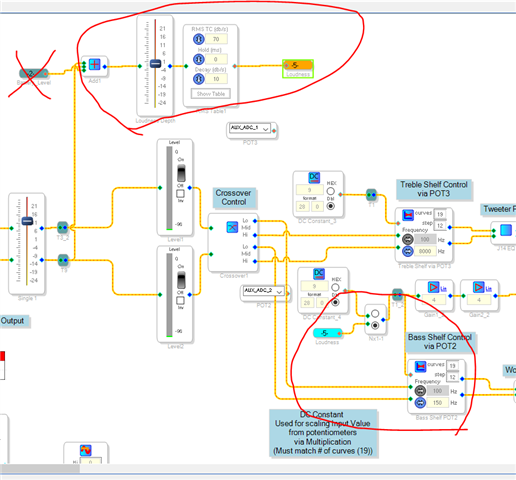
I have this example project that is a stereo crossover. I took the example project that Dayton Audio gives out for their boards and modified it quite a bit. One of the things I did was to use an RMS Table to sense the level and boost the low frequencies when the level was low and gradually change it as the audio level goes up. I also simulated using an AUXADC to read the battery level to lower the low frequency when the battery is getting low. Thereby extending the battery life. The actual hardware was not setup to do this and it was also not running on batteries (LOL) so I just used a DC cell to simulate an AUXADC that is reading the battery level. So that part of this project you could ignore. It is below the main audio flow of the schematic.
Here is a screenshot of the project. It is a bit complicated and I do not have the time today to draw up a simpler version.
I circled the RMS level detection. Just remove the battery part and reduce the addition block to just add the two audio channels.
Then you see the index controlled filter that I also circled. I have a switch on it so I can manually select a filter using a DC cell strictly for testing purposes. The switch and the DC cell is not needed. The "Loudness" tag could directly connect to the control pin however, keep the two gain cells feeding the Readback so you can see what filter curve is selected at any time during your testing.
This is something I want to cover on YouTube but just have not had the chance.
Here is the project. I also am attaching the text file that has the data for the loudness curve loaded into the RMS table. It is embedded in the project and you could save it off from there but since I had the file I might as well attach it.
8512.Stereo 2-way Speaker Project.dspproj
Fullscreen
Table for Loudness-2.txt
Download
2.14577E-06
2.14577E-06
2.14577E-06
2.14577E-06
2.14577E-06
2.14577E-06
2.14577E-06
2.14577E-06
2.14577E-06
2.14577E-06
2.14577E-06
2.14577E-06
2.14577E-06
2.14577E-06
2.14577E-06
2.02656E-06
1.90735E-06
1.78814E-06
1.66893E-06
1.54972E-06
1.43051E-06
1.3113E-06
1.19209E-06
1.19209E-06
1.07288E-06
1.07288E-06
1.07288E-06
1.07288E-06
1.07288E-06
9.53674E-07
8.34465E-07
5.96046E-07
3.57628E-07
Dave T
It works!! Super-awesomness!
Thank you very much for your fast reply :-)
Superawesomness again :-D And the hack with testing slider converted to the logic signal is also handy. I am totally new to this and I am more and more happy with this type of designing :-)
Thank you!
Hello EDMOQ,
Enjoy learning and using SigmaStudio. It is lots of fun. If you have not noticed my YouTube channel yet you should subscribe and watch some of the videos. It will help you learn this a little faster.
(21) How to SigmaDSP and SigmaStudio - YouTube
DaveT
Please log in to reply.