New user, stuck with basic USB errors trying to make my first program
Hello, just trying to get started here with this chip. I'm unable to get started with just the bare bone basics. I have tried 3 DPS units, 3 programmers, multiple USB cables (which will send data), two computers and I still cant get a simple chip coded. I get nothing but USB comms errors.
Setup:
- Wondum ICP3 programmer (tried two different ones to rule out hardware issue)
I also tried both of these DPS boards with out any luck:
- Dayton Audio DSPB-K DSP ADAU1701
- Wondum APM2 ADAU1701
I'm using the starter project from Dayton audio here
https://www.parts-express.com/Dayton-Audio-DSPB-K-DSP-Kernel-Board-325-130?quantity=1
I can see the USB device light up green in Sigma Studio. Note: If I connect the DPS to the programmer first, then it stays red and I get an unknown USB device in Windows device manager--I find that odd.
Steps to connect:
I set the DPS switch to position 2 (write mode). I plug the 6-pin cable in to the programmer after its connect to my PC, and when I link+compile+download I get the USB connection error popup every time. I'm wondering if there is just a basic starter example for either the Wondum APM2 or Dayton Audio DPSP-K with either an IPC3 or IPC5 programmers or any other way to program the device. I don't honestly even know if its the programmer or the DPS board itself or just Sigma studio quirks or a mismatches hardware configuration in Sigma studio. I have not found very good starter tutorials for this.
I would love to get started with some basic 2.1 DPS and looking for any tips to get past these newbie errors!
Thank you
Audio Signal Processors
Wondum
software
Dayton Audio
SigmaDSP Audio Processors
adau1701
Show More
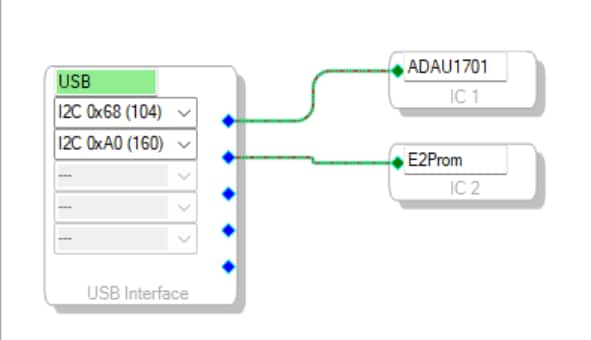
Hello LambdaBunker,
I have run across these sorts of problems often and it always ends up being some silly thing I am missing. So do not give yourself a hard time about it. I have "been there done that!" plenty of times! In fact, last week I had an issue. I could not program this eval board on my desk. Tried everything, even tried a different USBi programmer and no luck. Then I realized I had a second USBi plugged into my computer and it was dangling off the other side of the desk so I was using the wrong programmer! I had two and only one can work at any time on Windows.
Back to your problems. With I2C it is actually better because you do get error messages. The pop up window error usually only pops up once but you can see in the bottom right corner of the screen it will tell you there is a comms error.
So what can cause these?
1) Not having the programmer actually plugged in. You verified that by looking at the config window and seeing the "USB" label green instead of red. So in your screenshot it is green which tells me the driver is fine and the programmer is being "seen" by SigmaStudio. This first possibility is not what is happening for you.
2) The voltage is set wrong on the programmer. This again is not likely for you. For the USBi there is a 3.3V or 1.8V switch on the bottom of the board. It comes set to 3.3V and this is the setting you need so I do not expect this to be the problem.
3) No power on the target board. Some boards are low power and can be powered up by the USBi itself but I think this is not the case for the DSP Kernal board? I would have to test that. I have a bunch of these. I use those DSP-K boards for an Oscilloscope lab for my students as a signal generator. Try plugging a USB power supply to power up the board. Then try to program it.
The read and write modes have to do with the EEPROM and to just program the DSP you do not need to use the EEPROM.
The starter project from Dayton should be enough for testing.
The Wondom board I do not have.
Check that the DSP is actually powered up.
You also can take a scope and look at the I2C clock and data and see if you are getting an ACK from the DSP. I am guessing you are not which is why the comms is failing and nothing is working.
So my bet is on a power issue. The only thing that can prevent SigmaStudio from communicating with the DSP is if the part has no power or the part is being held in reset. I doubt reset is the issue but you can test that if possible. There is a reset switch on the board.
You do have it set to the correct address for this board.
By the way, have you looked at my YouTube channel?
Dave T
Thank you Dave, those are very helpful tips. I have noticed there can be a little little issues with getting these DPS's programed. I actually switched to an ICP5 which has a USB-C port and that seemed to have for now fixed my issues. I cant say for certain what was needed or if I even needed the ICP5, but I noticed that I need to boot the programmer up before connecting the 6-ping cable to the DSP board. I did start the DPS with a separate USB cable to power it (5 volts). I noticed when the 6-pin link cable is connected, the DPS turns off, but then turns on again when I unplug it.
I believe what eventually got things working for me was I wrote to EEPROM. Once I did that, I think things worked. Only then I was able to hear the music out of the DPS and I could live edit the crossover and confirmed it did what I more or less expected it to do. The other issue I had was that the default subwoofer output for the Dayton project was DAC2, but my subwoofer output on my device was DAC3. So until I switched it, I couldn't hear anything out of that output. That stumped me for a while.
I guess I'm left with a few questions newbie. What's the difference between "Link Compile Download" and "Write to EPROM".
I'm assuming once you write to the eeprom, then the DPS can boot and run that code? And I'm also assuming there is some way to live control the DPS from sigma studio but without having to write to the EPROM. e.g. during development and tweaking?
Advanced follow up questions if I get further along : Is there an API for serial communication or I2C to adjust the DPS settings after the DPS has boot up? I'm thinking ahead here to make an app that runs on a phone or desktop that can change things like gain or crossover settings. My experience with USB has so far only involved Arduino, but you can read and write to a serial buffer once you configure the baud rate. I'm guessing there must be some standard way to adjust the DPS settings with a custom software program?
Thank you Dave, your help is appreciated!
Hello LambdaBunker,
Glad you got things running a little better.
I am travelling for this entire week so I only have limited time to respond at this moment.
Quick answers...
Some eval boards have a reset generator built in. There is a reset line that is part of the USBi interface specification and you can toggle it from SigmaStudio. This might be the reason why the DSP is resetting when you plug and unplug it. If the USBi is not connected to the PC then it is not powered so it will pull the reset line low.
Your questions are great questions but some of these require a fair amount of background to properly answer and understand.
The EEPROM is a separate part and is not part of the DSP.
The DSP uses RAM internally so this means it has to be programmed every time it powers up. You can set the Selfboot pin high on the part which will make it go out to the EEPROM and load in a program from the EEPROM.
SigmaStudio just writes directly to the DSP RAM.
So link/compile/download will create your program and write it directly to the DSP RAM. It will overwrite anything that was there before. So if the DSP booted from the EEPROM then that program is overwritten.
If you want to program the EEPROM to have a DSP_program in it, then that is a different operation of writing to the EEPROM and NOT the DSP.
Then if you want to boot up off of the EEPROM yet you want to control it from SigmaStudio to see things like levels and click on buttons, then you use the Link.Compile/Connect. This compiles the project so SigmaStudio knows where the objects are located in the RAM so it can control it. But, it does NOT overwrite the program running in the DSP that the DSP loaded in from EEPROM.
Your microcontroller would do the same thing. It can program the DSP if you like or it can just let the DSP boot itself then just control the objects running in the program.
Have you watched any of my videos on YouTube?
Watch the one called Intro to SigmaDSP andSigmaStudio.
Then watch the ones about the 1701 but the important one will be the one about the Params window, the capture window and the sequencer.
There are several others about the 1701 that might have some nuggets in there that you would find interesting.
(48) How to SigmaDSP and SigmaStudio - YouTube
Dave T
Have you
Thank you for explaining that Dave. This does make more sense to me now. Thanks for the YT videos, I will watch this next!
Please log in to reply.