Jingle on Turn on
Hello, I would like to ask whether it is possible to detect that the device (ADAU1701 in my case) was turned on so I can react on this "event".
Related to this - is it possible to play some custom sample (mp3, wav...) after the device was turned on?
Thank you very much in advance
Audio Signal Processors
hardware
on startup
SigmaDSP Audio Processors
jingle
adau1701
event
Show More
Hello EDMOQ,
It seems that you are asking two different questions somewhat related.
EDMOQ said:
detect that the device (ADAU1701 in my case) was turned on so I can react on this "event"
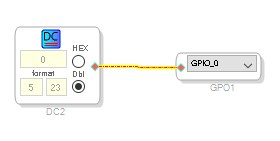
Yes, you can use a GPIO pin that is tied to a DC cell. I think the pins will float high when it is first powered up. So the thing to do is to set the pin low in the program. So as soon as the program runs for the first time it will pull the pin low and so there is your signal. It would probably be good o have a pull-up resistor. A few experiments can answer these questions.
The program will be this simple:
You will have to set the pin to be a GPIO output in the register settings.
Next question:
EDMOQ said:
is it possible to play some custom sample (mp3, wav...) after the device was turne
This part cannot play custom samples. But, you could setup a chime or other signal source available in the library to play some sort of sound at power up.
I looked for an example program of mine that might have either of these. I did not find something but this program does some of this and might be a good starting point for you.
3051.ADAU1701 Timer to sequence codec reset audio mute and amp mute.dspproj
Dave T
Please log in to reply.