Microcontroller Read Back of the Level Detector W Numeric Display Low DSP MIPS Average Enable
In the Level Detector W Numeric Display. Low DSP MIPS. Average Enable, if I read back the level with a micro controller:
Does the average tickbox change the readback value? Is this just for the display in Sigma Studio, or does it actually change the readback value ?
Similarly, does the readback value get impacted by the time constant, or is this only in the display of Sigma Studio?
When I read back the value, I often see negative values, can I take the absolute value from this to display?
Audio Signal Processors
adau1452
hardware
SigmaDSP Audio Processors

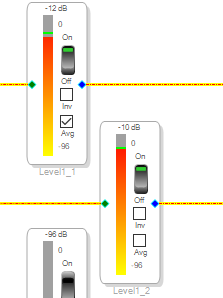
Hello Hardware,
Sorry, this might turn into a long post. Get out the fuzzy slippers and hot tea and enjoy.
First I want to point you to the Wiki entry about meters which has a little information for you.
Single Band Level Detectors [Analog Devices Wiki]
The meter you pulled out of the library is not the best meter to use. It uses very few instructions but the tradeoff is significant.
I will paste in what it says about this particular meter:
The Low DSP MIPS block acts as an audio sample readback register. The DSP does not perform any level detector calculations. Instead, SigmaStudio reads back the sample, converts it to dB, and performs averaging. As with the Direct Read algorithm, transient peaks may be missed by this level detector.
It is a readback that will read the signal I am guessing every 10ms. I am not 100% certain since it is not in the documentation. However, this is done by SigmaStudio NOT the DSP program. This Low MIPS meter only does one thing. Every sample period it stores the bottom 32 bits of the 64 bit result of an operation in the core. The programmers carried over some old code from the older SigmaDSP cores and so as you notice the LinX_Lo variable never has any values put into it. It is always zero so ignore it. This new sample is stored in the LinX variable.
This is a raw sample so yes, it will be negative at times. So this variable is updated every sample period (I know I am repeating myself) so 48,000 times a second. If you read this every 10ms you will be reading one sample out of 480 samples. So 479 samples will be missed and not measured at all.
This is simply a readback. Now, you could poll the SPI port at a much faster rate than 10ms but you will be limited by the SPI port speed at some point and if you have a lot of meters it is a problem.
This does give you a very general idea of the level and does not cost you many instructions to do so. So for a signal presence meter or a three or four LED bargraph this is fine. Anything more and it is limiting.
I wrote a project with this meter and the RMS meter in it and even with a 500Hz tone I can see it bouncing around because it is missing some of the peaks of the 500Hz sine wave.
So this answers your third question, Yes, you would need to take the absolute value of the result.
Questions 1&2 are easy answers. This is all done in SigmaStudio GUI on the PC. The averaging, the time constant settings, all of that is done in the PC so you would have to write code in your controller to do this. You have to convert to dB, and if you want to invert the direction this would be done in your program. You will notice that when you change the settings in SigmaStudio it takes effect without recompiling because it does not have to change the program and there are no parameters for these differences to tell the program to process the audio differently.
If you want a more accurate meter then you will need to have the DSP do some of the math for you. It will need to do the summing and accumulating so you will need a time constant with a hold time and a decay,
I wrote this program that makes it easy to test the meters. I will attach it down into this post.
It has the Low MIPS meter and the RMS meter that is the first one listed on the Wiki page.
This one does some math for you but there are things you see on the params window I wish it did not it does not use all the variables.
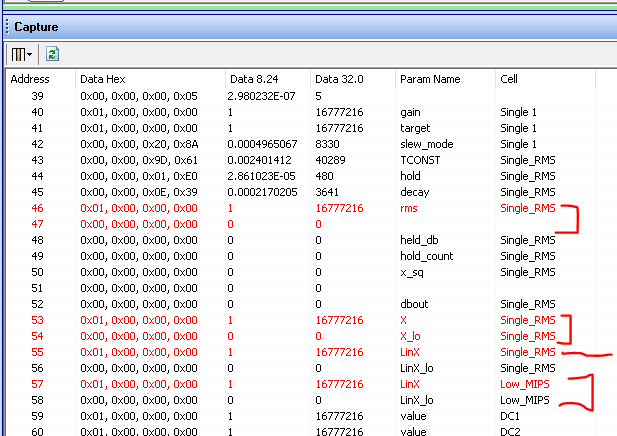
Here is a screenshot of the Params window:
I named the two meters a descriptive name, Low_MIPS and Single_RMS
The Low MIPS will stuff the 32 bits into the variable called LinX as I mentioned above and nothing into the LinX_Lo.
The RMS meter will stuff the raw sample into the one called LinX just like the Low MIPS meter does.
But then it squares it and stuffs the 8.65 value into the variables X and X_Lo. The 8.56 number is left justified to start with the "X" variable and the rest is in the X_Lo. There is some funky math because I do not see zeros in the X_Lo when I test it. There may be some round-off errors happening. But this is way down so it is not a problem.
The parameter called RMS does not seem to be the actual RMS value but an accumulated sum of the squares from which you could get the RMS value by taking the square root. This variable is again, an 8.56 number that spans two 32 bit storage locations. The unlabeled one is the low word.
The other variables you see in black below the RMS values do nothing until you get down to the "X" variable. I wish it would calculate the dbout but it does not.
The TCONST is the attack time constant.
The Hold is the hold time in samples. Note that it is set to 480 which is 10ms. This means you should poll this every 10ms to not miss any peaks.
The decay is the decay time constant.
So as you see I do not have all the answers. I would have to ask for the code to answer some of these more detailed questions that I brought out.
If your applications has a lot of available instructions then you could get much fancier and have the DSP do even more. I have used an envelope generator and fed that to an RMS table that I stuffed with the dB values. Then the table will output the value in dB and you can read it with a readback cell. But this is a topic for another post. This one is getting too long. Plus, I think I covered this years ago?...
I hope this helps. You are jumping into the deep end of the SigmaDSP programming pool.
Here is my program. Be careful! do NOT run this up with speakers or headphones on. It will have super high levels and I think I left it set with full scale DC output.
ADAU1452 Meter Comparison RMS to LowMIPS.dspproj
Dave T
Thank you ! I am planning to use this for a simple 3 bar "LED" display, so the low MIPS should work fine.
When I read back the address for each of these I get 0 for data, always.
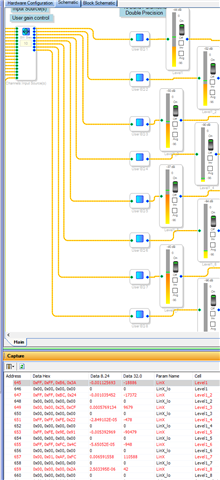
Answered my own question, turns out I had the wrong SigmaStudio file loaded! Operator error.
Please log in to reply.