Play chime when max volume is reached on PushButton Volume Mute
This is my first post here.. I'm also a nobie SigmaStudio/ADAU1701 user!...
I want to activate a Chime sound when the up button is pressed, and the index (on PushButton Volume Mute) is already at max position (max volume)...
Is there a better way to implement this feature?
My project (work in progress):
Thank you!
Audio Signal Processors
software
sigmaStudio 4.7
volume
SigmaDSP Audio Processors
chime
max
adau1701
Show More
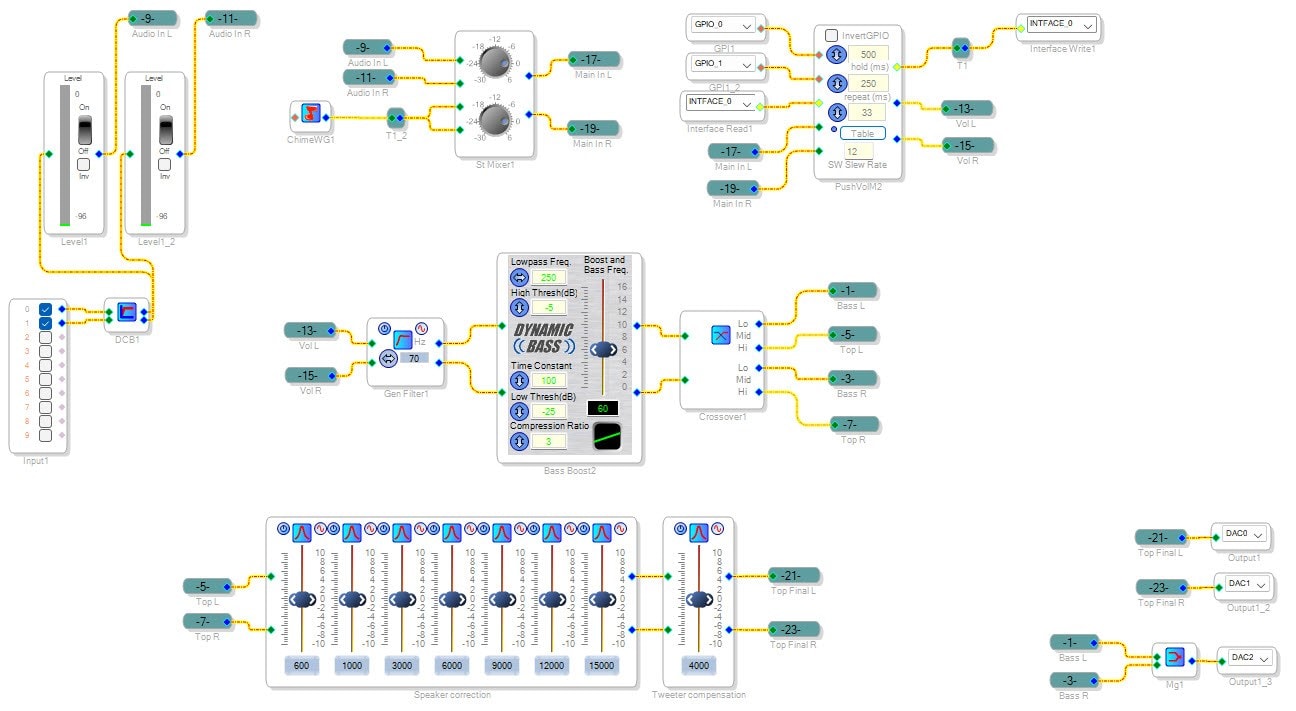
Hello Imperyal,
Here is a project that does what you ask and a little more.
I also put in a chime for when the control is at the bottom. Then this was also part of an example project showing how to override the volume control using a micro-controller so there is a lot of extra stuff on here but it has what you need.
Also, I did not spend a lot of time getting the chime to sound cool. It is not a great sound and it is a little too long but you can have fun messing with that.
Dave T
ADAU1701 Up-Down Vol with Chime at max and min vol.dspproj
Thank you DaveThib, that was fantastic help, I think I managed to adapt it to my project.
I have a couple of questions, just so that I understand everything that's going on...
Why do I need the feedback before the chime?
The ZeroCompare is needed to invert the button state?
I'm counting on the DSP board to arrive today, can't wait! :)
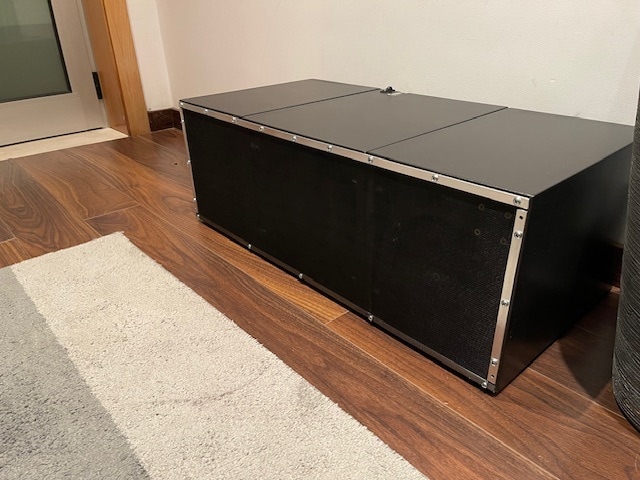
This is to use on a high power, portable, Bluetooth speaker. Around 200w RMS 2.1 setup. It is working but the DSP will help to get the most out of it I'm sure.
I have noticed that from track to track sometimes there is a big difference in output, some light compression or similar would help...
If you have any suggestions to improve the DSP, I would appreciate it very much.
The project so far:
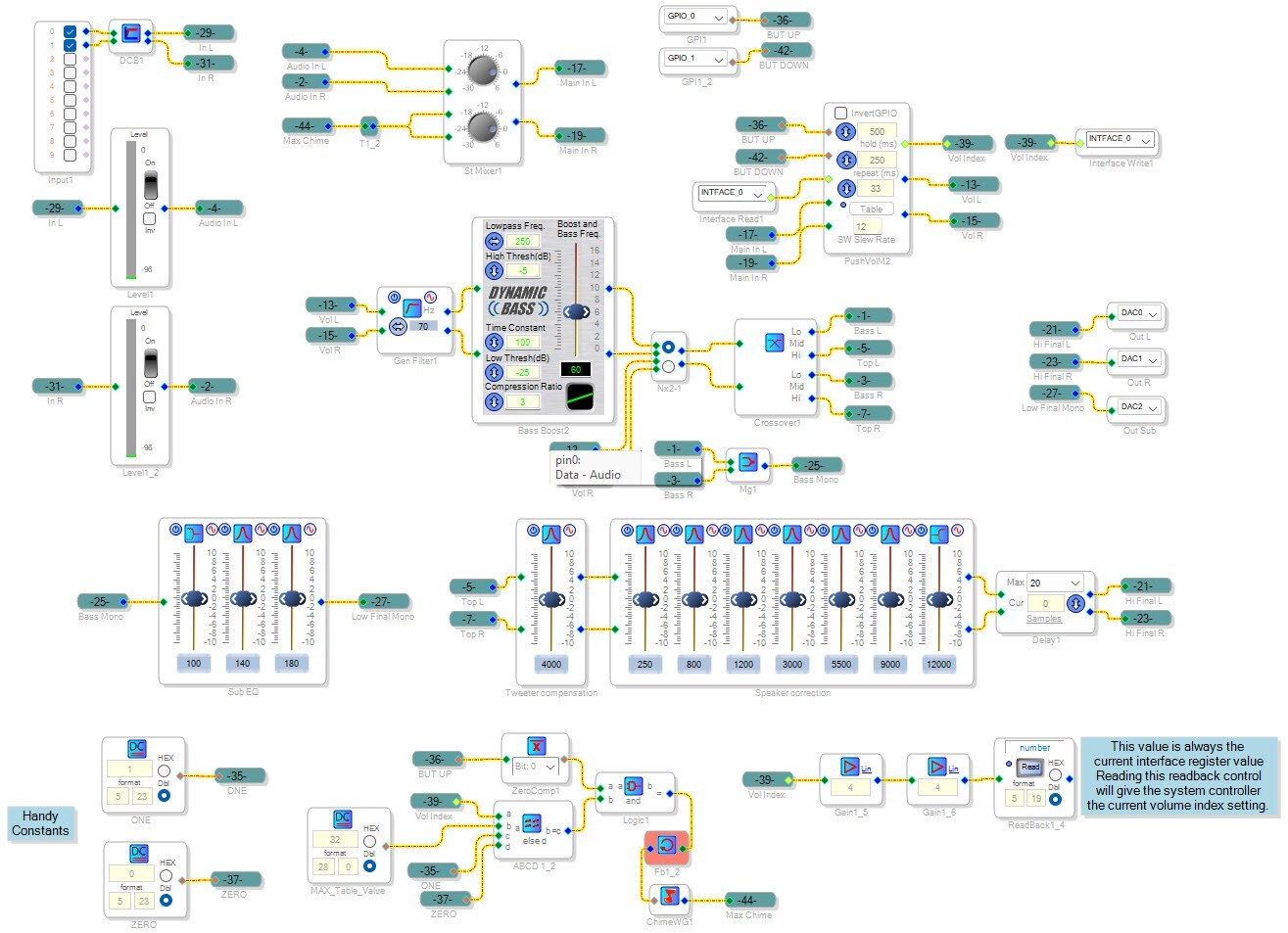
Hello Imperyal,
Glad you got is up and going. It is a great idea to have the program do that.
I love the picture of the prototype. It looks great! It "looks" like it is loud!
Imperyal said:
Why do I need the feedback before the chime?
This has to do with the way the compiler compiles the program. You have to keep in mind that the code is run every sample period. So if a block needs data from another block, it has to have been executed already during that sample period. A program can end up such that the output of a block is required as input to another block that has yet to be processed. So it is like a feedback loop. Without the output data there is no way to know what the input data is but without the input you cannot get the output and you are stuck!! The solution is to introduce a one sample period delay. So you use the data from the previous sample period which is usually no a problem. That is what the feedback cell is. It is a one sample delay block. The program will tell you when this happens. It will give you an error saying it has detected an illegal feedback loop. Dropping in the feedback cell fixes it.
Imperyal said:
The ZeroCompare is needed to invert the button state?
Because of the logic levels required. The chime needs to sit low and then go high to trigger the chime. So for the button press it needs to go from low to high. Momentary buttons are usually designed to sit high and then pull the line low when pressed. So it goes from high to low. Therefore, the logic needs to be inverted and the zero comparator does that.
I set it up to sense the button so you will get the chime EVERY time you press the button and the result is the max value of the table. If that AND function and the input from the button it would chime when you reached max and then not trigger again if you pressed it again. I felt it was better to have it chime every time you press it if it is at max.
You can put in Readback cells and watch all of this work. I do that when I develop the programs then delete the Readbacks. Always check things as you go along.
I will attach a project I did for the Dayton Audio hardware. I added to their stock program but what I added was limiters at the output to keep it from clipping. This is not what you asked about.
I also added a way to lower or raise the low end based on level of the audio and based on the battery level. The idea being to lower the low end to extend battery life if it is getting weaker. The other idea is to boost the low end when the audio is quiet for a "loudness" control feature.
I used an RMS table to do this. I have done some automatic level controls using similar techniques. I think that is what you are thinking of... OK, so I should attach a couple of projects.
This is the Dayton Audio crossover program.
2451.Stereo 2-way Speaker Project.dspproj
This next one is the automatic level control one where you can set a target level that the project tries to keep the audio level at. If it is soft it increases the gain, if it is too loud it reduces the gain. You would have to mess with the time constants so it is not too audible.
7532.ADAU1701 AGC Example with Target Level Setting.dspproj
Dave T
Thank you once again... The DSP arrived yesterday, finally I will be able to play with it for real
I will experiment with all of these suggestions and share the final thing here for others to use.
Please log in to reply.