AGC
Hi,
Many thanks to you for this schematics.
I try to make a system to help the earing impaired people to watch TV.
For those people (I belong to this group) : "I can ear something but I don't understand anything". I guess that maintain the level in the band 300 Hz to 3000 Hz would help.
There is no relationship with the auding aid that is already used.
The films are coded with Dolby 3.0 or 5.0 and there is a lot of noise effects now. Impossible to ear the voices for these people.
Furthermore, Dolby 5.0 creates a virtual center channel and sends the voices on this channel. Unfortunatly this channel is not sent to the earphone !!
I have several questions:
1) It seems that you take the RMS level of each channel and sum these levels, how about to take he RMS level of the sum of the channels ?
2) You measure the level of the inputs and then apply a gain to obtain the desired level (it is an open loop AGC)
Is it possible to make the classical closed loop AGC? What is the difference ?
When I try to do so, I receive a message "Error: closed loop detected" , why?
3) With the ADAU1701 it is mentioned that there are only 2 inputs, so I am obliged to re-inject the central channel thanks to a analog system before the ADAU1701.
Is it possible to do that in the DSP instead ?
If you can enlighten my knowledge you are welcome !!!
Best regards,
Patrice
Audio Signal Processors
hardware
SigmaDSP Audio Processors
adau1701
Hello Patrice,
DaveThib wrote an informative AGC thread here. Note the red Feedback cell in one of his example schematics -- use this to avoid that Illegal feedback detected error. I'm afraid I can't help with your questions concerning multi-channel surround formats, not being familiar with them.
Best regards,
Bob
Hello Patrice,
Thanks KJBob for the answer.
Patrice, I think you are talking about Dolby ProLogic decoding? We do not have that available for these DSPs because it requires a license from Dolby.
You will not be able to decode it with this part. You will need some sort of external decoder then send it into one of our SigmaDSPs and then process it for intelligibility.
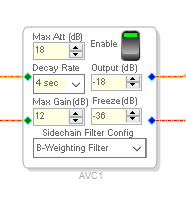
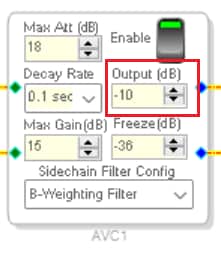
We do have a block that helps for TV listening. It is a fancy AGC with a B-weighting filter in the sidechain so that the compressor (AGC) does not react to low and high frequency effects and it only acts on the dialog for the most part. You can set it to a target level and it tries to keep it at that level.
The only problem is that this block is not available on the 1701. It is only available on the ADAU1761, ADAU1442, and ADAU1452 family of processors. Here is what it looks like:
Dave T
Hello Dave and Patrice,
The AVC block is truly useful and unique! Although it's certainly possible to build your own sidechain with a -1701, it likely would use a ton of instructions and still not work as smoothly. Besides, the -1452 is still a better solution since Patrice mentioned measuring and/or processing multiple inputs. If we must add external ADCs to a -1701, we might as well add them to a -1452. It also includes a better Divide algorithm in case there are level ratios to be figured.
Best regards,
Bob
Hi Dave and Bob,
Thanks for the infos.
There is another discussion with Dave, are they merged ?
For the moment I want to test the device on a ADAU1701 and the circuit provided by Dave. I'll test in a second step this circuit when I buy an ADAU1761 or ADAU1442 or ADAU145.
There is another point to take into account: recent films use Dolby 5.1 so there is a central channel containing voices.
Unfortunately this center channel is not routed to the earphone: we must re-inject this channel to the Rigth and Left channels. Since there are only 2 inputs the best is to create an analogic board upstream.
Many thanks,
Patrice
Hi Bob,
Could you please give me the reference of the ADAU1452 Board ?
I want to test this DSP now.
Best regards,
Patrice
Hello DaveThib ,
Sorry bringing you back to this old thread. I have some question about the control for AVC function block.
I have searched the AVC function and I also tried the AGC project which you provide in Engineer Zone and I have test in ADAU1467 evkit and that working perfect! (I port the original adau1701 project to adau1467).
But the origin AVC function in ADI algorithm folder, this one has more powerful function (like Decay Rate and Freeze).
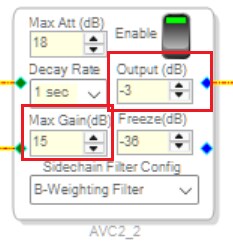
One question for this AVC block is: the Output dB and Max Gain is quite narrow for our customer project, the Output will lock at -3dB and Max Gain lock at +15dB.
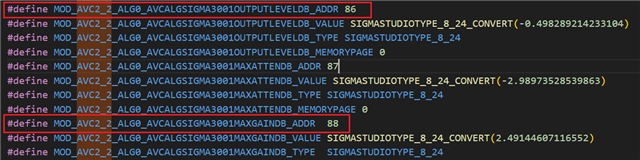
I tried exporting AVC block and checking the parameter, I saw the Output and Max Gain can be controlled, do these mean they both can over the value what I want? Do there any limitation? like the maximum value ?
Cause I change those value in Sigma Parameter window and nothing happen.
Could you share your advice for me?
Thank you!
Best Regards,
Davids
Hi,
I have experimented with this AGC block for the ADAU1452.
It seems this is the same AGC.
I also noticed that changing the parameters values don't change anything.
I saw that this block is not really an AGC function: it does not amplify the signal , it only reduces the level.
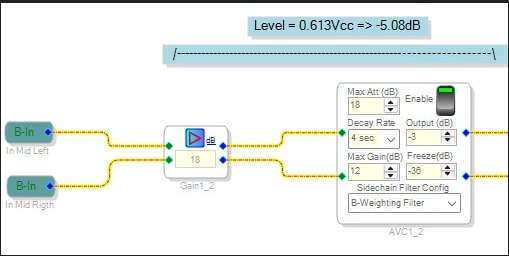
To have a true AGC function it is necessary to put an amplifier at the input with a gain (here 12dB).
Look at the schematics in attachment.
The problem is the saturation that is reduced, but this is not an issue for numerical signals.
Best regards,
Patrice
With the schematics
Hello Patrice,
Thanks for the reply!
From your picture, I saw you add up +18dB before you feed in to AVC block, which means you against the Max Att, am I right?
But at the final, the output will still stick at -3dB? or Could I say that +18 dB help you give more +15dB headroom to boost?
Best Regards,
Davids
No, it is dur to the fact the AGC doesn't have gain. For that it is not a true AGC
Hello Patrice,
Thanks for the reply.
I have tested with the schematic which you suggest.
Like you said, this AGC does not amplify any signal.
What if we need to go up over -3dB or control output to a specific level (like +5dB) we need to add the gain block behind the AGC block?
What I want to do is, I need to set a "Target Level" which need up to +24dB, cause we want to use AVC at microphone boost up.
Any idea for this one?
Thanks!
Best Regards,
Davids
Hello Patrice,
I did more test with write/change parameter function:
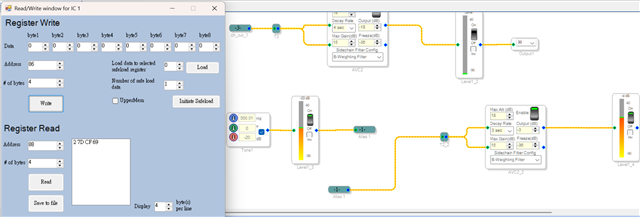
I use SigmaStudio register write to verify:
The original AVC block "Max_Gain db" limit at +15dB, but if you change the parameter with write function, like this example
===> in original AVC block, when I input -20dB level, it will only output -5 dB (cause -20dB + 15dB)
Then I send the parameter which is +20dB from SigmaStudio Register write, in below picture blue box, and it does add gain +20dB!
Next move I am trying to output 6dB...(below red box value), the final value I get is -1dB
No matter I input 0dB or 6dB even higher dB, it limits at output -1 dB, seems the max value is at here...
Hello DaveThib sorry to bother you, what if I need AGC control for Microphone boost up, and to prevent pumping effect, do we have any chance for this AVC block control to add up more +24 dB?
Thank you!
Davids.

Hello Patrice,
I apologize ahead of time but this will be a long post.
I have been experimenting with this block. I see it working fine, increasing gain or decreasing gain to match the value listed in the "Output" field. However, I see the limitations you are referring to.
You can write to the parameters either with a uC or directly from the DSP program on the Sigma300/350 parts. That is another discussion. At the moment I am simply writing directly to the parameters using the Params tab in the Capture window.
First, I setup a possible output level you might want, it is a little high but it makes the math a little easier.
So I set it up to -10dB for the target level.
I setup a test program.
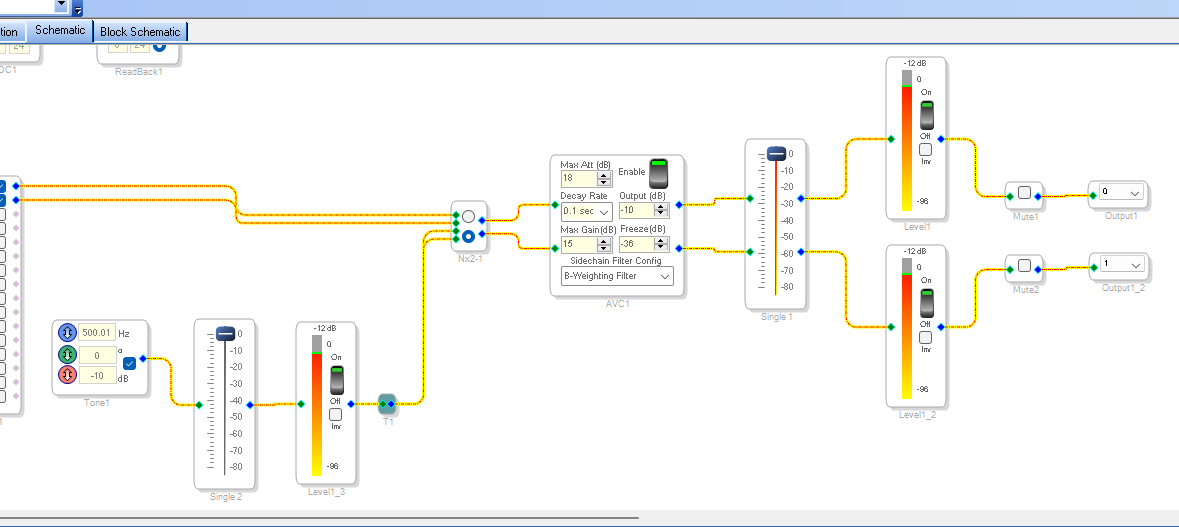
So here is an oscillator setup to output a -10dB signal and you can see what the meters read. Keep in mind that the meters are RMS meters and will roughly read -3dB when reading a 0dB signal. In this case it is reading -12dB instead of -13dB because of math details. If I change the level to -10.1dB it reads -13dB. But, it still gives us a good reading of the level.
So all the meters are reading -12
Now next I figured out what is going on internally. I see a parameter called Max Gain and when I change it I see it change.
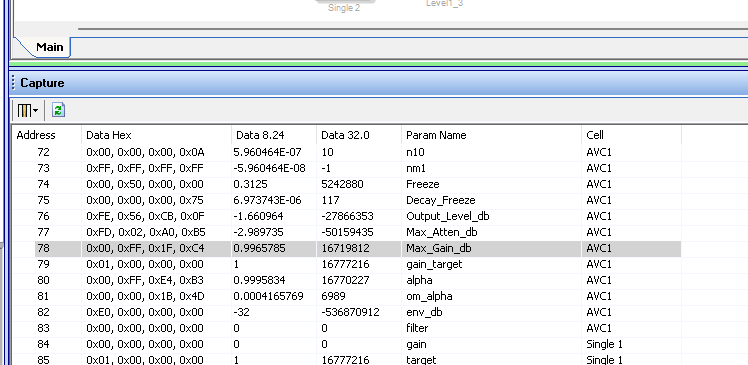
I lowered it to -6dB and this is what I get:
Basically it is 1, so this tells me it is doubling the voltage internally probably because it is adding up the two signals into the sidechain so it will add up 6dB. For whatever reason, I was expecting it to be a factor of 2. When I change it to 3dB max gain I get close to 0.5 so this all aligns that the voltage is being doubled internally. I can work with this.
So you want more than 24dB. A gain factor of 5 will be 13.979dB so I will call that 14dB. Then with the doubling it would be 28dB
In my experiments, I left it at the max gain in the GUI control which is 15dB.
So if my target is -10 and I go down by 15dB I can send in a -25dB signal and it should boost it up to -10dB and it does. I will not paste in a screenshot but the meters on the output read -12 as they did before.
If I change the oscillator to -26dB the meter now reads -14dB. Remember this goes back to the math, it was close to -13 before so going down one dB would be -14 but -10 was just a hair high enough to read -12. Don't obsess about this, the point is I lowered it by one more dB and I saw it had reached its max gain and went down by one dB.
So you want to be able to boost by 24dB. So a -34dB signal should be able to be boosted up to the -10dB. (reading -12 on the meter)
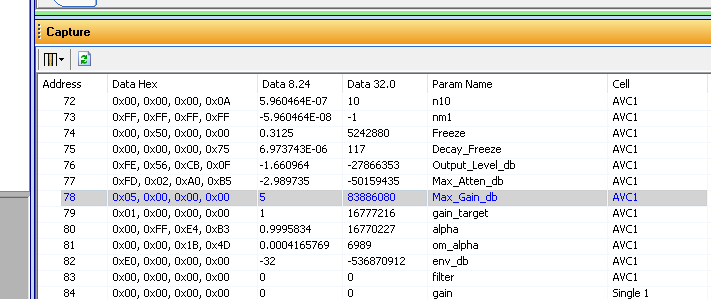
So I click on the 8.24 format data field and enter a "5" which should give us around 28 dB of gain possible.
When I do that with the oscillator still set to -26 the output went back up to -12dB
Now I enter -34dB in the oscillator block and the output meter stays at -12!! Yay!! I am getting the 24dB of gain.
I should be able to get around 28dB.
If I enter -37 it goes down and comes back up but passes the -12 and goes up to -10 when it really should not. So something else is interacting. It is probably the Freeze but that seems to make no difference.
There is a chance this block may be able to function like you want it to but you will need to stretch it out and there might be some other surprises. I got it to do well up to 24dB. Increasing the max gain factor does not seem to make this work better.
Here is my test project:
ADAU1452 AVC Test Project.dspproj
Experiment some and see if you can get it to work for you.
Dave T
Hello DaveThib,
Thanks for the reply!
For your testing, it is valuable and I also did this test 2 days ago, to change the Max Gain dB value, it does work.
But what I mention is "Output" in AVC block.
In AVC that limit at -3 dB, I want output to +24 dB at max, which means AVC can output to -3 to +24 dB
I am not sure AVC allow us to do that... in my self test, it always locking at -1dB at max
Thanks again for the quick reply.
Hope you can give me another idea for the "Output" setting.
Best Regards,
Davids
Hi Dave,
Thank you for this interesting reply.
For the moment I stopped the study of this device. I bought a board with analog outputs Center, Left, Right , etc. this board can be connected to an optical link but impossible to use it (chineese components are good but the notice is not tip-top).
I use new audiophones with a LE BlueTooth link that allows to receive directly the TV.
Best regards,
Patrice.
Please log in to reply.