ADAU1701 as master and WM8782 ADC and PCM5102 DAC as slaves possible?
Hello, Im fairly new to this kind of electronics so please excuse my stupid questions!
I have the following hardware:
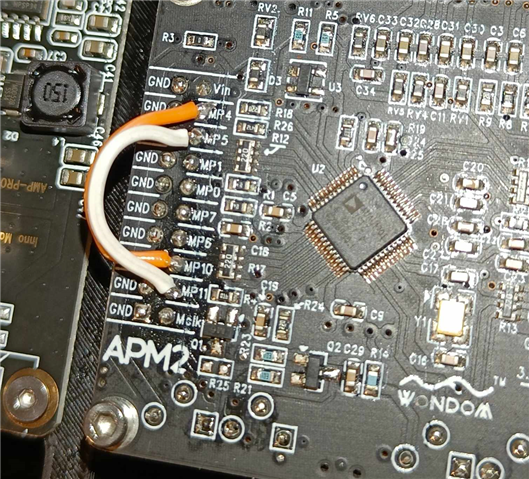
ADAU1701 from wondom (Their APM2 board):
PCM5102 from Aliexpress;
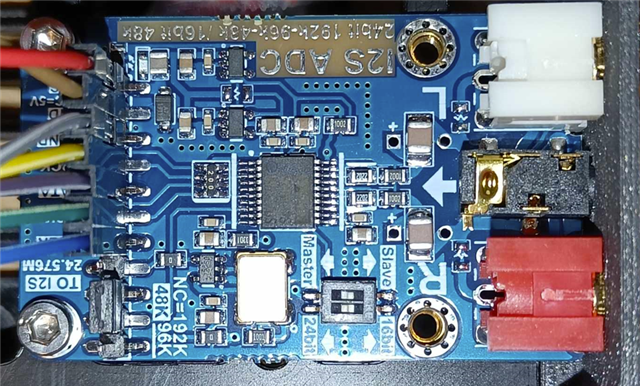
WM8782 ADC from Audiophonics:
All devices are powered by the same 5V supply with a power and gnd connection.
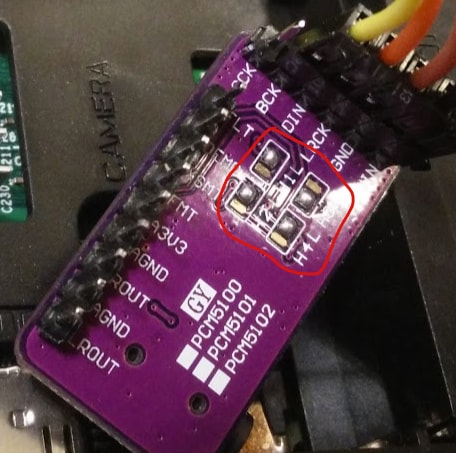
The DAC works and can play sound from the adau1701 (internally generated sine tone). It is setup with the following jumper pads shorted:
SCK to gnd - this way it uses an internal clock
Back side jumpers:
Not sure exactly what these things mean, it didn't work with no bridges(didn't try other combinations). I followed this guide: https://raspberrypi.stackexchange.com/questions/76188/how-to-make-pcm5102-dac-work-on-raspberry-pi-zerow
The DAC is connected to:
Sdata out to MP6
BCLK to MP11
LCK to MP10
The 1701 can not read usefull data from the ADC. All I get is a 0dB white noise which is very VERY loud if let through to the speaker. The ADC is steup as follows:
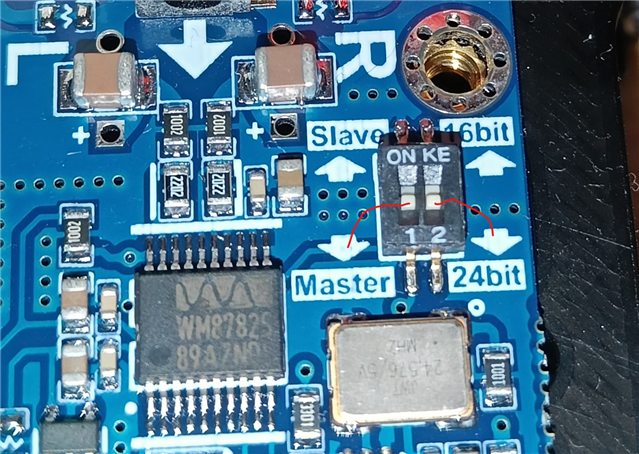
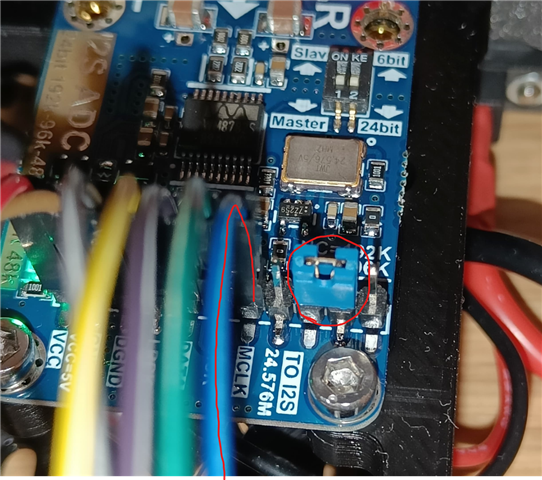
Dip switch set to slave and 24 bit
Jumper connected to use 48 Khz
Sdata to MP0
BCLK to MP5
LRCK to MP4
MCLK to Mclk on the J4 header on APM2. (Not entirely sure if this is a output, would asume so. I have asked wondom to confirm this)
(Bad picture sorry)
I have additionally shorted MP4 to MP10 and MP5 to MP11 according to the datasheet of 1701 when using a slave ADC.
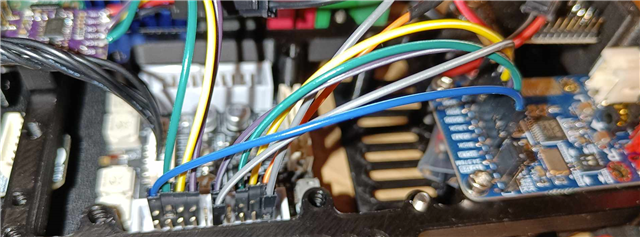
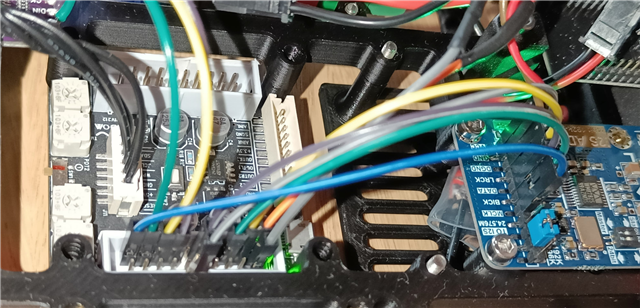
The hardware setup looks like this:
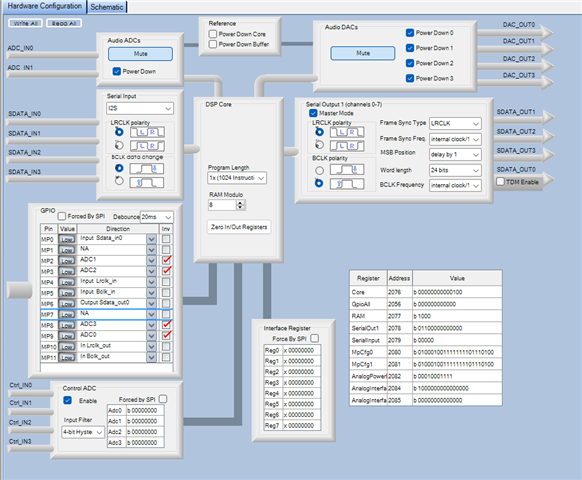
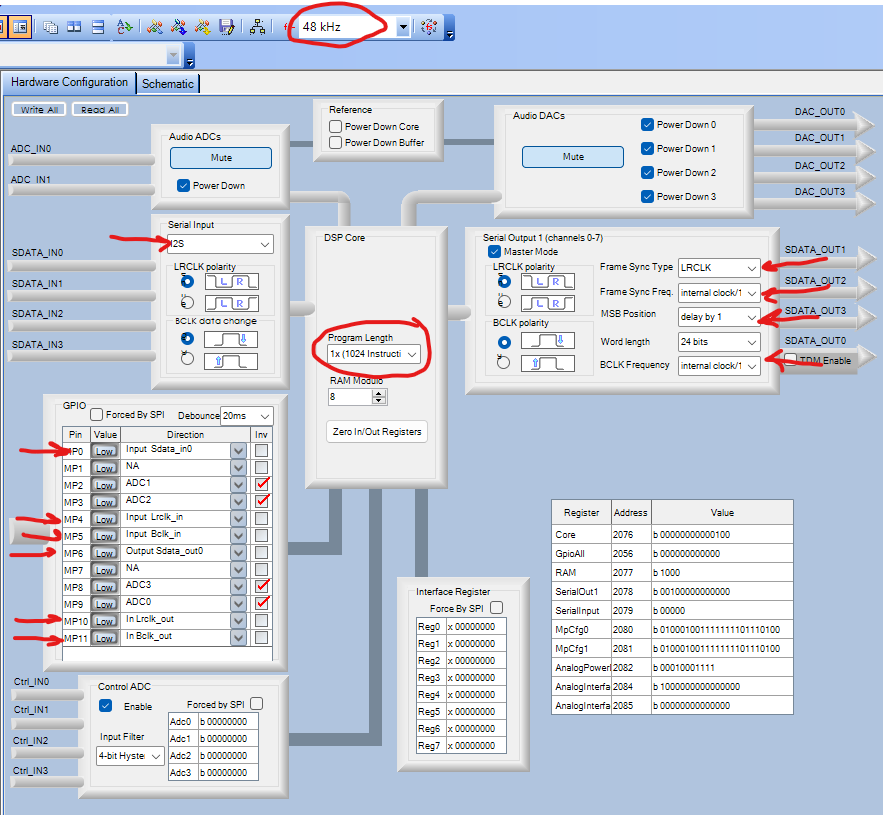
Frame sync freq = /1024 (Any other setting and the DAC stops playing
MSB position = 1 (any other setting distorts the sound of the DAC)
BCLK freq. = /16 Any other setting also distorts the DAC sound.
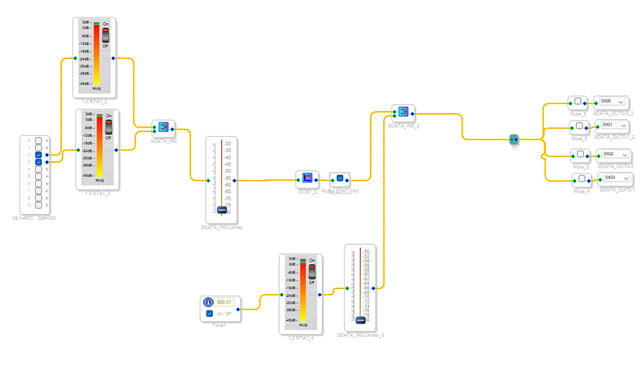
This is my simple schemattic, please ignore the second set of dig outputs, they are not used.
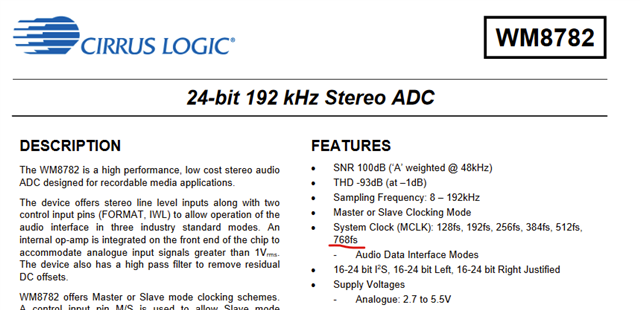
So my question is, what did I do wrong? Or are these i2S perefials not compatible while using the adau1701 as input and output has to use the same settings for BCLK and LRCLK and so on? I did notice in the WM8782 datasheet it only goes to a fs of 768, and im using af frame syng freq. of 1024 right? Though setting it to 768 does not look like it works on the level meter and DAC no longer works.
Thanks in advance!
Edit Notes
Removed links for other vendors.
[edited by: GenevaCooper at 1:25 PM (GMT -4) on 29 Oct 2024]
Thread Notes
santha.vijay - Moved from Processors and DSP to SigmaDSP Processors & SigmaStudio Dev. Tool. Post date updated from Tuesday, October 29, 2024 7:33 AM UTC to Wednesday, October 30, 2024 5:58 AM UTC to reflect the move.
santha.vijay - Moved from Processors and DSP to SigmaDSP Processors & SigmaStudio Dev. Tool. Post date updated from Wednesday, October 30, 2024 5:58 AM UTC to Wednesday, October 30, 2024 5:58 AM UTC to reflect the move.
santha.vijay - Moved from Processors and DSP to SigmaDSP Processors & SigmaStudio Dev. Tool. Post date updated from Tuesday, October 29, 2024 7:33 AM UTC to Wednesday, October 30, 2024 5:59 AM UTC to reflect the move.
santha.vijay - Moved from Processors and DSP to SigmaDSP Processors & SigmaStudio Dev. Tool. Post date updated from Wednesday, October 30, 2024 5:59 AM UTC to Wednesday, October 30, 2024 5:59 AM UTC to reflect the move.
Harishgowtham - Moved from Processors and DSP to SigmaDSP Processors & SigmaStudio Dev. Tool. Post date updated from Tuesday, October 29, 2024 7:33 AM UTC to Wednesday, October 30, 2024 6:02 AM UTC to reflect the move.
Harishgowtham - Moved from Processors and DSP to SigmaDSP Processors & SigmaStudio Dev. Tool. Post date updated from Wednesday, October 30, 2024 6:02 AM UTC to Wednesday, October 30, 2024 6:02 AM UTC to reflect the move.
Audio Signal Processors
adc
hardware
apm2
wondom
pcm5102
SigmaDSP Audio Processors
WM8782
adau1701
dac
Show More
Okay I was overthinking things and didn't quite understand the master/slave setup.
The ADAU1701 can be setup as master for the DAC while the ADC can be a master for the i2S input side. So this is the setup that works:
ADC:
Set as master
24 bit
set jumper to 48 khz
remove the clk jumper
inject mclk from the adau. You will find a pin on J4 of APM2 called mclk. in wondoms documentation it says its a input only. However, they themselves use it as an output in one of their video tutorials and it works as such. i suspect that pin is connected directly to MCLKIN on 1701 and therefore also the crystal output.
Connect lrclk, bclk and data from adc to appropiate pins on J4 of APM2 (ideally they should all be twisted pairs with a gnd wire, but hard to achieve with only one GND pin on the ADC and this seems to work to a point where no noise is added beyound the noise floor of my current amp).
Leave the solder bridge on the back of the ADC disconnected. This sets the output to i2S format.
DAC:
Set the back jumper bridges as shown here
Short the front solder bridge for a 3 wire i2S connection (I have not tried without it. it may work, but then you need to inject mclk to both the ADC and DAC)
Connect lrclk, bclk and data to appropiate pins on J4 of the APM2
APM2:
Do NOT jump lrclk in and out, same for bclk in and out. No jumpers required as adc is not a slave but master.
Set the hardware settings as follows:
Frame syng freq. = /1024
BCLK Freq. = /16
I choose to mute the internal ADC and DAC as I wont use them. They are crazy noisy on my unit at least.
All in all this setups works great. Much better performance than the build-in ADC and DAC on the adau1701, at least in the APM2 implementation. Only gripe I have is that the adc starts clipping when I go beyound 60% volume on my Desktop pc which is currently the source.
NOTE: When the programme (ICP5) is connected to APM2 there is a clear ground noise. disappears as soon as the programmer is diconnected.


Hello DannerD3H,
I apologize for missing this post. It was not in the usual forum for this part but you did put it in a logical place. Next time use this space: Q&A - SigmaDSP Processors & SigmaStudio Dev. Tool - EngineerZone
Everything needs to be on the same master clock. From my quick read of your posts it looks like that is what you eventually did.
With the 1701 you must be on the same master clock and there are no sample rate converters.
It is best to have the ADC be the clock master for I2S clocks (BLCK and LRCLK) and it is best for the 1701 to be the master for the clocks and data going to the DAC. Again, BCLK and LRCLK. This gives you the best timing margin.
You mentioned that it looks like the ADC is clipping early. This might be an issue with the data format settings between the two parts.
It looks to me that you have the 1701 set properly but I cannot vouch for the ADC settings. Looking at it on a scope will help you see if it is clipping or if there is one more bit missing. This post I wrote you might find helpful for setting up a scope for looking at the I2S signals.
How to Take Meaningful Screenshots of I2S Audio Signals - Q&A - Audio - EngineerZone
One bit is 6dB and -6dB is half voltage. +6dB is double the voltage. So this is a clue. However, it could simply be that the ADC is setup to have a lower level be full scale and the computer is putting out way too high of a level. Looking at the digital data stream will help answer that. Another way is to measure the peak voltages at the pin of the ADC input and see how that relates to what the ADC datasheet says is a full scale voltage. For me, I just look at the data but I look at this stuff so much that I know what full scale data looks like. (I know, I have an appointment with my psychiatrist about it. LOL)
My hats off to you!! Great project and great work! You did awesome by just starting halfway with having the DSP generate a signal and getting the DAC to work. Then moving to the ADC side once the DAC side was proven. Well done! Did you watch my Troubleshooting video on YouTube?
Dave T
No worries, I wasn't expecting an answer, I was just explaining what I did if anyone else would ever need it :)
Yes the ADAU1701 PCB provides the MCLK for both ADC and adau1701.
ADC is set as m-a-s-t-e-r to generate its own LRCK an BCK.
DAC's are set as s-l-a-v-e and PLL mode. So they recive BCK and LRCK from the ADAU1701. They do not recive MCLK as it isn't needed for this particular DAC.
As far as I can see the data formats are set correctly.. I simply suspect the quality of these china PCB' /implementations. That being said, i really need to get myself a scope and learn how to use it to be able to see whats going on. Especially now with my own DSP design.. Thanks for that link, that surely will come in very handy later!
Thanks! I hope my own DSP and DAC/ADC will work better than this spaghetti monster.. time will tell xD will first test the dsp with this ADC and DAC so expect no difference in performance. But then I can hopefully verify if the DSP works as I know the other two parts "work". Then I will go for the DAC and ADC board :)
Please log in to reply.