Regarding the behavior of the adau1772 evaluation board
Hello. I recently purchased and am using the adau1772 evaluation board.
The power to the eval board is powered by USB.
For the input signal, I input a signal with OFFSET=0V, AMPLITUDE=500mV to AIN0 of J11 through a function generator. Also, to see the output, I am using it by connecting CLASS AB audio amp -> speaker to J23 in that order.
(Overall structure: function generator -> adau eval board -> audio amp -> speaker)
(The positions of each jumper are the settings that were delivered when it was first installed.)
When I first operated it as above, the sound was output well and various functions (inverting, PGA, etc.) on Sigma Studio worked well.
But suddenly, the appropriate address for operation is not entered in the register, and even if the appropriate address is entered, the sound is not output.
It may seem like a silly question, but I have no idea why it doesn't work.
I'm attaching the SigmaStudio file I used and a picture of the board.
Thank you.design1.dspproj
Audio Signal Processors
hardware
adau1772
Integrated/Special Purpose A/D Converters
SigmaDSP Audio Processors
Audio CODECs
Show More
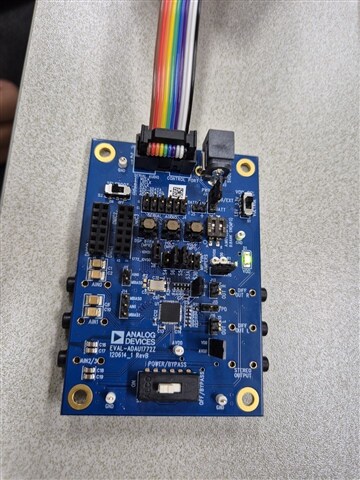
+++
When measuring AIN0 of adau1772 chip with OSC, I confirmed that the signal input to the function generator was input. However, when measuring RP/LOUTRP, which is thought to be the output pin of adau1772 chip with OSC, no signal was measured.
DVDD measured 1.26V.
CM measured 1.65V.
Hello YEONGJI,
you somehow turned on the Selfboot function which will cause problems if it is not programmed.
On this part it will also lock up the USBi if you try to program it so if you get the "compiled Comms Failed" message on the bottom right of the screen. Then unplug the USBi from the USB port and reinsert it, then try to program the part after you turn off the selfboot switch.
I verified this on my board using your program.
Dave T
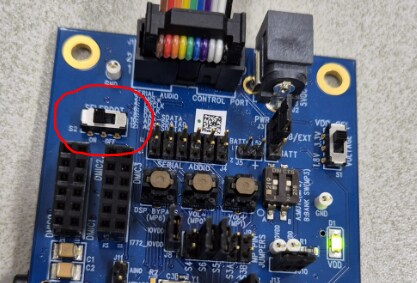
Hello. Thank you for your answer.
However, I still have a problem with the operation.
I turned off selfboot and tried to operate the board yesterday. However, when I upload (F7), the sound for the input signal is output for about 1-2 seconds and the board turns off immediately.
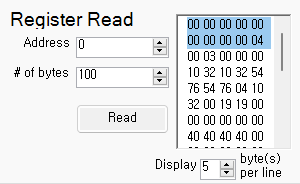
Q1) When the sound is output for 1-2 seconds, the numbers from the first to the 10th byte are different from when it doesn't work. Is this normal?
Q2) When I first bought the board, I confirmed that it worked well, but now it doesn't work well even with the same settings as before. Could it be a board failure? I don't know what else to try.
Hi YEONGJI ,
I was also able to run your project you attached and see the following from the Register Read window
I have no issues reading the first 10 bytes which are show as all zeros from your screen capture.
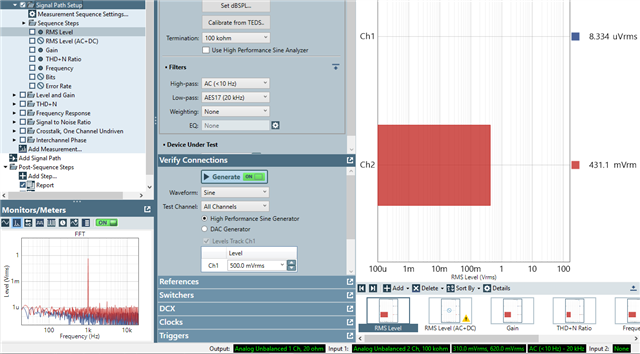
I can also see the 500mV input signal from a 1kHz sine wave generator I'm using at the output of RP/LOUTRP.
The fact that you were able to hear output for only 1-2 seconds and then for your setup stops is very strange. Perhaps the project you're using has been corrupted?
Could you try re-downloading the project you've uploaded to this thread and re-try?
Thanks,
TBM
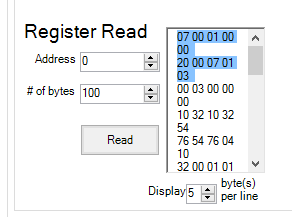
Is there a way to reset all the settings on the eval board? I can't seem to find it in the datasheet.
disconnect your preamp/amplifier/speaker and just look at the output with a scope and see if it stays present.
Please log in to reply.