Best practice for volume controlling with IR remote and potetiometr (ADAU1701)
I am designing an active speaker system with remote control via IR. Could you please advise on the best practices for volume control using both a potentiometer on the device itself and buttons on the IR remote?
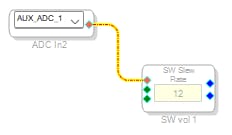
My current solution includes using the AUX_ADC block for the potentiometer on the device
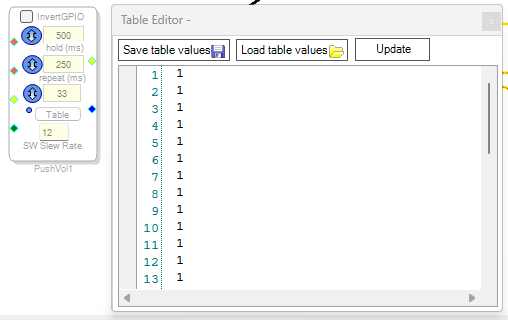
and the Up/Down PushButton Volume block for adjusting the volume via the remote. The ESP32 microcontroller, connected to an IR receiver, will send the control commands.
I have a few questions regarding the Up/Down PushButton Volume block:
What format should the data in this block’s table follow?
Should I be using the green "Interface In/Interface Out" pins in some way?
Is this setup optimal, or is there a better way to implement this functionality?
Thank you in advance for any advice and recommendations!
Audio Signal Processors
hardware
SigmaDSP Audio Processors
adau1701
Hello OctopusDev,
You have the solution for using the AUXADC feature to control a volume control. For this DSP that is all you need to do.
For the IR control have your microcontroller create an Up/Down control output then send these out to two pins that you setup as a GPIO inputs. Then send those to the volume control in the library that is made for Up/Down buttons.
I actually went over this on one of my videos. So I suggest you watch this because I talk about a lot of little things that take too much to type.
ADAU1701 2-Way Crossover
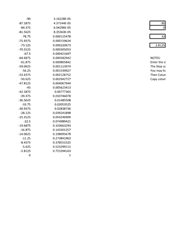
For the table... These are gain factors. The numbers that are listed are used as a multiplier to multiply the audio by that number. So a "1" is unity gain, or full volume. You can actually add gain but usually that is not needed or desired. You will have to implement a taper of your choosing. I have setup a spreadsheet to calculate gain factors in logarithmic steps to have more of a normal audio taper to the volume control.
I also did this other rather complicated project where someone wanted to be able to read the current setting with their microcontroller and also to update it if needed. Like when it powers up load in the last saved setting. They also asked for a chime for when you reach min and max volume.
Here is the project but keep in mind this is a bit complicated so do not be scared away.
2210.ADAU1701 Up-Down Vol with Chime at max and min vol.dspproj
Here is a text file of the 33 log values I used in that project. You can load it in from the GUI. You can also save it away in a file from the GUI.
Fullscreen
1374.33 Item Table Log values from 0 to 1.txt
Download
0.00001
1.43301E-05
2.05353E-05
2.94273E-05
4.21697E-05
6.04296E-05
8.65964E-05
0.000124094
0.000177828
0.00025483
0.000365174
0.000523299
0.000749894
0.001074608
0.001539927
0.002206734
0.003162278
0.004531584
0.006493816
0.00930572
0.013335214
0.01910953
0.027384196
0.039241898
0.056234133
0.080584219
0.115478198
0.16548171
0.237137371
0.339820833
0.486967525
0.697830585
1
Here is my gain factor spreadsheet. You should be able to figure this out. Just enter the starting dB and ending dB and number of table elements and it will do the rest. Then copy and paste the gain factors into a text file then import the text file into the volume control GUI.
One little detail about the text files. Make sure the last line is indeed the last line. If there is a carriage return at the end of that line then you end up with one extra element in the table when you import it. you will think it is 33 but it will be 34.
XLSX
I think all this info should help you. Do not be discouraged, it is not that complicated I just gave you lots to go over.
Dave T
Thank you very much Dave! Now I have a clear idea how to do IR control. But how to implement volume control, both with a potentiometer and with a remote control? I agree that when turned on, the volume would take the value of the potentiometer.
Hello OctopusDev,
Have a pot using an AUXADC and an IR remote with and Up/Down control are somewhat at odds with each other. So you may have to program some smarts into a system controller to take care of this. Because you will have to override the pot when you change the volume with the remote so do you then just have an offset of the volume setting on the pot? If you click the remote then turn the pot what happens? What wins? My first thought on this is to have the AUXADC just feed a ReadBack and that is it, then the system controller reads that level. Then have a DC cell to drive a volume control that you update using your system controller. This means your controller has full control of what the level is and when it is updated and what updated it. If you were using a rotary encoder and or uup/down buttons on the hardware then then have the remote with an Up/Dwon control then one of my examples I gave you would because they both work the same basic way. The problem with using a pot and then an Up/Down control is that they work very differently.
Dave T
Hello Dave!
I would like the user to see the potentiometer mark and know what volume he will get when turning on the source or after turning on the device. (This is important, because there will be many users and I would like to do without using digital displays). In this regard, I would not like to use an encoder. A person sets the average normal volume, and then adjusts it from the remote control if necessary. (This is for shaping areas). I expect the following behavior - when turning the potentiometer, the system completely obeys it. When turning on, it also follow the potentiometer ADC value.
The main question is - when giving UP DOWN signals from the remote control, will the system automatically use the values from the potentiometer? Such behavior is not needed. I want the system to accept the value from the potentiometer only when it is rotated and the device is turned on. Will it be possible to ensure such behavior? I suspect that contact anti-bounce needs to be used.
Thank you!
Hello OctopusDev,
You are narrowing down on the behavior.
This is where the system controller would monitor the movement of the POT.
What I envision is this:
At power up, have the DC cell that is driving the volume control be set to zero. (off)
Have the controller read the pot and then update the DC cell with the correct value based on the position of the pot.
Then if you press up/down then just update the DC cell with the undated gain value.
Then the controller should always be polling the Readback of the pot so see if it moves. If it moves then update the DC cell with the new volume based on the position of the pot.
I probably can build a project that will have the ability to do this. Have a switch between a DC cell and the pot and have logic switch to the pot whenever it is moved.
Dave T
Please log in to reply.