Change sample rate to 192 kHz
Hello,
i am a mechatronics student and have a problem with the developer board EVAL-ADAU1467Z. The board is set to a sample rate of 48 kHz at the factory. I would like to set the developer board to a sample rate of 192 kHz. There are no precise instructions in the data sheet for the developer board.
Can you give me step-by-step instructions on how to set the ADAU1467 and AD1937 codec to 192 kHz with the USBi in SigmaStudio 4.7?
Thanks for your help.
Mario
Edit Notes
.
[edited by: MarioSchmitz at 4:40 PM (GMT -5) on 11 Nov 2024]
Audio Signal Processors
software
sample rate
sigmaStudio 4.7
adau1467
EVAL-ADAU1467Z
Integrated/Special Purpose A/D Converters
SigmaDSP Audio Processors
Audio CODECs
ad1937
Show More
Hello Mario,
I wish this was simpler but it is a bit complicated.
There is a switch on the eval board that sets the codec into StandAlone mode. In this mode it will run at 48kHz due to the crystal that is stuffed on the board. The standalone mode on this codec means it also only accepts I2S and not TDM data. You can read about this in the AD1937 datasheet.
The ADAU1467 has the ability to split off the I2C master comms port to two MP pins. This is all detailed in the ADAU1467 datasheet.
So the switch will move the codec I2C control pins over to the two MP pins on the DSP.
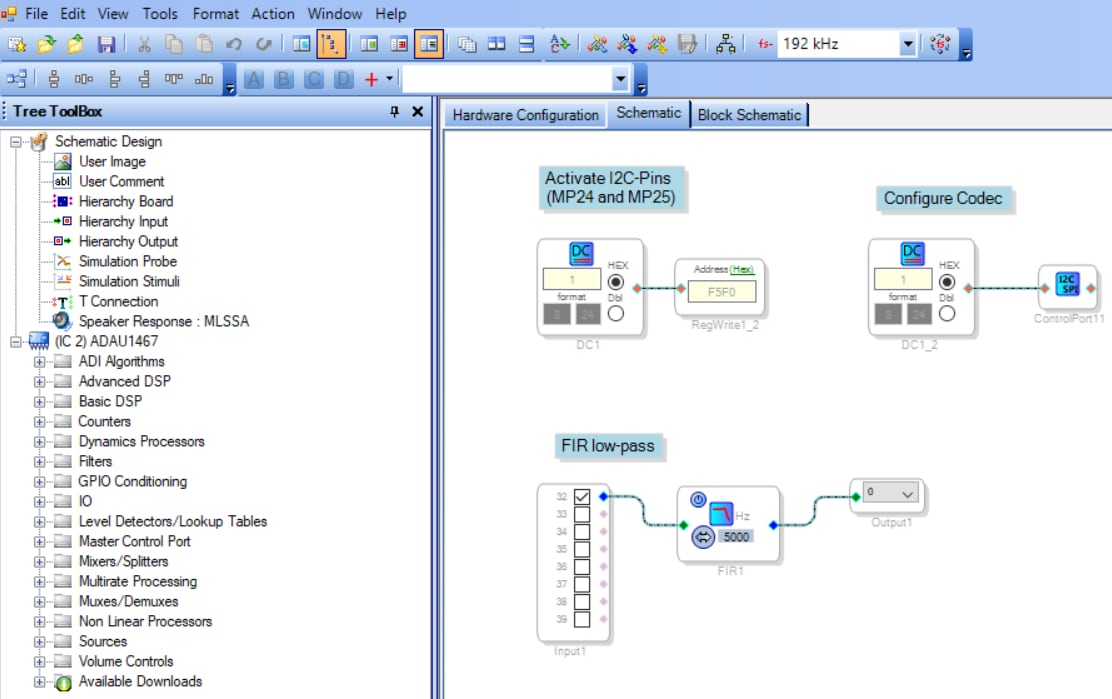
So this handles the basic hardware aspect. Now, you have to program the DSP to spilt off the control port and setup the MP pins correctly.(just register writes) and then you have to program the DSP to setup the codec. This is done using a special cell in SigmaStudio and point that cell to an XML file that has the commands to setup the codec registers to run at 192kHz and any other changes needed like if you want to use TDM.
Then of course you have to setup the DSP program and all its registers to run at 192kHz.
This is also barely mentioned in the eval board user guide on page 22
EVAL-ADAU1467Z (Rev. 0)
I have an example in my computer archives. It looks like there are two examples in here. One dated 2018 and one dated 2022. The number in the project name is actually our build date code for the eval board. I think this should be the board you have. If not I think this newer file and the newer XML file is what you need. The date code is 08-048585 and you will see that in the project file name and you should see it on the board right below the Analog Devices logo and board part number.
4477.SigmaDSP Programming CODEC via I2C to 192 kHz.zip
This should get you further along.
Pull out a scope and watch the LRCLK lines to see if it switches to 192kHz and also you can watch the I2C lines to see if commands are going out.
I think it is MP24 and 25 and there are test points on the board. Since you are a student I will say that if you want to gain an advantage from other students learn how to use a scope really well and learn how to see and read I2C on a scope!
Dave T
Hello Dave,
Thank you very much for the very quick reply and your good advice. I have the board labeled “08-048585”. I have already done some tests with your script and checked with an oscilloscope. The LRCLK data line now has a frequency of 192 kHz.
This is how I proceeded:
- Switch S2 to “I2C”
- Insert XML file: Hardware Configuration --> IC 1 - WinE2PromLoader --> press “click here to browse for file” (above the button “DownLoad File to E2Prom”)
- upload code with the schematic
However, running my FIR filter is still causing problems:
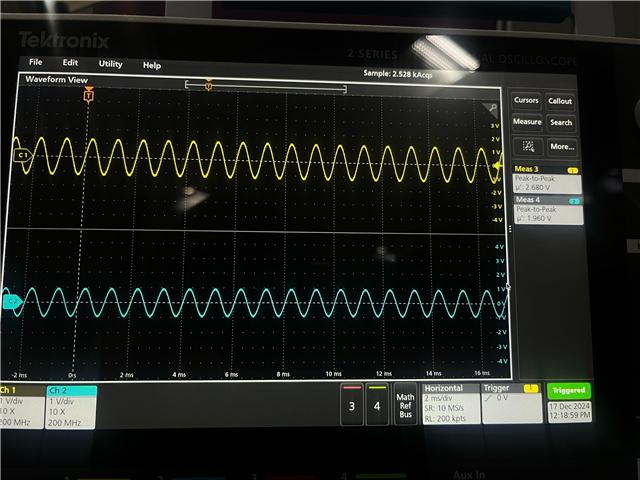
I would like to measure the latency in my tests in order to examine the real-time capability of the developer board. To do this, I use a 2 kHz sinusoidal signal that is output every 10 ms. The yellow curve is the input signal and the blue curve is the output signal.
I set the FIR low-pass filter to a cut-off frequency of 5 kHz. I tested the measurements at 48 kHz (left image) and 192 kHz (right image) and both output signals should be equally attenuated (attention, a smaller measuring range was used for the right image). However, the signal is attenuated far too much at 192 kHz. What could be the reason for this? Do I still have to make settings in the clock registers of the adau1467?
Thank you already for your help.
Mario


Hello Mario,
Good progress on this!
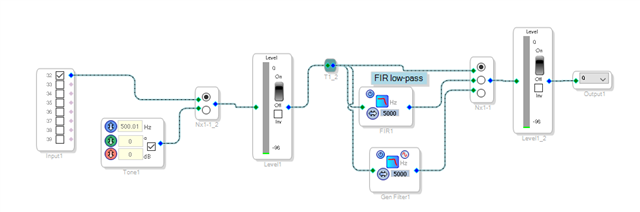
Do one small thing and that is to add a MUX (a switch) so you can bypass the FIR filter to rule out any filter issues.
You can also add even one more selection on the switch and drop in an oscillator to have the DSP core generate a signal and measure that was well.
There is some much troubleshooting you can do using SigmaStudio!
Have you watched my troubleshooting video?
How to use SigmaStudio for troubleshooting
Anyhow, do those basic experiments and then when you respond include your project so I can check for some other possible issues.
Dave T
Hello Dave,
thanks for the feedback. Everything looks fine when looping through the signal. I have also investigated IIR low pass filters and the 4 band compressor and they don't give false outputs like the fir low pass filter.
I have already watched your video and I'm going to try a few things from it.
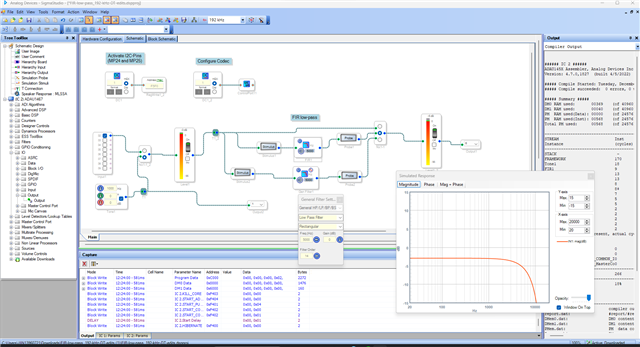
Here is my project file with the faulty FIR low-pass filter.
FIR-low-pass_192-kHz.zip
Thanks for your help
Mario
Hello,
I tested whether the DSP reproduces the specified frequency at a sampling rate of 192 kHz using dsp's own tone generator and that was the case. So everything should be set correctly, but unfortunately the problem with the fir filter remains. With other algorithms, such as an IIR filter, everything works as it should. What could be the reason for this?
Mario
Hello Mario,
You have the DSP core set to a sample rate of 48kHz. I question how you tested the internal oscillator because that should have been 1/4th the frequency. The project you supplied did not have any testing options at all.
Set the core rate to 192kHz and that should help.
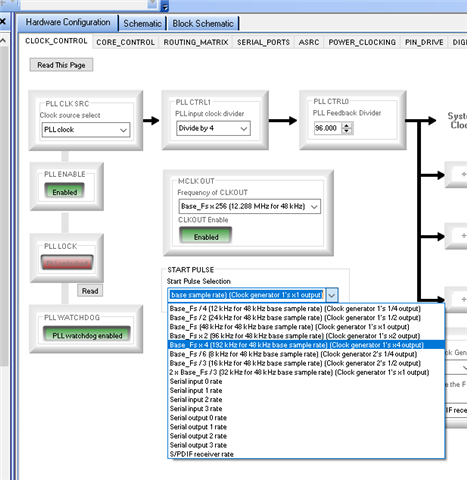
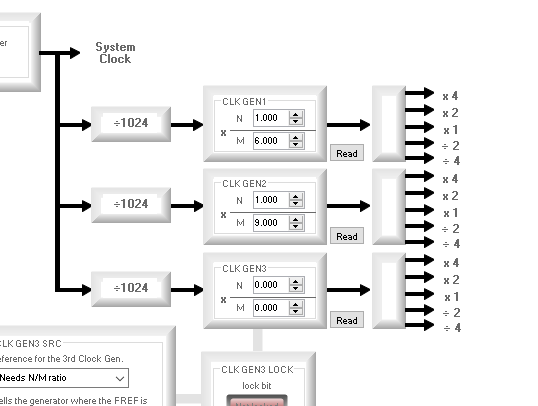
The other detail is that you had the clock generator 1 set to 2/3. Which will produce the correct 192kHz sampling rate when set to the base fs x 1 setting so you were running at 192kHz. However, I had mentioned this earlier that this is not a good way to run this part. This means you have internal clocks just screaming at fsx4 = 768kHz. this eats up power and add noise onto the ground and power and is not needed. Set it up for a base fs of 48kHz and set the start pulse to use the fsx4 output of the clock generator.
So this goes back to why were you getting bad output? It seems you were running at the correct rate.
I am not able to test this at the moment... too many other demands on my time.
Your program is too simple and does not allow you very much of an ability to troubleshoot.
Do something like this:
This gives you instand ability to see if the signal is there. You can use an external or internal source with the click of a button. You can read out the output directly from the input to check the inputs and the core and then be able to look at the Bi-quad or FIR filter and see the level in the core before it goes out.
Here are the changes I made to your project
FIR-low-pass_192-kHz-DT-edits.dspproj
Dave T

Hi Dave,
thank you very much for the detailed description. I have tested your code and set the base sampling rate for the serial input and output to “4*Fs” so that the serial interface runs at 192 khz. Unfortunately, the measurements with the oscilloscope did not show any improvement in the fir filter. Here is my code.
FIR-low-pass_192-kHz-DT-edits.zip
I will carry out further investigations to solve the problem.
Mario
Hello Mario,
I have run your code, and I got an expected output at 192KHz. Please have a look below.
Have a look at the frequency response of the filter, it is -3dB at 1000Hz. when I input a 0dBFS signal of 1000Hz, the level meter at the output of the filter shows -6dB correctly.
Note that these meters show RMS value, so a 0dBFS will be shown as -3dB and -3dB signal will be shown as -6dB.
The yellow trace is output 1 (direct) and blue trace is output 0 (thru filter). The output of the filter is very much related to the frequency response of the filter.
Note the filter parameters above (cutoff, filter order etc)
When I changed the program sample rate from 192KHz to 48KHz, the frequency response will obviously change. Now for the same filter parameters, the frequency response is different at 48KHz. Have a look below. SS calculates the new coefficients for the new sample rate.
So, when you change the program sample rate, the same filter (parameters) at one sample rate will behave differently at another sample rate. Because it's totally different coefficients. So, it's up to you to design it as you want with respect to the sample rate.
So, in your case when you designed a filter at 48KHz and measured the output and just changed the sample rate to 192KHz (the frequency response of the filter would've changed) and measured the output, you will definitely see the difference. In the above two picture, you can see the 192KHz response is lower than the 48KHz one.
Regards,
Harish

Please log in to reply.