Which file I have to select at Step3 ?
Hi,
I am a beginner with the following boards: AMP2 + AMP3 and the ICP1 Programming board.
I installed the system using "Basic SigmaStudio Programming Guide" : there is no issue.
Now I try to compile and show , using "Connect ICP1 with ADAU1701 DSP Products for programming"
At step 3 it is written "Click here to browze for file" and select the firmware file : What is the name of this file ?
In the directory "Projet" I have a lot of files:
net_list_out2 /
compliler_output.txt
hex_program.data.DAT
hex_program_simdata.DAT
program_data.DAT
spi_map.DAT
trap.DAT
as_code.enc.ENC
net_list.cir2.CIR2
trap.DAT
Witch file should I select ?
Is there any document explaining that?
You are welcome to enlightener me.
Best regards,
Patrice
Audio Signal Processors
software
SigmaDSP Audio Processors
adau1701
Hello Patrice,
These are instructions for using the ICP1 which is not our programmer but it really should not be different.
At first I thought you were asking about programming the EEPROM but I think you are just asking about programming the DSP on the board to test it and see if the program does what you want correct?
Then you need the xxx.dspproj file. This is the DSP project.
I do not know the name of the file because I do not know what product you have.
Here is an example file I have from Dayton Audio
This is the DSP project file.
Have you found my YouTube channel yet?
(3) How to SigmaDSP and SigmaStudio - YouTube
Dave T

Hi Dave,
At first I thought you were asking about programming the EEPROM but I think you are just asking about programming the DSP on the board to test it and see if the program does what you want correct? Yes
Thanks for the YouTube link.
I'll take a look at it, but unfortunately I am not English but Français. It's very difficult for me to see them.
I discovered a bad solder in the ICP1 Board, so for the moment it is impossible to program the board anyway.
Many thanks,
Patrice
I think it is impossible to progress: I have new boards, new wires, new sotfware, new application ...
I have to test the system gradually: how should I proceed ?
Hello Patrice,
I wish my French was better but it is horrible! LOL. The good thing about YouTube is the translation feature but it will get some things wrong. I try to talk more slowly but it is difficult when making these videos.
Yes, I interpreted your question as how to program the DSP itself not the EEPROM.
What boards do you have?
What software are you using?
What application?
Give some details.
Pictures can sometimes be handy to see something obvious to me but not to others who are new at this.
Dave T
Hi Dave,
I have AMP1 + AMP2 boards and the ICP1 Programming tool.
In fact the ICP1 Board does not work correctly (the USB connector is badly soldered)
Since I am in Canary Island it takes months to exchange it !!
I created a very simple DSP software: An input connected to 2 outputs.
When I compile the DSP Program it is ok but when I click the "Link Compile Download", I get the following result in the bottom/right corner: 'Compiled, Comms Failed"
---> I suppose this is normal since the ICP1 board is not correct !!
Anyway I try to move forward (is it possible without the ICP1 board ?), I follow the document "Connect ICP1 With ADAU1701 DSP Products for programming" at stage "Step3" ---> I get a problem.
It is impossible to click on the "Write Display to E2Prom" : should I have to do so ?
For the moment I can't progress on the subjet, I have to wait for a correct ICP1 Board ( or is it possible to test the program without board ? )
I hope this can help for understanding my situation.
Yours sincerely,
Patrice
Hello Patrice,
I still do not know which boards you are using. When I go to Dayton Audio web site they do not have the AMP1 or AMP2 boards listed. Please include a link.
The No-Comms message means several things. There could be no power on the DSP or the board. The address could be set wrong for either the DSP or in SigmaStudio. Then the connection issues. Once you fix the ICP1 it should work. Use a scope and attach it to the SDA and SCK lines somewhere close to the DSP. Then see if the ICP1 is sending out an I2C message. Then see if the DSP is returning an ACK. This will help figure out if the problem is on the board or the ICP1. Look a little deeper and get a bit more info. It will help point you in the right direction.
If the EEPROM is empty then that is good. Also, if you can disable the selfboot and just power up the part it will have a default program. This is explained in the datasheet.
This could help in troubleshooting as well.
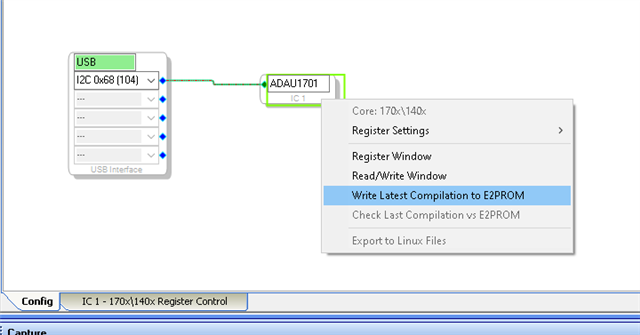
You only have to click on Write Display to EEPROM when you have loaded in a hex file from either the disk drive or from the EEPROM itself. You have to have a programmer working for this to function.
Usually, you compile the program then you write the latest compilation to the DSP and you do not use the Read/Write window. This is where you do it:
You right click on the DSP GUI.
But, again, without the programmer you cannot communicate with anything.
Dave T
Hi Dave,
I don't bought the boards on Dayton Audio web site, I bought them on Wondom web site.
This site belongs to Sure : https://store.sure-electronics.com/home
ICP1 = Board DB-DP11219
AMP2 = Board AA-AP23122
AMP3 = Board AA-AA11428
Best Regards,
Patrice
I just bought same boards from Wondom (adau1701) (except ICP5). I have the identical error. Program compiles fine, but it will not load. So I'd like to participate in this thread.
Hello AeroS and PatriceLan,
So let me get this straight. Both of you compile the program and just click on Link/Compile/Download and then you get the "comms Failed" error on the bottom right of the screen correct?
Do either or both of you have an oscilloscope? Tie two channels of the scope onto the SDA and SCL pins 22 and 23. Trigger on the SCL signal and set the scope for single sweep to catch the first communications to the part. Set the sweep speed so it gets several bytes and fast enough to see each bit and cycle of the clock. Then send that over.
Usually you get these errors when only a few things happen.
1) no power on the DSP
2) The address of the DSP is set wrong or does not agree with the address in SigmaStudio. The address is set on pin 20 and pin 7. Most of the time address 0b00 is used so both of these pins will need to be set low.
3) The reset pin , pin 5 is held low holding the part in reset.
4) It is best to not be in selfboot mode when trying to directly program the DSP but this often does not give you the comms error. It would just not program correctly or not work correctly. But you can communicate with the part. The selfboot pin is pin 6 and it is most likely pulled up to put it in Selfboot mode. So pull the pin low. If it is tied to power then you cannot pull it low. I doubt they did that. They should pulled it up or down with a resistor like the datasheet suggests.
AeroS, are you by any chance in the Boston area? If you are then send me a friend request and then a PM.
Dave T
Hi Dave, Thanks for the input. I am getting some screen shots on my Tek scope. SCL and SDA look fine. Power and ground solid. I do know it is not in reset. I'm going to check the status of pins 6,7,20 for low status. When I do this, I will give a full reply.
BTW I waved my Majic wand over the board -set yesterday and by some action, got it to program. I loaded several programs and the Wondom system works well. I left it on all night, and it was working this morning. But accidently un-plugged the USB to the programmer and lost it. After many tries and sequences today, no go.
More later. I just wanted to let you know I'm working in this. I'm convinced it a hardware issue on the Wondom programming board (Cypress USB chip?) but can't prove it yet. I'm sure its not an ADI issue, but its strange we can't communicate with Wondom support.
Thanks for our support.
Hi Dave, The ADAU1701 address is set in Sigma Studio 4.5 as I2C 0x68 (104). The DSP (1701) is on the Wondom APM2 board. I found DSP: pin 5 (high, then low if the reset switch is held); pin 6-high, 7-low, 20-low. Comments? Don (AeroS). Sorry, in western Colorado.
Morning Dave and Patrice, I pulled pin 6 low (out of self-boot) and I've started up 3 times, compiled and download successfully. So thanks to Dave for suggesting this. I bought these Wondom boards as an economical way to try the ADAU1701 (and use SigmaStudio), without making a big $ commitment until I found a DSP that would work for me. These boards are well built, but I can't find schematics. I'm surprised I needed to do board work to change self-boot (pin 6)! I found pin 6 high thru R26 (4.14k) and a 0-ohm resistor pulled to 3.3V. I moved R26 (so 1 pad matched the trace to pin 6 and isolated the trace to the 0-Ohm resistor. Then soldered a 20mm jumper to ground. To start-up, I had the programmer powered thru USB and then held the reset switch on the '1701 board and plugged in a USB for power-only from a 5V wall-charger. Then released the switch; compiled, downloaded. This is fine until I need to go back to self -boot (reverse changes). It' odd and bad practice to require two 5V supplies since the 5V back-feeds to the programmer board.
If you want a picture of what I did, please advise. This closes out this thread for me. Thank you. Don-AeroS (retired experimenter stage of life, having used ADI parts since 1995!)
Hi all,
For the moment I can't be of any help. I have to way for a new PC board (I live in Lanzarote and there is a long delay to receive a new board).
Have a good experiment !!
Best regard,
Patrice
Hello AeroS,
Good work!
Comments for others first,... When checking the I2C comms, seeing a transmission on the scope is the first good sign that "something" is happening but what you then need to do is to look closely at the bits. There will be a ninth bit that is the ACK (acknowledge). The transmitting device will allow the line to float high because of the pull up resistor. Then the receiving device will pull the data line low. You will see a small tick where it is high for a very short time then gets pulled down. The transmitting device will see the SDA line low and know that the receiving device got the byte. I have seen it where the receiver does not pull it down. The transmitter will try a few more times then give up and report the comms error. That is what I look for. Is the receiver returning the ACK?
For the Selfboot. What happens is this. SigmaStudio will send a soft reset to the part so SigmaStudio knows the state of the part and all the registers. This reset will cause the DSP to wake up, see the selfboot pin high and start booting from the EEPROM.
This happens rather quickly. Meanwhile, SigmaStudio and Windows takes its good old time to compile the program and start sending the program to the DSP. Not knowing the DSP is selfbooting.
If the program is fairly small then the selfboot loads in the program and is done, then SigmaStudio starts overwriting the program with its program and starts up that program. Often you do not notice any issues. Sometimes the EEPROM program changed a register that causes a problem if the SigmaStudio program does not need to write to that register.
If a program is large, then the Selfboot state machine is not completed when SigmaStudio starts to write to program RAM. So now you get a mish-mash of the two programs and anything is possible and it usually is not pretty.
I think that is what you were running into. So pulling down the Selfboot pin to disable it removes the issue.
The Wondom boards are great and super low cost but they are not responsive at all. I tried to contact them as well and silence. Even with my ADI credentials and email address. I was looking to see if they would build a board for schools to use and also for schematics since I do end up supporting them by default! Oh well....
I am glad to see they are using our DSPs.
Dave T
Please log in to reply.