ADAU1772Z selfboot questions
Hi,
I'm back working with the ADAU1772 eval board along with our Audio Precision APx555 and I am finding some behaviors that I have questions about.
1) Say I play with the SigmaStudio registers and get things working like I want. Now I want to program the EEPROM. I did not have the EEPROM as part of my configuration, so I add it. I erase and write the EEPROM as per UG instructions and move the boot switch to ON. But now things get weird and I found out why.... I am using the Audio Precision APx555 audio analyzer for I2S. I am running the eval board with power from USB. When I pull the USB cable I expect the eval board to power down but it doesn't. The APx555 I2S is powering the board somehow. I pull individual I2S lines from the board and the green led drops in brightness varying amounts. Not good. Do you guys have a mod to prevent this from happening. I bet lots of guys are expecting a power cycle and its not happening.
2) Starting from scratch to check the EEPROM config. out, I power cycle the APx555 and the eval board running off USB. Things look good. On the ADAU1772 Register Control tab there are two buttons at the bottom: Reset Register to Default, and Read All Registers. When do you use these and what do they do? Say I change settings on this page and do a Link-Compile-Download. Does one of these buttons clear such changes back to the original EEPROM data? Why would I use the Read All Registers button?
3) If I were to load Sigma Studio with a different program and connect the eval board, and do a Link/Compile/Download, the 1772 is loaded with this data, overwriting what was written with the EEPROM Selfboot, correct? - irregardless of the Selfboot switch position? (data on the EEPROM stays intact).
4) Having successfully verified serial I2S data from the analyzer is converted to analog out the stereo jack, I want to add the 4 channel analog in capability. I want to mix this with the serial I2S data as this is all going to be amplified by a headset. Unfortunately the UG doesn't go into depth on the Signal Routing tab. No video on this topic either that I've found. Can you recommend anything that may help? I think I have a pretty good idea but more reference material would help.
hardware
adau1772
eval-adau1772z
i2s
Integrated/Special Purpose A/D Converters
Audio CODECs
Show More
Hello bklein,
For item #1. This is something that people run into when they design their system such that some parts of the system can be powered down and this can cause issues. We ran across this same thing in the lab with the ADAU7002 which is a VERY low power part and if you remove the power it continues to function just fine!! What?!!! Magic! LOL
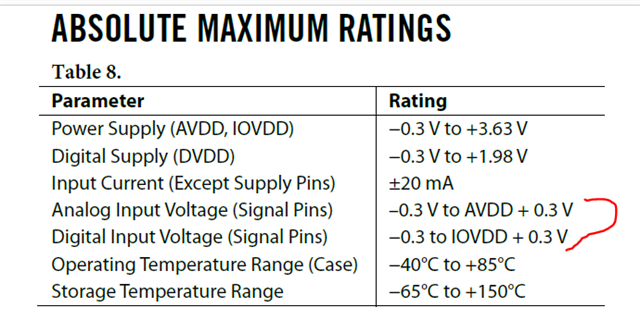
Here is what is happening. Look at the datasheet, it is actually well hidden in there. Here is a screenshot of the 1772 datasheet:
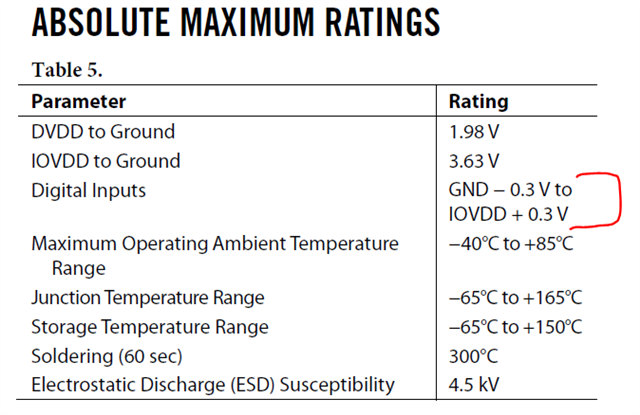
I did not write this datasheet and if I had I would have done it slightly different. Here is a table from the ADAU7118 that I did write. You will notice the slight difference.
The difference is that ground was not mentioned in the 1772 table, it was implied but here is what is going on.
The maximum voltage on the digital pins are IOVDD + 0.3V. If you exceed that voltage the ESD circuits will kick in and try to limit this over voltage and forward bias the protection diodes which will hopefully shunt this overvoltage through the power supply of the PCB.
Well, if you shut off or disconnect the power then IOVDD = 0V.
This means that the MAX voltage on the digital pins is now 0V + 0.3V which equals 0.3V. Now ANYTHING over 0.3V is violating the max voltage on the pin. It will forward bias these protection diodes and this overvoltage will present itself onto the power net of the PCB. The clocks and data coming from the APx is 3.3V! Now the clocks and data from the APx is trying to power up the entire part!! These parts operate as such a low power these days that it is actually able to allow the part to continue to work! If you remove the USBi connection you must go to the Audio Precision and shut off the clocks on the I2S lines. Disable the I2S. You also do not want the data to sit high.
Our automotive customers have to deal with this. Your radio in the car can be shut off but there are still signals coming from other sections of the car that are active and so they use power level translators to isolate these signals should the IOVDD or AVDD power be shut off. I first noticed this in a lab with the ADAU1442 DSP. I would shut off the part but not stop the clocks and thinking I reset the part but I would reconnect the power and discover the registers were not at the default settings??? What? What was going on is the similar thing. The DSP is too much of a load to actually work from the power from clock lines but it was just enough to keep the memory alive and not trip the internal reset circuits. Needless to say. I am very much in the habit now of shutting off the I2S interface on the AP when I power down eval boards.
On to the next...
bklein said:
Reset Register to Default, and Read All Registers.
Reset registers to default will write to ALL the registers in the part and set them to the default values. What more to say? I rarely use this. It could be handy if you are working on a sequencer set of commands to setup the part so being able to restore it to default without all the power-down steps could be handy.
Read all registers is a way to confirm all the settings. This could be handy when you have a system controller in your system that sets up the DSP and you are using SigmaStudio to just "connect" to the part but not program it. You then can read all the settings so you can see what they are to confirm things are being programmed correctly. Etc....
WARNING!!! If you are working on programming the part DO NOT Read All Registers until you have saved your work!! Save it off then click on it. Because, if you are using SPI and you do a read all and nothing is connected or power is down on the part or you have the wrong address (many issues) you will read all 0xFF or all 0x00 which will change ALL of the registers in your SigmaStudio project file. For this part it is not quite the end of the world but for the Sigma300/350 DSP part with hundreds of registers you have now wiped all of the registers!
Your question 3 the answer is Yes, Link/Compile/Download will overwrite the program loaded into the DSP. It will not change the contents of the EEPROM. You have to deliberately do that.
If you want to have it boot up off of the EEPROM but be able to control the DSP then use the Link/Compile/Connect command. You MUST have loaded the same exact program that was used to program the EEPROM. Then you can control the DSP objects but it will not overwrite the program or parameters. This is a great way to verify the correct program is actually in the EEPROM.
Question 4 is tough. The routing tab shows the signal routing in the chip rather well. Better than the datasheet does. Then it is up to you to program the part to do the adding. The only issue I can see is that there are only four inputs into the core. You will not be able to add all four ADC inputs plus add in the audio from the I2S. You can do two ADCs and two I2S but not more than four channels into the core. If you have an external system processor then you can route the four ADC channels out of the part and then have the external device create a sum and return it to the part via I2S.
This may be a subject for a new post.
Dave T
I'm embarassed to say that all this is a repeat of a year and a 2 years back. I asked many of the same questions here and you answered them. I am now testing Analog in to the eval board and Serial out to the AP. Tried a bunch of things but no workee. Loopback works. The fix is likely in the past history, which I will review.
Alas, we had a cubicle/lab physical restructuring and someone tossed all my notes regarding my work with the ADAU1772. I reviewed the thread and don't see what the secret is to get things working. Looking at the sample files given at the beginning of this thread, the AP file titled ADCInput to SPT_OUT, has the AP output as Analog unbalanced and Digital Serial AP Input. File titles got me really messed up - I now label them per what hardware they apply to, and this would be Analog Unbalanced Out Serial Input. Anyway, this is the correct file for my test.
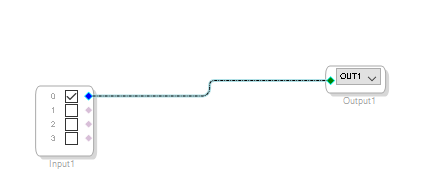
Now switching to the SigmaStudio file of the same name... let's start with the schematic. It shows an "Input 1" that has "inputs" 0 and 1 checked. What is going on here, as the inputs on the board being used are the stereo line in's Inputs 2 and 3. The yellow lines go to Output1 (in grey) but titled OUT0, and the other Output2 (in grey) titled Output1.
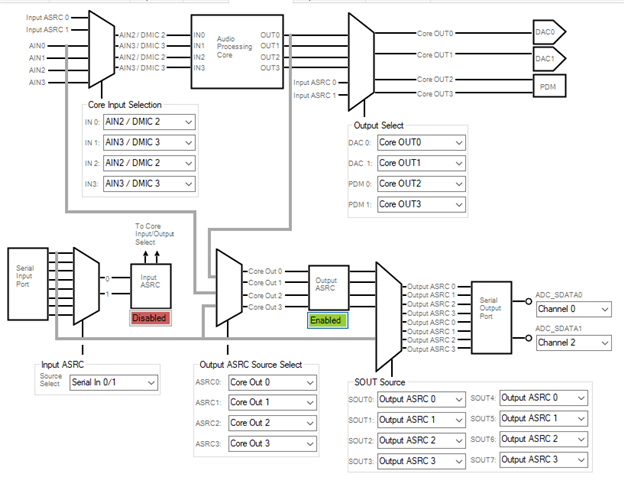
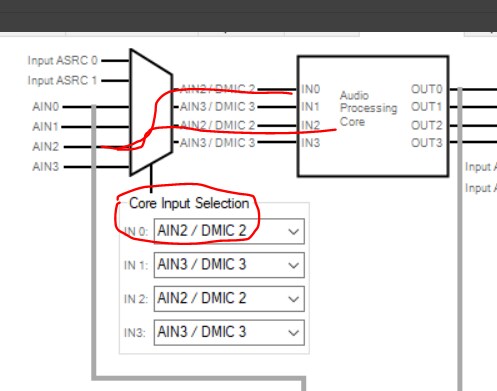
Switch now to Hardware Configuration/Signal Routing, I see AIN0-3 on the left and the right of the trapazoid thing. Is the Core input the trapazoid thing or the left side of the "Audio Processing Core"? I have a mental block on understanding this. I want to see inputs 2,3 in a way that makes sense to me (like the schematic) and.... I see AIN2/DMIC2 goes to IN0 on the APC... Could you walk me through it? If it is correct, I should assume some setting on the AP is preventing success, even though loopback works?
I'm thinking there must be a jumper or I2S wiring thing I need to change. Just can't remember the secret.
Again, go home, come back next day and all is different. I needed to move the APX555 receive cable pin that was on DAC_SDATA to ADC_SDATA0. Boom, working.
I still would appreciate an explanation of the schematic block/pin naming and the routing diagram.
Hello bklein,
I read your questions a few times and I think I get what you are asking about. I might not have it all but here is a go...
The ADC is an analog input that goes to digital so the digital pins associated with the ADC are outputs and there are four ADCs so if you setup the digital at I2S then you need two pins. ADC_SDATA_0 and 1. The routing is super flexible so you can send digital data from many different sources to these pins labeled as ADC. It can come directly from the ADC or it could be from the core output or even direct copy of the serial input.
The serial input pin is thought of being used to go to the DACs. So that is why they are labeled DAC_SDATA. However, you have lots of routing options for that signal path as well. The diagram in SigmaStudio does a decent job of showing the options and what the registers are currently set for.
As part of your questions you mentioned a box with checkmarks. So you must be talking about the actual DSP core programming.
I took a screenshot of your screenshot.
This is where you select what signals are routed to the four core inputs.
This is for the hardware. You have sent the ADC 2 and 3 to two outputs each so the signals are repeated. Distributed to two core inputs each.
Then in the core, you drag in the input object which are the four inputs to the core. The checkmarks only tells SigmaStudio what you plan to use and what is active. So it will not take the time to read in the data from the memory location. Here is a screenshot of one of my programs.
In this program I only have one checked. So I am only taking audio from input 0 of the core. In your case you are ADC2 available on input 0 and input 2 and ADC3 available on input 1 and input 3 should you choose to check them off and use them.
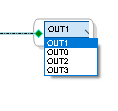
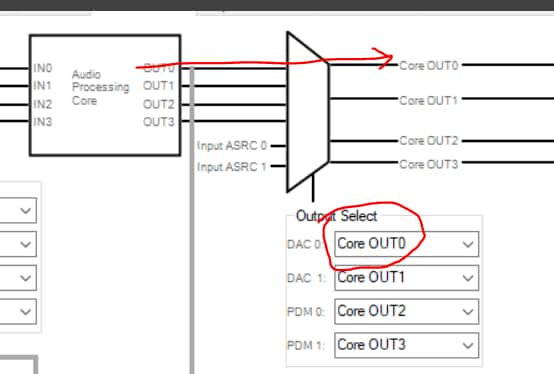
Then the output of the core is again, four channels. You choose that with the pull-down box.
Then i in the hardware registers you choose where these outputs go and what is actually being used.
So there are two components. The hardware registers for signal flow and then the DSP software component of the core. what does it do with the four inputs and outputs.
Does this help?
Dave T
Yes, the only other thing is the grey labeling of the input and output blocks. I have been progressing just ignoring the input/output blocks and now I realize it is representing the DSP core and has functional limitations as to the number of them. I can't explain how my mind works (or doesn't) sometimes.
Hey, all great thinkers in history have been different from the mainstream and saw things differently. So embrace your uniqueness and your input is helpful to keep us from missing an obvious improvement. I am kind of off the beaten path as well at times. I am left-handed and a musician. So right there I am a bit weird... LOL. Sometimes it is good and sometimes it is not.
Hopefully we get to meet in person some day!
Dave T
That would be cool! I'm no musician but occasionally I try to play piano. Electronic music and ham radio is what got me into electronics - self-taught, thanks to Electronotes and Bernie Hutchins. I eventually wrote a book called Electronic Music Circuits for SAMS, worked for Leo Fender/Music Man, and later 25 years at WDC. This ADAU1772 is all new to me - wish we had at least one guy here who I could bounce some of these questions off of, but I'm the guy...
Hello bklein,
Great experience! You are proving how diverse and impressive our customers are on this forum! It looks like you are on the west coast. I would be interested in taking this conversation off-line to discuss what your application is and why you are looking at the 1772 as a solution? There are some other newer parts but there are some other challenges and if your quantities are high enough we might have some other options. I am always open to input from customers about the problems they are trying to solve. This information is important to ADI and we do listen to the customer.
Dave T
Please log in to reply.