SigmaStudio General 2nd order block bypass function with Phase Shift enabled
Hi,
I'm working on a speaker crossover project based on ADAU1466.
Could you please confirm what is the expected behavior of Enable/Bypass button of General 2nd order filter block?
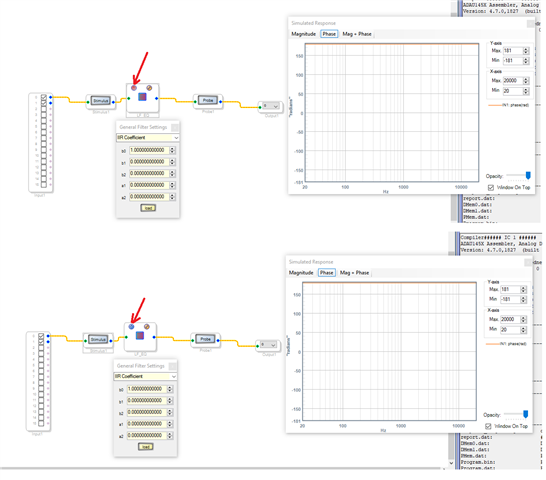
I noticed that even if I bypass the filter, when the Phase Shift button is enabled I can see the phase inversion and cannot bypass it. I tested this on both simulation with Stimulus/Probe inserted and downloaded it on DSP as well.
I did not find any description in Wiki page but my expectation was that with Bypass enabled it passes the signal without any additional processing to the following block.
ez.analog.com/.../bypass-an-filter
Thanks, Plamen
Audio Signal Processors
software
2nd order
4.7
phase inversion
SigmaDSP Audio Processors
bypass
adau1466
Show More
Hello Plamen,
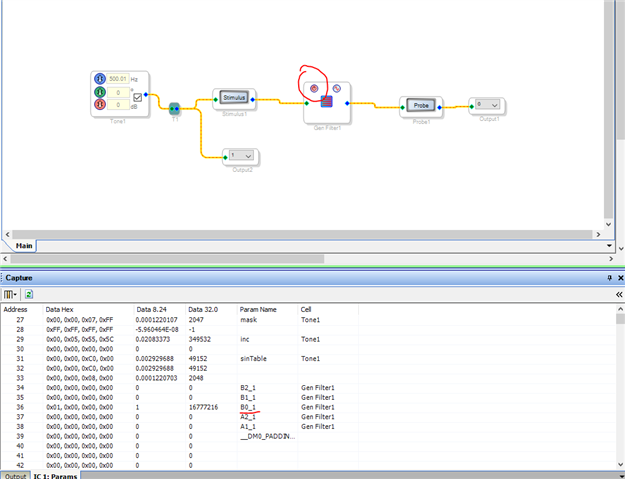
Yes, if you normally bypass the filter, only the B0 will be '1' and rest of the coefficients are zero. so, when it's getting summed, it will be the same value which means the filter will multiply the input signal by '1' (B0) and will output the same value. So, the input is unaffected.
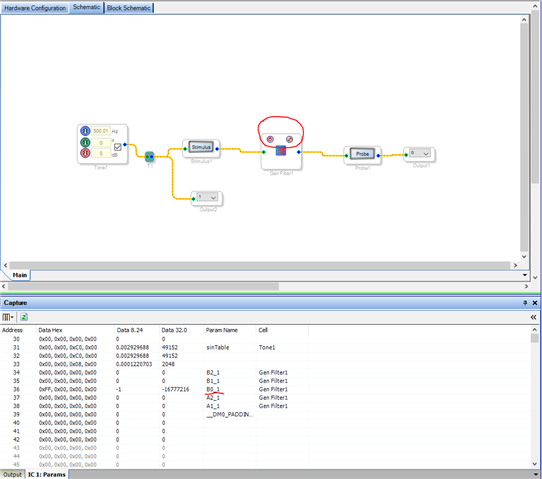
when you enable the phase inversion and bypass the filter, you can see the B0 is '-1'. Hence the inverted output.
I edited the coefficient B0 in the capture window from -1 to 1. Now I can see in the scope that the signal is in phase (just same as bypass).
Regards,
Harish

Thanks for the prompt reply, Harish!
Please log in to reply.