Connecting SPI peripherals to read back data from DSP
I am new to SigmaDSP so I apologize if I am overlooking something obvious here.
For testing I have the ADAU1467 eval board connected via USBi to the PC.
I want to simultaneously get some data/values from the DSP into (preferably) my mac or (not preferred) into the PC.
My thinking was to use the master SPI port (on J6 on the eval board) to connect an MCU (ESP8266 in this case) to provide a serial bridge from DSP to the mac, where I could read the data from the ESP.
On the signal flow there is the interface write block, but I can't seem to select anything other than interface 0, which seems to be the USBi(?).
What settings must be changed so that the communiation is established?
Is there another way to get readback data from the DSP? Maybe over network? I don't need fast audio transfer, just a few values updated at 0.5Hz or so. I want to implement some automatic level checks etc in the DSP and for debugging purposes would like to gather the data on the mac for plotting etc.
It's important that the USBi stays connected all the time since it would be very cumbersome having to constantly switch between to connections every time I want to make a change.
Any insight is apprecciated, thanks.
Audio Signal Processors
hardware
spi
adau1467
SigmaDSP Audio Processors
Hello JHe,
You are trying to go around what is setup for you already. SigmaStudio is the interface to give you information to your PC.
We have a graphing block in SigmaStudio for graphing data.
To answer your question more directly. The master SPI port may be able to do what you want. The Interface Write is meant to write to an EEPROM. That is what it is expecting to write to. If you set it up to write you should see it on a scope.
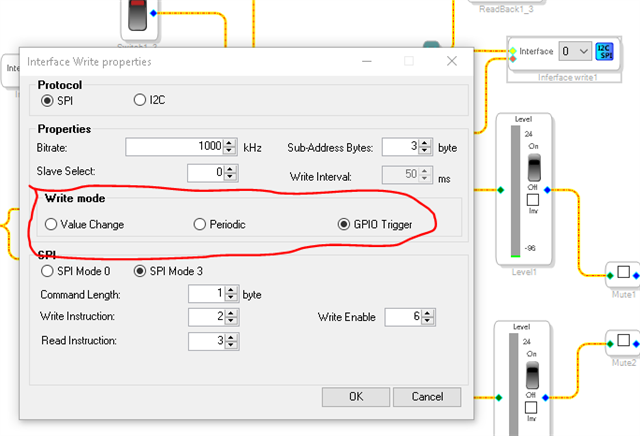
Set it up for the write mode you want.
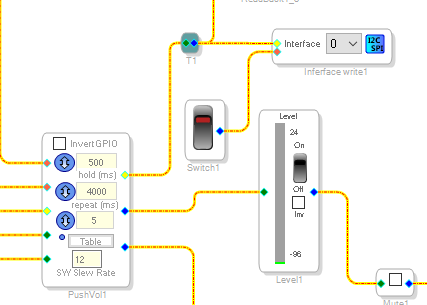
In the program I put together a few years ago it uses a GPIO trigger that I put on a switch and it is connected to the interface/write output of a volume control so the value going out will be the table index number.
Whatever data is on the pin during the sample period where it is triggered will be sent out.
FYI, the number in the pull-down box comes from a historical setup on the old 1701 DSP. That part had eight locations in the EEPROM file format for setting data to be written back to when power is going down. During operation these are just memory locations. The Interface write will write the value to this memory location and the interface read will read it at the start of the next sample period and set the block to use that new value. This is how volume controls are incremented and changed. So the number is a RAM memory location.
I think for troubleshooting you can send information to other outputs like a serial port or a GPIO. A readback cell is handy to use. But you will need to read it using either SigmaStudio or a microcontroller that is connected to the slave port where the USBi is connected. You can have two things communicating but they cannot be at the same time so care needs to be taken that SigmaStudio is not trying to talk to the part when a micro-controller is also trying.
I suggest you have a look at my YouTube channel. I have some intro videos and also a video on using SigmaStudio for troubleshooting.
(7) How to SigmaDSP and SigmaStudio - YouTube
Well, this should start the conversation going...
Dave T
Please log in to reply.