Control two different devices and selfboot EEPROM with USBi
Hello,
For a dual-DSP project i want to use two different ADAU1466 on one PCB, each equipped with an EEPROM for selfboot functionality.
I'd like to program both of them via SPI through one USBi programmer.
As far as I understand it should be possible to connect both SPI secondary ports of the DSP's to the SPI programming header and within Sigma Studio I connect two devices to the USBi with two different adresses (e.g. 0 and 1)
Also I would connect two EEPROMs to the USBi with the respective SPI address of the DSP that it is connected to.
Can someone confirm that this will work ? Is it possible to control both DSP's via one USBi, and can I download the DSP code to both the EEPROMs ?
Do I have to make hardware modifications, or is the addressing handled entirely by software ?
Thank you,
Sebastian
Edit Notes
.
[edited by: MaxDelius at 5:45 PM (GMT -5) on 20 Dec 2024]
Audio Signal Processors
hardware
spi communication
SigmaDSP Audio Processors
adau1466
Hello Sebastian,
You simply have to set the address of the slave port on both of the 1466 DSPs to different values. Then in the SigmaStudio project you set the DSP address to agree with the setting you made with the pins.
The EEPROMs will not be tied together at all. They will each be attached to its own DSP's master SPI port and when you go to "Program the EEPROM through the DSP" SigmaStudio will communicate with the correct DSP because the DSPs are set to different addresses and then program its EEPROM with its program.
There is an old App Note about the USBi that might help a little. It was written before the Sigma300 was designed so there is nothing with a DSP that has two ports but it discusses the addressing of multiple DSPs.
AN-1006: Using the EVAL-ADUSB2EBZ | Analog Devices
Dave T
Hello Dave,
Thanks for the answer, that clarified most of my questions.
As I am using SPI, it wont be necessary to set the addresses via pin configuration, correct ?
Thanks,
Sebastian
Hello Sebastian,
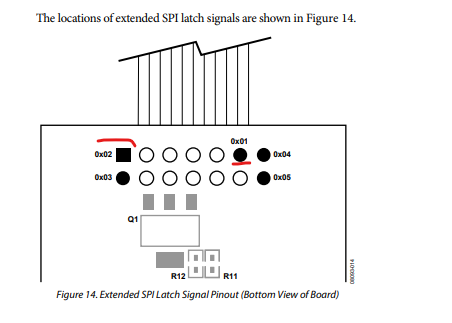
Just set different slave select to the second DSP. You should take out extra latch from the USBi by referring the documentation attached above by Dave.
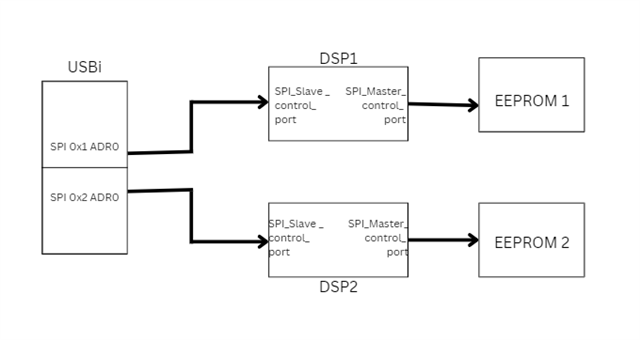
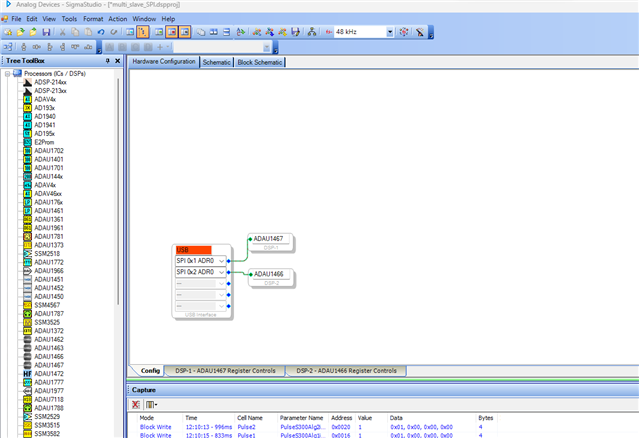
The default SPI slave address for this DSPs is 0x0 (write), just use another chip select for DSP-2. Please refer the below diagram and projects for SPI multi slave.
Here, I used latch-2 of the USBi to address DSP-2. The latch-1 is used in the USBi header as a primary latch (DSP-1). please look below.
multi_slave_SPI.dspproj
Regards,
Harish
Hello Sebastian,
I want to add to what Harish detailed. It might be handy to see what I had done to the USBi to obtain the extra slave select line to use for the codec. I detailed it in the user guide for the evaluation board. You can find it at the link below and it starts on page 26. Figure 77 and 81 might be helpful to see.
Dave T
EVAL-ADAU1452REVBZ User Guide (Rev. 0)
Thank you Harish and Dave, that solved my questions and I now modified my own board now so that I can use the other latches from the USBi.
Best regards,
Sebastian
Please log in to reply.