ADAU1701 Reboot Noise Issue
Hi,
We have been seeing noise introduced into our system together with normal audio output (from external DAC) but then resolve itself fine with no noise after a power reboot.
This will happen intermittently where we have the noise coming back after certain reboot cycles.
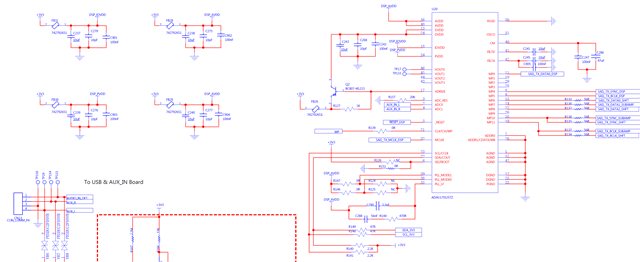
Are you able to verify my hardware schematics below if there is anything in particular that I may have done wrong?
Likewise any other recommendations in the firmware side other than what has already been advised on startup on Table 11 of the datasheet?
Thank you!
Audio Signal Processors
hardware
SigmaDSP Audio Processors
adau1701
Hello ricmark,
Thanks for the info you already provided. I did not have anything stand out with a quick scan of your schematic. Can you provide a few more details so I can make more educated guesses to move us forward to finding the cause?
First, what is your MCLK distribution setup and what is the frequency? Are you sending the same MCLK to the DAC as you are to the DSP?
What is the serial format you are using?
What is your sampling rate?
Who is the clock master in the serial data transfer between the parts?
Does the noise appear ONLY when there is an audio signal being sent to the DAC or is it there even with just a noise floor signal?
Then if you could record the noise into a sound file and attach it? Just a short 10 second file is probably enough if the noise is constant.
It might be good to see your SigmaStudio project file as well. If you need to protect it from getting out into the public then send it to me in a PM. Just be sure to also send me a friend request because the default setting on the forum is to only accept messages from friends and I will not be able to reply. My profile is setup to accept PMs from anyone.
This might also end up being a PCB layout issue. However, with what you have explained so far I do not think this is the root cause.
Dave T
Hi Dave,
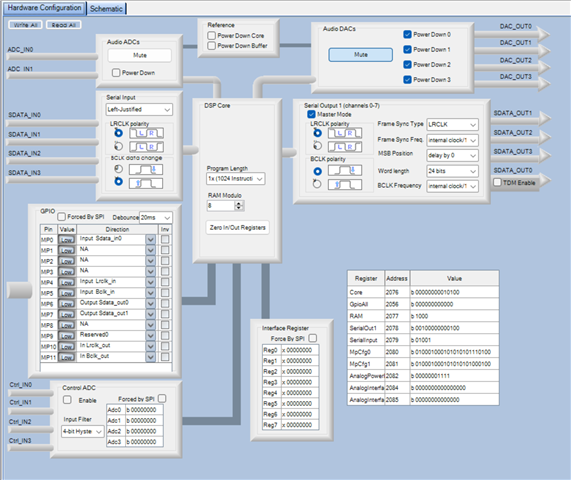
Thanks for the quick response and I will answer your questions first before getting back to you on whether I am able to provide a Sigma Studio file. I have instead provided the hardware configuration screenshot for now on Sigma Studio.
First, what is your MCLK distribution setup and what is the frequency? Are you sending the same MCLK to the DAC as you are to the DSP?
I am unsure on your definition of distribution setup, but the DSP is the clock master as far as the DACs/Amps are concerned, but I believe this equates to a passthrough of the source MCLK signal from the host MCU SAI peripheral.
What is the serial format you are using?
Left-justified, 8 x 32-bit channels (4 x stereo) but only 1 pair in use
What is your sampling rate?
44.1kHz
Who is the clock master in the serial data transfer between the parts?
I believed the answer here would be similar to the first question? (The host MCU)
Does the noise appear ONLY when there is an audio signal being sent to the DAC or is it there even with just a noise floor signal?
The noise is only present when there is an audio signal being set to the DAC.
Then if you could record the noise into a sound file and attach it? Just a short 10 second file is probably enough if the noise is constant.
Will PM you the recorded audio file!
Once again deeply appreciate your help on this !
Hi Dave, another thing I have noticed as well was this happened when PLL_LF was changed from DSP_PVDD to DSP_AVDD which is the same supply but different in capacitances. However, we don't think that this is the root cause and could do with the MCU SAI interface interacting with the DSP incorrectly during bootup?
Hello ricmark,
Thanks for the info. There is a lot to unwrap here but I think I know what setting might fix this.
By the way, the sound file was handy and if you used a 100Hz or so signal you probably would hear it quite well.
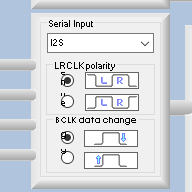
These are bit errors and usually the I2S and TDM "standards" (I am roughly using the word standard here) is to have the data change on the falling edge of the bit clock. You have it set to the rising edge. this will throw off the timing if the receiving side is picking up (reading) the data also on the rising edge. So have a close look at that.
Here is what I usually see for stereo I2S serial format.
Also, usually the data is not left justified fully but delayed by one bit clock.
So change it to the falling edge and it might fix the problem. However, there is probably more going on since you mention it changing after some reboots...
So let me press on...
First, I want to say I am NOT in the habit of arguing with customers in any way. So do not perceive my comments as arguing, just shedding light on details and trying to get you up and going ASAP. Plus, you did have some questions marks so I think we are all fine here.
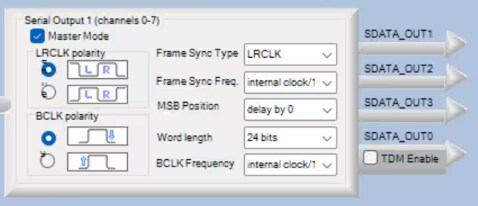
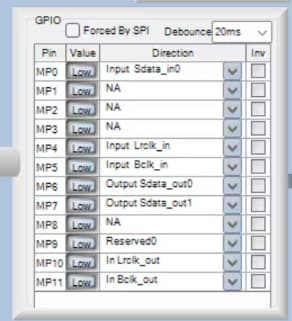
You mentioned that the MCU is the master, or your were questioning it. Thanks to your screenshot you showed me that the DSP is the clock master to the DAC for the serial port. This is a screenshot of part of your screenshot. In addition you also said 8 channels?
Your settings is the serial output port is a clock master. So it is sending clocks to the DAC (I assume) .
You do NOT have TDM enabled which means that each serial data output pin is stereo.
Your GPIO setting show you only using two pins.
You mentioned only one pair in use, I assume you meant one pair of pins which would be four channels? Anyway, at the moment you have SDATA_OUT0 and 1 setup to be used.
Now changing to the MCLK signals and distribution. I am still not clear as to what is going on in your system.
What is the MCLK frequency coming out of the MCU that is going to the MCLK_IN pin of the DSP and the MCLK_IN pin of the DAC?
From your schematic I do not know what your PLL settings are. You have jumpers to allow you to set it up for any of the four settings.
You HAVE to have the same MCLK going to the DSP and to the DAC. They must be clocked at the same basic rate.
Usually most people use the fsx256 PLL setting and supply the part with am 11.2896MHz clock. This will give you a sample rate of 44.1kHz. I did notice your frame rate and BCLK frequencies appear to be set to internal clock /1024 and internal clock /16. These would all be correct settings.
Are you using the serial input port? You have it setup in the registers.
If you are then you should be jumpering the In_LRCLK_Out pin to the Input LRCLK_In pin. Then the In_BCLK_OUT pin to the Input BCLK_In pin. This is confusing and if I would have been on this project team I would have had them just make this connection internally!! The serial input port is ALWAYS a slave port. Only the serial output port has a choice and usually if it is set to a Master then the clock of the serial output port needs to clock in the data for the input port as well.
You could get it from an ADC as long as it is on the same MCLK.
Since the noise changes from boot to boot up then I think it has to do with counters that count the clock edges and it might be slightly later one time verses another so looking closely as to the clocking helps and the register settings.
Also, look at what you do when rebooting. Is there a reset generator on the board? So when you reboot you can reset every part on the board at the same time? That always helps. Plus a reset generator will guarantee a long enough reset pulse. We have some great ones in our ADI portfolio.
Enough for now...
Dave T
Hello ricmark,
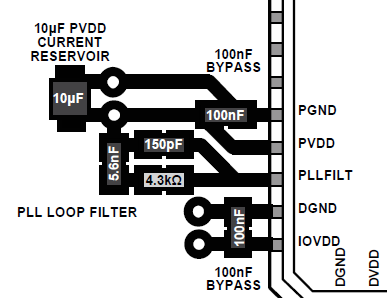
This is significant and very important. The PLL could be unlocking or taking too long to lock. The power to these pins are often the same supply for obvious reasons. However, we labeled the PVDD pin to denote that this is powering the PLL so it needs to be treated with more care and the loop filter must be returned to this pin not any other AVDD pins. Or just to the AVDD power plane. the PCB layout of the loop filter and the bypass caps are important. I have several posts about this. you can look at the ADAU1452 RevD version datasheet. Look at page 193 figure 88 which shows how to do the layout of the loop filter. Do it in a similar way on this part. I did the most recent updates to the 1452 datasheet and added a lot of PCB layout details to it. The 1701 is so old it would be a nightmare to update.
Let me take a screenshot of it to save you time. Do the bypass caps like the one you see in this screenshot. The placement of the vias are super important.
Dave T
Hi Dave T, will reply to this particular reply first as are working out on the interface and firmware pointers above.
We will revise on having the PLL_LF pin too be closer to PVDD as you mentioned. Are you able to provide a layout drawing specifically for ADAU1701? The screenshot you have shown above has a different PLL loop filter design. ADAU1701 has a 3.3nF in parallel to 56nF in series with 470R. Just want to absolute get this right as our layout is being done by a third party and want to be sure the screenshot is reflective of the ADAU1701.
Additionally, we believe this will solve the noise you have heard in the audio recording mainly but there is another reboot noise we believe your pointers will help alot. Will reply ASAP.
Cheers!
ricmark
Hello ricmark,
You are asking a good question about the different layouts on the loop filter for the two different parts.
So I did an analysis and will detail it here.
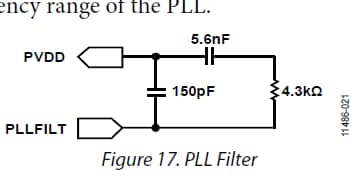
Here is the ADAU1452 PLL Loop filter design:
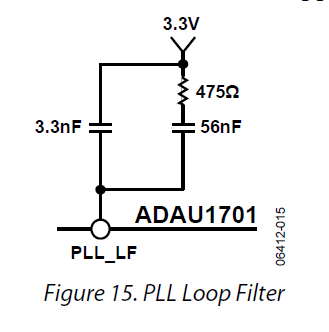
Here below is the ADAU1701 loop filter design:
Yes, the values are different and should be. Use the values as given.
The big difference between these two is that the resistor and cap are swapped. But, it is a series circuit so it makes zero difference. Resistor to cap or cap to resistor. So you can swap the order of the 475ohm with the 56nf cap in the drawing and then they are exactly the same. It makes no difference in the circuit. So you can use the exact same layout example. Just change the values of course.
I do need to note that in the layout example there are the 100nf cap and the 10uf cap in the layout. These caps will be needed in the ADAU1701 and are included somewhere in the datasheet details for bypassing the power rails.
Each power pin will have a 100nf cap that must be located close to the pin and no vias between them. Each power rail will have at least a 10uf bulk capacitor. It is not that important to place that close. It can even be on the bottom and can have vias before it or on the way to the cap. It is for longer and slower transients so the inductance of a via and the trace capacitance is not a factor. It is a factor for the 100nf cap.
In this post I detail how and why the bypass caps and vias need to be done a certain way. This document is for our codec but it applies to any part. All bypass caps need to be done this way on the entire board in my humble opinion.
(+) PCB Layout Best Practices for AD193x codecs - Q&A - Audio - EngineerZone
Dave T
Hi Dave, your pointers were really very helpful! I have PMed you our PCB layout snippets currently with this problem and how I am going to suggest changes to our 3rd party PCB supplier based on your recommendations! Please kindly reply in our group chat due to confidentiality!
Hi Dave! Hope all is well ! I have further explained my setup through a direct message. There is something we have yet to resolve even after the layout improvement suggestion below.
Thank you
rimark
Hello rimark,
Yes, sorry for the delay. Things have been a bit hectic for me. I should get to that soon.
Hi Dave, no worries. Do let me know when you can get back to us.
Really deeply appreciate your guidance here.
Please log in to reply.