adau1466,cs4272 not work
I set the cs4272 to single-speed standalone mode, and use the adau1466 to output a 12.288Mhz clock as the MCLK of the codec. There is no audio output, but the sd pin has a waveform of about 400-500khz, and the 1466 can read it back normally.
Below is my schematic diagram and test program, please help me, thank you.
PDF7635.Design 1.dspproj
Audio Signal Processors
software
SigmaDSP Audio Processors
Hello 1165074610,
The first thing I noticed is that you did not connect anything on the serial input ports except the one serial data input pin. The serial input and output ports are separate entities however, you are operating the DAO as the clock master and the codec as the clock slave. So this will work but you have no other options of how to operate the codec. I am not saying to change anything here just pointing out that there is no flexibility. I also noticed that the codec only has one set of clock pins.
Ok, so on to your problems.
As you noticed, it is difficult to see what the data is really doing it by just looking at the SDATA pin. I applaud you for pulling out a scope and looking at it. Also, your project is simple with just an oscillator out but I see nothing for the serial input. Connect the serial input to a meter as see if you can see a signal coming in. You said the 1466 can read it normally, how are you determining that it is reading it right?
I have this post which explains how to take screenshots and look at I2S signals. This should help you with seeing if the data is good or not.
(+) How to Take Meaningful Screenshots of I2S Audio Signals - Q&A - Audio - EngineerZone
Take some screenshots. You can see the data come and go. I would add some mutes to the outputs so you can mute only one channel at a time.
Have a look at my starter project for the ADAU1452 on my YouTube channel. The ADAU1452 and ADAU1466 are pretty much the same part. The core is the same. This project gives you a lot of ability to troubleshoot issues and I also have a video about troubleshooting.
ADAU1452 Basic Starter ProjectADAU1452 Basic Starter Project
So get some more info and perhaps some screenshots of the I2S signals and we can start narrowing in on the problem.
Dave T
Hey, Dave, I measured mclk at 12.288mhz, lrck at 48mhz, sclk at 3.072mhz. As for how I know 1466 is working properly, because I sent a sine wave and then used the read-back module to get dynamic data. I don't know if there is a problem with my hardware connection, I tested that vcom has a voltage of around 1.5v, but I can't get a signal on any analog output of the codec. What other information do I need to provide? Thank you for your reply!
Hello ,
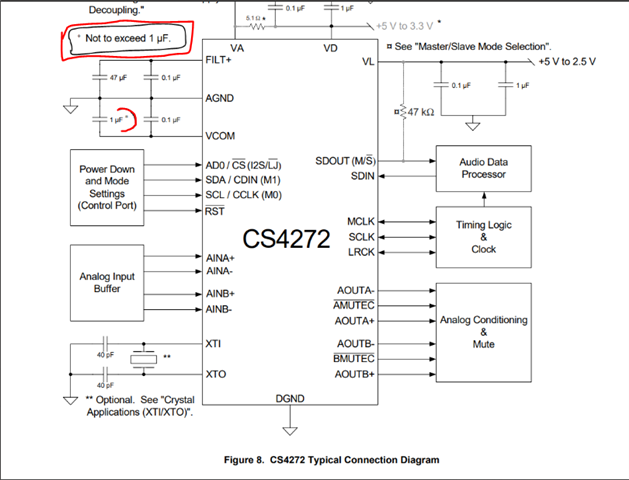
We found this note on the CS4272 datasheet.
In your design it is ten times greater.
Since it was mentioned in the datasheet I have a feeling there is a problem here that they are hiding. I would follow the suggestion in the datasheet.
Dave T
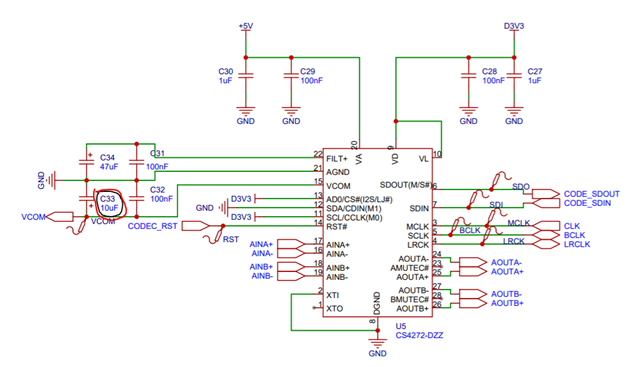
Sorry that it took so long to reply you. I have replaced this capacitor, but the problem still exists. I have a device that uses bf706 and cs4272 with the same hardware connection as mine, but its mclk is 8.33mhz, lrck is 32khz, and sclk is 2.083mhz. I think this should mean that it runs at 32k sample rate, so how should I change my device to run at this parameter? Look forward to your reply, thank you!
Hello ,
There is something very wrong here. 8.33MHz does not divide evenly by 32kHz. Neither does 2.083MHz. Did you get these numbers from your scope? That would explain them to be slightly off.
8.33MHz/32kHz= 260.3125
2.082MHz/32kHz = 65.09375
My guess is that the MCLK should be 256x fs and the bit clock is 64x fs.
64x fs for the bit clock makes sense for standard I2S is stereo signals each with 32 bits per channel so 64 bits per frame.
256x is a standard MCLK frequency that most PLLs can handle.
Just setup the 1466 seral port to use this format at 32kHz. fs.
If you feed it this ~8MHz MCLK then just set it up in a very standard and mostly default way and you will be fine.
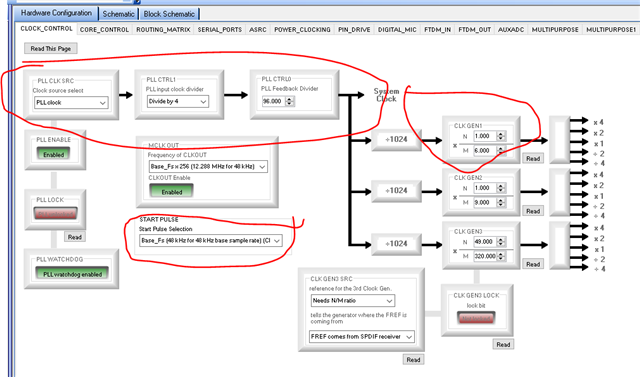
This setup if you have a 12.288MHz clock will produce 48kHz sample rate. The ratio of MCLK to sampling rate is 256.
So if you feed it ~8MHz and change nothing then you will get an fs that is the 8MHz/256 which will be 32kHz.
So when the register settings say "48kHz" it will really be 32kHz. Because the clocks will actually dictate the rate.
What will be important is to "tell" SigmaStudio that you are actually running at 32kHz. Because the things like filter coefficients and time constants will be wrong if it is set to 48kHz. So you have to set the sample rate to 32kHz in the SigmaStudio program. Not the registers.
You have to realize you are clocking the part slower. To verify this just set a serial port to be a master and then look at the LRCLK output on a scope and you should see it as 32kHz not 48kHz even though you have it set to 48kHz in the registers. The actual clocks dictate the rate.
Dave T

Please log in to reply.