ADAU1452
Good afternoon, please tell me, I want to control the Loudness module settings using a microcontroller, how do I implement this? Thank you.
Audio Signal Processors
adau1452
software
SigmaDSP Audio Processors
sigmastudio4.7
Hello ADanditoz,
You have to compile the project and export the system files, then find the particular parameter address in the params.h file (one of the files that you exported) and then write to that address from your MCU. If you want more info on this, then I will be happy to explain it in a detailed way.
Please attach your project, so that I can be sure which module you are using and will try to attach an example.
Kindly do reply if you need any clarification.
Regards,
Harish
Hi Harish! thanks to reply!
I'm attaching a simple project that uses main volume, toggle and Loudness(Low,Hi). The logic is that when the switch is in the upper position, the sound is without processing, if in the lower position, then with processing, only there is a moment, most likely the gain in the Loudness module must be moved simultaneously with the main volume? well, accordingly, it is necessary to control the frequency for LOW and HI, as well as the gain for these ranges.Loudness_test.zip
Hello ABanditoz,
You can compile the project and click 'export system files' icon given next to link compile download. You will find params.h file where you can find the parameter addresses. Below is how it looks like.
Write your newly calculated values to these addresses from your MCU. If you are changing the filter parameters, then use safe loading method.
Please follow the steps given in the below documentation to interface your uC with sigmaDSP.
Please also have a look at this page to get some example files on how to interface teensy MCU (Arduino based MCU) with SigmaDSP.
Feel free to reach out if you need further assistance.
Regards,
Harish
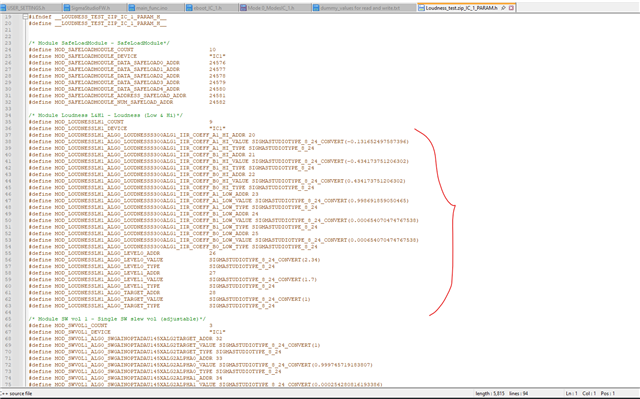
Thank you, but I know about this, there are a number of questions:
1. ADDR_LOUDNESSLH1_TARGET is a gain control, as I understand it, but numeric values from 1 to 0(float), how should I act if I need to record volume values in parallel, since it contains values from 0 to -80.
2 ADDR_LOUDNESSLH1_LEVEL0, ADDR_LOUDNESSLH1_LEVEL1 are frequency volume controls, numeric values from 0.5 to 2.5, here with what step to add / subtract since they are in float.
3 ADDR_LOUDNESSLH1_IIR_COEFF_A1_HI are the addresses of the coefficients for LOW and HI. Do they count according to the same principle as for equalizers? I have implemented management for them. Thank you.
Hello
I can add a little to this for you.
Your question 1. This is the target volume (gain) setting you want to go to. The DSP program will then slew the actual gain until it reaches this target so make it smooth and no zipper noise. This number is a gain factor. So if you want no gain change you multiple the audio sample by 1.0. If you want 6dB of loss in level then you multiply it by 0.5 to obtain -6dB of loss. It is a gain factor.
I do not understand what you mean by "values in parallel"? Do you need to measure what the actual audio levels are? In that case put in meters into your project and read the meters with your controller. They are setup to be read every 10ms unless you change some of the parameters. But you have to do some math to get it to a dB level. You could use the RMS table to have the DSP do that for you and read out the output of the table using a Readback. I plan to explain this more in the near future.
Question 2 will require more work on my part to understand what the parameter means. Check the Wiki for details. Sometimes there is some info in these help files. I am not sure exactly which loudness block you are using.
Loudness (Low and High) [Analog Devices Wiki]
Question 3, Yes, these are Bi-Quad filter coefficients.
Dave T
1. I will explain why in parallel. I have a main volume in my project, when I turn the switch to the lower position, the sound comes out processed from the Loudness module (Low, Hi). There is only a moment when I change the main volume, these changes will not affect the processed signal in any way, you need to change the volume simultaneously with the main one, so I called it parallel (simultaneously). Hence the question, let's say I have a main volume value of -10 db, how can I recalculate this for the target gain volume? Or can you advise the implementation of a project where after changing the main volume, it was also used in the Loudness module, but as far as I know, these modules do not support dynamic regulation.
2. I have a Loudness module (Low, Hi). I posted a demo project.
3. I understand, thank you.
Hello ABanditoz,
ABanditoz said:
let's say I have a main volume value of -10 db, how can I recalculate this for the target gain volume?
So, do you want to set the same volume level for the main volume and the target volume from your MCU? Like if you adjust the main volume (to some dB down), the same adjustment (in dB) should be set in the target volume as well?
So, if you want to set -10dB of gain, then here is how you can convert dB to decimal and vice versa.
dB to decimal (linear gain),
X (Linear gain in decimal) = 10^(dB/20) = 10^(-10/20) = 10^(-0.5) = 0.316227766
X= 0.316227766
decimal value to dB,
dB = 20*log(value) = 20*log (0.316227766) = 20* (-0.50000000) = -10dB
If you write this value to that respective parameter i.e main volume's target and loudness module's target addresses, then that module's gain factor is set for -10dB.
ABanditoz said:
but as far as I know, these modules do not support dynamic regulation.
As stated in the wiki, this is a fixed algorithm, not dynamic.
ABanditoz said:
ADDR_LOUDNESSLH1_IIR_COEFF_A1_HI are the addresses of the coefficients for LOW and HI. Do they count according to the same principle as for equalizers? I have implemented management for them. Thank you.
They are first order filters, if you want to know the frequency response then take a 2nd order general filter block and put it in 'direct IIR coefficient entry mode' and enter B0, B1 and -A1 from capture window (while entering A1 into the coeff window, it needs to be flipped from what is shown in the capture) and let B2 and A2 as 0. I have shown that too in the above attached screen shot.
Please make use of the below code snippet for converting the floating-point number to fixed point 8.24 number.
Does this answer your question?
Regards,
Harish
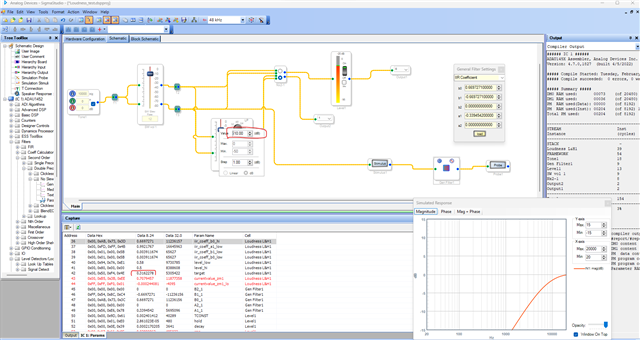

regarding the LOW and HI levels, the labels in the block are from 0 to 96 , but in the capture window the values are from 0.5 to 2.5
Hello Abanditoz,
I guess the values are from 0 to 100. Below is what I found from an old thread reg parameters.
Controls:
LP Knob The LP gain knob controls the relative amount of low frequency boost that is applied 0% - 100%.
LP Frequency The LP frequency spin control lets you change the cutoff frequency of the lowpass filter. The default value approximates the Fletcher-Munson curve. Higher-frequency values provide greater bass-bandwidth gain.
HF Knob The HP gain knob controls the relative amount of high frequency boost that is applied 0% - 100%.
HP Frequency The HF frequency spin control lets you change the cutoff frequency of the highpass filter. The default value of 7kHz approximates the Fletcher-Munson curve.
SW Slew Rate Adjusts the external volume parameter's slew rate (controls how quickly the algorithm responds to changes in the control signal).
It says the boost is applied between 0% to 100% and the values shown are between 0.5 to 2.5.
So, it seems 0.5 is 20%, 1.0 is 40%, 2.0 is 80% and 2.5 is 100%.
In the GUI 0.5 (20%) seems to be the minimum level, however you can overwrite this parameter value to below 0.5 in the capture window and see how it behaves.
So, try to play around with the values and please tell us if it works for you.
Regards,
Harish
and what is the calculation formula?
Hello,
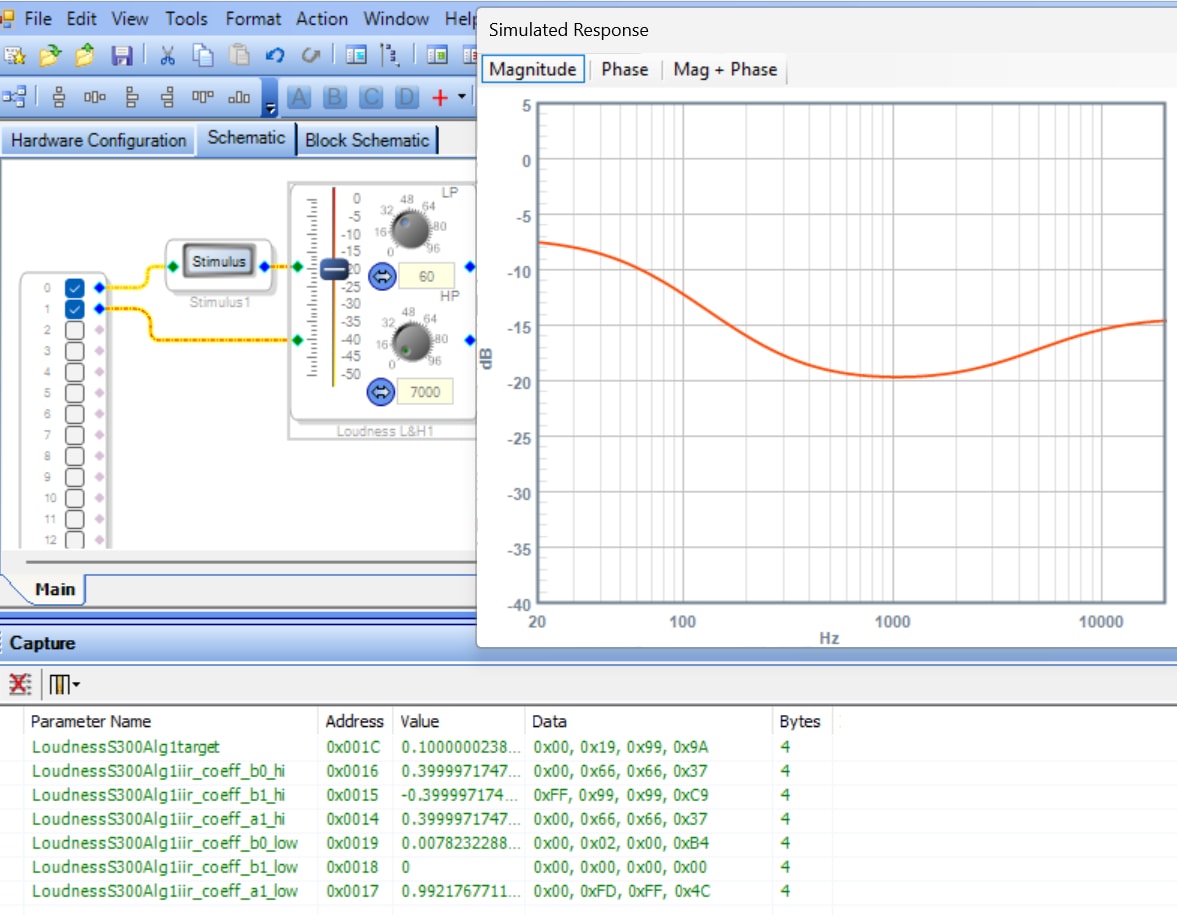
The Loudness (Low and High) block loads seven 4-byte parameters and one 8-byte parameter. This picture only shows some of them in the Capture Window.
We can recognize the Target value as the linear equivalent of the dB Volume slider. The LP and HP frequency settings translate to first-order IIR coefficients. Each of the two knobs relates linearly to each half of the double parameter. The attached spreadsheet calculates all the parameter values from the block's GUI settings.
Loudness-Params.zip
Best regards,
Bob
Please log in to reply.