Write through DSP without SigmaStudio
Hi,
I want to use the “Write latest Compilation through DSP” feature without using SigmaStudio.
I have captured the output and tried to figure out what's going on.
It seems that the sequence is roughly as follows (with some chip configuration commands in between):
- Temporarily write a Flash loader program to the DSP
- send the flash loader writing instruction for each page of data of the program to be written
- rewrite the current program to restore an active state.
I could extract the Flash loader program from that sequence, however I do not quite understand how the program data (DM0 Data, DM1 Data and Program Data) is split into the Page chunks.
Here is an example of DM0 Data, which seems to get placed into Page_A0_S256_N8_idx0.
<action instr="writeXbytes" len="294" addr="0" AddrIncr="4" ParamName="DM0 Data" DspName="IC 1">00 00 00 00 00 00 00 00 00 00 00 00 00 00 00 00 00 00 00 00 00 00 00 00 00 00 00 00 00 00 00 00 00 00 00 00 00 00 00 00 00 00 00 00 00 00 00 00 00 00 00 00 00 00 00 00 00 00 00 00 00 00 00 00 00 00 00 20 00 00 00 20 00 00 00 14 00 00 00 00 01 00 00 00 00 00 00 00 00 00 00 00 00 00 07 FF FF FF FF FF 00 01 11 11 00 00 00 00 00 00 C0 00 00 00 C0 00 00 00 08 00 00 00 20 8A 00 00 20 8A 00 00 20 8A 00 00 20 8A 00 00 00 00 00 00 00 00 00 FF F9 72 00 00 00 00 00 00 00 00 00 FF F9 72 00 00 00 00 00 00 00 00 00 FF F9 72 00 00 00 00 00 00 00 00 00 FF F9 72 00 00 00 00 01 00 00 00 00 00 00 00 00 00 00 00 01 00 00 00 00 00 00 00 00 00 00 00 00 00 00 00 00 00 00 00 00 00 00 00 01 00 00 00 00 00 00 00 00 00 00 00 00 00 00 00 00 00 00 00 00 00 00 00 00 00 00 00 00 00 00 00 00 00 00 00 01 00 00 00 00 0C D4 95 01 00 00 00 01 00 00 00 00 00 00 00 00 00 00 00 00 00 00 00 00 00 00 00</action>
<action instr="writeXbytes" len="258" addr="64" AddrIncr="4" ParamName="Page_A0_S256_N8_idx0" DspName="IC 1">AA 00 00 10 00 03 00 60 00 68 00 05 00 00 00 0F 00 00 00 10 00 35 00 00 00 00 00 20 00 00 00 20 00 00 00 14 00 00 00 00 01 00 00 00 00 00 00 00 00 00 00 00 00 00 07 FF FF FF FF FF 00 01 11 11 00 00 00 00 00 00 C0 00 00 00 C0 00 00 00 08 00 00 00 20 8A 00 00 20 8A 00 00 20 8A 00 00 20 8A 00 00 00 00 00 00 00 00 00 FF F9 72 00 00 00 00 00 00 00 00 00 FF F9 72 00 00 00 00 00 00 00 00 00 FF F9 72 00 00 00 00 00 00 00 00 00 FF F9 72 00 00 00 00 01 00 00 00 00 00 00 00 00 00 00 00 01 00 00 00 00 00 00 00 00 00 00 00 00 00 00 00 00 00 00 00 00 00 00 00 01 00 00 00 00 00 00 00 00 00 00 00 00 00 00 00 00 00 00 00 00 00 00 00 00 00 00 00 00 00 00 00 00 00 00 00 01 00 00 00 00 0C D4 95 01 00 00 00 01 00 00 00 00 01 00 00 00 1D 00 00 00 00 00 00 00 00 00 00 00 00 00 00</action>
There is a large chunk of common data between these two, but the also some differences.
For instance, the page contains a “header” AA 00 00 10 00 03 00 60 00 68 00 05 00 00 00 0F 00 00 00 10 00 35
Which is not part of the DM0 Block.
In the entire sequence, I found no explanation for this “header”, nor does it get used on the other page chunks (so it’s probably not even a header).
It would be greatly appreciated if you could provide some documentation / explanations on this.
Thanks in advance!
Audio Signal Processors
software
SigmaDSP Audio Processors
adau1466
Hello nneu,
At the moment I am overwhelmed so I cannot take a couple of days to fully document this. Let me explain a little about what is going on when you program through the DSP.
The first thing SigmaStudio does is to load in a program into program RAM that is a data server program. With this program you can read or write to the EEPROM via the master SPI/I2C port.
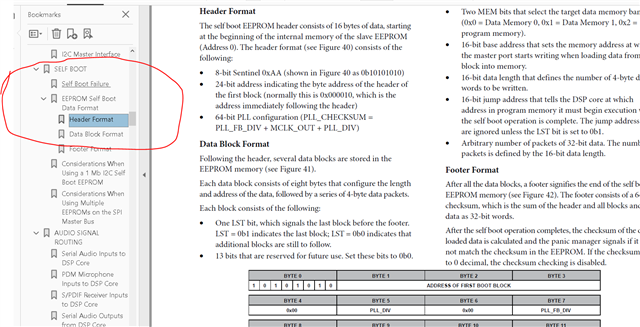
Once this program is loaded and running, then SigmaStudio "uses" the program to write to the EEPROM. The data you see that starts with "AA" is the actual contents that is being written into the EEPROM. There is documentation of the EERPOM header in the datasheet. Here is where you find it.
But this is all the contents of the EERPOM. I do not know why you are asking. I suppose you want to program your system controller to be able to update the EEPROM on your own?
Then once the entire file is done being transferred then SigmaStudio loads in and restores the current program as you noted.
This is a good topic to document further. I do not recall anyone else doing this on the forum. So this is a good question just not a simple one to answer fully. I will work on getting more info.
Dave T
Hi Dave,
Thanks for your answer!
DaveThib said:
I do not know why you are asking. I suppose you want to program your system controller to be able to update the EEPROM on your own?
Quick explanation on the background:
This concerns a product, which wasn't originally expected to require DSP FW updates. Thus, the product uses the DSP in self boot mode as well as a low power 8 bit MCU for control of the system and some basic DSP parameters via i2c.
The MCU does have an update mechanism and a connection to the outside world.
The solution to this problem was to use the MCU as an i2c bridge in combination with an according PC program to reprogram the DSP.
Flashing a program from an exported XML sequence file and an XML System File (Floppy disk icon next to link compile download) was quickly implemented. But this is not persistent.
My current workaround is to capture the entire update process as a sequence, export it, and use it as the basis for this update process.
This is a bit hacky and inconvenient though, so I would prefer to be able to export the XML System File and design the PC tool in a way to enable temporary or persistent flashing of said file.
DaveThib said:
There is documentation of the EERPOM header in the datasheet. Here is where you find it.
My bad for not checking the most obvious place to check - the data sheet...
This does explain a lot.
If I apply this to my header, I get
AA | 00 00 10 | 00 03, 00 60, 00 68, 00 05 | 00 00 00 0F
Sentinel | 1st blk adr | PLL_CTRL1, fbdiv, cs, MCLK_OUT | g_spi_speed
I can get the PLL_CTRL1 and MCLK_OUT values from the exported XML System File, but not the PLL_FB_DIV value (which would be called PLL_CTRL0 ).
As far as the values are concerned, this would add up though: 0x0068 = 0x0003 + 0x0060 + 0x0005
Looking forward to hearing from you
Noel
Hello Noel,
Thanks for explaining your challenge. It certainly is one!!
To not muddy up the water some but I am wondering if SigmaStudo might be able to be used? We do have a feature called SigmaStudio Server which allows SigmaStudio to be controlled via a command line interface but it is something I have not really had a reason to use and normally it is used to simply load in a program and program one of our older parts that had direct access to the DSP and to the EEPROM. I will ask to see if this is a possibility. Then hopefully the 8-bit controller you have as an I2C bridge would not be a problem. In theory I think it should work... Famous last words...
Getting back to your current attempts. You actually do not need to parse out and decode the contents of the EEPROM. It just needs to be loaded in as it is. The DSP will read it in and decode it when it selfboots.
You can extract the contents of the EEPROM file from the screen captures you are seeing but the EEPROM contents are also stored as a file when SigmaStudio compiles a program.
You may know this but I will detail it here for others who may read this.
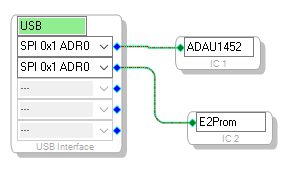
When you place an EEPROM into your project like this:
It assigns an "IC" number to it. Often it ends up being IC2 but it could be something else.
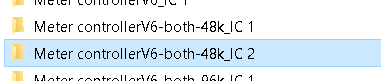
Now with an EEPROM in the system, it "tells" SigmaStudio to create a hex file for the EEPROM. Then in the resulting folders that are created you will see one called IC2 like this:
Then when you open that folder you will see these files:
These are the contents of the EEPROM in Hex file format and binary file format.
So you really do not need to capture the EEPROM contents when it flies by on the Capture window.
I will take the time right now to show you what is happening. I added an EEPROM to one of my basic example starter programs. I did do this with a Sigma350 processor, the 1466 as you used. There may be some slight differences if someone uses a Sigma300 due to the lack of memory pages.
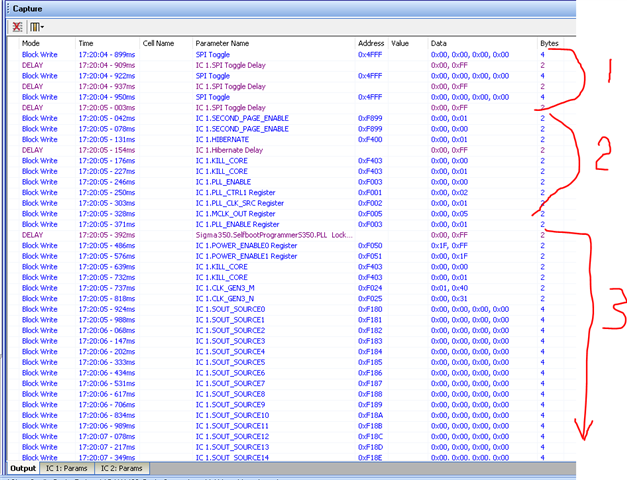
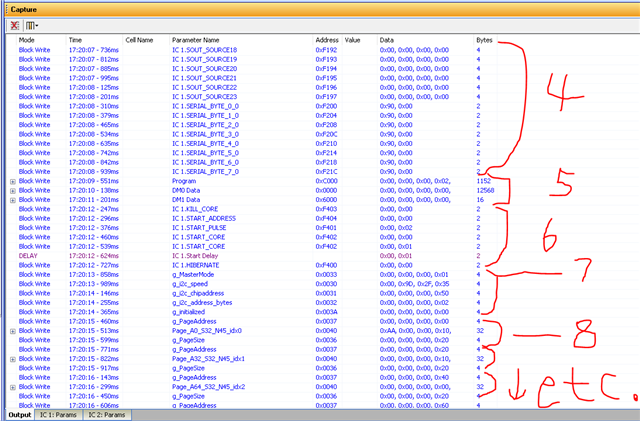
Then I wrote the program through the DSP and captured it on the Capture window. Here are some screenshots of what went by.
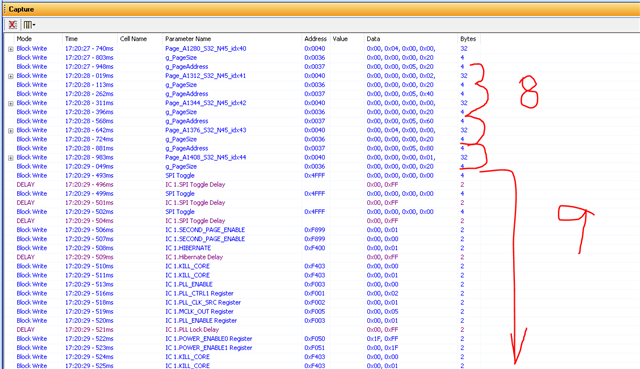
The #1 is showing placing the part into SPI mode. Three toggles.
#2 is some housekeeping since SigmaStudio does not know the state of the part when this starts up so it puts it into hibernation and waits for any code to finish. Then it stops the core and restarts it and sets up the PLL.
#3 is the wait for the PLL to lock and then it starts uploading ALL the registers in the part. Many of these might be default values and if you know the part was reset or powered up from cold then it could be streamlined a bit. However, as I mentioned above, we do not know the previous state of the part so we do EVERYTHING!
My screen is not 6ft tall so on to the next screenshot... LOL
This is where all the interesting stuff happens.
#4 is the rest of the register writes I mentioned in the last screenshot.
Then #5 is the actual data server program!! Notice it is a block write. You can click on the little "+" sign on the left and it opens up and you can copy the data. You see it does three block writes. One to program memory, one to DM0 and one to DM1.
Then #6 is where the program is initiated and is started up to run.
#7 is the configuration of the master port. I do not know all of the options here but all you need to do is copy this.
Then #8 is the boring part.... LOL.
It begins a series of three writes. Note the addresses are the same. You write the Page address to 0x0037. This is the page on the EEPROM.
Then you load in the data to write to the EEPROM as a block which should be one page in size. this is to address 0x0040.
Then you load in the page size to address 0x0036. By writing to this memory location it will trigger the write to EEPROM to begin.
Then this simply repeats until you have loaded the entire contents of the HEX file into the EEPROM.
What is not shown is that there will have to be a wait delay between these sets of writes to allow time for the data to be sent to the EEPROM. This is not shown at all in the Capture window but it has to be there. I do not see it polling the page size to see when it is set back to zero. The program is fairly simple. It checks the size and if it is not zero then it starts moving bytes one at a time until the pagesize is zero. This is how the "trigger" works.
Then this is the last part
This is the end of section 8 where it is writing one page at a time.
When it is done the as you see in section 9, It starts over like you just turned on the part. It gives the three SPI toggles and starts loading back in the current program you are working on to restore the current program. Clearly you would not need to do this. All you need to do is reset the DSP if you have control of the reset pin. Then it will load in the new program into the DSP and run it.
One thing I wondered as I wrote this. Did you tie the Write Protect pin on the EEPROM low in hardware to protect it? You have to obviously be able to enable the EEPROM to be written to.
Sorry for the huge post but it is not a simple two sentence answer.
Dave T

Hi Dave,
Thanks for your detailed answer!
Using the EEPROM Hex file seems like a good approach, however trying this solution, SigmaStudio didn't create an _IC2 folder.
I tried reopening the project after adding the EEPROM as shown and then and recompiling, but that doesn't seem to work.
I tried using SigmaStudio 4.6 and 4.7 with two different project files, but the _IC2 folder never appears.MINIMAL TEST.dspproj
Hello nneu,
It has been some long days for me. I did not quite get all the details right. I was almost there.
You are correct, I Add the EEPROM in the project and I compile and it does not create the folder.
When I right click and select to program the EEPROM through the DSP it creates the folder at that time. I guess that kind of makes sense. You do not want it creating new files constantly as you are developing the program but once you are ready to load it into the EEPROM that is when the hex file needs to be created.
Dave T

That did the trick!
Thanks again for taking the time to explain this in such detail!
Please log in to reply.