How to send my data from SPI
HI
I want to connect display to adau1467 via SPI. This information also will be useful for future designs to connect different 3rd parity chips.
So let's say. I want to send "0A 12 B0" data from Spi port. How to do it?
M0...M3 pins connected to memory chip for self boot. Shel I use this pins with CS1 on MP4?
I tried "Inferface write" and "ControlPort" blocks with no success. No data on pins. Could you give me project which will send some data via SPI?
I know I can use general purpose MCU to that, but need simple(hardware) solution. Also I need to simply show volume/filter data on SPI display.
And second question is any UART port available?
Audio Signal Processors
software
sigmaStudio 4.7
adau1467
spi communication
SigmaDSP Audio Processors
SigmaDSP
Show More
Hello Jarrr,
Do you want to continuously send out the parameter value via SPI? Like when you make a change in the schematic, the receiving chip must be updated with the new value?
Jarrr said:
I tried "Inferface write" and "ControlPort" blocks with no success.
which interface write module did you use? Is it the one under the master control port?
Have a look at the screenshot below and see if it will work for you.
Is this what you want?
My eval board's master control port is connected to an EEPROM, so I quickly have sent a value in real time via SPI and checked it, and readback the correct value.
You can send out the values via SPI like this. Is this enough for you?
SPI_value_out.dspproj
Feel free to reach out if you need any clarification or I have misunderstood your requirement.
Jarrr said:
And second question is any UART port available?
Unfortunately, it is not available with these DSPs.
Regards,
Harish
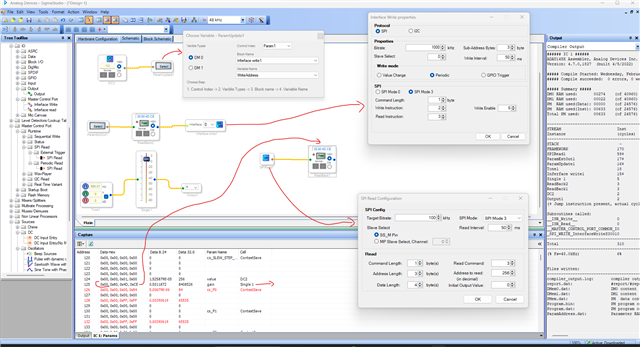
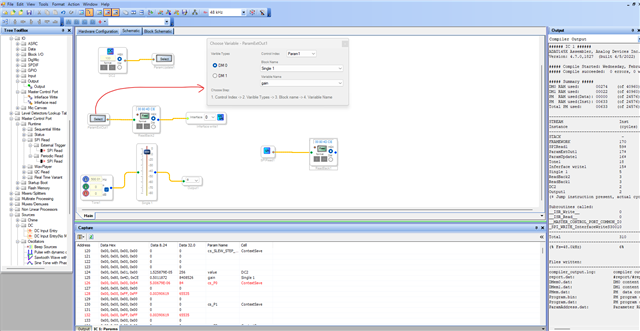
Thanks a lot for your help. It has moved me forward much. I got some output on SPI line. that is great. Also I found that my project file has currented some how. If I move my blocks to your project it also works. But doesn't meter, I assembled my project from a sketch and got data on SPI line from my project as well.
yes, I use master control port.
But something is going wrong now.
I use your file. but when I change gain nothing changes. I always got "0300 0100 0000 0000"
Then I removed SPI read block from project and data now changes with the gain. I don't need this block, but I wonder why is it works this way?
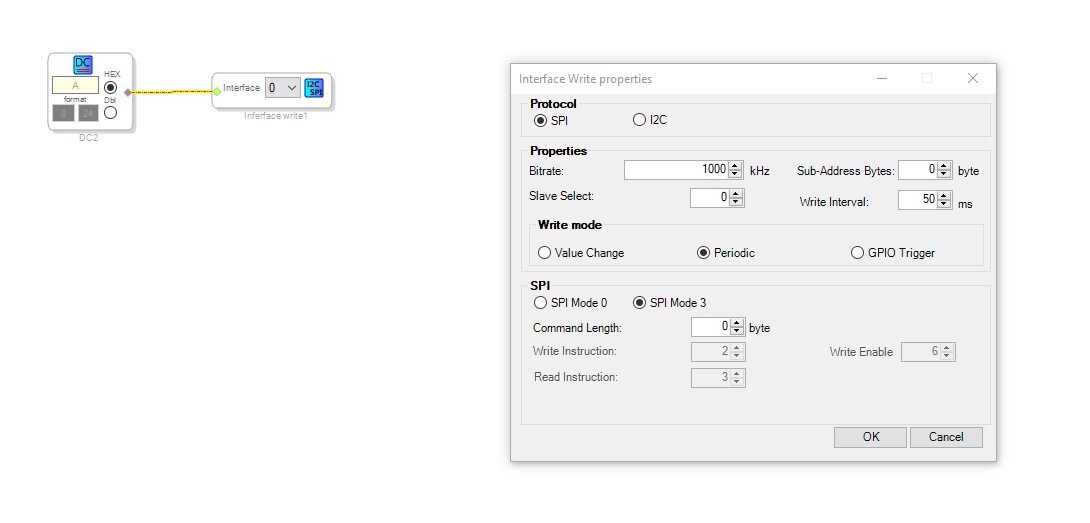
But I need particular data to be sent, so I made it as simple as possible.
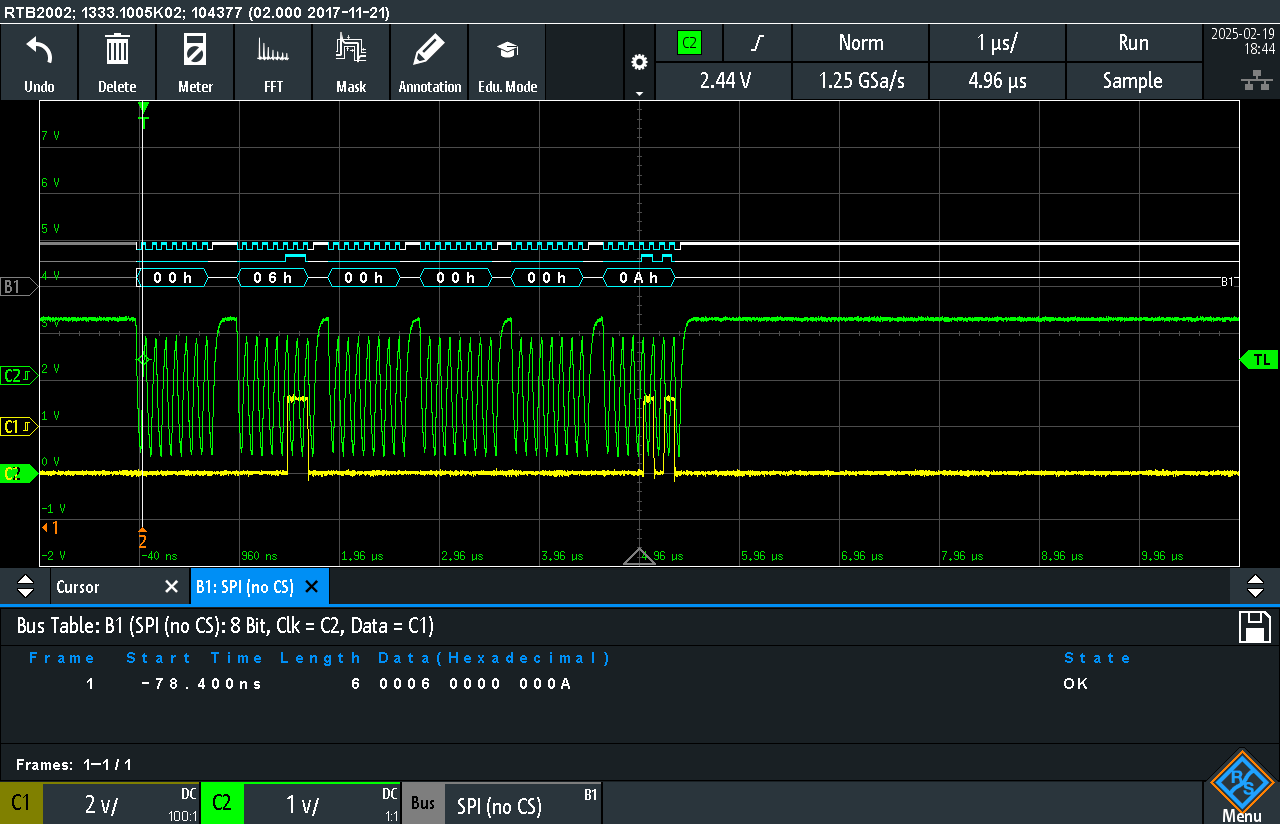
But instead of "a" expected I got "0006 0000 000A". How to send exact data? for example "A". I set command length to 0 but it looks wright enable command still included.
Is any way to send some list of commands?
Hello Jarrr,
I think you might be trying to scoop up water with a pitchfork. The master port of the DSP is designed to interface to memory devices mostly or to boot up other parts like a codec when you would send a block of data at the start of the program and no more after. You are seeing the Write-Enable command because a memory device has to see that.
If you want to get information from the program like levels, meters, and other "signals" you get that the same way SigmaStudio does which is via the slave port. You can also control objects running in the DSP as well.
Usually if someone has a display device they have a microcontroller involved that controls what is on the display and then reads data from the DSP, processes it and then sends it to the display.
I do not think directly writing to a display device will ever work. A DSP is just not designed to do that.
Dave T
Thanks for your answer. I fully understand your thought. But I see I got some free space in my project, why not to try. Removing MCU + parts around can save few $. For mass production it can save much money. I want to display few values for a customer only. No graphics needed.
I can always add MCU to my project if no success.
Also I would like to try 7 segment indicator. Have you got any experience in this case?
Hello Jarrr,
No, I do not know of anyone who has tried to interface a 7-segment display with one of our DSPs. It might be possible to hack this but it would take a lot of complicated code to do it. We used to have a block for driving serial shift register style LED driver chips to make LED meters. But, when the chip went obsolete we stopped supplying the block. There is the MAX6979 that probably could be used. It is made for SPI but it might be able to be done just using GPIO pins.
Any of the master Comms port blocks are written to interface to chips so there are address bytes included. I suppose you might be able to use a SPI Delay block and set the address to zero so the address byte would be zeros but I think there would be the read and write commands sent. Although, you do have the option to change those and you might be able to make them zeros.
Thinking some more about this. There is this other block you might be able to make work...
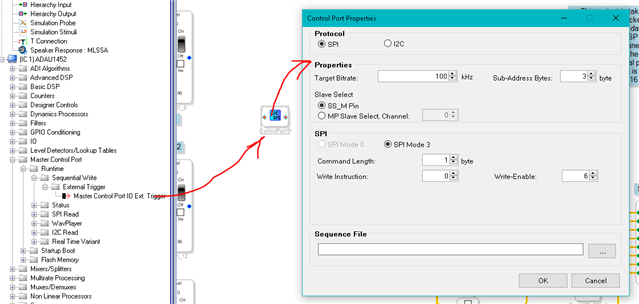
I was able to change the settings in this block to have zero sub-address bytes and no write enable by setting the command length to zero. So you could stop the command byte from being sent.
This block will take in an XML sequence file to send out. Here is the Wiki help file about the block.
Master Control Port Runtime Sequential Write (ADAU145x) [Analog Devices Wiki]
Here is the trick I think you possibly could do. The compiler will take the contents of the sequence file and compile it into the program then send it out when you trigger the cell. So once the program is compiled, you could figure out where the sequence is stored and replace it with other data during runtime using Parameter Update or more likely the Register Write block. You probably will have to use the Parameter Update to Update the address in the Register Write block because the compiler only lets you put in valid register addresses so you have work around that. I have done that many times.
Then you can update the data the compiler put in there during runtime.
Yes, this is all quite a hack but you are trying to do something very unusual and really meant for a uC.
Dave T
Hello Jarrr,
I took some time to run some experiments. I took a delay line for an external memory. I set it up for only one channel. I changed its settings so the commands would be zeros. Then I fed data into it from DC cells and I see the data on the SPI output. There is one small problem and that is if the data in the top bit is a "1" then it saturates the entire 32 bits with "1"'s.
The other problem is that the delay will write a word then read a word. Well, there is nothing there to read from so it will be all zeros but the chip select bit will go low.
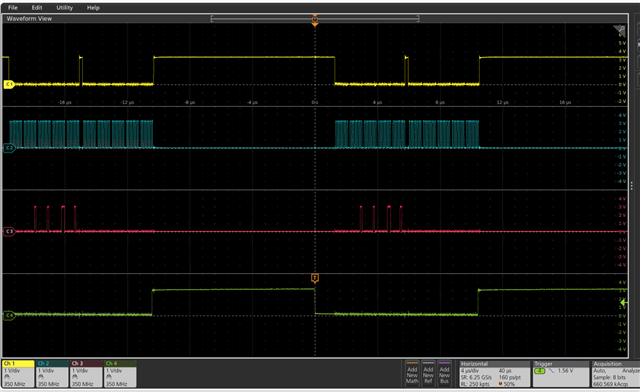
Here is a screenshot of the results:
The top trace is the Slave Select bit, and I am using a GPIO pin for this.
The second trace down, the blue one, is the SPI clock.
The Red trace is the data. I am sending 0x01, 0x02, 0x03, 0x04
The bottom trace is the sampling rate LRCLK and that it what I am triggered on.
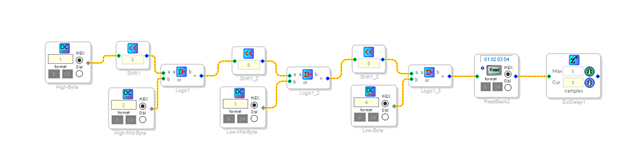
This is the part of the program that is producing this:
Here is the full project:
ADAU1467 Master SPI Data Output and Heartbeat signal on GPIO.dspproj
You might be able to make this work in your system. I am not certain. Hopefully, the MSB will never have to be a "1". There might be a way around that but I have not tried.
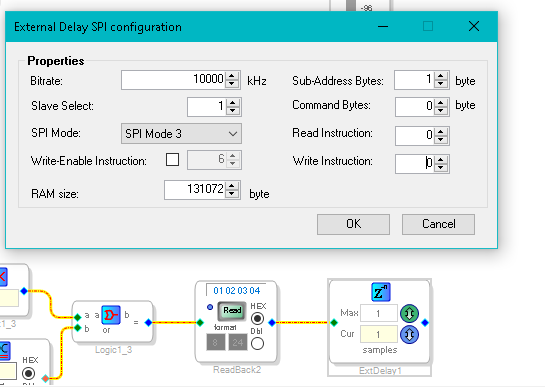
Here are the setting in the delay cell.
You can see I zeroed out all that I could.
Dave T
Dear Dave
Thanks for efforts.
If set command length to zero write-enable becomes grey, but still sent. (bug?)
I have found that I can first set write-enable to zero, then set command length to zero. And I got two zero ahead of my data.
So If use XML file I can send any data I want with "00 00" at the beginning. For oled/lcd that is an issue, but for shift register is not because I can shift this 00 out with additional data.
So I will try to make separate xml for each digit I need and call them with separate blocks.
It looks I can take any shift register to drive segments.
So I order few sample of segment displays, will try it.
Thanks.
P.S. my project file is dead again. no uploading, not connection. I have to reassemble it again in new project file. As project becomes bigger it makes troubles. How to fix dead project files?
As see in the internet it is a common issue, but no solution jet.
Friendly speaking I don't understand what is the reason to use delay block and shift registers. Your project got "00h 02h 04h 06h 08h 00h 00h 00h 00h 00h" on the output. Unfortunately 00s(I understand that is read operation) at the end makes troubles.
Hello Jarr,
You are missing the entire point.
The shift registers is to assemble a command as a 32 bit word.
The delay block is a block that sends data out of the DSP to an external memory. I set it up as one single 32 bit word of delay. So it is sending the 32 bit word I am assembling out of the DSP to the external device that is supposed to be sitting on the master SPI port. It does not know it is not a memory device but it is a video screen. We are tricking the delay line to send data to some other device rather than a memory device. Yes, it is trying to read and it will obtain either all zeros or all "FF" but we do not have to use it and in my project I am not using the data that is read back because we do not care.
You said you are having many dead project files. I work with SigmaStudio almost daily and maybe once a year I end up with a bad project file. I use SigmaStudio very creatively and as a power user and I never have it corrupt a project file. Very very infrequent. Something strange is going on if you are having many bad projects.
You may be doing something strange. You have never included your project so I have no clue as to what might be going wrong. Include a good project and include a bad project.
Dave T
Dear Dave.
the trouble of this read is that it start clocking the line and shift register will start shifting getting zero from inactive data line. For the shift register IC it looks like one more transition. Or I miss something. Sorry, I confused.
At this point I almost sure I will spend some $ for MCU :-)))
Sorry I deleted all files. next time I will attach. I think you are right it should be my actions making troubles with project files. This time I found that "disable download of registers upon download was selected. But I don't remember that I pushed it. and I did not do any saves of project after last success download. I think when I will be more experienced with sigmastudio I will know critical options to check in case of troubles. For now is any way to reset all options(registers values) to the default keeping schematics? Is any full user manual with all the options in sigmastudio?
Hello Jarrr,
Hang in there. It will get easier and easier. We have the Wiki which is certainly not complete but it is something. SigmaStudio and SigmaDSP Documentation [Analog Devices Wiki]
Then my YouTube channel and of course searching this forum is a big help. There is a lot up here and the programming team has been working hard to make the searching more productive.
Dave T
Thanks for your help. If will come back for sure :-)
Please log in to reply.