Registers configuration
Dear all,
I need to use the ADAU1467 at 192kHz using EVALboard1467Z. As I looked in other posts, I must configurate the AD1937 codec via I2C with the main control port. I made all the configuration via .xml file and setting the ADAU1467 registers (Fs base at 48 kHz, CLCK GEN 1 N/M =2/3, etc.).
The board runs good, so I apply some 100Hz sin tone to the input and I can see it in the outputs at 0.14 ms. However, I can see attenuation in the output compared to the input and I do not know why. I suspect this is because the ADC or DAC gain register control must be set also as when it is run standalone. In the .xml file I can see there is no action on the DACVolume registers but I dont know if I miss something.
Could someone tell me if there is another ADC DAC register configuration that I need to set up to have 0 gain?
I attach the project and the xml file. Also capture of the input and output signal levels.
Fullscreen
2055.Codec XML file.xml
Download
<?xml version="1.0" standalone="no"?>
<ROM IC="AD193x" IC_Address="8" Address_byte_length="1">
<dateTime>2018-01-24T15:53:18.9331122Z</dateTime>
<version>3.16.4.1751</version>
<page modetype="Mode 0">
<action instr="writeXbytes" len="2" addr="4" ParamName="IC 1.DacCtrl2Register" DspName="IC 1">41</action>
<action instr="writeXbytes" len="2" addr="0" ParamName="IC 1.HWConfiguration.PllCtrl0Register" DspName="IC 1">80</action>
<action instr="writeXbytes" len="2" addr="1" ParamName="IC 1.HWConfiguration.PllCtrl1Register" DspName="IC 1">00</action>
<action instr="writeXbytes" len="2" addr="2" ParamName="IC 1.HWConfiguration.DacCtrl0Register" DspName="IC 1">04</action>
<action instr="writeXbytes" len="2" addr="3" ParamName="IC 1.HWConfiguration.DacCtrl1Register" DspName="IC 1">00</action>
<action instr="writeXbytes" len="2" addr="4" ParamName="IC 1.HWConfiguration.DacCtrl2Register" DspName="IC 1">41</action>
<action instr="writeXbytes" len="2" addr="5" ParamName="IC 1.HWConfiguration.DacMutesRegister" DspName="IC 1">00</action>
<action instr="writeXbytes" len="2" addr="6" ParamName="IC 1.HWConfiguration.DacVolumeRegistes0" DspName="IC 1">00</action>
<action instr="writeXbytes" len="2" addr="7" ParamName="IC 1.HWConfiguration.DacVolumeRegistes1" DspName="IC 1">00</action>
<action instr="writeXbytes" len="2" addr="8" ParamName="IC 1.HWConfiguration.DacVolumeRegistes2" DspName="IC 1">00</action>
<action instr="writeXbytes" len="2" addr="9" ParamName="IC 1.HWConfiguration.DacVolumeRegistes3" DspName="IC 1">00</action>
<action instr="writeXbytes" len="2" addr="10" ParamName="IC 1.HWConfiguration.DacVolumeRegistes4" DspName="IC 1">00</action>
<action instr="writeXbytes" len="2" addr="11" ParamName="IC 1.HWConfiguration.DacVolumeRegistes5" DspName="IC 1">00</action>
<action instr="writeXbytes" len="2" addr="12" ParamName="IC 1.HWConfiguration.DacVolumeRegistes6" DspName="IC 1">00</action>
<action instr="writeXbytes" len="2" addr="13" ParamName="IC 1.HWConfiguration.DacVolumeRegistes7" DspName="IC 1">00</action>
<action instr="writeXbytes" len="2" addr="14" ParamName="IC 1.HWConfiguration.AdcCtrl0Register" DspName="IC 1">80</action>
<action instr="writeXbytes" len="2" addr="15" ParamName="IC 1.HWConfiguration.AdcCtrl1Register" DspName="IC 1">00</action>
<action instr="writeXbytes" len="2" addr="16" ParamName="IC 1.HWConfiguration.AdcCtrl2Register" DspName="IC 1">00</action>
<action instr="writeXbytes" len="2" addr="4" ParamName="IC 1.HWConfiguration.DacCtrl2Register" DspName="IC 1">40</action>
</page>
</ROM>
Latency_192k_rev0.dspproj
Audio Signal Processors
hardware
Integrated/Special Purpose A/D Converters
SigmaDSP Audio Processors
Audio CODECs
ad1937
Show More

Hello
You wrote: "The board runs good, so I apply some 100Hz sin tone to the input and I can see it in the outputs at 0.14 ms. "
Milliseconds? You go on to talk about level differences so I am not sure if you were measuring time or level? Of course there are DAC Volume control registers but you will probably need gain not reduction so this is best done in the DSP itself.
ADCs and DACs are no perfect and no silicon is exactly the same so we try to plan the variance to have the least impact.
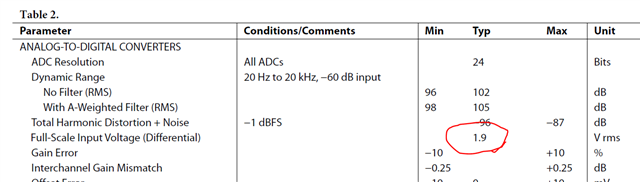
From the datasheet, here is the ADC full scale:
For the DAC you see this spec:
First, this is typical so there will be variance part to part and over temperature.
For the ADC, you see, 1.9Vrms will give you a 0dBFS digital signal.
For the DAC, a 0dBFS digital signal will give you a 1.76Vrms level signal. Slightly lower than 1.9V. So you should see a slight loss of level.
By the way, 1.9Vrms - 1.76Vrms = 0.14Vrms. Interesting that you stated 0.14ms.
You will need to either have a trim pot on the analog input or output circuits to be able to calibrate the levels or you add a volume control trim in the DSP to adjust the calibration. There are good things and bad things about either approach. There are no registers that control level. There are DAC gain registers but those only attenuate and you will need some gain so it is best done in the DSP core.
Also, it looks like you figured out how to change register 14 to change the ADCs to 192kHz sampling rate. I noticed this post after I responded to your earlier one.
Dave T

Dear DaveThib
I just commented all that stuff in order to put you in context. What I wanted to say is that I configured the Evalboard as suggested in other posts in order to work at 192kHz... and I got at the output same 100Hz sinus signal with 0.14 ms delay, less than when I worked on 48kHz, but with lower level.
When I say the level mismatch,I attached a picture in where you can see 3 times lower level in the output than in the input, and that's why I was wondering if there is something to set up as I did not implement any attenuator in the signal path.
As you answer, maybe is the different Full Scale level of the ADCs and DACs, as I got 0.08V less in the output. I need to check it increasing the input level and see if the attenuation is still by 3 or just 0.08V 0.14 Vrms.
Thank you for your quickly reply.
Please log in to reply.