Codec at 192k while code at 12k
Dear community,
I have trying to use Evalboard Adau1467Z with different sampling frequencies. The idea is to implement ANC algorithm so I need to use de AD1937 codec at high sampling frequencies, i.e. at 192kHz in order to decrease latency, and keep the Sigmastudio sampling frequency at 12kHz so I can have more filter taps in order to describe my LMS filters.
I am able to setup the full evalboard at 192kHz via the .xml file as some posts suggest keeping the Base fs and start pulse at 48kHz and change the CLKGEN1 N and M values.
However if I try to implement downsampling to 12 kHz, I ve got lost about set up the CORE and start pulse clocks. I attach my project to have an idea of what I am trying to do. I just put the value of N/M CLKGEN1 to 1/24 in order to get 12kHz, but this becomes in a distorted sound in the outputs... The code works fine downsampling from 48kHz to 12kHz and selfboot mode of the codec (atteched also the project).
I hope someone can advise me how to implement this....
MFxLMS_192kto12k_rev0.dspproj
MFxLMS_48kto12k_rev0.dspproj
Audio Signal Processors
hardware
adau1467
Integrated/Special Purpose A/D Converters
SigmaDSP Audio Processors
Audio CODECs
Show More
Hello AudioSignalProcessing,
Thanks for attaching your projects. I have NOT looked at them yet but I can already see a few problems just from your description.
You have some options,...
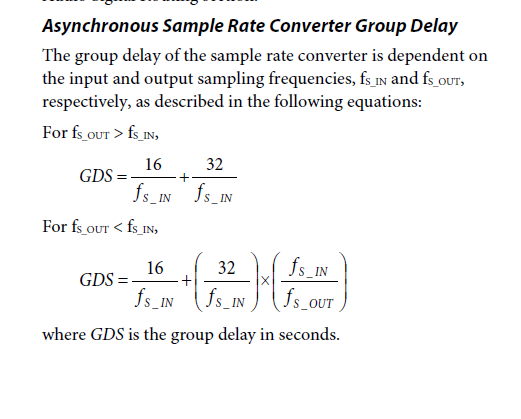
Run the serial ports at 192kHz and then route the audio from the serial port through a sample rate converter into the core that is running at the lower rate, However, 12kHz is a problem. I know that the ASRC part that these were taken from only can do a ratio of 8:1 or 1:8. So from 192kHz you could only go down to 24kHz. Then the other problem is that it adds a lot of group delay. This will mess up the entire reason you are going to 192kHZ fs. The group delay will be around 1 ms.
There is a formula:
This is from page 81 of the ADAU1452 datasheet. It will be the same in the 1467 datasheet.
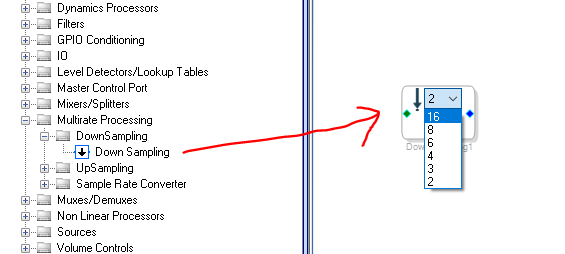
Another way you can do it is to run the main core rate at 192kHz so you come in from the serial port at 192kHZ. Then use the multirate processing cells to bring down the sampling rate to 12kHz. This block does let you go down to 12kHz (divide by 16)
However, there is still an issue here. How this cell works is that it outputs every 16th sample if it is set to 16. So you will need to filter the output. So again, that will be a hit to latency. The advantage here is that you have more control over the filter. You can use a bi-quad IIR Low Pass Filter which has a lot less latency than an FIR filter. But, the cutoff will not be as sharp but it might not be as big of a deal for your application. You can increase the order to get the performance you need and take performance tradeoffs for better latency.
Here is an example I did a long time ago. This example mostly uses FIR filters because I was going for the best audio quality and very little aliasing. Note that a few of the cells you see a checkbox for a LPF. We removed those because they had some issues and I feel it is best to have full control.
So maybe you can use this technique to go down to 12kHz and save on instructions but still end up with low enough latency. But, I think you will run into trouble. Are you really running out of instructions?
ADAU1452 Multirate Example.dspproj
Dave T
Dear DaveThib
Thanks for your quickly reply. Actually, if you check my projects
I was using the downsampling technique, but I though they must work at the sampling frequency of the project, so if the codec, core and start pulses are set to 48kHz, I was setting the project at 12kHz and after the serial inputs apply the downsampling block (set to 4 for samples), make all the process and beofre going to the outputs apply the upsampling block (set to 4). Regarding your post, I understand the project should work at 48kHz in order to make it well...Another think is that I though you already implemented the antialiasing filters so there was not check box for LPF and I did not apply it. From your post, I understand I should apply them. Same way for Fs=192kHz with Multirate blocks at 16 samples. Correct me if I am wrong.
With this situation I imagine as the project is running at 192kHz, the number of instructions will be less even if I apply the multirate blocks? or the project recognizes this downsampling and set up the following blocks as if we are at 12kHz?
I attach the modified project with fs=192kH and Downsamling blocks set to 16. I apply N order butterworth IIR antialiasing filters. The secondary path taps set to 120 and the main LMS set to 80. The compiler shows 314 instructions at 192kHz (21%) and 1289 instructions at 12kHz (6%). So I think it could work well. Could you tell me if the project is well defined?
Also, I dont understand the difference between the Zero insertion and Zero order hold. I guess from your project as I downsampling from 192k to 12k, if I use zero order hold I do not need to apply any gain after upsampling, but if I apply zero insertion I should apply gain of 16. What is the difference between setting up the upsampling blocks with zero order hold and zero instertion? Pros and cons?
Thank you in advance!
5280.MFxLMS_192kto12k_rev0.dspproj
Please log in to reply.