Missing Single Channel RMS Compressor with configurable point density
In SigmaStudio 4.7 I am able to use the 'Dynamics Processors -> RMS -> Full Range (-140dB to +40dB) -> No Ext Detector Input -> 1 -Channel -> RMS (No Gain)' Block to create a single channel RMS limiter with a configurable density of points.
'
This style of block doesn't exist in SigmaStudio+, using a Stereo RMS Compressor takes up a significantly larger portion of memory to waste a channel, is it possible to implement the selectable point density to the 'Dynamic Processors -> Compressor -> RMS 1Ch'
Audio Signal Processors
adau1452
software
SigmaStudio+ 2.3.0 (Update 2)
Sigmastudio+
SigmaDSP Audio Processors
Show More
Hello kanemcnamara,
How much more memory does it use? I will investigate when I have some time but it seems you have the info handy. The reason why I ask is because it should not use a lot more. The majority of the processing is the sidechain and that should still be mono. The processing should take the audio input to the block and sum the two channels. That is basically one instruction to add and one move. Then the sidechain is no different. Then once the gain factor is calculated, then there are two multiples done to the audio to create the changed gain at the output. So again, that is one instruction for the multiply and one move. But, with the quad MAC this still can all be done in one instruction. This core can do four multiplies in one instruction so really the gain change part of this uses no extra instructions. The extra memory should be the extra storage location for the input sample and the one extra memory location for the output. The compression curve is mono.
Please feel free to offer an example program but I will look at it when I get a chance. Something does not seem to add up here. Harish, if you see this and have time please have a look at this.
Dave T
Hi Dave,
Thanks for the prompt response!
See attached example program, I have discovered that the 'Standard RMS' can get me closer to what I'm after in respect to memory usage. From my earlier playing around, it seems that the 'Dynamic Processors -> Compressor -> RMS 1Ch' block had a table ranging from -140db to +40db input giving 3dB steps for the 54 values.
Is this the same for this 'Dynamic Processors -> Compressor -> Standard RMS' block? Or it seems more like '-135db to +20db', are you able to confirm?
Best,
Kane
RMSComparison.ssprj
Hello Kane,
kanemcnamara said:
using a Stereo RMS Compressor takes up a significantly larger portion of memory to waste a channel
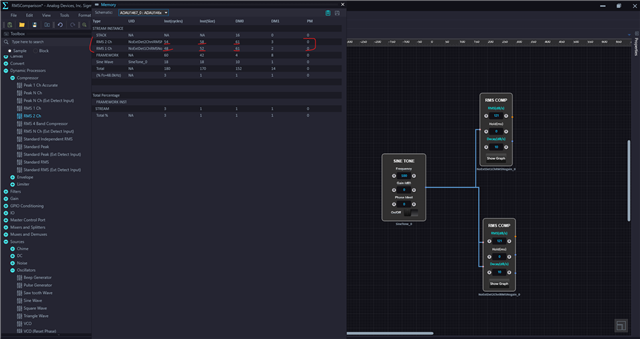
As Dave said, using a stereo compressor will not double the resource used by mono compressor. Below is the comparison where you can see the stereo compressor only takes a single memory and a very few instructions extra.
I can't seem to find a way to change the point density with this block, it stays at 54 points. I will have to investigate this further.
kanemcnamara said:
Standard RMS' block? Or it seems more like '-135db to +20db', are you able to confirm?
You are right, the standard RMS block has the range between -135 to +20dB as shown in the GUI curve. Actually, it goes from -135 to +21 dB. This is a range of 156dB. So, 156 / 3 = 52 points. We add one on each end for interpolation and you get 54 points.
kanemcnamara said:
RMS 1Ch' block had a table ranging from -140db to +40db input giving 3dB steps for the 54 values.
All the RMS compressors in sigma studio has the range between -135 to +21dB. However, you can see under the RMS section, the tool tree box naming says Full range ( -140dB to +40dB) but it's not correct, when you drag and drop the block and open the GUI curve, you can see it ranges from -135 to +21dB.
The full range -140 to +40dB is available in the peak compressors only. where points can be chosen as 30,60,120. if you choose 30 points then it will cover the 180dB range by 6dB step, if you choose 60 points, then it will cover the 180dB in 3dB step. So, this is available in peak compressors, you can see this in SS+ too.
Now, I can see that the GUI curve of the RMS ch1 block in SS+ shows -140 to +40dB range but the table has only 54 points, So, Now I have to check whether it's a GUI error or it really covers 180dB range by increasing the step size as 3.46dB (180dB/52 points).
I can see that If I set the curve for a 40dB gain, I can see the respective table gain values in the parameter window. For ex, if I set the input level to be -5dB and the output level to be 35dB, I can see the gain value of 40dB in the table. so, it looks like SS+ calculates the gain values with respect to the curve. I will have a look at this further.
Regards,
Harish
Hi Harish,
Thanks for the detailed reply! Much appreciated, good to confirm the ranges for the peak and RMS limiters and also, this confirms my coefficient table calculations should be accurate
Best,
Kane
Please log in to reply.