Problem with custom board sound
Hi,
I need some assistance with making our custom board with ADAU1787 play sound. The codec is connected to the MCU via I2C for control, and via I2S serial port to play sound. An external oscillator is connected to the board with a frequency of 25Mhz. I'm facing 2 issues I can't figure out. I'm using sigma studio project and attaching it here for reference.
1. When connecting my I2S signals to the EVB, and the evb is programmed via the sigma studio the sound is played correctly and everything is OK. However, when I connect the iusb adapter I2C pins to my custom board I can not play sound from the I2S port. However I can hear a tone generated by the sigma studio software.
2. When I tried programming the codec by using I2C commands from my MCU using the generated C code from sigma studio, I read back the memory registers and everything was written correctly. However not even the tone was played. so I'm wondering are there differences between the generated code sequence and the sigma studio direct connection sequence?
In any case I would greatly appreciate any help regarding the HW differences the might cause the sound not to be played.
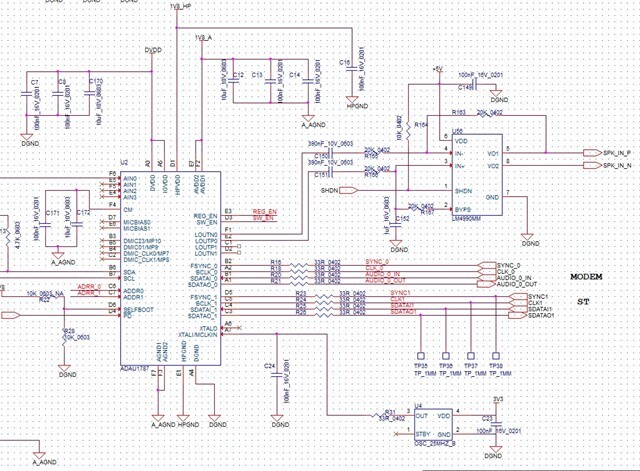
Attaching the electrical schema and also the sigma studio project.
Thanks,
Einat
ADAU1787-SALI.dspproj
software
ADAU1787
Integrated/Special Purpose A/D Converters
Audio CODECs
Hello Einat,
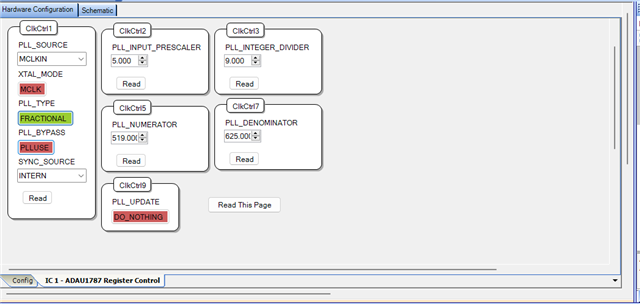
Firstly, for a 25MHz MCLK, you have to properly scale the 25MHz MCLK_IN with the PLL registers to get the PLL output of 49.152MHz which is typically the core clock. But, in your project, your PLL registers are set for the default value which is used for nominal 24.576MHz MCLK input.
So please do the following, the below shown register values set the PLL to output 49.152MHz.
Set Pre input scaler = 5
PLL integer divider = 9
N/M = 519/625
So, for a 25MHz MCLK input,
25MHz/5= 5MHz
= 5MHz (R + (N/M)) = 5MHz (9 + (519/625)) = 5MHz (9 + (0.8304)) = 5MHz x 9.8304 = 49.152MHz
So, please set the PLL registers as shown above and see if it works correctly.
EYR said:
When I tried programming the codec by using I2C commands from my MCU using the generated C code from sigma studio, I read back the memory registers and everything was written correctly. However not even the tone was played. so I'm wondering are there differences between the generated code sequence and the sigma studio direct connection sequence?
what registers did you read back and verify the working?
You can include a DC cell and readback module in your schematic, and compile, export the files and try to read the DC value from your uC and see if the value is read back correctly.
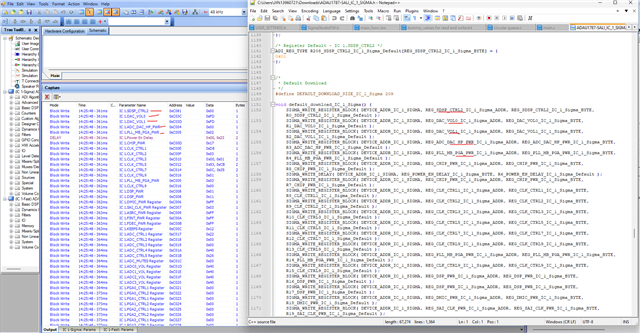
The sequence of the Sigma studio and the files exported from the sigma studio are just the same. You can verify it in the capture window. The transaction shown in the capture window after compilation is exactly exported as a C file.
I hope the I2C addressing is properly configured. I see that ADDR0 and ADDR1 are not connected anywhere in the schematic. You can ground both of them or tie both of them to IOVDD or tie one to IOVDD and other to ground or vice versa to get different address combinations. Have a look below.
In the Eval board, both ADDR0 and ADDR1 are grounded, so the address will become 0101000 = 0x28 (7 bit) and when you are writing then the LSB is '0', so 01010000 = 0x50, this is what you will see in USBi block in the schematic.
If you want to use the address 0x50 for writing, then you have to ground the ADDR0 and ADDR1 pins. It's up to you to choose the address by changing pin's state.
Also note that, the IOVDD is 1.8V, make sure that the other devices are in the same logic level. Make sure that the USBi module's switch (S1) is also set to output 1.8V.
Please try these things and see if it works.
Regards,
Harish

Hi Harish,
Thank you for your elaborate response. I am reading back every register I write and comparing them with the register data from the capture window.
My main issue though is the sound not playing .I changed the PLL as you suggested. Also I noticed is that in our board the I2S serial data is connected to serial port 1 and not to serial port 0. My configuration is for port0. can you assist with changing the port from 0 to 1 in the SS project? I tried to change it myself but still no sound is playing. I'm attaching my sigma studio project configured with SPT1, if you can have a look and see what I missed.
Thanks,
Einat
ADAU1787-SALI-SPT1.dspproj
Hello Einat,
Your project seems fine, and it straight away works with my setup without any modification.
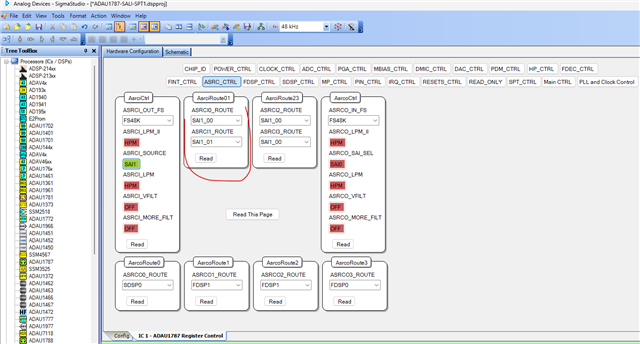
One little thing I want to mention is that you configured the input ASRC 0 and ASRC1 to a same channel (SAI1_00), typically left channel of the incoming I2S stream. so, you are copying left channel again and bringing into the core, right channel is ignored. Maybe it is intentional, but if you want to bring in left and right channel then it should be SAI1_00 for input ASRC0 and SAI1_01 for input ASRC1. If it's intentionally set that way, then please ignore this.
Then, I suggest you use sigma studio until we make things work as expected. Once everything is fine then we can export the files and boot from uC.
The reason for that is just to utilize the debugging abilities of sigma studio. You can put some meters like below and see if the signa is getting into the core and put some DC or oscillator block connected to a readback to confirm the basic communication is properly happening between the SS and the DSP.
If this is all fine and 'incoming I2S can't be played back' is the only problem, the please send us the scope shot of I2S signal. Here is the thread of how to take meaningful screenshots by Dave.
I have slightly updated your project by adding some meters and all, also I disabled some of the unused registers in the power control tab. please make sure to turn them on when you are using them.
ADAU1787-SALI-SPT1_upd.dspproj
Regards,
Harish

Hi Harish,
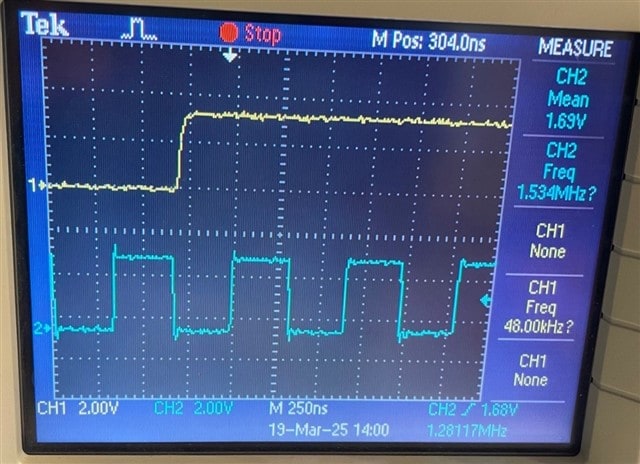
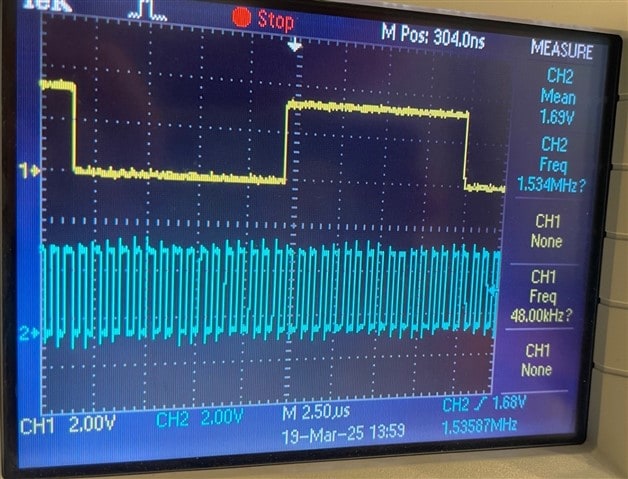
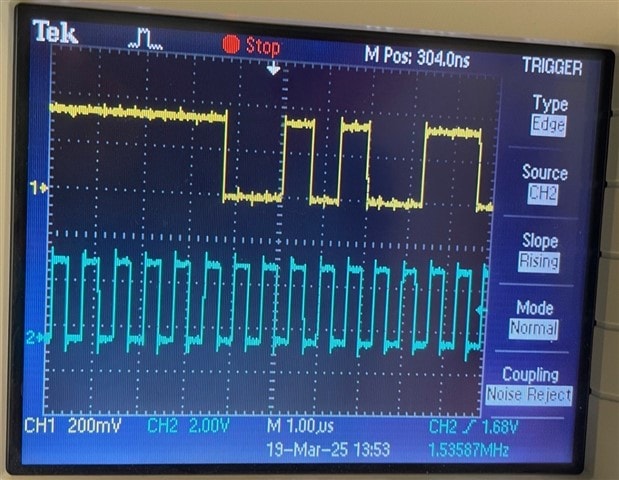
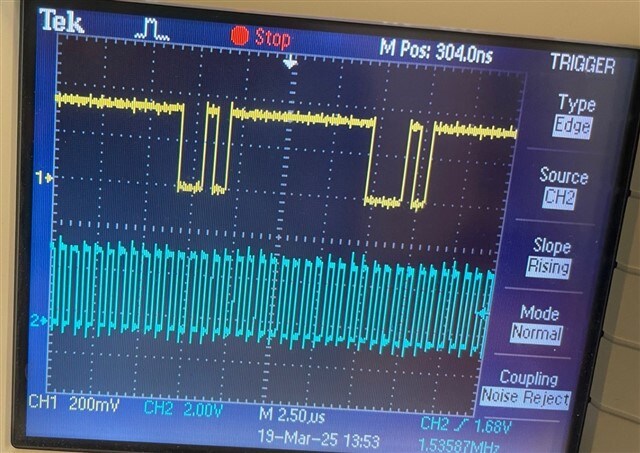
I tried using your project and couldn't see any signal coming into SPT1,nor hear any sound. When connecting the the synthetic pulse to the output I can hear ticks so the output is working fine. I'm attaching some scope Images.
regarding what you mentioned about the ASRC, I only have one output (mono) so I don't really need both left and right.
2 HW differences we did find:
1. The I2S digital signals amplitude is 3.3V in the custom board.
2. The reg_en pin is connected to GND in the custom board
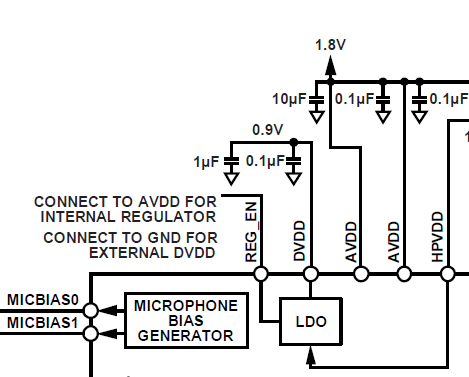
Also I have a question regarding the REG_EN pin. if we connect it to VDD (1.8V), and enable the internal regulator, is it OK if the DVDD stays connected to 0.9V?
Thanks,
Einat.
Hello Einat,
Aren't you using any level translator?
You must NOT directly give the 3.3V signal as an input to the ADAU1787. The max IOVDD of ADAU1787 is 1.8V. You should need a level shifter/translator that will convert your MCU's 3.3V audio signal to a 1.8V signal which you can input to the ADAU1787's serial port.
You need a level translator between your MCU and the ADAU1787.
Regards,
Harish
Hi Harish,
This was not intended but it's an error in the design. we are working on a fix. I'm forwarding a question from our HW engineer, regarding the REG_EN:
Hi
By mistake I’ve connected the DVDD pin to 1.8V,
Will it be O.K to connect the REG_EN to AVDD – For internal regulator, so the 0.9V will be supplied internally ?
Thanks,
Einat
Hello Einat,
You can connect the Reg_Enable pin to the AVDD as long as it is the AVDD used for the ADAU1787 and that it is 1.8V nominal.
I am concerned that you damaged the part by putting 1.8V on the DVDD pin. The max for that pin is 1V. (0.99). Plus it is supplied by the internal LDO so they were fighting each other. However, if you had the internal LDO disabled then you can supply the DVDD from an external source using that pin but again, the max is 0.99V. This is all detailed in the datasheet in table 12 for the pin functions.
The purpose of the DVDD pin is to have some external decoupling caps that we cannot put on the die.
Dave T
Please log in to reply.