Strange behaviour in "Single Slew Ext Volume" element
Greetings,
I'm testing the behaviour of this component (Single Slew Ext Volume) and it seems I've stumbled unto a bug.
I've searched the many posts on this forum discussing this component but didn't find anything similar to what I'm experiencing.
Both slews are set to "RC" and to a rather long slew time (I used 52 for my tests, on both)
For my analysis I read the current gain of the volume component via a "Param Ext out" component.
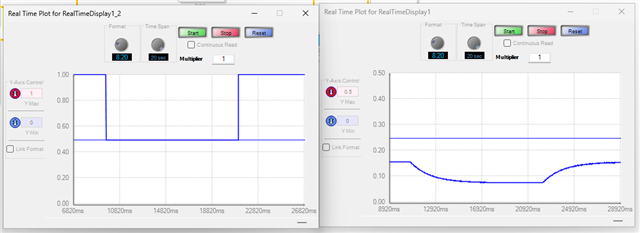
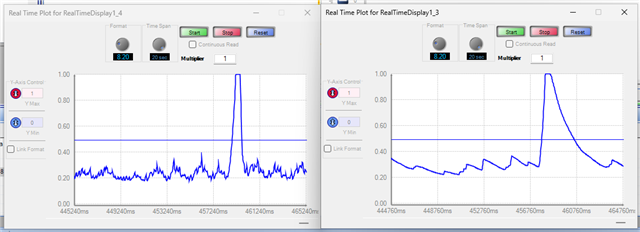
When piloting the gain via a DC block on pin0, the slew times are respected, both up and down as show below
The left curve is the value going into pin0, the right curve is the current variable of the HW volume component.
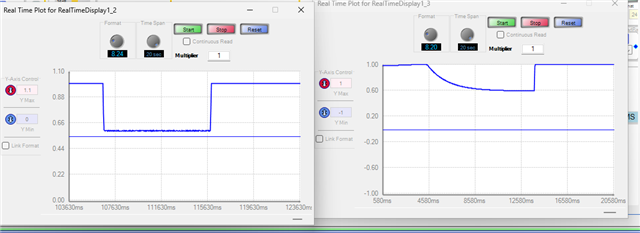
Now when piloting this pin with the output of a custom schema I get the result below (again, left is the pin0 input and right is the current gain)
Asyou can see the ramping down is correct but ramping up is almost immediate.
Is this a bug or am I misunderstanding something ?
Audio Signal Processors
software
adau1467
processors and dsp
SigmaDSP Audio Processors
Processors and Microcontrollers
Show More
Hello JBAX,
I understand that English is not the first language for most of the people on the forum. I am a little confused by the word "piloting". I think you mean the external control pin, which is an input to the volume control. So in the upper example you are using a DC cell to drive the gain input pin of the volume control.
The gain output on the right does not look correct to me. It does not go between 0 and 1.
Are you reading the parameter called "Current Gain"?
JBAX said:
For my analysis I read the current gain of the volume component via a "Param Ext out" component
Hmm... I suggest you try this. Place a DC cell on the audio input of the volume control. Set it for a 1.0 in 8.24 format. Then graph the output of the volume control. If it is full gain it will output a 1.0 if the input to the control pin is zero then the audio output should be zero.
Now, for your second set of pictures. The lower ones. It looks like you are driving it with a signal that starts at 1.0 but only goes down to about 0.5 or 0.6. This is a gain factor so a gain factor of 0.5 is only about -6dB. I think that is what I see in the right graph. It is showing the gain going from 1.0 to 0.6.
Now the question about it jumping right up in interesting. This is one of the oldest blocks in the library. It must be 20 years old so I know it is super well tested and has no bugs.
Are you writing to the parameter called "Current Gain"? You should not be writing to that parameter. Write to the "Target Gain" parameter.
Dave T
Hello,
Thanks for your fast answer. Sorry I wasn't very clear. Let me rephrase. Also there was a mistake on the scale of the left plot of the first screenshot, but this is a bit irrelevant to my issue as I wanted to illustrate the correct behavior of the component. On the right you can see the slew on both changes of gain, down and up. My issue is that on my use case (bottom screenshot) the slew is only applied when the target value goes down, not up
So on my use case :
The external control pin is linked/connected to other math components computing a target volume value.This is plotted on the left of the bottom screenshot with a graph component via a "T".
The "current" parameter is only read for the plot which is displayed on the right of the second screenshot. Maybe if you prefer I can plot the actual audio output on a sine but I think the screenshot illustrates the issue quite well.
The issue is when the target volume ramps up then the current gain does not ramp up. Maybe I shouldn't read this value but the actual signal passing through this component has the same issue : signal volume slew down when the target volume goes down, but slew extremely quickly (ignoring the slew paramaters it seems) when the target value goes up.
To sum up, the target volume is plotted on the left, and the actual volume on the right. It slew down but not up.
I tested with a DC component connected to the pin 0 (target volume) and it works perfectly. Why is it not the case when connected/linked to a value that changes slightly with the audio, as you can see with the noise present on the left plot ? I understand it would unlikely be a bug, but then what am I doing wrong and what is the solution ? The only difference I see is that the target volume is not always a perfect constant but can be a bit noisy and change according to the input signal.
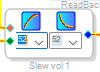
Also I forgot to post the parameters of the HW volume :
Thanks ! English is not my first language, you're spot on !
Some more info :
If I put a "Software Debounce" element to try and "flatten" the target gain and avoid noise, the issue no longer appears, but it changes my target gain value as this component was not designed for that, at all. So it doesn't solve my issue but maybe will help us analyze it.
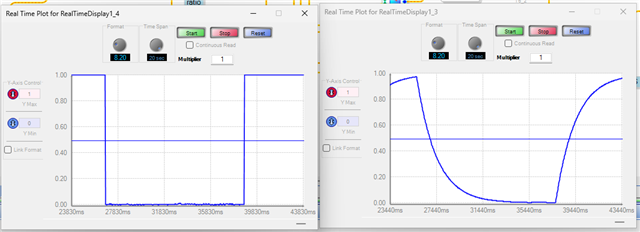
Here is the test run again with the "Software Debounce" element, target gain on the left, actual gain on the right
As you can see it works correctly : when the target goes down quite instantly, the actual gain slews according to the slew parameters. Same when going up.
Just to be sure I'm understood, here is the incorrect behaviour (no debounce element), target gain on the left, actual gain on the right :
As you can see, when the target goes down, the actual volume slews down way slower, as expected. When the target goes up, the actual gain is equal to the target, bypassing the slew altogether. The downward slopes are all slewed, the upward slopes are equal to the target.
Am I wrong thinking I should not have any "debounce" or other element to "filter" the target value ? I thought that was the purpose of the slew, to be able to take rapid changes, am I mistaken ? Is there another way I can achieve what I'd like (for the upward slew to behave as the downward slew)
----
Also I tried another workaround, with the SW volume to replace the HW volume, which seems to work correctly (by ramping up and down the target value, the actual gain changes respecting the slew parameters, both going up and going down).
Unfortunately there is no documentation to understand how the "alpha" variable is computed. I understand the om_alpha means 1-alpha, and in this thread (RE: Before Annual Leave ) it is said :
"alpha would be e^(-t/T)"
Which make no sense to me as alpha is supposed to be a constant ant t is the elapsed time (and not to be mixed up with T which is the time constant)
So even if I use this workaround (sw volume instead of hw volume as the latter does not behave as I expect) I still got to know how to compute alpha from the slew rate parameter (0-23) Could you provide the formula please ? That would solve the issue by not using the HW slew element.
Thanks
Please log in to reply.