Signal Prioritization / Automatically selecting active audio source
Hello all,
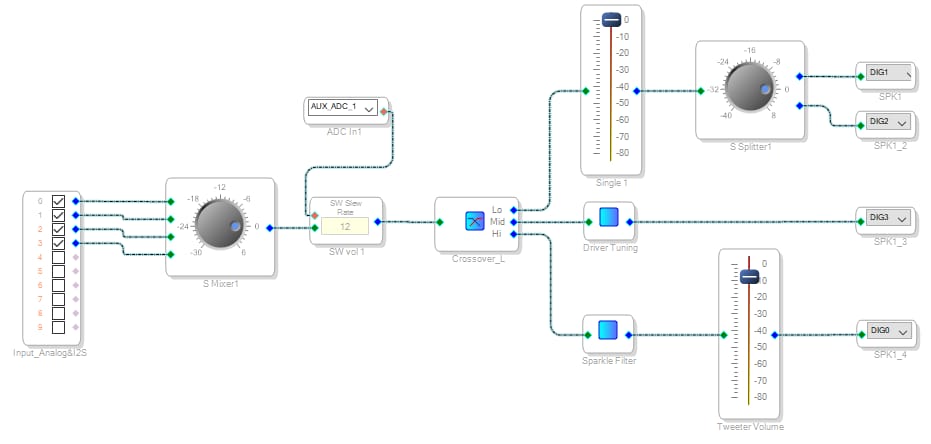
This is my first post here and I'm a newbie on Sigma but gone through some steep learning curve. Got my ADAU1701 to work pretty good already, which is part of the TSA7804B from Tiny. I have multiple sources on my setup where I want to be able to detect a signal on either input 0 or 1 (RCA connectors), and if so mute input 2 & 3 (Bluetooth) until signal on input 0 & 1 is stopped. As far as I've read, this is quite doable. I found this thread back from 2016 ( automatically selecting active audio source in adau1452 ) but I've not been able to re-create a similar setup. Could somebody please assist me how to extend/modify the current setup so signal prioritization would work as I hope it will?
Edit Notes
none
[edited by: StighAa at 6:18 PM (GMT -4) on 27 Mar 2025]
Audio Signal Processors
hardware
SigmaDSP Audio Processors
adau1701
Hello StighAa,
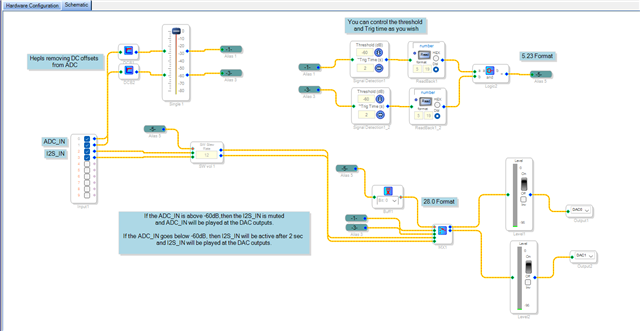
If I understand you condition correctly, then the below attached project will work fine. The comments are also added in the project which will help you understand the flow.
You can expand your project further with necessary algorithms.
Feel free to reach out if you need any clarification.
1701_conditional source select.dspproj
Regards,
Harish

Hello StighAa,
The response from Harish should help you.
I want to make a small comment about your program you have in the screenshot.
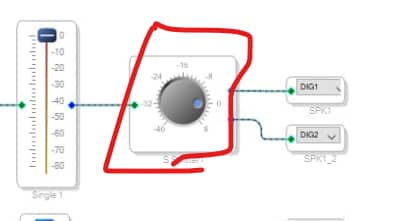
You are splitting the output to two outputs.
A splitter has a gain element and you do not need it because there is a volume control right before it. So it is a waste of instructions. I suggest you "mult" or "split" aa signal in one of two ways that uses zero instructions.
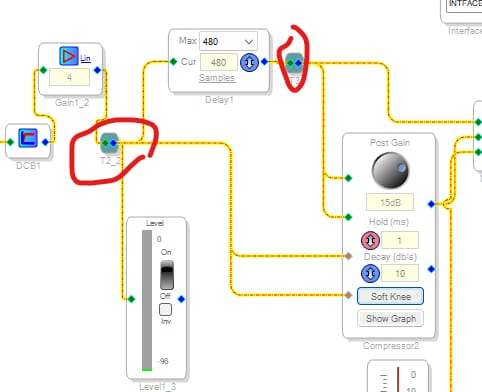
One way Harish used in his example and that is using an alias. That also cleans up the spaghetti in a schematic. You can copy the destination alias as many times as you want and it comes free of additional instructions.
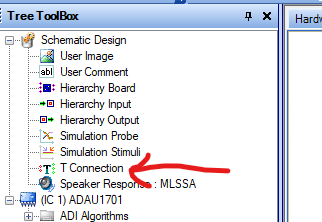
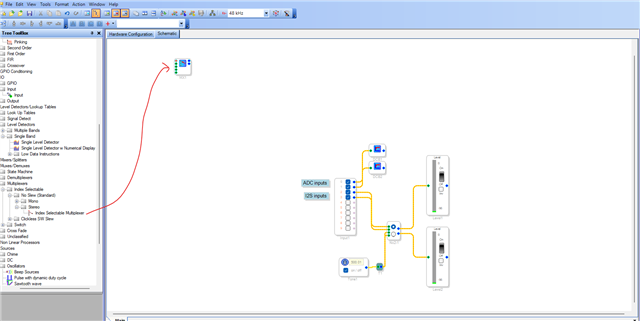
The other way is the use a "T" connection like this:
You get it from here in the library:
Dave T
Hi Harishgowtham
First - when connected with my PC, I have a slight ground issue creating static noise over the RCA in the background. Important for what I will describe below.
I've tried to implement your suggestion.
When no RCA playback but I do Bluetooth playback - I can't hear anything, not even static noise in the background.
If I start RCA playback, I can hear the music - and the static noise in the background. If I pause the music, I hear the static for 2 seconds, then it goes away.
So at this stage, it seems the prioritization seems to work where it open the RCA when there is playback and close when playback stops.
Though, I can't get Bluetooth to work at all, even when I physically disconnect the RCA to remove any static noise.
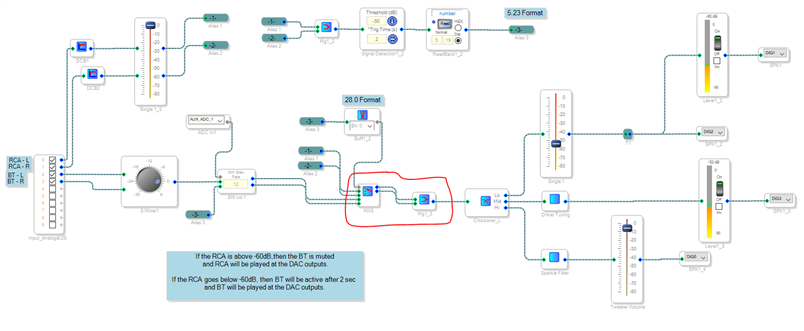
This is the current setup:
As a test, I removed and replaced part of the configuration to test that BT works, and I did. I've pasted the part I tested also.
I don't know what to look for now, and ideas?
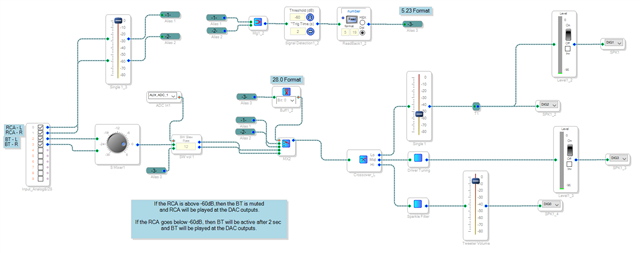
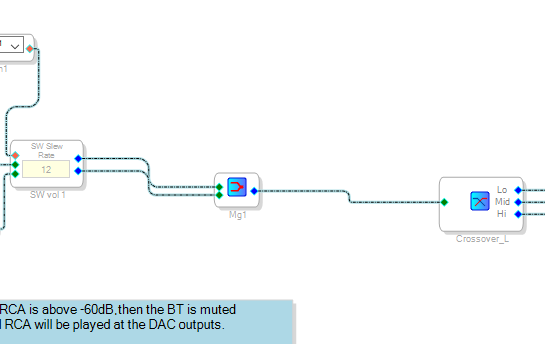
Hello StighAa,
One little note about the project that I attached in my previous reply above is, I just have only made the schematics for your logic, and I have NOT set any registers. So, it's up to you to set the control registers accordingly.
Regarding your current schematic below,
1) The Mux that you are using is a mono Mux and you have grown it to four channels, which means there are four inputs, and based on the signal in the control pin (index 0-3 in 28.0 format), a single input is passed to the output. But you connected the signal detection's flag as a control input, which will only give 0 or 1. so either your RCA input 0 or 1 is selected, your Bluetooth inputs are ignored regardless of the control input signal. So, you should use a stereo Mux like I did, or you can copy paste my schematic.
2) You connected the AUXADC input to the slew volume control, so muting will be done based on the AUXADC input, but not with the signal detection flag, so you can't expect muting function based on the signal detection flag. If you want to use the signal detection flag and AUXADC input together for muting, we can do that with a small logic.
3) I noticed that you connected the signal detection flag as the one of the input channels to slew volume control, that will either be '1' or '0' but not audio. I don't know why you connected this way.
StighAa said:
When no RCA playback but I do Bluetooth playback - I can't hear anything, not even static noise in the background.
StighAa said:
Though, I can't get Bluetooth to work at all, even when I physically disconnect the RCA to remove any static noise.
This is because the Bluetooth input is not routed to the output in your schematic. you should use a stereo mux.
I suggest you test my schematic until all inputs and outputs are working fine, one it all works fine then you can include your EQs, crossovers etc.
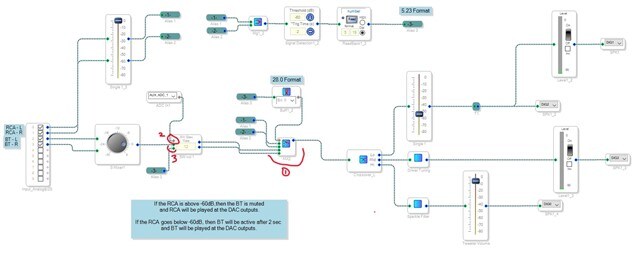
Use my project, set the hardware registers properly for receiving I2S stream (I haven't set it in my project), use some meters in your project to see if the I2S audio is coming in and use DC blocking filter after ADC inputs like below. I have included a tone module, where you can switch between I2S input and tone module for debugging purpose.
I have also shown where the stereo Mux is residing, you can see there are two pair of input and one pair of output. The control input (red pin) decides which pair to pass thru.
Regarding the noise, it will be helpful if you attach your hardware schematic and some details on your MCLK.
My project will work fine with prioritized input switching, so you can just run my basic project with all inputs present (once you verified ADC and I2S inputs are coming into the core by using meters), if you get it working, then you can modify it with your necessary algorithms.
Please do these things and get back to us.
Regards,
Harish
Hello StighAa.
I do not expect BlueTooth to work properly on this part. Because the DSP does not have a sample rate converter. The ADAU1701 digital input must be correlated with the MCLK input. So if the settings are for an MCLK of 256xfs then there are internal counters that count the incoming sample rate pulses and if it does not add up to 256 it mutes the audio! BlueTooth is a tough thing because the signal is over radio so there is no way for the source to run off of the same MCLK. Then the BlueTooth modules usually do not output an MCLK and if they do it is only when there is a valid connection. So you cannot just tie the BlueTooth MCLK to the DSP and use it in your system because it comes and goes.
If the sample rate is really close you will hear some clicks and pops which will sound like static.
I have seen some designs using the 1701 with BlueTooth but I do not have the schematics to see how they did it. If anyone out there has done it please educate me and everyone else. Are there Bluetooth modules that either have a built in sample rate converter to synchronize with the local system or is there a module that will output an MCLK always?
Dave T
Hi Harish (and Dave),
Currently on travel but will test when I get back home.
Unfortunately, as I said in my first post - I'm completely novice with audio equipment, so I do not know when you refer to MCLK.
This is my board: https://www.tinysineaudio.com/products/4-x-50w-bluetooth-dsp-amplifier-board-tsa7804bapt-x?_pos=1&_psq=tsa7804b&_ss=e&_v=1.0
I attach the default DSP file from TinyAudio (TSA7804.dspproj), and I also attach my latest Beta 3 build.
TSA7804.dspproj
TSA7804B MAIN DSP V3 - BETA 3.dspproj
Regarding the noise I have, this is just a grounding issue and disappear when disconnecting my USB connection to the ADAU.
Hi Harishgowtham
I got it to work! A huge THANK YOU!
Only remaining issue now is a high pop when it switches between RCA <-> BT, is there a way I can filter this pop out (and perhaps a smoother transition)?
What I did was replace the Mixer to Stereo (which I now understand why the mono didn't work) and merge the signal before the Crossover.
Hello StighAa,
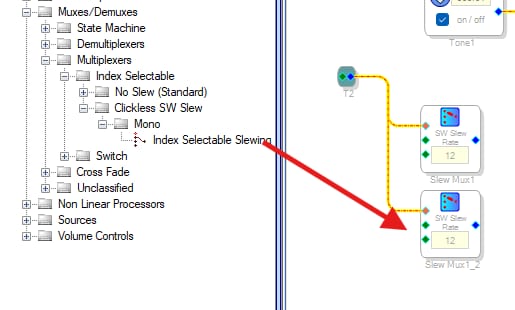
You should try a slewed MUX. The one you are using has no slew so it just immediately switches. However, this processor does not have an index selectable slewed mux that is stereo. So you will have to do something like this and pull out two of them from the library and use one for the left channel and one for the right. Then just MULT the control signal to both.
You earlier asked about MCLK. MCLK is Master Clock and all audio systems need it. It will regulate the exact sample rate of everything in the system. No two clocks can ever run at the same exact speed. Even high quality crystals will not run at exactly the same speed and will slightly drift. So you need a master clock to do this. With Bluetooth there is no way to send a master clock to something that is many feet away and is wireless! I need to do some more investigation of Bluetooth modules available out there because the devices may have improved.
One of the reasons I use MCLK in my posts is first because that is what we call the pin. Well, almost that, It is pin 32, MCLKI, MCLK-in
Then the second reason is because the forum complains when we use the word "Master". It says that words matter. I agree, words do matter and many people on the forum do not speak English as their primary language so I use the word "Master" because everybody knows the meaning! I am super doubtful anybody will be offended. PM me if you are offended. Make sure to send me a friend request so I can respond.
Dave T
Please log in to reply.