Issues writing to EEPROM - Was previously working
Hello,
I have build my own DSP board based off the ADAU1466 DSP.
On the board I also have a EEPROM from Microchip. Its the 25LC1024T-E/SM. It is a 1Mbit SPI EEPROM.
I have succesfully written a program to the chip previously, but now I just cannot get it to work. I had some strange issues in the beginning where it sometimes worked and sometimes didn't. However, now it just wont work. Only thing i did since last time where it worked was leaving it turned off for a week and then experimenting with SS+ instead of SS. But im pretty sure the first time I tried writing with SS+ it did actually work. It most likely has nothing to do with SS+ but just thought I would mention it.
Loading a program to the DSP it self works perfectly fine.
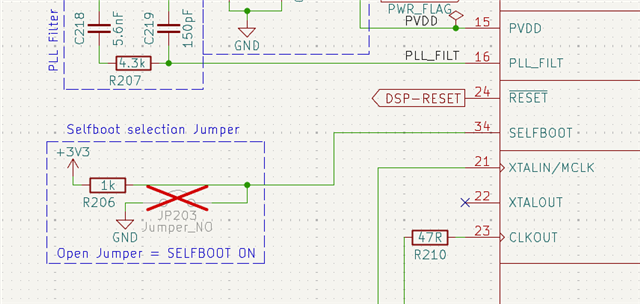
Lets start from the beginning. This is what the schemattic look like:
PCB layout looks like this:
What I do:
Write the program to the DSP (I have verified that it works with a MP controlling a LED and with audio through the DSP)
Go to the hardware configuration config page in SS
Right click on the ADAU1466 IC
Self boot memory -> write last complication through DSP
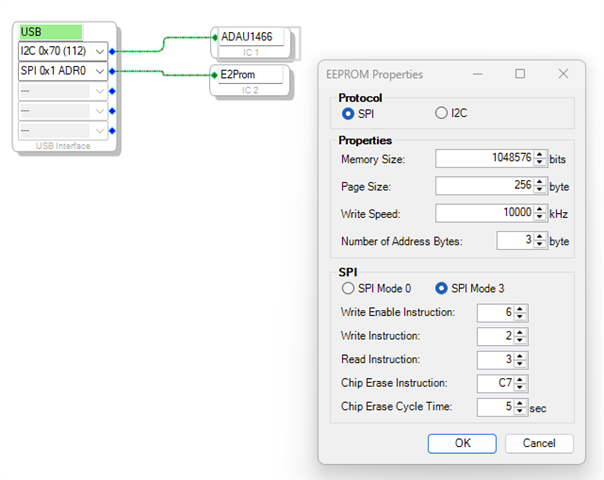
I get the EEPROM configuration popup which has looked like this all the time (I didn't change anythiing here between it working and not working)
I click ok and accept the warning, it seems to be doing its thing as usual and when done it looks like this (not sure if there is anything relevant here)
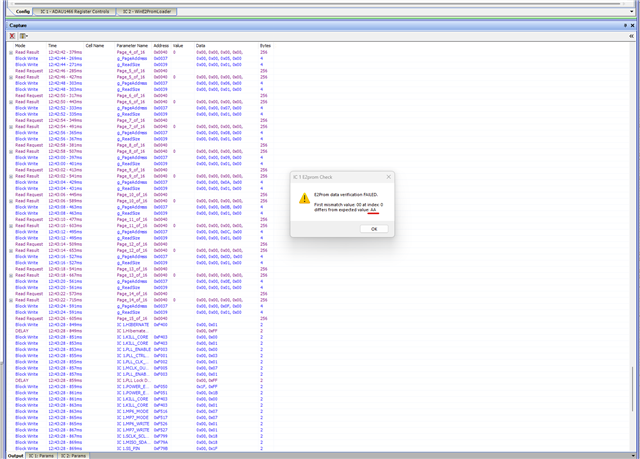
But when i reset the dsp by pressing the reset button or power cycle it does not load the program. And if I do a self boot memeory check through the DSP after writing to it I get this error:
I am pretty sure the AA underlined in red said FF the first times it didn't work.
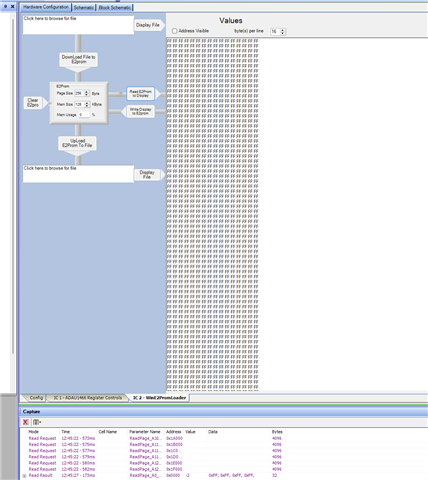
If i go to the EEPROM tap and read from EEPROM i get this (not sure if it makes any sense or not to make that check)
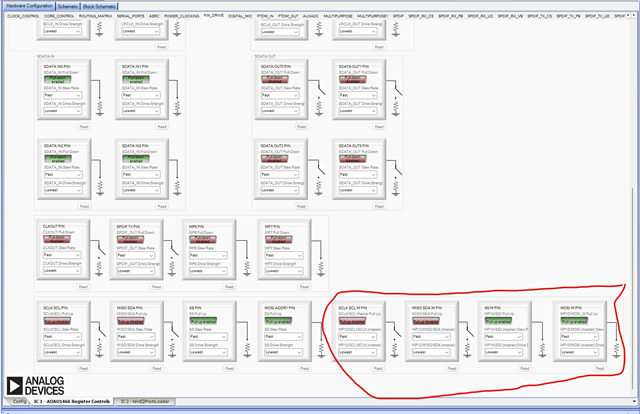
I have been playing a round with the settings under the PIN drive tap of the DSP chip. Not sure if i broke anything by doing that (Again I didn't chance anything between it working and not working). I was guessing that the ones outlined in red has something to do with the communication between the DSP and the EEPROM?
Any ideas as to what is going on?
Thanks! Daniel
Audio Signal Processors
hardware
eeprom
eeprom write problem through DSP
SigmaDSP Audio Processors
adau1466
Show More
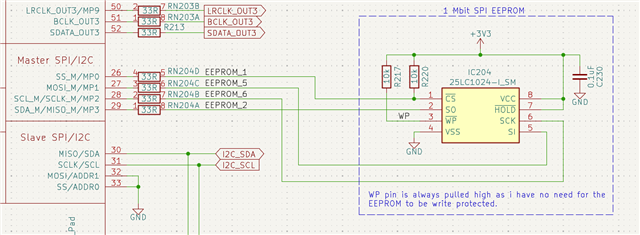
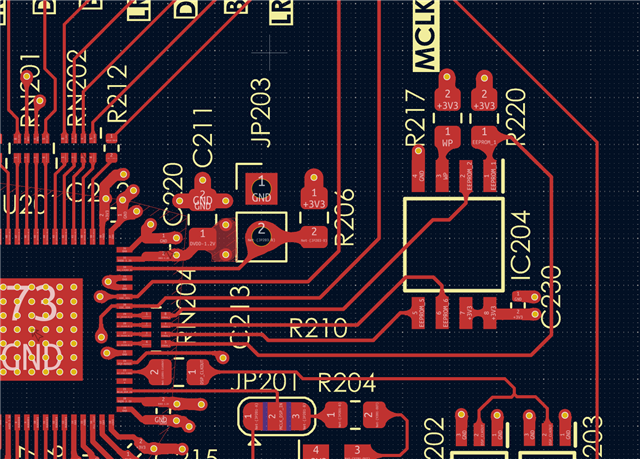

Hello Daniel,
Thanks for the detailed info, it was helpful.
My first question will be, what is the state of the selfboot pin?
Note that when you are writing to the EEPROM from SS, the selfboot pin must be LOW. If it was HIGH, then please LOW it and try again.
DannerD3H said:
But when i reset the dsp by pressing the reset button or power cycle it does not load the program. And if I do a self boot memeory check through the DSP after writing to it I get this error:
It looks like the program is not properly written to the EEPROM. The first byte should always be 0xAA for the DSP to properly selfboot. This info is given in the EEPROM header section of the datasheet.
DannerD3H said:
If i go to the EEPROM tap and read from EEPROM i get this (not sure if it makes any sense or not to make that check)
Actually, you can't do this since the EEPROM is connected in the master control port side and USBi is in slave control port side. So, you can't directly read the EEPROM from USBi, it has to be done via the DSP (like you did with ''check latest compilation thru DSP).
Your EEPROM config window looks correct, maybe if you could share your project, we will have a look and see if we can find anything in there.
Regards,
Harish
Hello Harishgowtham !
Thanks for the quick response.
So for your first question. The self boot pin is connected to 3v3 trhough a 1k pullup.
I am pretty sure I did manage to do a EEPROM write in this config at one point. Maybe I am mistaken though..
However, I have also tried to install the jumper (pulling the self boot pin low) and then writing to the EEPROM but I still get the sama behavior. No apparant error messages upon write but a error when checking the memory.
How do I best share my project? Im not used to sharing Sigmastudio files, and not on here where every link throws the post into a quranteen.. I have attempted to add a zip with the sigma file and the settings folder. Is this sufficient?
Your help is much appreciated!
Best regards, Daniel

Hello Daniel,
I actually just can't get your project; it goes to page that doesn't exist, and the attached picture is also not visible, I can only see the picture icon (not sure if I only have this problem)
Anyway, you can just drag and drop your file into the reply box, or you can attach it by insert>> file>>upload.
DannerD3H said:
I am pretty sure I did manage to do a EEPROM write in this config at one point. Maybe I am mistaken though..
Yeah, it might have worked sometimes but you should always disable the selfboot when writing the program through the DSP. This is because SigmaStudio will reset the DSP then it starts writing the passthrough program to the DSP. When the DSP is reset it will start loading the program from the EEPROM. So then you have the DSP loading in a program and SigmaStudio loading in a program which as you can imagine can cause flaky problems. It can be different every time. If the program in EEPROM is really short you don't notice the problem because it completes the bootup before SigmaStudio starts to write the program. But, if the program is longer they will clash.
DannerD3H said:
However, I have also tried to install the jumper (pulling the self boot pin low) and then writing to the EEPROM but I still get the sama behavior. No apparant error messages upon write but a error when checking the memory.
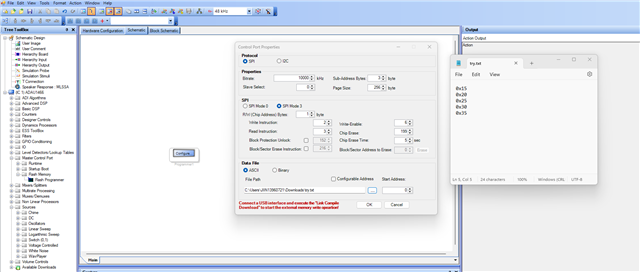
Ok, let's quickly check if you can read and write to the EEPROM properly, we will just write 5 data and try to read that back.
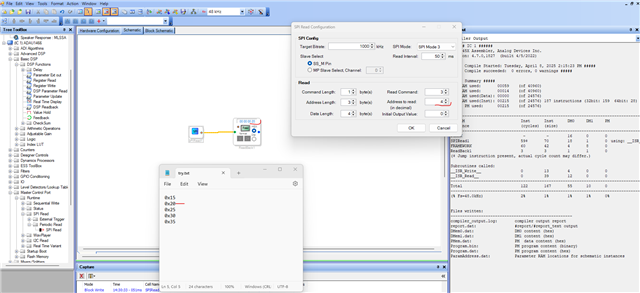
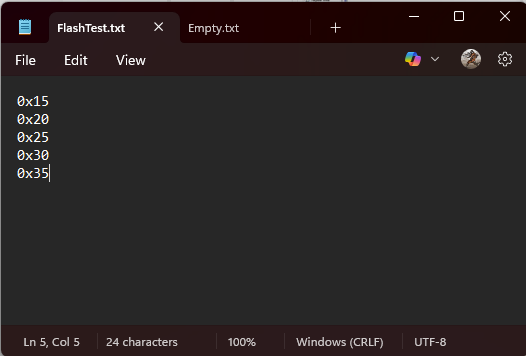
1) Take a flash programmer, set it and write a data file like below.
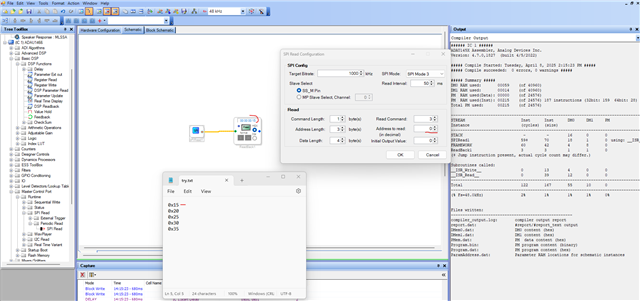
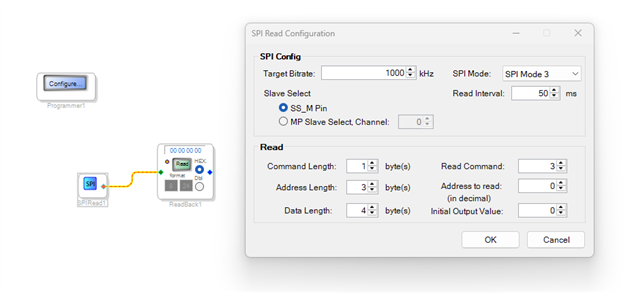
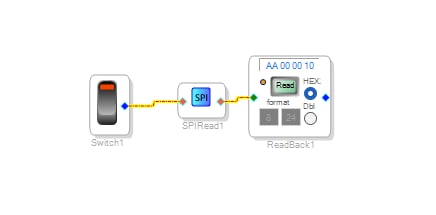
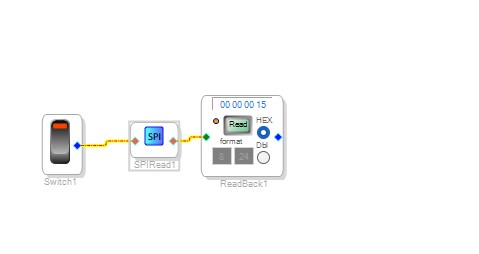
2) take an SPI read module and try to read it back like below.
By doing this, we can verify a basic read and write operation between the EEPROM and the DSP.
Regards
Harish
Hello Harishgowtham ,
I do not know what happend to the attachments.. I tried attaching them here again.
Image:
Project:
ADAU1466 Generic Crossover.zip
Will try the test you describe when I get home!
Cheers, Daniel
Hello again Harishgowtham ,
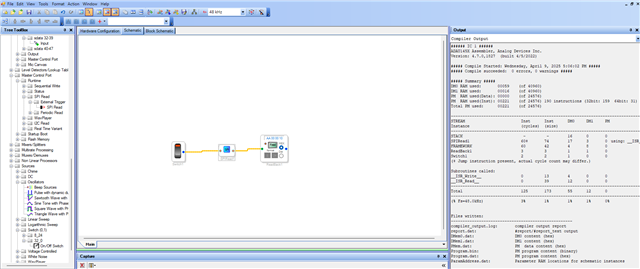
I tried to make your program.
When I press link compile I get this warning(As expected)
It then goes to write data.
Then it asks if it should verify the data.
I pressed yes and it said succesfull.
But when I try to read it i just get "00 00 00 00" as shown above. but i doo see something down in the capture window but not until the 4th value.
This was done without the selfboot jumper, meaning selfboot pin pulled high. with the jumper i just get a "programmer" error.
Does this make any sense to you?

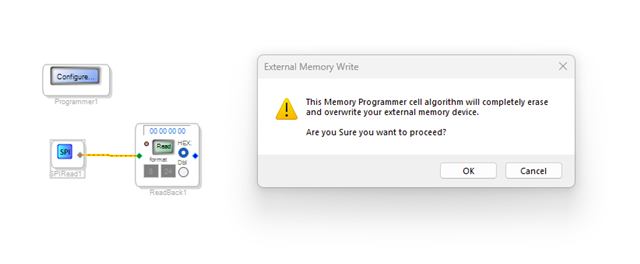
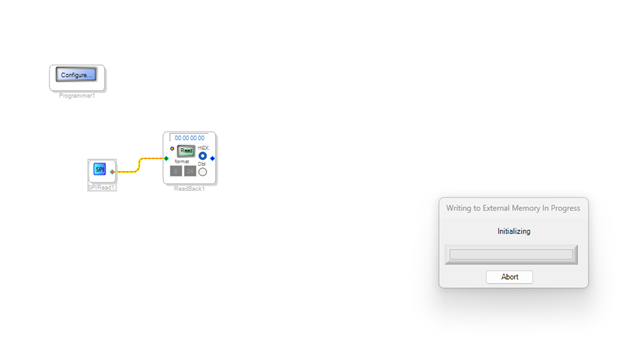
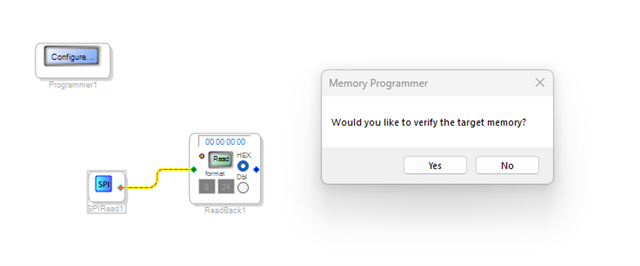
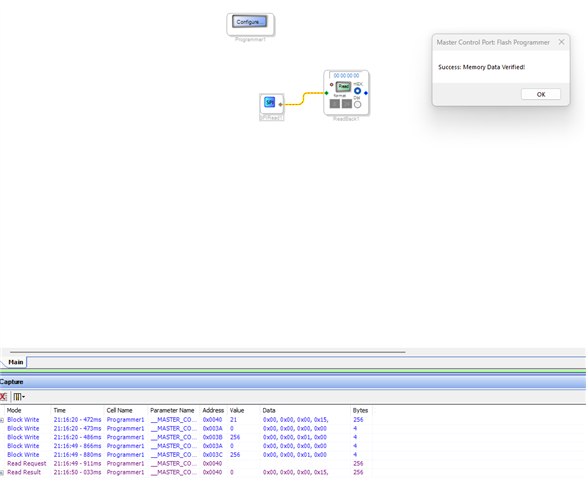
Hello Daniel,
Thank you for the tests.
You have to use different project for read and write. if you have still the flash programmer in the 'reading project' then whenever you compile, the flash programmer will try to write to the EEPROM. So, I would either create a new project for SPI read and readback or would delete the flash programmer and include the SPI read and readback modules.
I always use a single project for flash programmer alone, once I'm done flashing the file and I will create new project for reading and doing other things.
Your project seems fine, I tested with my Eval-board, it self-boots just fine.
Once I wrote your project to the EEPROM, I also created another project to read the content of the EEPROM just to see if the proper data is stored in the EEPROM.
Below is what is stored in the first 4 bytes of the EEPROM which is expected (Refer the self-boot data header section in the datasheet)
Could you try this and let us know your results?
One more thing is that, are you using our ADI's USBi module to program your custom board from SS or you are using any third-party USB to I2C converter?
Regards,
Harish
Hello Harishgowtham ,
Okay 1st thing. After the last test that didn't really seem to work i just tried to write my real program to it just because.. and it worked.. both with and without the self boot pin pulled low.
Since then it has been working every time.
I did your test and i get the same result
So I also went back and tried the test you described previously. It also works..
So now Im happy that I can again write to it, but it bothers me imensely that I seemingly didn't change anything to "break" it and also didn't change anything to fix it.. I even tried leaving the DSP powered on for 2 days to see if something changed over time. Seemingly not.
To answer your question. No, I do not use AD's USBi interface. I use a ICP5 from Wondom. I cannot llink to it as it will ban my post.. I previously used some of their product and had this programmer already on hand so wanted to try and use that instead of the very price USBi to see if it worked. I never had issues with it before while using the Wondom DSP's (ADAU1701 based). Could this be related? It does create a lot of audible noise in the speakers when it is connected to the DSP and PC though compared to when it is removed. Is this normal behavior from the USBi too?
I have a few questions:
Is the proper way of programming the board to pull the self boot pin low as soon as I connect the programmer? then compile and download as I test the program. Then write the EEPROM. Remove the jumper. and then reset the board?
Or should I leave the self boot high until Im ready to write the eeprom?
Could my issue be related to Noise or i2c signal issues on my board?
Can the EEPROM be semi dead and sometimes work and sometimes not?
Can you verify that this is the correct pin setup for SPI communication with the EEPROM and i2C communication with the DSP?
Also, I have seen this often that the illustration shows the pull don enabled even though the toggle switch says disabled. What may cause this?
Sorry for all the questions. Im just a bit frustrated and confused why it stopped working and now suddenly works again..

Harishgowtham
It has come to my attention that there seem to be a genreal EEPROM issue with the ADAU14 series when playing around in SigmaStudio for too long before attempting to write the EEPROM. This is a qute I found:
"This is a well-known issue, and no one knows the exact reason why the EEPROM stops working. I haven't seen any clear explanation online regarding this problem.
I can share my own theory — during project debugging and flashing the ADAU, there is activity on the EEPROM programming port. Under certain circumstances, this signal may cause the EEPROM to execute an instruction that disrupts its normal operation. This would explain why the issue doesn’t occur when uploading a pre-debugged and finalized project to the ADAU — it only arises during the debugging process with project uploads. After such sessions, EEPROM-related problems begin to appear. Sometimes, performing a full erase of the EEPROM through the ADAU helps, but sometimes the EEPROM has to be replaced."
Does this sound familiar to you?
In my current design I have the WriteProtect pin of my EEPROM pulled high at all times. I guess this is what allows something like this to happen? Would this process be a secure way of operating a ADAU14XX with a EEPROM:
Have WP pulled low during debugging through SS to prevent any SPI chatter from corroupting the EEPROM.
Also have selfboot pulled high
This would be the nominal operation of the device too.
Once Im ready to write the EEPROM I then have a small switch or something on the backpanel that puts Sellfboot to GND and WP high to enable the DSP to write to the EEPROM
This should be a foolproof method right? As long as I do not for some reason need to write the EEPROM from the program while running. Is there a reason I would wnat to do that?
Hello Daniel,
DannerD3H said:
It has come to my attention that there seem to be a genreal EEPROM issue with the ADAU14 series when playing around in SigmaStudio for too long before attempting to write the EEPROM. This is a qute I found:
I'm not certain about this, I have been using the on-board EEPROM on the Eval-board for almost 4 years and I have never come across this problem.
DannerD3H said:
In my current design I have the WriteProtect pin of my EEPROM pulled high at all times. I guess this is what allows something like this to happen? Would this process be a secure way of operating a ADAU14XX with a EEPROM:
I don't think so, the Eval board design and other typical EEPROM designs have the WP pin tied to IOVDD all the time and it doesn't seem to be causing this failure.
Sorry, if I haven't exactly answered your questions, let me get back to you.
Regards,
Harish
May also be a EEPROM specific thing if the eval board never had issues. Have you always used the self boot pin as described in the manual for the eval board? Aka disable self boot when writing the EEPROM?
If you could verify the correct pin settings for the m-aster port used to communicate with the EEPROM then I will be very happy! Thanks :)
Cheers Daniel
Harishgowtham I stll have issues...
I have begun using the self boot pin as described in the data sheet, but i still sometimes cannot write to the EEPROM. After I rebooted my PC and the DSP it then suddenly works again. I have a suspicion that it may be related to either my programmer(ICP5 from Wondom), sigma studio, my pc or the order which I start and connect things since a full reboot of everything solves it(at least sometimes).
Do you think it could be related to the use of a non genuine USBI programmer? I never had issues controling the DSP directly its only the EEPORM write that is problemeatic, so I cant see how that should be related to the programmer really..
DaveThib Do you have any inputs on this matter?
Hello Daniel,
I first started working with the SigmaDSP products back in around 2014 when I was told by my manager that I will be the new support person for the product line! I can't believe it has been that long now! My how time flies!
One of the early issues I also ran across was this issue of programming the EEPROM. One of the programmers of SigmaStudio told me that he just erases the EEPROM and then it works. Being the seasoned troubleshooter I am, (Read "old" into that! LOL) I did not accept that and wanted to know why?!! In studying the problem I ran into this explanation which seems to solve the problem for me. This would have probably been around 2015 when I did this work and had these realizations.
First, I learned the details of the selfboot state machine. That when the part powers up,(or comes out of reset), it will look at the Selfboot pin. If it is high then it will read from location 0x00 in the EEPROM and look for an 0xAA. If it reads that then it continues loading the program. If it does not then it tries two more times and quits.
If it has a program in it then it loads up the program into program memory and the parameters and register settings. Then it read a checksum and if it matches it runs the program. If it does not match it will try two more times and then quit and stuff a value into the Software Value Registers. I detailed this in the last revision of the ADAU1452 datasheet. It is not in the ADAU1467 series datasheet because that part was handled by another group and a different Apps Engineer.
Another thing I learned was to defeat the checksum you change the EEPROM contents to have zeros for the checksum. If the state machine reads zeros for a checksum it will just run the program and not perform a checksum.
Here is where these details are all important.
When SigmaStudio writes a program to the DSP, it performs a software reset of the part. This is important because you want the registers to be in a known state and then write updates that the program needs that are differnent from any default settings.
SigmaStudio takes a little while to start writing the program to the program memory after it does a reset. So it sends the reset,... then if the Selfboot pin is high the part will start to read in a program from the EEPROM!! If it is erased it will not take long before it quits and nothing is written to the DSP memory. If there is a small program then it will read in this program while SigmaStudio is figuring out what to write for a program and then SigmaStudio will overwrite the program that was just loaded. There still may be an issue with register settings but the program often functions fine.
If the program is large enough then both the Selboot state machine AND SigmaStudio are writing to program memory, parameter memory and register settings at the same time! This is a recipe for disaster and all sorts of flaky stuff. The program might work or it might not.
Now, switching over to the programming of the EEPROM itself. To do this we have to load in this data handler program to read data from the USBi and write it out to the EEPROM. Then the other way around when verifying. So again, if the Selfboot pin is high, the DSP will be loading in two programs at the same time unless the EEPROM is blank.
So the moral of the story is to have the ability to ground the Selfboot pin when the USBi is plugged in or have a jumper.
When developing the program keep selfboot defeated. This also applies to just regular program development and not just writing to the EEPROM.
The 5V coming from the USBi is handy to use to drive a FET or a transistor to do this. A jumper is a good low-tech way to do it and it does not have to be stuffed for production if field upgrades are not planned. I also have seen some customers setup a bridge between the two I2C/SPI ports on the part so you could use the EEPROM utilities in SigmaStudio to directly talk to the EEPROM.
Switching topics to the programmer. The Wondom programmer is popular and seems to work fine. I personally do not have one. I have used the Wondom DSP boards but I obviously have a pile of USBi programmers at hand so I did not bother to buy it. Your issue with noise is ground loop issues. I have had that issue in the lab here when I used the computer also for an audio source. Grounding on computer USB ports is horrendous. Every computer is slightly different. So by using the audio card output of the computer it creates a ground loop. So I either use a transformer isolation box (hassle) or I just use a different computer for the audio source. I often use my personal MAC for that. They do a better job of grounding and the USBi is not on the same computer.
So in short, you are doing nothing wrong and I would not be too quick to blame the Wondom programmer itself. Chances are it is the computer that is the problem.
This post is long enough!
Thanks!
Dave T
Wow, once again thansk for the very thorough explenation, love to actually understand whats going on.
So basically, whenever I plug the programmer into the DSP I would ideally ground the Selboot pin before plugging in and issue a reset. This way I ensure that the DSP only listens to SS and not the EEPROM.
If doing this I should ideally "never" run into problems?
Should I run into issues again then grounding the Selfboot and then erasing the eeprom should fix it and "unlock" the EEPROM?
Since the responses from Harish I added a external switch to switch the selfboot pin to GND for programming and 3v3 for selfboot. Last time I had an issue I may not have switched it until right before I attempted to write the EEPROM. And then when restarting everything it was already switched and thats probably why it worked? From now on I will toggle it before plugging in the programmer.
In the next revision I will add a fett as you describe to hopefully completely nuke the problem.. I was also considdering adding a i2C isolator between the programmer and the DSP hoping that this will eleminate the GND loop issue. Does that sound viable?
Again, thanks for your elaborate response! and thanks for keeping me sane regarding the programmer xD
Cheers, Daniel
Hello Daniel,
You should not have to erase the EEPROM if you ground the Selfboot pin. If you still have issues then it is something else going on.
Does your program have any blocks that write to the EEPROM or other memory on the master comms port?
Then it might be some writes locking up the EEPROM. Eliminating the Selfboot issue is a great start.
The I2C isolator might help. When it comes to grounding, it really takes a lot of study and looking at all the details. I have done a LOT of this at many recording studios. You have to take each situation as a new problem.
My best success story was at Long View Farms where I fixed a ground problem with the Trident A-Range console that had been there for ten years and they asked me to come in to fix it in one day. I did it!
Dave T
I didn't have any issues yesterday, so fingers crossed it was just me being stupid :D
No the program does not talk to the EEPROM.
Hmmm have you tried a simple USB isolator between the pc and the programmer? Does that work or not?
Haha nice job. what a upgrade after 10 years of noise xD
Hello again, sorry to bring this back up, but I still had issues but now seem to have found the "issue" and a "solution".
I started sticking very specifically to the procedure outlined in the eval manual:
I dissabled selfboot, then I connected usb and did the thing in sigma
Then I write the selfboot memory
Then i check the memory
If succesful i disconnect the usb, turn on selfboot and reset the dsp.
This seemed to work, but now again I suddnely seem to have random issues again. I tried al sorts of power up sequence, restarts of both dsp, sigma and pc. It sometimes worked, seemingly random.
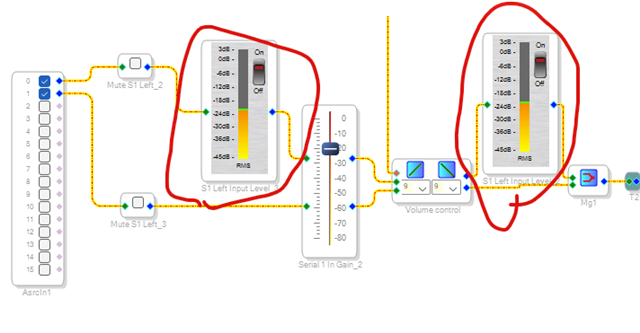
But suddenly I realized that everytime it didn't work I had been using theese meters:
I have now consistently for the last couple of times had issues writing the eeprom when these were on and no issues when they were of.
So it seems like there is a problem writing the EEPROM when the DSP is communicating back to the PC with these meters. As soon as i turn them off (Still in the program) it all seem to work.
Not sure if this is a bug in Sigma Studio, a layout issue on my board or if this is simply a limitation of the dsp. However I just wanted to leave it here for completion in case other people run into the same issue.
Cheers, Daniel
Hello Daniel,
That is interesting. I suppose it is possible that the constant communications between the USBi and the DSP was either adding noise or actually injecting communications into the stream when the USBi is trying to write and read from the EEPROM? Just a guess on my part. I would have to mock this up and see but I do not recall this issue in the past. However, I usually use the newer style of meter not the ones you are using so that may be the key here as to why I have not seen this?
Anyhow,...
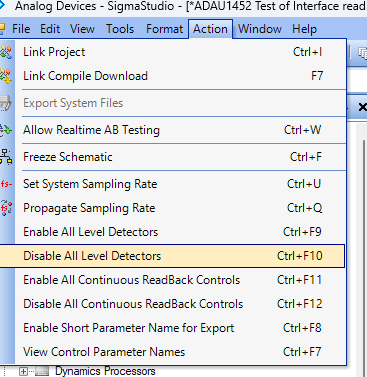
There is a shortcut in the Action pull down menu that is useful:
Then two positions down there is another to disable the continuous readbacks as well.
Dave T
Thanks for the tip!
not sure if it has anything to do with my icp5 programmer vs a real usbi? but it seem to be consistent.
what meters are you using?
Cheers, Daniel
Please log in to reply.