ADC192k down to 12k
Dear community,
I am trying to use the ADAU1467-Z evalboard with 192kH ADC in order to decrease latency, and then downsample the signal in the canvas for processing it. After process upsample the signal to 192k.
I am setting the ADC parameters via I2C with xml file. I am using the downsampling and upsampling blocks on Sigma for this purpose. However, I have not any signal in the output when I play some white noise.
The evalboard works well if I set it up at 48kHz and ADc in standalone mode with downsampling blocks. Can anyone tell me if I need to set up anything else for the 192kHz mode? I attach the two projects.
1638.MFxLMS_48kto12k_rev0.dspproj
8546.MFxLMS_192kto12k_rev0.dspproj
Best regards,
Sergio
Audio Signal Processors
hardware
adau1467
SigmaDSP Audio Processors
Hello Sergio,
The codec on the eval board comes setup in StandAlone mode. In that mode it ONLY operates at 48kHz. You will need to setup the board so the DSP can program the codec when the DSP boots up.
This is a bit complicated. You will need to read the user guide for the eval board that has a section about the boot mode and how to get it out of standalone mode.
Here is a zipped file with a project and the required XML files you will need.
Dave T
7737.SigmaDSP Programming CODEC via I2C to 192 kHz.zip
I already made this. I wrote in the post. I setup the codec via I2c via the xml file as you said.
Hello Sergio,
In this method (programming CODEC by I2C master control port), I can see that when we include the up/down sampling blocks into the project, the CODEC is not properly programmed. However, I can see the I2C commands going out of the master control port, but I guess the codec registers are not properly programmed, I don't know why but I have been looking at this and will get back to you.
I think I can get you going with your project for now, you can run and test your project at 192KHz. We will just split the project into two and run it.
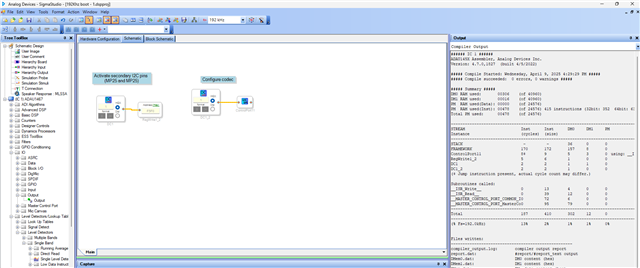
I took your original project and deleted the audio path and kept the I2C split register and master port write part alone, below is how it will look. then I saved this as a codec boot project (project 1).
Just put the switch S2 on the eval board to I2C CODEC boot mode (you know this already) and link compile download this project.
(then DO NOT reset or power cycle the board)
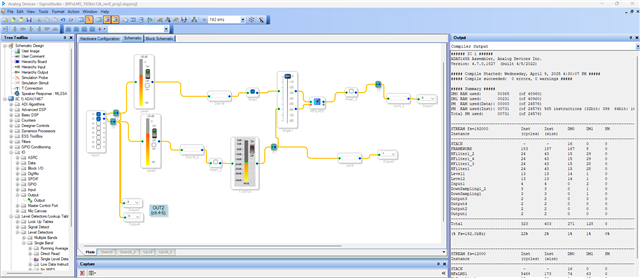
Take your original project again and this time keep the audio path alone and delete the I2C split register and master control port blocks and save it as your new project. Below is the picture.
I just added meters in the front and enabled OUT1 on the board as a bypass.
Now link compile download the project, you will be able to hear the output (the codec is already programmed at 192KHz with our previous program/project)
I will also attach the projects below.
192Khz boot - 1.dspproj
MFxLMS_192kto12k_rev0_proj2.dspproj
Please try this and see if it works for you.
This is a little workaround for now, it will have a look if there is any other solution.
Regards,
Harish
Please log in to reply.