Selfboot
Hello,
I am working with the AD2428WD1BZ, which integrates the ADAU1452 DSP. I have successfully saved a SigmaStudio schematic to the onboard EEPROM and verified that the selfboot functionality operates correctly.
My question is: How can I store and switch between multiple DSP architectures (schematics) on the same EEPROM? I have developed three different signal processing configurations for the ADAU1452, while the A2B network remains unchanged. Ideally, I would like to use GPIOs or similar hardware triggers to select and activate one of the DSP configurations during or after boot.
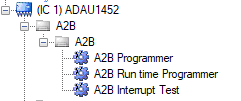
Should I use something like the "A2B Run time Programmer" Block in sigmastudio?
Audio Signal Processors
adau1452
software
eeprom
sigmaStudio 4.7
AD2428WD1BZ
SigmaDSP Audio Processors
selfboot
Show More
Hello payreza,
You use the Real Time Variant block and some GPIO pins or a DC block to select which one. The Wiki help files explains this all.
Real Time Variant [Analog Devices Wiki]
Dave T
Please log in to reply.