Self boot method change
Hi Engineer zone,
Is it possible to replace the host MCU with a self boot method using EEPROM?
If so, please share how to change.
BRs,
Eliott
Audio Signal Processors
hardware
adau1467
SigmaDSP Audio Processors
Hello Eliott,
Yes, these DSPs are capable of self-boot from an EEPROM without use of a system controller.
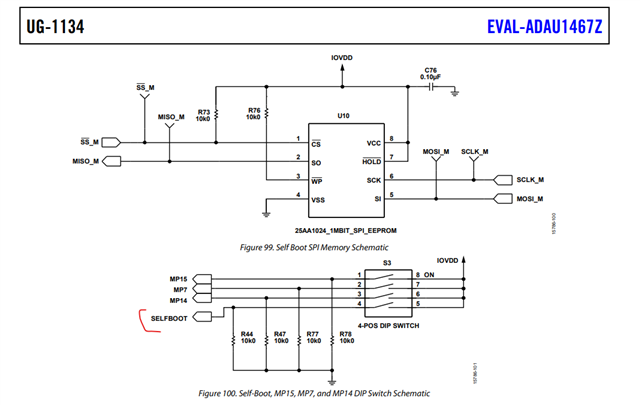
You have to connect your EEPROM in the master control port side of the DSP and all the other required hardware connections, refer the Eval board schematics here.
Design the selfboot pin of the DSP as a switch in the way that you can turn ON and OFF when needed, this is necessary because you have to LOW the selfboot pin when writing to the EEPROM from Sigma studio. Below is how it's designed in the eval board.
when the hardware requirements are done,
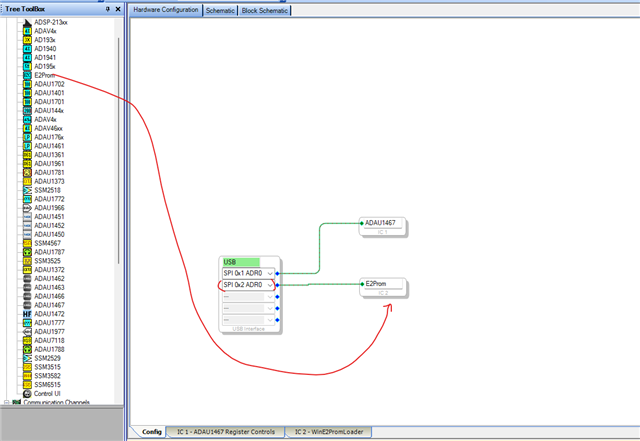
Open your project to be self-booted from EEPROM and add EEPROM IC into the schematic. If you are using SPI EEPROM, then select 'SPI' in the USBi module like shown below. Because, though there are no connection between USBi and EEPROM, selecting SPI will get you correct values in the EEPROM properties window, so that you don't want to edit them, you just click ok and go forward.
LOW the self-boot pin.
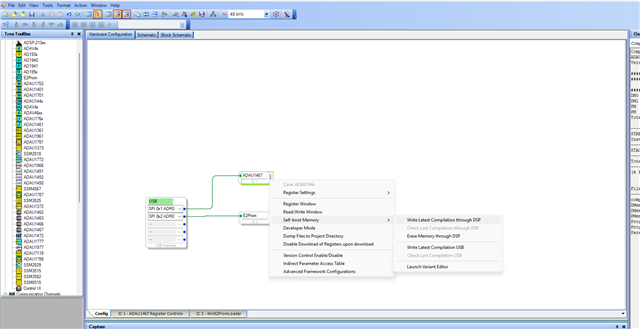
Then compile the project once, and right click on the DSP IC >> self-boot memory >> click "write latest compilation thru DSP"
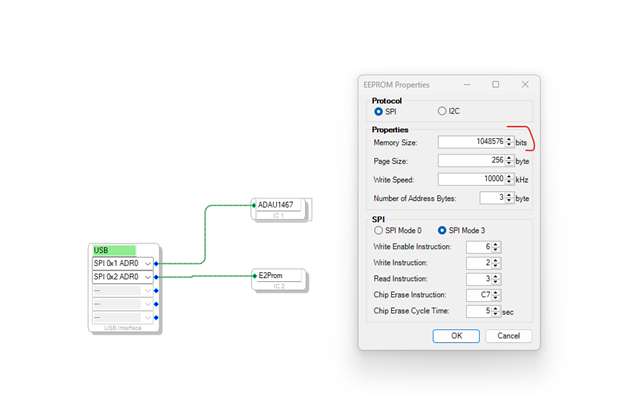
The window will appear, the values are pre-configured for a 1Mbit SPI memory, if you are using the same memory that we used in the Eval board, you can just click 'ok' and proceed.
If you are using some different memory, then you have to enter the correct memory size (in bits) and other instructions according to the EEPROM's datasheet (mostly it will be the same for all SPI EEPROMs).
Once you click 'ok', then the EEPROM will be written, and you will get a message in the GUI.
Now, unplug the USBi and reset the board or give a power cycle. Now turn on the self-boot switch and hit reset. Your program will be self-booted and running. You can include a LED blink and audio pass thru to verify the self-boot behavior.
This is all detailed in Eval board user guide under self-boot section. There is a step-by-step guide in the user manual that I attached above.
Please try this and let us know if it works. If you need any other information, feel free to reach out.
Regards,
Harish
Sorry for the confusion.
My intention was to ask if it is possible to set the SigmaStudio settings via the host MCU without using EEPROM.
I'm really sorry.
BRs,
Eliott
Hello Eliott,
No worries, please refer to the attached post here that shows how to do this.
Regards,
Harish
Hi Harish,
Thank you for your quick reply.
BRs,
Eliott
Please log in to reply.