ADAU1701+esp32+micropython
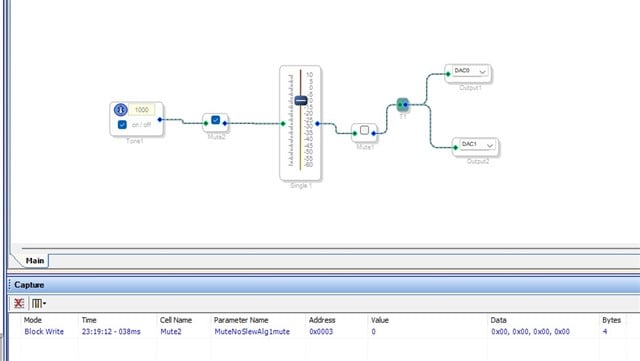
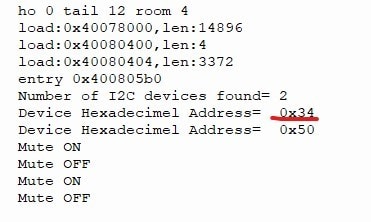
hi. I decided to experiment with adau1701 and esp32, wrote a simple code to turn mute on and off using micropython, ran it on a microprocessor, but it doesn't want to work. I checked the dsp address, as well as the addresses of the mute element resistors. What could be wrong?
from machine import Pin, I2C
import time
i2c = I2C(0, scl=Pin(22), sda=Pin(21), freq=100000)
ADAU1701_ADDR = 0x34
MUTE_REGISTER = 0x0003
button = Pin(0, Pin.IN, Pin.PULL_UP)
mute_state = False
last_button_state = True
debounce_time = 0
def write_adau_register(reg, value):
data = bytearray([(reg >> 8) & 0xFF, reg & 0xFF, value])
i2c.writeto(ADAU1701_ADDR, data)
def toggle_mute():
global mute_state
mute_state = not mute_state
write_adau_register(MUTE_REGISTER, 0x01 if mute_state else 0x00)
print("Mute", "ON" if mute_state else "OFF")
while True:
current_state = button.value()
if current_state != last_button_state:
last_button_state = current_state
if current_state == 0:
debounce_time = time.ticks_ms()
if last_button_state == 0 and (time.ticks_ms() - debounce_time) > 50:
toggle_mute()
while button.value() == 0:
time.sleep_ms(10)
last_button_state = 1
time.sleep_ms(10)
Audio Signal Processors
programming
hardware
microcontroller
SigmaDSP Audio Processors
adau1701
Show More
Hello Fell1987,
Sorry for the delay in response.
Have you placed a scope on the I2C SCL and SDA to "see" the transactions? This way you can see if the 1701 is actually responding and the EPS32 is actually sending commands.
Please also attach your hardware schematic, we may find something in there.
I have come across this thread where a user put together some project and files to control the SigamDSP from ESP32 using python. You can compare your code with this reference.
Control SigmaDSP ADAU1701 / ADAU1401 from PC or ESP32 - Discussions - SigmaDSP Processors & SigmaStudio Dev. Tool - EngineerZone
Try searching the forum for some answers/references.
Regards,
Harish
Hi! Thanks for the reply. I only checked that the adau1701 responds to the port scan and outputs its address, I did not scan the messages, and do not know how to scan i2c messages. I have a very simple project, I flashed the program with the mute module via USBi on the EPROM, the adau1701 is running in selfboot mode, maybe this is the problem?
I watched that thread about ESP32, but nothing is clear to me there. Therefore, I would like to learn something very simple to begin with with a single module.
Hi, I believe the problem can be in the esp32 i2c driver. I had this problem some time ago, and the core of it is that some details about the timing of clock are not ok for the 1701.
This is my routine for reading using "c" code ... I don't use micropython.
/////////////////////////////////////////////////////////////////////////////////////////////////////////////////////////////////////////////////////////////////////////////////
// Legge "numbytes" (FINO a 253) bytes dal registro di indirizzo reg_address nel buffer "buffer". In uscita 0 = OK
/////////////////////////////////////////////////////////////////////////////////////////////////////////////////////////////////////////////////////////////////////////////////
uint8_t ReadI2C(uint8_t chip_address_8bit, unsigned int reg_address, int address_size_bytes, uint8_t *buffer, uint8_t numbytes)
{
i2c_cmd_handle_t cmd = i2c_cmd_link_create();
if(cmd == NULL) ESP_LOGE(TAG, "i2c_cmd_link_create ERROR, NULL cmd");
esp_err_t err = i2c_master_start(cmd);
if(err != ESP_OK) ESP_LOGE(TAG, "i2c_master_start ERROR, code= %d", err);
err = i2c_master_write_byte(cmd, chip_address_8bit | I2C_MASTER_WRITE, true); //sends I2C addr
if(err != ESP_OK) ESP_LOGE(TAG, "i2c_master_write_byte ERROR, code= %d", err);
err = i2c_master_write_byte(cmd, reg_address >> 8, true); // then two bytes of read address
if(err != ESP_OK) ESP_LOGE(TAG, "i2c_master_write_byte ERROR, code= %d", err);
err = i2c_master_write_byte(cmd, reg_address & 0xff, true);
if(err != ESP_OK) ESP_LOGE(TAG, "i2c_master_write_byte ERROR, code= %d", err);
// ADAU1701 non vuole lo stop intermedio ma subito il nuovo start. Così la lettura funziona
err = i2c_master_start(cmd);
if(err != ESP_OK) ESP_LOGE(TAG, "i2c_master_start ERROR, code= %d", err);
i2c_master_write_byte(cmd, chip_address_8bit | I2C_MASTER_READ, true); // send I2C addr
if(err != ESP_OK) ESP_LOGE(TAG, "i2c_master_write_byte ERROR, code= %d", err);
err = i2c_master_read(cmd, buffer, numbytes, I2C_MASTER_LAST_NACK); // ack for all except last byte
if(err != ESP_OK) ESP_LOGE(TAG, "i2c_master_read ERROR, code= %d", err);
err = i2c_master_stop(cmd);
if(err != ESP_OK) ESP_LOGE(TAG, "i2c_master_stop ERROR, code= %d", err);
err = i2c_master_cmd_begin(I2C_NUM_0, cmd, 1000);
if(err != ESP_OK) ESP_LOGE(TAG, "i2c_master_cmd_begin ERROR, code= %d", err);
i2c_cmd_link_delete(cmd);
return err;
}
The problem is that the 1701 for reading does not want an intermediate "stop" on i2c between the write and the read phase. The code above actually works.
Now I don't know what is the driver used by micropython, but if this detail is not considered it's likely that you can't read anything form the 1701.
The only way to check is with an oscilloscope, you need to see if the 1701 acnowledges the request and actually sends the reply.
Hope this helps.
Thanks for the answer! Unfortunately, I am not highly qualified to write an i2c driver and I don't know how to check the transmission with an oscilloscope. But there is something to think about.
Please log in to reply.