I2S signal on SDATA_IN0 in SigmaStudio+ configuration not working
Hi,
I recently bought an EVAL-ADAU1467Z rev. B board and I would like to process an external 48Khz, 16bit, 2channel I2S signal that I've connected on header J8 to SDATA_IN0, LRCLK_IN0 and BCLK_IN0. The signal is there because I've connected my oscilloscope to verify it.
I would like the ADAU1467 to be the I2S slave and my STM32 which is producinng the signal to be the master.
I'm trying to visualize my signal in SigmaStudio+ but I don't see any signal on the level detector.
I'm new to SigmaStudio+ so I guess I'm missing something in the configuration. Can someone help me to visualize that I have a signal coming in.
These are my settings so far:
Thanks!
TG808
Audio Signal Processors
software
adau1467
i2s
SigmaDSP Audio Processors
SDATA_IN0
SigmaStudio+ 2.3.0 (update2)
Show More


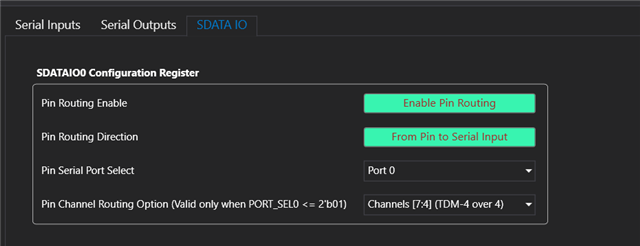
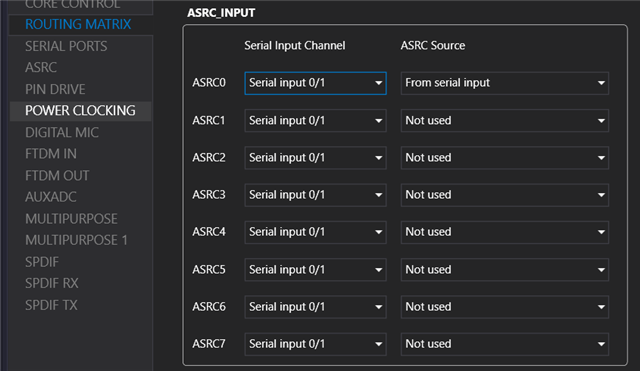
Hello TG808,
I have attached a project below that I just configured it for your requirements mentioned above. It works fine here in my bench.
Connect the BCLK, LRCLK, SDATA, GND from your uC to serial input 0 port (J8), and run this project, it will work fine. I routed the signal to the output, so you can hear the output at OUT1 jack.
For just monitoring the signal, you don't need level designer, just use level detector like my project.
SS+ I2S input.ssprj
Feel free to reach out if you have any questions.
Regards,
Harish
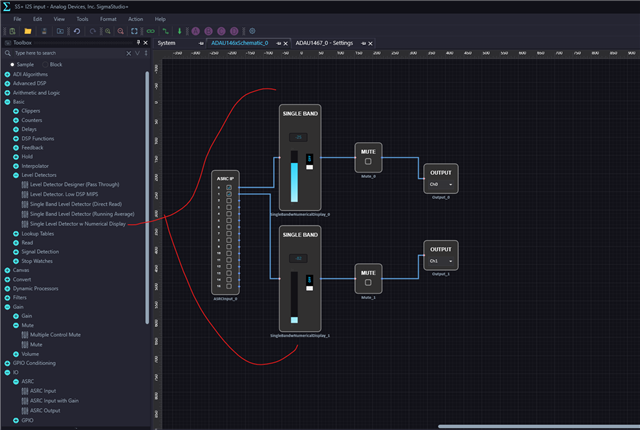
Hello Harish,
Thank you very much! This was exactly what I needed.
Best regards,
TG808
Hello Harish,
If I use the project I notice that the audio at out1 jack is heavily distorted.
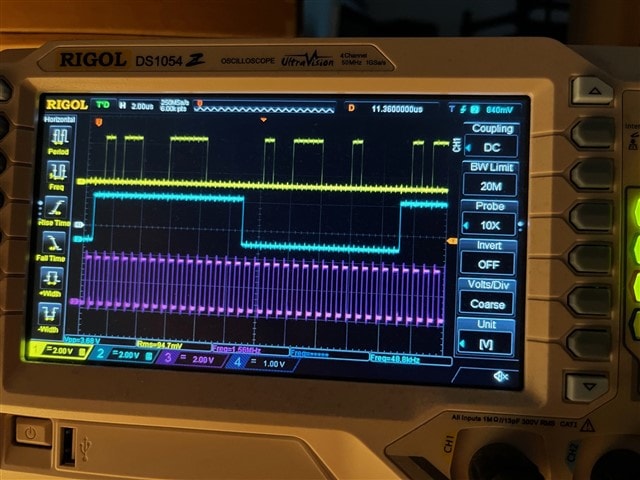
As a test I wrote a small program that sends a buffer with a positive value alternating with a negative value tot the ADAU1467 like this:
void generate_HI_LO() {
for (int i = 0; i < BUFFER_SIZE; i++) {
hiloBuffer[i] = i%2 == 0 ? 20000 : -20000;
}
}
This is what I see on my scope:
But this is what comes out of output1 for the left or right channel:
Any idea what could be causing this?
Best regards,
TG808
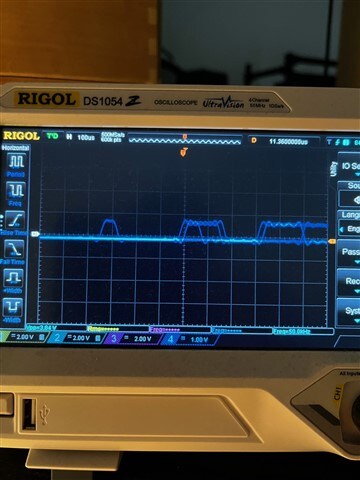
Hello TG808,
SigmaDSPs are audio processors, so you are supposed to be sending audio signals to the serial ports. The audio signal will be processed and sent to DAC for reconstruction and then be played out.
what you are sending isn't an audio signal, you just send two numbers continuously, it will produce undefined output at the DAC. I don't know what you expect it to output.
what is your expectation and what are you trying to do?
Regards,
Harish
Hello Harish,
Thank you for your reply.
I'm working on a project to convert an RTP stream to I2S. If I test that and play audio, I can recognize the audio at output1 of the ADAU1467 board but it is heavily distorted. To debug, I generated a sinewave that was sent via I2S to test things without RTP and the sinewave was also very distorted. That is why I did the test with sending 20000 and -20000 to narrow things down because I thought that if I sent the same value constantly to the left channel, I would see a flat line at the output, but I got the second image from my post above. So it looks to me that some kind of distortion is added in the dsp. I don't know what is causing that, maybe it has something to do with settings, but I double checked everything and both my stm32 and the ADAU1467 are set to 48Khz, 16 bit,2 channels.
Best regards,
TG808
Hello Harish,
This is the distorted sine that is coming out of the ADAU1467 output. If I check the I2S data that is sent by the STM32 on a logic analyzer, it is correct. Do you know what could be causing this problem?
Best regards,
TG808

Hello TG808,
Have tried the internal tone generator?
Are you using the project that I sent? If it's your own project, then please attach it.
Please add this blocks into the project that I attached and see if it's working.
I just added an internal sine tone generator to the outputs with a Mux, so that you can switch between the digital input and internal tone.
Since it's an Eval board, we can quickly get this sorted out, please get back with your results.
Regards,
Harish

Hello Harish,
I've added the internal tone generator and it produces a perfect sine. I think I have a synchronisation issue with I2S that is causing the malformed sine, because I recently noticed that depending on when I boot the STM32, sometimes the sine can look a lot better. Like in the picture below.
Is there a way to get better I2S synchronisation? Is there a setting that I'm missing? This is my project:
3583.SS+ I2S input.ssprj
The STM can produce a masterCLK out for I2S, but I don't see an I2S masterCLK input on any of the headers on my Eval board. In all de I2S documentation I have I always see 3 lines connected: data, LRCLK and BCLK so I didn't think I would need the masterCLK. Sorry If I get things wrong but I'm still learning.
Best regards,
TG808
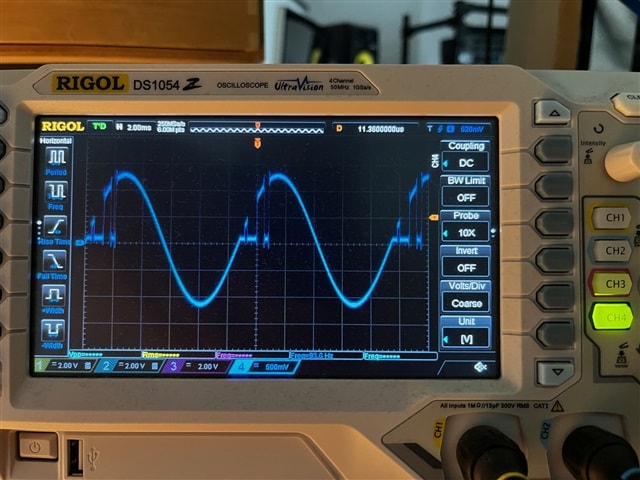
Hello,
Is there anyone who can help me out or who has experienced similar sync problems with I2S when the ADAU1467 is set in I2Sslave-mode? I've already tried so many settings but I can't get the ADAU1467 board to play the I2S sinus without sync problems. I was wondering, would it perhaps be possible to remove the crystal from my STM32 board and use the clock from the ADAU board as clock for my STM board?
Any tips or ideas are are really appreciated!
Best regards,
TG808
Hello TG808,
Your project works fine for me, and it is set correctly.
I used two Eval boards, one to send I2S output (sine/music) and the other to receive, I run your project in the receiving board, and it produces a clean sine wave from I2S input. My both Eval boards run on its own MCLK domain, yet I don't have any sync problems since ASRC is used.
So, I doubt your I2S input stream, have you verified that input stream with some other boards, are you sure that I2S output from STM32 will produce a clean sine wave?
since it's an Eval board, mostly there won't be any other issue but the input stream. Maybe please send us your hardware connection/setup.
Regarding giving MCLK to the board, you can remove one resistor and give MCLK to the board, if you want to use the crystal again then you can put the jumper and go back to the original state.
I have explained that here in this thread
(4) MCLK Source Select on ADAU1467 eval board - Q&A - SigmaDSP Processors & SigmaStudio Dev. Tool - EngineerZone
Regards,
Harish
Please log in to reply.