Downsampling part of the schema
Hello,
I have a complex schematic that runs in 96KHz
I would like to know if it was possible on the 1467 to downsample just part of the schema to run in 48KHz, to reduce the MIPS usage.
I'v tryed using the down/upsample blocks, but there is no way to set the blocks in-between to 48KHZ while the rest of the project runs at 96KHz (or I didn't find it)
Is it possible ? if so, how ?
Thanks
Audio Signal Processors
software
sigmaStudio 4.7
adau1467
SigmaDSP Audio Processors
Hello JBAX,
These DSPs support multi rate processing, so you can certainly do that.
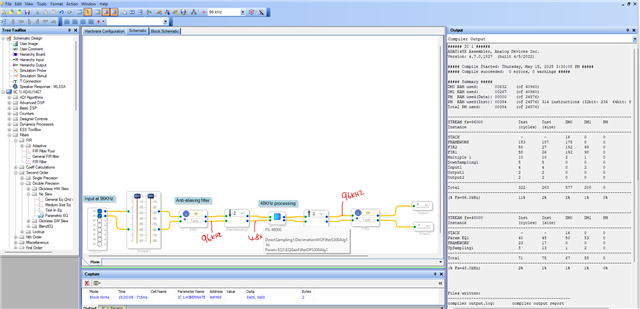
You should have anti-aliasing filters like I included below.
please keep in mind that the core must run at higher rate, which is 96KHz, so your start pulse register must be set for 96KHz rate.
Feel free to reach out if you have any questions.
Regards,
Harish
Thanks for your swift answer !
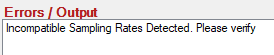
I'm trying to put a whole schema in 48KHz which is saved in a hierarchy board. When doing exactly like you (but with the hierarchy board containing dozens of blocks instead of your paramEQ) I get this error :
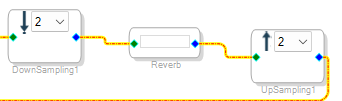
As you guessed "Reverb" is my hierarchy board.
My guess is that the hierarchy board's inner blocks are set to 96KHz and I don't know where to put them in 48KHz, I'll investigate more on my own to understand where lies the issue but if you have any pointers I'll be grateful :)
Unfortunately I can't post my project/board here but I'll try to do a minimal repro example and post it here, if I don't manage to solve it myself.
Good to know that it should be possible though !
Hello JBAX,
Inside the reverb board you can't set something to use 96KHz, because the reverb thread is at 48KHz. This is just a sample rate mismatch, but it would be difficult without looking at your project. you can PM me if you want to share your project privately, make sure you send a friend request before.
You can hover over the thread (that connects the blocks in SS), it will show the sample rate at that point. you can see where the mismatch is.
Regards,
Harish
Ok I have a clue : inside my reverb I have many "DC source" blocks, which are set to 96KHz, I got to set them all manually one by one to 48KHZ I guess. I'll check if maybe there are other such elements.
Thanks for putting me in the right direction (I didn't know about getting a thread sample rate by hovering it, crucial piece of info !)
I'll do that and report asap (will take some time, i have sub-boards each with lots of dc blocks)
Ok, a few notes that could help someone else :
- when clicking "propagate sampling rate" it sets back ALL the Dc blocks to 96KHz (even those who are connected to other 48KHz elements )
- all the sources must be manually set to 48Khz (oscillators, white noise generators ... not just DC)
Another issue I can't seem to resolve:
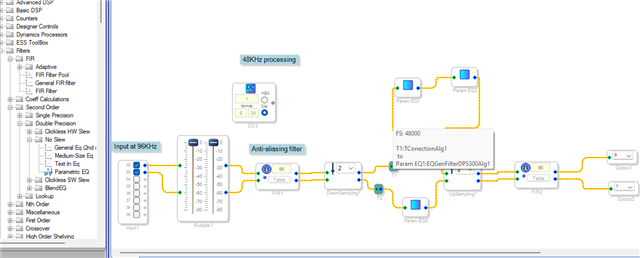
When I connect a 48KHz source to a T, the thread between the source and the T is 48KHz, but the thread between the T and the element afterwards is still 96KHz ... I can't set the sample rate of the T anywhere
How can I work around that ? I need Ts !
Hello JBAX,
I was about to tell you the 'propagate sample rate', glad that you found yourself.
Reg the T,
It shows like that before compilation, and it will be fine once you compile the project. please look below
Regards,
Harish
I didn't touch the "progpagate sample rate" as it set the sources back to 96KHZ
For the T's you're right, once I've put all the sources at 48KHZ they are fine and I can compile correctly.
HUGE thanks to you Harish :)
Hello JBAX,
Glad that, you are going forward with your project. I hope the rest of the project goes well.
Regards,
Harish
Please log in to reply.