Best MCLK source for an MCU-controlled HDMI DSP setup
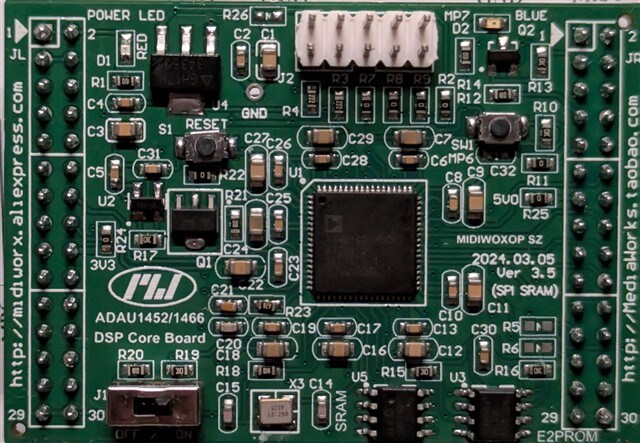
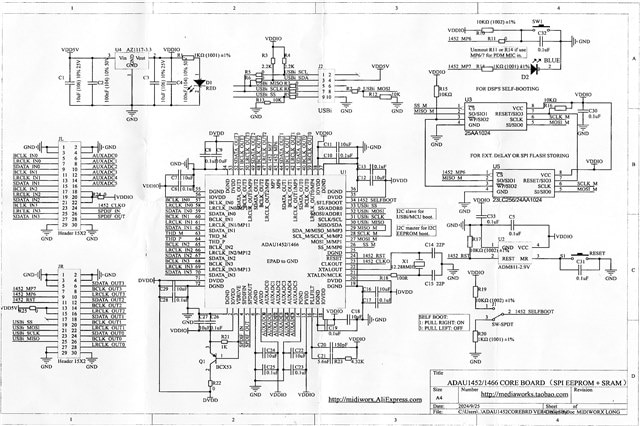
I purchased an ADAU1452 Core Board from MediaWorks (aka MidiWorx on AliExpress). The board mounts an ADAU1452WBCPZ (#2201 D 5625508.1) and is very well designed, including pull-up/pull-down resistors for the control ports and an internal 12.288 MHz crystal. The only issue I am having is that I am planning to use it in a configuration where the DSP must be slaved to the clock from an external HDMI extractor, but the board doesn't allow isolating the internal crystal and doesn't even expose the MCLK input pin. The board and its schematics are displayed below:
The other components involved in my setup are:
Apple TV: the source of multichannel audio
HDMI Extractor: Based on an EP92A3E chip, it extracts the audio in 4 different I2S streams. This model already includes four DACs for the 7.1 outputs but doesn't expose the I2S pins directly. Nevertheless, it's relatively easy to get the correct signals from the pins of the onboard DACs (CS4354)
ADAU1452 Core Board: I have already programmed it with an NxM mixing matrix so that I can control how each input is mixed into each output, which allows me to create my custom mixdown presets (e.g. 7.1 > 3.0 or 2.0 > 5.1) and also control the balancing of each speaker through individual volume controls. The program in SigmaStudio also includes a global volume and a global mute component that is ultimately going to respond to the CEC signal from the Apple TV
DAC+Ampli: Each passive speaker will be equipped with a DAC (CS4344) plus a 100W amplifier (TPA3116). This way, the signal can stay in the digital domain until its final destination.
ESP8266: A D1-Mini hosts a web user interface that controls the DSP via the I2C bus. The controller is in charge of:
configuring the balancing of the speakers, the global level, and the mute;
storing custom presets with different mixdown configurations;
listening to the CEC signal coming from the Apple TV and controlling the global volume and mute accordingly;
ensuring that the ADAU1452 is reset after the boot (or loss of power) so that the I2C bus is activated in slave mode.
The firmware is already done and tested: everything is working as intended, including the communication with the registers of the ADAU1452.
In the context of that setup, I am debating between two possible solutions for the source of the main MCLK:
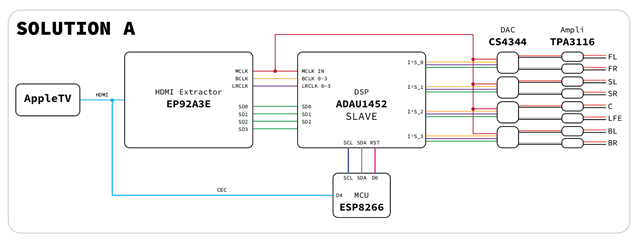
Solution A. Desolder the crystal from the core board (pin 21 and 22 in the schematics; on the board, it is on the right of the self-boot switch on the bottom side of the board, between the C14 and C15 condensers). Then, solder a short wire from an NC pin of the 10-pin header to the loose end of R18, which goes into the MCLK input pin of the ADAU1452
PRO: Everything is synced to the same MCLK from the HDMI extractor, provided that the clock from the EP92A3E is compatible with the ADAU1452
CON: A rather delicate modification to the board is required, which involves dealing with miniaturized SMD components and the risk of trashing the whole board
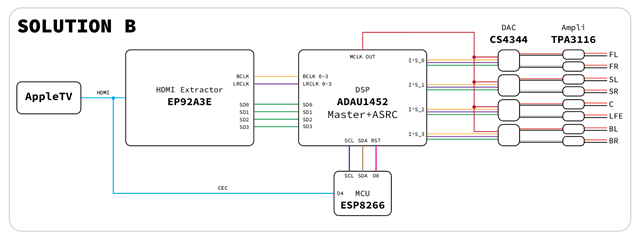
Solution B – Run the DSP at its internal clock and use four ASRCs to convert the sample rate of the I2S signals coming from the EP92A3E in the HDMI extractor.
PRO: It is easier to configure because it only needs the correct program in SigmaStudio and doesn't require any modification to the ADAU1452 Core Board
CON: There might be a potential degradation of the audio quality due to the sample rate conversion.
Which solution would you recommend? I'd appreciate your thoughts on this. Thank you in advance!
Luigi.
Audio Signal Processors
adau1452
hardware
adau1452 sigmastudio
adau1452 + mcu
SigmaDSP Audio Processors
ADAU1452 + sigmaStudio4.7
Show More
Hello Luigi,
You've got quite a sophisticated project here. I'd suggest trying Solution B first, since it doesn't involve modifying your board. Moreover, many who had to externally clock a DSP without SRCs (ADAU1701, etc.) ran into trouble -- for example, when the receiving device goes idle. Thus, given a ADAU1452 equipped with SRCs, we might as well make good use of them.
As for audio quality, the -1452 SRCs' dynamic range and THD+N specs are as good or better than those of the AD1895 dedicated SRC chip. The Theory of Operation, p. 16-18 of that chip's data sheet describes the amazing detail which goes into SRC design. The -1452 SRCs' specs also exceed those of many codecs, including the AD1938 and the CS4344. Thus, you're not likely to hear any degradation.
Best regards,
Hello KJBob.
Thank you so much for taking the time to go through all my details and for providing some technical insights about the internal ASRCs of the ADAU1452.
I will certainly follow your suggestion and keep the internal crystal active for the time being. I simply like the idea of running everything clean off the same clock, but I surely appreciate the reassurance about the internal ASRC's quality if I decide to keep the setup that way.
As soon as I put the whole configuration together, I will report back my results.
I found a new extractor based on the EP94Z1E. This new board comes with some important benefits:
It contains the CEA-861 extension block for the EDID handshaking to extract the 7.1 audio stream from the HDMI input (no need to connect an output display)
It exposes MCLK, BCLK, LRCLK and SD0 through SD3 as onboard pins (no need to modify anything hardware-wise)
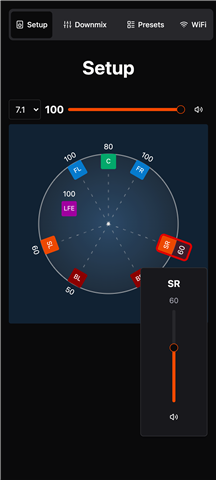
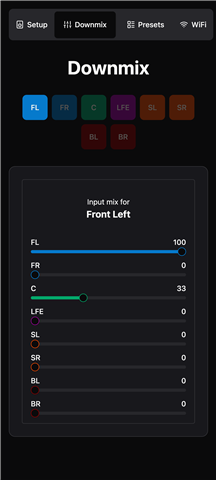
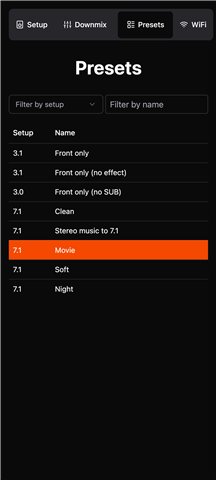
While I'm waiting for that new board to arrive, I completed the WebUI inside the ESP8266 (it is developed in React) and verified that the CEC signals from the Apple TV are correctly received by the ESP8266. Here are the screenshots of the three configuration pages: Setup (speaker setup and balance), Downmix (NxM mixing matrix) and Presets (each preset stores both the speaker balance and the NxM matrix).
Thanks Bob, for your inputs.
Hello Luigi,
To answer your original question, there is one more thing that you can do unless your project is very big in a way it uses 95% of the DSP resources.
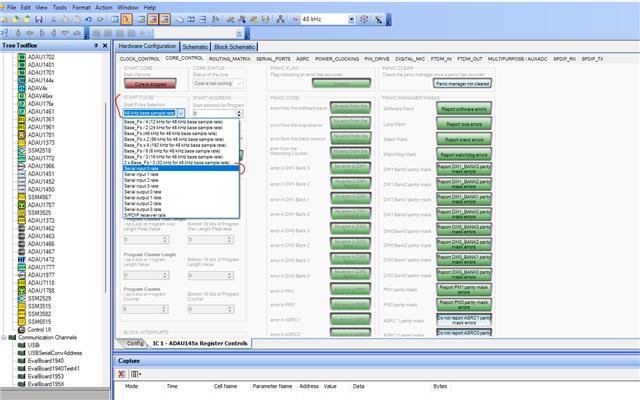
You don't need to modify the hardware or use the ASRC, you can just set the start pulse to be the incoming serial port.
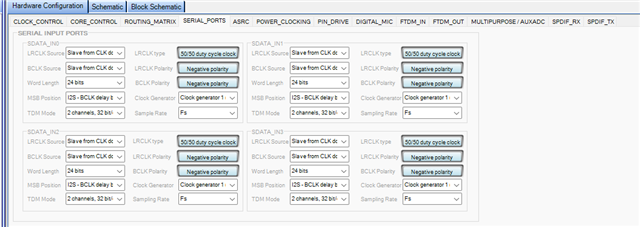
I can see you have a single I2S source (All your I2S clocks are generated from a single source, this case it's HDMI extractor) and each port uses 2 channels and at same sample rate, so the BCLK, LRCLK frequency is same. so, you can provide the BCLK, LRCLK to any one of the incoming ports and let other ports use it internally. Let's assume you use serial input port 0 to receive clocks from HDMI, then set all ports to 'slave from clock domain 0'. This way you can reduce the wires/jumpers/traces.
Now coming to the start pulse setting,
If your application doesn't include SPDIF then you can set the DSP sample rate to be the incoming sample rate. For that, you should set the start pulse rate to be the incoming serial port rate (Serial input 0). By doing this, you can simply have the core start the frame processing after a new sample has arrived.
Also note that, if the serial input clock goes away, then the core will no longer get an interrupt to start executing the program at the start of the frame. So, the core stops. Therefore, any code you write to change the start pulse back to an internal source can never be reached because the program is not running. So, serial input clocks must be present all the time for the DSP to run.
So, if your project is not so big, doesn't include SPDIF, serial input clocks will be present all the time, then you can try this method. Below is the setting.
The reason for mentioning 'big project' is that, Now the core clock (294.912MHz) is from the internal source (crystal and PLL) and DSP sample rate is from external source (HDMI), so they won't be in sync, which means some sample periods will have more MCLK cycles and some will have lesser. But this will not be a problem unless you use almost 100% of the DSP resource.
If you are okay with above conditions, you can use this way or just use ASRC.
You can use the CLKOUT pin of the DSP as an MCLK input to all your DACs. (solution B)
Regards,
Harish
Thank you so much, Harish.
Your explanation is extremely clear and detailed. The configuration you are recommending sounds like the way to go.
Harishgowtham said:
you can provide the BCLK, LRCLK to any one of the incoming ports and let other ports use it internally
This is possibly the point I like the most among the ones you made. It helps simplify the physical connection between the extractor (which has only one set of B/LR-clocks) and the 1452 Core Board, which I am working on right now.
Harishgowtham said:
if the serial input clock goes away, then the core will no longer get an interrupt to start executing the program at the start of the frame
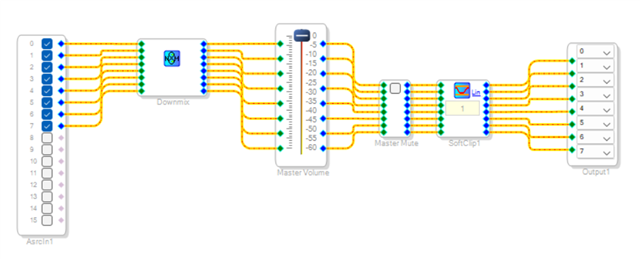
If I understand this correctly, the DSP can only operate when there is an incoming audio stream through the serial ports, otherwise, it simply stops running. But will it resume automatically when the serial ports start receiving data again? My application is very basic (I would say even rudimentary), so this should be ok because I won't need to perform any actions if there is no audio coming in. The program I have in SigmaStudio at the moment is fairly simple:
Harishgowtham said:
If you are okay with above conditions, you can use this way or just use ASRC.
I will definitely go this route and switch to the ASRCs in case something is not working.
Thank you again for all the details you provided me with. I truly appreciate it.
Best regards,
Luigi.
Hello Luigi,
LuigiPulcini said:
If I understand this correctly, the DSP can only operate when there is an incoming audio stream through the serial ports, otherwise, it simply stops running. But will it resume automatically when the serial ports start receiving data again?
It's not about the data, it's about the clocks, as long as the serial port receives clocks it will run the program.
For example, you are giving BCLK, LRCLK, DATA from HDMI to DSP and if your program has an audio pass thru (audio coming via serial input port 0 and going out via output port 0) and LED blink with GPIO. if you disconnect the data pin alone from HDMI, the audio will go away obviously but DSP will still run, you can see the LED blink, since the DSP receives the clocks as its DSP start pulse source. Here the LRCLK indicates the DSP sample rate.
If you disconnect the clocks, the core will stop since it has no interrupt clock. so audio, LED blink nothing will work.
Yes, the core will start running again as soon as it receives the clocks. You can experiment with this and let us know if anything is needed.
Regards,
Harish
Thanks again for the additional information.
I admit my terminology was completely off but, with the word "data", I was improperly referring to all the signals coming from the HDMI extractor, including the clocks, not just SData. So, your reply answers my question.
Now, it is just a matter of assembling all the components and running all the necessary tests.
Thank you so much for your prompt replies and assistance.
Best,
Luigi.
Hello, everyone.
In case anyone is interested, I can share my progress on this project. I have finally managed to put everything together, and I can confirm that the final device works flawlessly. In regard to my original question, I ended up following Harish's suggestion and configured the start pulse to the incoming I2S ports. That was enough to make everything work.
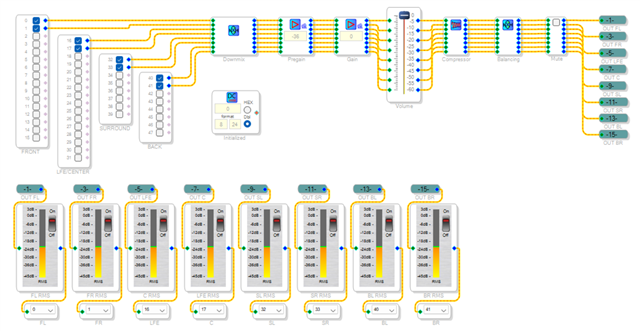
The final SigmaStudio app can be seen in the screenshot below (and the project file is attached).
Every component is controlled by the ESP8266 through the I2C bus:
Downmix: 8x8 mixer that controls how each input channel contributes to each output channel
Pregain and Gain: gain components that help adjust the overall level before the master volume
Volume: the master volume, controlled by the CEC 0x41/0x42 messages captured from the HDMI connection
Balancing: an 8-channel router responsible for the balancing of each speaker
Mute: the master mute, controlled by the CEC 0x43 message
A DC Source, called Initialized, is used by the ESP8266 to determine whether the device has just started (so the DSP needs to be populated with all the values stored in the MCU's EEPROM) or if the ESP8266 was reset but the DSP is still functioning properly (in which case, the MCU loads the values from the DSP register and the device keeps working with no interruptions). The DC source is initially 0, but it is set to 1 as soon as the first boot has completed.
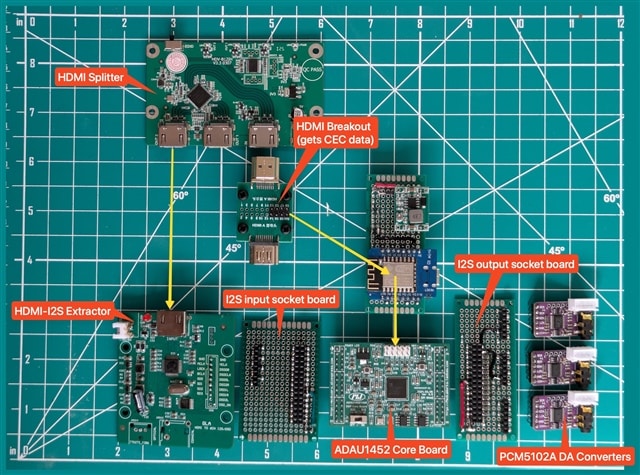
The boards used in this project can be seen in the images below.
Mini AVR.dspproj

Please log in to reply.